+1
more
more
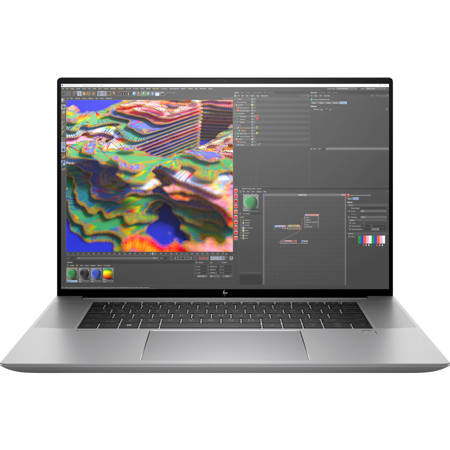
This item is no longer available.
Review Summary
2023-02-27T19:00:00
Not enough memory, performance not as expected
Hlespinosa

2022-12-19T19:00:00
I want to first start this review by pointing out the brand of HP. The HP name is known for quality and has been for a very long time. HP is the leader in personal computing and continues to advance the industry with the best in class products. You certainly can depend on HP if you decide to pick them as your laptop provider, which I would highly recommend. My HP ZBook studio G9 was delivered to me in a smart and durable package that protected it throughout the shipping process. I was very impressed with how well engineered the box was to have a place for the laptop and accessories and documentation. The documentation walked you through the set up and provided you information that is important. Registration, functions, and accessories. This is certainly one of the nicest laptops I have ever owned. Far nicer than even those that have been given to me from my employer for work. This is lightweight and super slim. The screen is large and clear which allows for multi tasking with open tabs. This computer is very quiet and really fast processing data.There are so many features and options on this computer and you can customize the features and options you want or need that are specific to your use. Being able to customize the computer you need and the functionality that is specific to you is one great benefit to owning an HP computer. I am very pleased with this laptop and know it will be used for many years as our home personal computing device. I would recommend that you work with an HP representative to customize the ZBook that is right for you.
Kellyopp10
2022-12-18T19:00:00
Pros 1. The resolution is 3840x2400 - this is insanely good for a laptop. 2. The screen is very crisp and you can increase the font magnification in case you want to keep the resolution but not have tiny fonts 3. 16" screen size is a big plus. 4. 120Hz refresh rate - playing games is a pleasurable experience 5. NVIDIA RTX A2000 graphics card is blazingly fast. The experience of playing games with real time ray tracing is out of this world. 6. Video editing is a breeze in case you are into content creation. Cons 1. The weight is about 5 pounds so obviously not super light, but that's expected with such a powerhouse of a laptop Overall rating 5/5
bluefalcon
2022-11-15T19:00:00
This HP zbook is an excellent laptop for any kind of personal or work use. It came with a 16" 4K resolution, 32gb RAM, and a 1TB SSD drive. The fingerprint reader works really fast to unlock the windows screen when it works, but a few times it was not able to recognize my print. That has been my only issue with it. Otherwise it is a very powerful laptop and the 4K screen is great for watching videos and movies on.
RealNguyener
2022-11-15T19:00:00
I use this primarily for CAD work and it performs fantastically. The all-aluminum chassis is slick, light and durable. When first turning it on, I noticed a request to sign up for Xbox live, and now I'm reliving the fun of Madden football again. The graphics are phenomenal. With an i7 process and 32GB of ram, I see this system being around for years to come.
Pmunk22
2022-11-14T19:00:00
HP has done a great job with a stylish beautiful laptop design form factor. The specs on this machine are top notch. Super fast boot time, plays VR games (attached to my quest pro) ... and I love the face detection login. The battery life is normal but I usually keep it plugged in. and to boot it has a 4k lcd touchscreen which is awesome. All in all I definitely recommend this powerhouse if you are looking for a strong laptop and don't want to sacrifice style and performance.
brian s.
2022-11-08T19:00:00
This PC is just the best. It?s so fast and sleek looking and is just a great product. It has a great feel and touch to it as it?s very easy to use. I can?t stress enough what a high quality product this PC is. I would highly recommend it!
Robpolo19
2022-10-21T20:00:00
The laptop was easy to setup. It had a big screen size and I liked the backlit keyboard. The fan ran often even from just browsing the web. I think this laptop is built to last and has awesome features. It ran fast and was able to load programs right away
Kdawg
2022-10-20T20:00:00
This thing is great. We use our laptops for resource intensive applications like editing photos and this thing stands up really well. Super impressed with the performance and how well it holds up to even multitasking with large applications open.
Emardubs
2022-10-20T20:00:00
I have used HP?s popular line of workstation desktops before and was excited to try this HP ZBook Studio G9. Knowing about HP?s workstations gave me more confidence in this notebook. Mine had pretty good specs, including a 12th gen I7-12800H CPU with 14 cores consisting of 6 Performance cores and 8 Efficient cores, and totaling 20 threads. It also has 32GB of RAM, 1TB SSD, and a high resolution 3840x2400 16? display. With the display?s high resolution and high pixel density, I can see fine details in my work. It also has a high 120Hz refresh rate, resulting in very smooth scrolling and panning. I was fairly surprised with the display detail and smoothness. Compared to standard laptop displays, it?s much better. To drive the display, it has a hybrid GPU setup with the Iris GPU and an RTX A2000 8GB GPU. Many modern video, 3D, and other professional software have GPU acceleration, making the GPU very important for performance in professional environments. I did a video encoding and 3D rendering for testing and was pretty impressed with the speed. The lid edge has no indentation, which makes it a little hard to open with one hand, but I don?t mind it too much. At idle, the fan is audible but about right for a high performance laptop. At full load and at high temperatures, the fan woosh can be heard. It?s a little more than I expected, but considering the high performance GPU and CPU, I think it needs to be like that in order to keep it cool. The bottom has a wide array of cooling holes, more than I?ve seen before. The ZBook has 3 USB-C ports, 1 USB-A port, a round power port, 3.5mm headphone jack, and a microSD card slot. I love that it still has a USB-A port because many of my peripherals are still USB-A. I also would like Ethernet, but maybe that?s asking too much. USB-C ports require all sorts of adapters and dongles, but at least it has 3 of USB-C ports. The microSD card slot is useful for transferring photos without needing a separate adapter. It also has a 3.5mm headphone jack, which is handy for conference calls. In addition, it has stereo speakers on the sides of the keyboard. Below the keyboard is a large trackpad and a fingerprint reader. The keyboard itself feels ok and has RGB lighting. The laptop comes preinstalled with software to fully control the RGB lighting, like giving it different colors or patterns and animations. For a workstation laptop, it has pretty good performance and a good display.
rl2210
2022-10-18T20:00:00
OK, I will be honest. I have gone back and forth between Macs and PCs over the years, always finding pros and cons with each. Lately I have been more into using a Mac... until I found this gem. The Z by HP is surprisingly powerful, fast, and great for work (running multiple apps, comms tools, virtual meetings, etc) and for play (gaming!) alike. A definite 2-in-1 at a reasonable price. This guy goes with me everywhere now from the coffee shop to the office and anywhere in between.
kajdsl30
2022-10-18T20:00:00
I've been using apple products for quite a while now, but am really plesantly surprised with this unit. Super easy to setup, and the specs are great on it. Love the resolution, as well as the extra RAM and memory.
Russ14
2022-10-18T20:00:00
I received the HP zbook studio and I was amazed at everything it does. I can see everything so clearly and I can game on it so easily. The memory is amazing and I feel like I'll be able to use this computer forever. The only downfall is the battery doesn't last for too long so I have to be consistently charging it but that could just be the one I received. It can handle all games that I've used it for and I'm very impressed.
catie767676
2022-10-17T20:00:00
What an excellent laptop! I love the sleekness of it. It?s not at all heavy. The installation was a breeze. I like that the refresh rate is amazing. The keys are super soft to touch and extremely responsive. It?s a good sized laptop with so much ability. I have been playing online games on it and let me tell you, the experience has been so good. The audio is excellent too. I like that it powers on quickly and is extremely responsive to the commands. I have been using cortana and have been extremely pleased. A must have for professional, students and gamers.
Ajay10
2022-10-17T20:00:00
This little laptop has heavyweight features, from is 4K resolution screen to its smooth, crisp graphics rendering. As a graphic designer who works with 3D animations, this laptop works great when I?m traveling and am not at my desktop computer. Honestly, this laptop outperforms my current desktop setup, so it?ll become my go-to computer for ALL my work- just pack up the laptop and go! The 1TB storage is great, knowing that I can work with huge files locally and then transfer them to an external drive when I?m done!
jpbrown1978
2022-10-17T20:00:00
I love this laptop. It is light and doesn't overheat. It is also fast and has a great processor. The screen is big--17 in is perfect so you can open more windows and view things together. I wish HP would pack it with less of their ads and software but overall a great laptop.
dizguhkk
2022-10-17T20:00:00
Awesome powerful laptop. I use it primarily for the professional photo editing software and a little bit of video content production, it runs those programs without any issues or lag. It?s compact for how powerful it is and I really like the touch on the keys (when I travel, at home I have it set up with a stand alone monitor and keyboard). I love it.
Sandro86
2022-10-17T20:00:00
I decided to shift back to using a Windows based laptop from MacOS and have been trying out a HP ZBook Studio G9 for the past week as my day-to-day computer for business and personal use. I could not be happier with the results. The ZBook Studio G9 is perfectly sized for daily usage at 16" and I find the screen and keyboard much better than my previous 13" Pro. The screen resolution is great, with text, videos and images displaying crisply with rich colors. Even more importantly, the ZBook Studio G9's system performance, power and battery life are very impressive. I can have as many programs running as I want and not see any slowdown. The brushed stainless steel laptop casing looks incredible and is relatively light weight, especially for the size. I also love that the ZBook Studio G9 still includes a USB-A port which makes life so much easier connecting all of my external backup drives, usb sticks and other devices. I highly recommend the HP ZBook Studio G9!
Cappers23
2022-10-17T20:00:00
This Zbook is replacing my 5 year old Surface Book 2. I wanted something that was comparable in hardware and functionality. The Zbook is a well-built laptop and from the initial startup it has run perfectly. Boot time is super fast. The processing speed has handled everything I have thrown at it with no issues or lag at all. I am a software engineer so I am constantly on Zoom meeting while running some sort of IDE to write code. It has synced with my peripheral components flawlessly. They are all HP as well. The keyboard on this laptop is very quiet, unlike my SB2. The backlit keyboard also makes typing in low light conditions much easier. There are plenty of ports to connect anything you need. This G9 came with a 1TB hard drive, which is twice the storage of my SB2. It also has 32GB of RAM. Again, twice what the SB2 has. The 12th gen Core i7 processor is plenty of power for my usage. Windows 10 pro was a surprise. I was expecting Windows 11 for new computers My ONLY complaint about this laptop is that it isn?t a touch screen. At this price point I feel like that should be standard. My SB2 is touchscreen with the screen also being detachable so you can use it as a tablet if needed. Not a deal breaker, but again?.this should be a given with a laptop of this price. My conclusion after using it for a few weeks is that purchasing this laptop is going to ensure you have the computing power to accomplish just about everything you would need from video editing to video conferencing and everything in between. If you want a touch screen?.unfortunately it isn?t going to be found with this one. I would give it 4.5 out of five but no half star ratings were available.
Hank73
2022-10-16T20:00:00
The light features are so neat on this laptop. I love that you can customize the color waves and set them based on your mood and productivity. The laptop is also very lightweight which is great. The fan in this laptop is pretty loud, which is a bummer. I think it's fairly annoying although it doesn't kick on that often.
hrr5059
2022-10-16T20:00:00
I don't think anything can supplant Apple for me based solely on software considerations. However, if it were possible to overcome that issue just with awesome hardware and a killer performance, this laptop would do it. Speed galore and massive storage. 32 GB of RAM is double my next most powerful machine, although we all know that more would be quite welcomed! Add a 1 TB SSD and you're really in business. Programs open with zip, and the keyboard feels nice and smooth. I'm a huge fan, and that's quite a feat since I have avoided windows machines like the plague for a decade now. The biggest issue with this machine is the price tag. Woof. That is a tough pill to swallow unless you've really got some cash laying around.
spacemonkeyMC
2022-10-16T20:00:00
So far I have been really enjoying the HP Z Book. The screen is massive, and the graphics are really good. It?s a super fast computer too. The computer is a little heavy in my opinion so I can?t easily throw it into my purse, I definitely need my backpack for it. The computer holds a long charge, and it has some cool features. One fun feature is the color changing keyboard. You can customize it to basically any color combination imaginable. It?s a super neat feature and fun to play around with. The Wolf Security is also a huge plus. I use this computer mainly for personal use and it has plenty of storage available for my everyday use (mainly music and photos). Highly recommended
Kp12345
2022-10-15T20:00:00
The HP Book Studio G9 is very nearly perfect. I need a computer for data science with which I can also travel far and wide as a digital nomad, and I?ve been searching a while for the best one. Besides programming, movies and writing are the other use cases, and the occasional Civilization game. I have come to decide, over several laptops, my main criteria were as follows: ? 16 or 17", 16:10 or 3:2 aspect ratio, matte anti-glare, bright (>= 400 nits max) QHD+ display ? Thin and light (given the 16? + size) but still durable, decent keyboard ? Good thermals/cpu, non-soldered ram preferred, 8+ hour real world battery life on basic productivity, with USB-C PD charging option This computer fits it all, while being an enterprise grade machine which explicitly markets towards data scientists (a first for me). My first impressions were, wow, that screen. It is perfect for productivity. Also, it has insanely loud, high-quality speakers. They make the Macbook look pathetic, a first. I also love that the keyboard has a gamer-type RGB customization, and generally feels nice to type on. I think that the RGB was an important addition as otherwise this laptop looks like a boringly generic silver rectangle. You can set it to plain white backlight if boring looks are what you want. This computer is lighter than any 16? computer I?ve compared, although noticeably heavier than many 13? competitors. The Gram series is lighter, but for me the little extra weight here is worth the extra performance and nicer screen. The port selection is pretty good for a thin-and-light, by which I mean it still has a USB-A style port and a micro sd card reader, which are missing on some competitors. I was quite impressed by the Geekbench scores running it (1757 / 12128). What impressed me was how quiet it stayed for the score it got, barely any fan noise while giving a good (if not best) score for the 12700H. Power tuning options are limited to the Windows performance slider, no fancy tuning options like on gaming laptops. I was a little worried at first as there was no Nvidia sticker on the front, but yes, there is an RTX A1000 inside. It?s the professional equivalent to an RTX 3050 and is perhaps the weakest RTX-branded Nvidia card out there. I rarely use GPU intensive tasks, and was planning on just using integrated graphics but this came standard. The A1000 is perfect for a little gaming or editing, while not eating massive amounts of power like its bigger siblings. For me, great. I would worry about the optional top-end A5000 being ridiculously expensive and also not cooled well enough in this chassis. Important note on battery life: make sure the screen is in Dynamic refresh rate (Windows 11) or 60 Hz. Originally mine was set to always 120Hz and that cut the battery life in half. Switching resolution to 2560 x 1600 from 4K also saves battery life, as well as the Windows performance slider. I haven?t tested extensively, but it?s at least 8 hours (I?m guessing around 9) under my use so far, which is exactly what I want. Probably longer on just video playback. I paid $2124 + tax for this computer, on sale. That included 16 GB of DDR5 and a 512 GB SSD. Since the customizable build price for this computer put it closer to $4,500, I decided to upgrade RAM and SSD on my own. That?s when I ran into some issues. The BIOS is complicated, enterprise grade, and I made the mistake of shutting off all the security features at once, then somehow getting stuck in an automatic BIOS upgrade loop. I ended up having to exchange my first computer after my edge case stumbled on this bug. Advice: be cautious when playing with BIOS. Also, some of the BIOS security hardening settings mean the boot process from complete shutdown takes more like 10 seconds, which seems slow after most premium Windows computers I use booting in more like 1 second. The bottom cover is not the best. I managed to damage it on both the exchanged computer and this one a little bit, just lifting it with plastic guitar picks. I am not a full-time expert at this, but I have opened plenty of laptops before, and it shouldn?t be so fragile. While the rest of the build quality feels good, I would advise caution if you are diving into the case at all. If you aren?t opening it up, then don?t worry about it. Feel of the chassis is fine. I think it?s got some sort of anti-fingerprint coating that makes the metal parts feel a little plasticky. There?s no flex in the chassis and it?s got military durability rating, so quality overall seems good, but, as mentioned above, it?s a bit boring in look. And it came in a very boring box, with a few nods to recyclability in packaging. Boring is probably fine for most people looking at this class of computer. Webcam and touchpad are both boring, and you can find nicer, but I knew that going in and it wasn?t one of my criteria. They both work well, but I find the touchpad a bit too ?clicky? for me. Inclusion of both fingerprint reader and Windows Hello IR is nice. The included Tile tracker is a nice touch in my opinion, but along with HP Cloud Managed BIOS and such makes me think this is not the right laptop for very privacy-sensitive people. I had to disable a Sure Boot setting and disable Bitlocker to replace the SSD. I opted for a power-saving Hynix P31 1TB drive and 64 GB of Crucial DDR5 4800 CL40 RAM. I had first tried some fancier Kingston Fury XMP-certified RAM but it wasn?t recognized. It took about 5 minutes to recognize the new hardware on boot, which was strange and I was certain it wasn?t working at first. The computer had come with nice Samsung RAM and SSD initially, which is a plus. Somewhat oddly, it came with Windows 10 preinstalled as a new model in the Windows 11 era. It also came with a ton of HP software, some of which is great, and some of which is not so great. Sadly, the Z Studio Lighting for the keyboard seems to use a bit of CPU in dynamic modes. I did a clean install of Windows 11 22H2 on the new SSD with no regrets. I did reinstall MyHP (camera and programmable button settings), Nvidia Studio Drivers, HP Z Data Science Stack Manager, the Tile application (from Windows store), and Windows auto-installed HP Audio Manager. The BIOS has access to hardware diagnostic and battery management, so I didn?t feel the software for those was necessary. There is a bit of annoying coil whine when running at 100 W USB-C PD, inside the chassis right where the PD converter likely is. A different 90W charger also had some whine, but was much quieter. It didn?t recognize one non-standard 60W charger I had, so heads up to stick with high wattage, USB-IF certified chargers. Or you know, use the included DC barrel charger and not worry about any of that. I should mention this comes standard with a 3 year warranty which is much better than the 1 year warranty standard on most consumer laptops in the US. Overall verdict: the HP ZBook Studio G9 is excellent for my use case.
Colin449
2022-10-14T20:00:00
I just recently replaced an old Macbook Pro with the ZBook G9 from HP. My ZBook has 32 GB RAM and is very fast and responsive. It was easy to set up - I followed along all the steps it lead me through. I appreciated the clarity of the steps and the help for making choices. The ZBook has plenty of great features! I hope I never lose or misplace it - but if I do, it has a built in Tile to allow me to find it using my phone. You can unlock the screen using a password, a thumb print, or facial recognition - great choices! The 4K display is beautiful. And the Bang and Olufsen speakers sound fantastic. I have not had this long - but so far, it is exceeding my expectations.
Wocket
2022-10-14T20:00:00
I maintain pretty strict standards for my work computers. I need them to work quickly and efficiently and definitely keep up with me. This computer is fantastic. It works really well for exactly what you needed to handles all of my tasks with CAD, software Excel spreadsheets and the rest with ease. Great stuff 10/10 - so glad I have this.
Compugeek
2022-10-13T20:00:00
Z by HP-HP ZBook Studio G9Z by HP is super fast and reliable. I love the sleek design. I would definitely recommend it to my co workers and family members. It is very light weight and east to carry to work.
Shrukh
Be ready when inspiration strikes. Packed with professional performance in an incredibly sleek PC that comfortably fits in your bag, the ZBook Studio is engineered to get you in the zone and help you stay focused. Now you can build complex assemblies, render in real time or visualize data-from anywhere.
Pro-grade performance for your biggest projects
Push your 3D workflows further with an Intel CPU, integrated or discrete graphics and upgraded memory.
See more of your content with less scrolling
Bring projects to life on a brilliant display and 16:10 aspect ratio so you can see more vertical content.
Create and collaborate on the go
Work from anywhere on a light laptop with up to a 12-hour battery life and AI noise cancellation software.
A work laptop you'll want to game on.
Intel Core i7 processor
Run several CPU-heavy programs simultaneously without sacrificing performance with an Intel Core i7 processor.
HP Z Turbo Drive High-speed Storage
Work without limits in any location with local PCIe storage that's up to 6x faster than SATA SSD, and up to 21x faster than traditional HDD storage.
HP Fast Charge
Ultra-fast recharge takes you from zero to 50% charge in just 30 minutes.
Spill-resistant Keyboard
Accidents happen - which is why we designed our keyboard with a drain hole, so minor spills flow out the bottom for easy cleanup.
Industry-leading security features
Advanced security features come standard. System safeguards like HP Sure Start - the industry's first self-healing BIOS - mean your device is locked down tight, so your data and identity are too.