2024-06-25T20:00:00
Rated 5 out of 5
Glad to own this HP product!
Well constructed, solid feel, smooth keyboard and futuristic operations.
WDarrow
Originally posted at

2024-06-20T20:00:00
Rated 5 out of 5
Excellent laptop
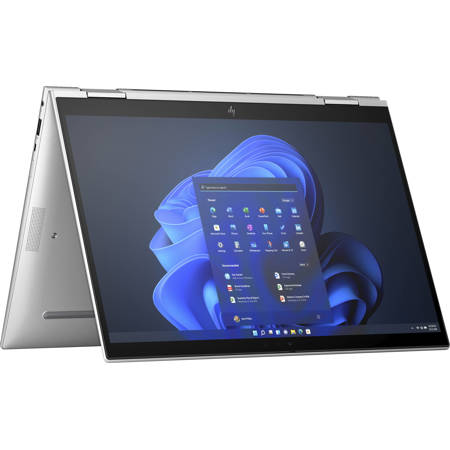
The product has exceeded my expectation. Light practical and easy to use. The double way of using laptop and tablet is just incredible. Excellent computer for work purpose.
GiuliaC
Originally posted at
2024-02-12T19:00:00
Rated 5 out of 5
Impressive
Runs well with 10+ browser tabs open even on the most power efficient settings. For best performance, would recommend a less memory-intensive browser.
Can run basic games like Minecraft quite well considering the lack of a dedicated GPU.
Biometrics are quick and effective. You can unlock your laptop using Face ID by just opening it, allowing you to get right to work.
Switching to/from touch mode is a breeze; the hinges feel nice, I hope they don't degrade too quickly or too badly, as bending anything that significantly can be problematic.
Stylus capability is high and customizable. Stylus can magnetically attach to the right side of the base of the laptop, or over the webcam at the top of the screen. Webcam spot prevents you from fully shutting the laptop -- it will still enter sleep mode, but being unable to fully shut can harm the structural integrity of the screen. This also blocks the webcam for Face ID when you reopen the laptop, so when transporting would recommend keeping the stylus on the right side of the base; however, I've had the stylus get lost in my bag from falling off in this position.
Keyboard backlight only turns on in dark atmospheres and also turns off after a period of inactivity and doesn't turn back on when the trackpad is used, making it easy to see it when you need it and not see it when you don't need it, all of which is good for power conservation. Speaking of, the battery life is exceptional; gets me through a whole day of classes without my charger.
Airplane mode being on F11 is a bit of a peeve; if you are trying to fullscreen an application, you can accidentally disable all your wireless connections. Fn lock also doesn't stay on through a restart. Fn lock is a personal preference though whether one prefers it one way or another.
Another peeve is that the charging port isn't the backmost port on the left side of the computer, which is usually standard; instead, an HDMI port is there.
The pros heavily outweigh the minute cons. Very impressive device. Happy with my purchase.
kamitao
Originally posted at
2023-11-16T19:00:00
Rated 4 out of 5
Pretty good, but not without flaws
Overall it's pretty good: quiet, reasonably lightweight, reasonably powerful, convertible, reasonably good keyboard. I still think the previous keyboards with home/insert/end/delete on the right side were better. This one is decent, but still flawed because `ins` is tied to F10, so Shift+Ins (paste) doesn't work right (Shift+F10 brings up the right-click menu). Key travel/feel is nice though.
No SD card slot, no media keys (play, prev/next track, etc.) Also audio latency (latencymon) isn't great. ACPI.sys is one culprit, but I think the NFC driver is a big one.
Also some intel platform framework exe burns up the CPU sometimes, I think it might be something about docking / undocking. So I've had to spend time troubleshooting glitches out of the box.
The Privacy screen (sure view) is okay. When off it still affects the viewing angles. Also I'd say for someone sitting close and directly adjacent (airplane) it is probably truly opaque for about half the screen. But it is decent. The image quality is a tradeoff though.
I ordered the 2 TB SSD. According to specs it apparently supports only 500 GB TBW which is pretty low for such a large SSD.
Mr S.
Originally posted at
2023-10-18T20:00:00
Rated 4 out of 5
Good 2-in-1, Pen could be Better
Excellent specs and a nice tablet screen for writing. However, I'm sad to see that the pen does not charge wirelessly.
sysadm
Originally posted at
2023-09-04T20:00:00
Rated 5 out of 5
Best windows laptop I have come across in a decade
One of the best Windows laptops out there. As a long term Macbook user, I can say honestly that Elitebook one gives Macbook a good run for money.
Dharvik
Originally posted at