
This item is no longer available.
Review Summary
2026-03-22T20:00:00
Prints fast. Good image quality. Takes up more space than my previous printer. It would be nice if the setup instructions warned you that the printer needs some time to do some sort of calibration or something. I was wondering for a while if everything was ok. I think the setup instructions should give you an estimated time for this process. I am using USB to communicate with the printer. I had no issues or surprises getting it up and printing other than the long wait after the initial power on.
A U.

2025-06-15T20:00:00
Overall works as needed. Disappointed that in the 10 years since last printer, nothing has really "improved" in quality of print in officejet. Also, there are very few printers that are not "all in one", which is not needed.
KLeon
2025-01-04T19:00:00
This printer sucks. It has twice the footprint of my old HP printer to accommodate for the all in one format that I do not have. Out of the box it needed a firm where update, it complains about the paper type and amount almost every print and you have to tell the printer to continue on the touch screen manually. It frequently picks up more than 1 sheet of paper and is SUPER slow to communicate with the printer settings (each print takes forever to set up). To get to the hp properties is exhausting and necessary with almost every print (please pick form the 20 different size types, envelopes are comical) My old HP was perfect in every way, it just wore out, so sad, this will be my last HP printer, wish I could return it.
steveocray
2024-12-25T19:00:00
I used to have all in one HP printer (print, scan, fax) for years. This is my first time switching to just print mode. This printer is easy to set up. Just a bit noisy as if some parts are going to fall apart. Otherwise, it prints nicely and quickly. It's pretty simple but it prints well.
Susanti
2024-10-22T20:00:00
This printer is great. It prints exceptionally fast and clear. Very cute little chime sound when it's all done working for you. Seems to stay connected to my WiFi, unlike other printers I've had. It's pretty quiet. To the point where I have to try to hear it to make sure it's printing. All in all, it's a great printer to have at home or a small office.
SnapperJ
2024-10-20T20:00:00
The HP OfficeJet 9110b is a game-changer for busy work-from-home moms like me. It's fast, efficient, and versatile - perfect for printing documents, school assignments, and even the occasional coupon or recipe. The compact design fits perfectly on my home office desk, and the wireless connectivity makes it a breeze to use from anywhere in the house. Highly recommend this printer for fellow multitasking moms! The print quality is excellent, with crisp text and vibrant colors. I've been able to print high-quality homework assignments, colorful art projects, and professional-looking reports, all from the comfort of my own home. The automatic duplex printing feature is a lifesaver, saving me time and paper. Overall, the HP OfficeJet 9110b has been an incredibly reliable and versatile addition to my home office setup.
Jennymac2018
2024-10-20T20:00:00
I've been using HP printers since forever and they never disappoint. The setup was easy, with simple instructions for it immediate use. I printed a few documents to see the quality of the printer, and let me tell you is amazing, the colors are vibrant and beautiful. The digital screen is the best addition. This is an amazing printer that help us save in supplies.
alexgonz1811
2024-10-17T20:00:00
I really appreciate sharp text and vibrant colors in my documents, making my work stand out. Whether when I was using it for presentations or everyday printing, the quality meets my professional standards. The setup instructions were straight forward , making it easy to get started right out of the box. The 9110B printer supports wireless connections, enabling me to connect it to my Wi-Fi network quickly. I really appreciate the features like Wi-Fi Direct, which allows for easy connections without needing a router. I usually do a lot of printing forms for work and this made the job really quick. I was thinking it was going to take a few minutes to get things done. I was very impression with the quick printing. The HP Smart app was a very nice feature that provides step-by-step setup instructions on my smartphone and tablet, making it even easier for me to manage my printer from all my devices. The initial setup was typically slow. But once you get pass this part. Everything else is amazing. There is a responsive touchscreen interface that simplifies the setup process, allowing me to navigate through initial configurations easily. Overall the combination of intuitive design, wireless capabilities, and helpful resources contributes to a fast and hassle-free setup experience, allowing me to start printing almost immediately.
shar1985
2024-10-17T20:00:00
Excellent printer. This printer will print on any size paper up to A3 or tabloid size paper. The paper-length-slider can be set to any length of paper.
Stephen M.

2024-10-15T20:00:00
Very smart packaging, no need to fight with the box. Large open compartement so you can view everything. The ink setup is pretty badly designed. I didn't hear the audible click that the setup says you should get, and there are springs that eject the cartidges. I didn't feel like they were in there secure. Easy set up of the printer though and no issues printing. This isn't a small printer by any means, but the top is just sturdy so I do set things in it since you don't need to open the lid. (The print speed is nice, my last printer was really slow).
JFred
2024-10-14T20:00:00
I set up the HP office Jet Pro 9110b in about 15-20 minutes. Instructions were very easy to follow. Loading the paper tray and ink was very easy. I like the digital screen, and it was very easy to use and understand. I had no problem hooking it to the Wi-Fi and entering the password. It had me do a test print, and then I was able to print a few documents of my own. I printed a document that had 25 pages and it only fed two pages at one time so it had one blank page and the entire document which wasn't bad. The printing colors are awesome and beautiful. It printed the document really fast. I was very impressed. I have to make a lot of print jobs for my volunteer work so this printer is going to come in real handy for that. I am happy that I got it and I am one. Happy customer.
SoggyBottomTrails
2024-10-10T20:00:00
The HP OfficeJet Pro 9110b is the best printer I've had. As a homeschool Mom, I need a great printer that I can rely on. I have been blown away by the vibrant colors and prints that I get when using this printer. I have printed out multiple homeschool curriculums and unit studies that I bound myself and I couldn't be more impressed with the quality. They all turned out beautifully. This printer is extremely easy to set up and get going. It is quiet and prints fast. I love the digital screen and the overall look of the printer itself. The ink lasts much longer than my previous printer? which is a win in my book. In addition to all of of the things I print daily, my husband is a business owner and also uses it daily. There is still no sign of the ink running low. I highly recommend this to anyone that needs a good reliable printer that will get the job done. So far it is very impressive and I couldn't be happier with this purchase.
Mommamegxo
2024-10-07T20:00:00
As a reseller that uses my printer every single day, this is a holy grail to my business! I print out packing slips for every single order, return shipping labels, business reports and other business-related materials on a daily basis. Having a reliable printer is a must. I haven't ran into any issues with the ink streaking or running out of ink in the middle of printing. The colors aren't quite as bright as I am used to, but honestly for the purpose of my business, it isn't necessary. The printer speed is fast enough that I don't have to wait around too long for all my paperwork. Even when doing double-sided printing. I like the idea of having the HP Instant Ink program with this as well so that it automatically detects if my printer is running low on ink and will send ink in the mail. I also signed up for the paper program so that it sends me 1 pack each month as well. The HP OfficJet Pro 9110b has proven to be a valuable addition to my business! I give this printer a 10/10!
megaland77
2024-10-03T20:00:00
The HP OfficeJet Pro 9110b is a reliable, all-in-one business printer that impresses with its performance and functionality. It is designed for small to medium-sized offices that require high-volume printing, scanning, and copying capabilities. Key Features: 1. Print Quality & Speed: The printer delivers excellent print quality with crisp text and vibrant colors, ideal for both document-heavy tasks and occasional marketing materials. It supports high-speed printing, handling up to 24 pages per minute, which is efficient for office environments. 2. Multifunctionality: As an all-in-one device, it combines printing, scanning, copying, and faxing functions in a single unit. The automatic document feeder (ADF) and duplex printing are significant time-savers for large tasks. 3. Paper Handling: The OfficeJet Pro 9110b comes with a 250-sheet input tray and supports a variety of paper sizes and types. For businesses that require heavy-duty usage, the paper tray capacity could be a limiting factor, but it's sufficient for moderate office needs. 4. Connectivity: The printer offers multiple connectivity options, including Ethernet, Wi-Fi, and USB, making it easy to connect and print from a variety of devices. Mobile printing via HP Smart App or Apple AirPrint is seamless, allowing for easy printing directly from smartphones or tablets. 5. Cost Efficiency: One of the biggest advantages is its cost-efficiency. It offers competitive per-page costs for both black-and-white and color prints, especially with HP's Instant Ink subscription service, which can help manage printing costs more effectively. Pros: High-quality prints Fast printing speed Supports duplex printing and scanning Multiple connectivity options Cost-efficient, especially with HP Instant Ink Cons: Paper tray capacity might not suit high-volume users The initial setup process can be a bit time-consuming. Conclusion: Overall, the HP OfficeJet Pro 9110b is a solid investment for small and medium-sized businesses that need a versatile, high-performance printer at a reasonable price. Its speed, quality, and cost-efficiency make it a valuable asset for any office environment.
Shazmekool
2024-10-02T20:00:00
I got this printer for a HP printer I had since 2017. It was an all in one printer for faxing, printing, copying and scanning. The older HP had ink cartridge issues and kept saying ink bays were damaged. I ordered this basic everyday color/black and white printer to only print occasionally for personal use and frequently for work. I print about 15-20 pages a week for my part time job in sales. This printer was so easy to set up and was ready to print from my iPhone in less than 15 minutes from box to first print using wifi. It is not as big and bulky as my older HP and still holds a decent amount of paper for printing for about a month. The ink cartridges that came with the printer are not full capacity but the color and black and white printing is decent. The printing speed is quick for black and white and not as quick for color but still sufficient for a home based printer. I like the printer's design and footprint on the table. See photos Thank you
Zeus2020
2024-10-02T20:00:00
This printer is amazing! It was a breeze to set it up. I appreciate that is has both wired and wireless printing. It was incredibly simple to connect this printer with my wifi and I love that I can print seamlessly from all my devices. I also am pleased that it can print both black and white and in color. Plus, it can also print double sided which is important to me. The printer itself has a nice sleek look and it fits beautifully in my home office. All in all, I am so happy with it!
Lrespler
2024-10-02T20:00:00
What an upgrade from my previous printer! I love using the HP Officejet Pro9110b for my weekly printing needs. This product was super easy to set up and connected very well with my wifi. This made printing wirelessly a breeze and fairly effortless. I thoroughly enjoyed the self adjusting feature which made it so much easier to print of coupons at the correct size without having to worry about the barcodes being printed too big or small. I do wish there was a copying feature but all in all this product makes my work from home and couponing needs super simple.
Cenalover159
2024-10-01T20:00:00
Let me just list the pros and con of this HP printer. Pros: Extremely fast Excellent with standard black and white text printing Good job with card stock general graphics. Great job with representing the rich colors in the graphics. Edge detail is very good. Cons: Prints so fast that it violently shakes the table/desk. Moved the printer to a more sturdy desk and it seemed to work fine. Be careful where you put this thing. It's fast! On photo paper it prints so fast that the ink smears before it can dry creating a weird finish on the image Can't print multiple color photos one after another because they will just sit on top of wet ink from the previous page. I would only recommend this printer for someone who want to take their time with printing and utilizes it more for black and white text.
liana132
2024-09-25T20:00:00
Let me start by saying I am a fan of HP products . When I started working from home during the pandemic , I purchased the HP Officejet Pro 9015 for my first floor office and was really impressed by the speed time to copy, print, scan , and fax . I am still working in a fast paced environment where my time is extremely valuable . This also means that I need speed and efficiency in everything I do . I wanted to try the HP Officejet Pro 9110B so I could have a printer on the second floor office of my house . This would eliminate running floor to floor from different workspaces as my ultimate goal . When the package arrived , I opened the box to see the set up and reference guide facing directly towards me as well as instructions to take the printer out of the box . Once the printer was out of the box, the guided set up illuminated on the control panel . Set up was extremely "user friendly ". The guided process via the control panel took about 15 minutes. I opted for automatic firmware updates because again , I need all my time . Speed was also impressive . I was able to print contracts up quickly and efficiently. One thing I did notice when comparing the HP OfficeJet Pro 9110B to my HP OfficeJetPro 9015 is that the 9110B does not make as much noise, if any at all . At first I questioned if printing from my phone was really working because I had not heard the printer printing . However, once I walked down the hall of my second floor to the printer it was already sitting in the paper tray waiting for me . HP you got me hooked again on yet another product ! Well done !
MelChampa2222
2024-09-23T20:00:00
I started using my HP OfficeJet Pro 9110b as soon as i got it. The printer set up was exceptionally easy. It took me about five minutes. I think I spent more time dusting the spot that the old printer was in then setting up this new one once I got it set up I loaded in the paper that I already had and did a calibration that was pretty easy as well as hooking up to my Wi-Fi Network. Once I did that I got straight to printing. I spend a lot of time on eBay selling in buying things when I sell things. I need to print labels as well as invoices and let me tell you this printer does it without an issue. I've had so many printers in the past take a long time for the documents to load once I send them from my phone. I've had printers take forever to print out one to two pages, even in black-and-white and this printer does not suffer from that. I was able to print out labels and invoices in seconds. I was able to print them in bulk and the printer never lost a beat. I would highly recommend this printer to anyone and everyone in fact, my brother who also has an eBay business was in the market for a new printer and I've already sent him a link to get him hooked up with one from a local store. I can't wait to continue to delve into the features and the other things that this printer can do. I'm looking forward to having this for a very long time and using it pretty much every day.
InsiderJoe90
2024-09-23T20:00:00
I have always heard that HP printers weren't the best, so in turn I haven't purchased one. I went out on a whim and decided to buy this printer, and honestly, it was one of my best decisions. The printer has already printed many pages and is still going like a champ. It was super easy to unbox and get set up, as well as the instructions were extremely easy to follow. I could not recommend this printer enough, I also have a different brand printer, and the HP is definitely the better of the two. I can say I will only buy HP printers from this point on!
kyleealison
2024-09-23T20:00:00
I was anxiously awaiting the arrival of my printer. The day it came it was left right on my doorstep, so I was able to bring it right in the house and proceed to get it set up and ready to use. It was packed carefully but came easily out of the box. It was light enough to lift and set on the table that I was utilizing for the printer. This printer is great for the less technological people. It was extremely easy to set up. Once plugged in the screen lead you through each stage of setting up the printer and connecting to your home internet as well as installing the ink cartridges. Also, it showed you how to put the paper in the paper drawer. I was easily able to print a recipe from my computer. I had a two (2) page document and was able to select two-sided printing easily. I wanted to print a page on card stock paper so the document would be more durable, and the printer handled that function very well. There was no problem with the heavier paper stock. I also used my cell phone and found a couple of pictures I wanted to print. I put a piece of photo paper in, and it printed a very good quality picture of 81/2x11 photo paper. I then put in a stack of 4x6 photo paper in the printer and It did take a few minutes to find how to change in the print preferences but then was able to print several really nice 4x6 photos. The next challenge was to print from a memory stick. The place to insert the USB end of the memory stick is on the left side of the printer and it is lit up and easy to find. Once the memory stick was inserted, I was able to select each picture that was on it and print on whatever size and style of paper I wished. All in all, I was quite happy with this simple and easy to use printer.
Sherry2442
2024-09-23T20:00:00
This printer is very sleek and looks great in any space. I love all of the features especially being able to print s document directly from my phone wirelessly. The print quality and speed is amazing, perfect for anyone who prints a lot like myself. The LCD touchscreen makes going through features a breeze. I highly recommend this printer!
Saidria
2024-09-23T20:00:00
I like the ease of setup, value for money, The touch screen could not be simpler to use, set up took about 5 minutes from start to finishIt works great and I would to share how easy it was to do.To use at home or work.
Mkhris
2024-09-23T20:00:00
As a busy work-from-home mom and educator for my homeschooled kids, the HP Officejet Pro 9110b has been a fantastic addition to our household. With four students constantly needing to print, this printer has more than met our needs. The print speed is incredibly fast, with up to 32 pages per minute in black and white. The print quality is exceptional, with a resolution of 1200 x 1200 dpi for black-and-white and up to 4800 x 1200 dpi for color prints on Photo Paper. The dynamic security feature also ensures that I can use cost-effective remanufactured or refilled cartridges without any issues. The large 2.7-inch touchscreen display makes it easy to navigate the printer's functions, and the mobile printing capability is a real lifesaver when I need to print from my smartphone or tablet. The borderless printing is also a nice touch, allowing me to create professional-looking documents and photos. With a recommended monthly page volume of up to 1,500 and a duty cycle of up to 25,000 pages, this printer is built to handle the demands of our busy household. The energy-efficient design is an added bonus, helping to keep our electricity costs down. Overall, the HP Officejet Pro 9110b has been a game-changer for our family. It's reliable, produces high-quality prints, and has all the features I need to keep our household running smoothly. I highly recommend this printer to any work-from-home parent or homeschooling family.
ThePlusOne
2024-09-23T20:00:00
The HP OfficeJet Pro 9110b is a great addition in my household and I definitely recommend and enjoy. The connectivity for the printer to the WiFi was easy to do and I am able to print from my phone seamlessly. The print quality is great I wish I can change the opacity levels to save some ink. The HP smart app is easy to use. The print speed is fast and I am able to print different pages back to back. love that it print double sided and the instructions for set up were easy to follow. Great product!
Figueroac2010
2024-09-23T20:00:00
The OfficeJet Pro 9110b delivers sharp text and vibrant color prints. A really nice feature this printer supports various connectivity options such as Wi-Fi, Ethernet, and mobile printer, The large paper tray was a nice feature very easy to use and load up paper. The setup was easy and fast. The printer is a little on the big size. So, it may limit your workspace. Additionally, it can be a bit noisy during printing. The setup time was very fast and easy. The auto updates and the user password protection were really nice to have. Installing the ink cartridges was very easy and fast. I really like that the cartridges were bigger in size. It made placing simple.
Jdrock99
2024-09-12T20:00:00
This printer has been so useful. First off the set up was quick and easy. The step by step process had it connected to my computer in just a few minutes. The colors are so vivd and bright it is perfect for marketing flyers for my business. I also love to craft and have used this printer for DIY projects, crafts, and my kids school projects. The design is so sleek and doesn't take up much room in my home office making it perfect.
Katiecupcake
2024-09-11T20:00:00
The HP OfficeJet Pro 9110b printer is the perfect printer for personal use. This printer was an absolute breeze to set up and came with everything needed. I love that it has multiple options for wired or wireless printing. I personally printed using WiFi and my computer. My computer connected easily and quickly. I'm somewhat tech savvy, but even a beginner would have no issues setting up an using this printer. The touch screen on the front walked me through exactly what to do! My printed pages came out clear and crisp and were absolutely perfect! I can't wait to incorporate this printer into my day to day life! I know it will work perfectly for so many used for me! I would definitely recommend.
shaykc20
2024-09-11T20:00:00
I was so pleasantly surprised with the quality of this printer. It has a sleek appearance, and is so user friendly. The touch screen could not be simpler to use, set up took about 5 minutes from start to finish. My favorite feature that I've never seen before, was the self adjusting feature that aligned the pages to ensure an even print every time. I would absolutely recommend this for anyone who works from home or has a home office.
Mkeo

Accidents happen where life happens. Protect your favorite Adorama products and purchase a protection plan to stay covered from accidental damage, mechanical or electrical failure, and more.

If we can’t fix it, we’ll replace it at no additional cost.

Protect your product from drops, spills, and more.

Enjoy your gear without fear. We have you covered!

When regular use of your product over time results in mechanical or electrical failure.

We will never charge you a deductible after the purchase of a plan.

Our claims process is simple & easy and our customer service team is happy to help.
Adorama Protect powered by Extend is available for purchase to customers in the United States. Not available for purchase Internationally or in U.S. Territories.
Browse our FAQ
Letter: Up to 22 ppm
Black (ISO): Up to 22 ppm
Color (ISO): Up to 18 ppm
First page out black: As fast as 12 sec
First Page Out Color: As fast as 13 sec
Black (draft): Up to 32 ppm
Color (draft): Up to 32 ppm
Print speed Black Duplex: Up to 14 ipm
Print speed Color Duplex: Up to 8 ipm
Black (best): 1200 x 1200 rendered dpi
Color (best): Up to 4800 x 1200 optimized dpi on HP Advance Photo Paper 1200 x 1200 dpi input
HP Thermal Inkjet
HP Thermal Inkjet
4 (1 each black, cyan, magenta, yellow)
Yes, on photo paper only, up to 8.5 x 11" (US letter), 210 x 297 mm (A4)
HP PCL6, PCL5, native PDF, HP Postscript
Features
Orientation: Portrait/Landscape/Rotate by 180 degrees
Print On Both Sides
None, Flip on Long Edge, Flip on Short Edge
Pages per sheet: 1 page per sheet/2 pages per sheet/4 pages per sheet/6 pages per sheet/9 pages per sheet/16 pages per sheet
Print Quality: HP Standard/Quick Draft/Premium/Detailed
RGB color: Printer Default/Office (sRGB)/Photo (sRGB)/Device RGB/Adobe RGB/Vivid (sRGB)/Custom RGB Printing Shortcuts
Factory Defaults
EcoSMART settings
Labels
CardStock/Heavy
Transparencies
Booklet Printing
General Everyday Printing
Page order: Front to Back/Back to Front/
Booklet Layout: Off/Left binding/Right binding
Print page borders
Special pages: Front cover/Back Cover/Print pages on different paper/Insert Blank Pages Resizing Options: Actual size/Print document on:/Scale manually Watermarks:
None/Confidential/Draft/Sample/Custom
Collate
Reverse page order
Print all text as black
Control Panel Shortcuts
HP EasyColo: Off/Conservative/Automatic Wireless
1x Ethernet
1x Hi-Speed USB 2.0 (device)
1x Hi-Speed USB 2.0 (host)
1x Wi-Fi 802.11 a/b/g/n/ac (dual band)
Yes, via built-in Ethernet
Wireless 802.11 a/b/g/n/ac
Yes, with built-in dual-band Wi-Fi 802.11 a/b/g/n/ac and a self-heal solution
Apple AirPrint
Wi-Fi Direct Printing
Mopria certified
Standard: 512 MB
Maximum: 512 MB DDR3
1.2GHz
Monthly, letter: Up to 25,000 pages
Monthly, A4: Up to 25,000 pages
Up to 1500
Plain Paper, HP Photo Papers, HP Matte Brochure or Professional Paper, HP Matte Presentation Paper, HP Glossy Brochure or Professional Paper, Other Photo Inkjet Papers, Other Matte Inkjet Papers, Other Glossy Inkjet Papers, Thick Plain Paper, Light/Recycled Plain Paper, HP Tri-fold Brochure Paper, Glossy
16 to 28 lbs (plain paper)
60 to 75 lbs (photo)
20 to 24 lbs (envelope)
90 to 110 lbs (card)
Letter; Legal; Government Legal; Executive; Statement; 3 x 5" ; 4 x 6" ; 5 x 7" ; 13 x 18cm; 8 x 10" ; 10 x 15cm; L; Photo 2L; Envelope( #10, Monarch, 5.5 bar); Card (3 x 5", 4 x 6", 5 x 8")
Tray 1: 3 x 5" to 8.5 x 14"
Input Capacities: Up to 250 sheets Standard, Up to 30 envelopes, Up to 50 cards, Up to 50 sheets Labels, Up to 250 sheets Legal
Output Capacities: Up to 60 sheets Standard, Up to 10 envelopes, Up to 30 cards, Up to 30 sheets Labels, Up to 60 sheets Legal
Duplex Options: Automatic (standard)
Envelope feeder: No
Standard paper trays: 1
HP 936 Black Original Ink Cartridge (-1,250 pages) 4S6V2LN, HP 936 Cyan Original Ink Cartridge (-800 pages) 4S6U9LN
HP 936 Magenta Original Ink Cartridge (-800 pages) 4S6V0LN
HP 936 Yellow Original Ink Cartridge (-800 pages) 4S6V1LN
HP EvoMore planned to be available April 2024: HP 936e EvoMore Black Original Ink Cartridge (-2,500 pages) 4S6V6LN
HP 936e EvoMore Cyan Original Ink Cartridge (-1,650 pages) 4S6V3LN
HP 936e EvoMore Magenta Original Ink Cartridge (-1,650 pages) 4S6V4LN
HP 936e EvoMore Yellow Original Ink Cartridge (-1,650 pages) 4S6V5LN. Actual yield varies considerably based on content of printed pages and other factors. HP 937 Black Original Ink Cartridge (-1,250 pages) 4S6W5N
HP 937 Cyan Original Ink Cartridge (-800 pages) 4S6W2N
HP 937 Magenta Original Ink Cartridge (-800 pages) 4S6W3N
HP 937 Yellow Original Ink Cartridge (-800 pages) 4S6W4N
HP EvoMore planned to be available April 2024: HP 937e EvoMore Black Original Ink Cartridge (-2,500 pages) 4S6W9N
HP 937e EvoMore Cyan Original Ink Cartridge (-1,650 pages) 4S6W6N
HP 937e EvoMore Magenta Original Ink Cartridge (-1,650 pages) 4S6W7N
HP 937e EvoMore Yellow Original Ink Cartridge (-1,650 pages) 4S6W8N. Actual yield varies considerably based on content of printed pages and other factors. HP 938 Black Original Ink Cartridge (-1,250 pages) 4S6X8P
HP 938 Cyan Original Ink Cartridge (-800 pages) 4S6X5P
HP 938 Magenta Original Ink Cartridge (-800 pages) 4S6X6P
HP 938 Yellow Original Ink Cartridge (-800 pages) 4S6X7P
HP EvoMore planned to be available April 2024: HP 938e EvoMore Black Original Ink Cartridge (-2,500 pages) 4S6Y2P
HP 938e EvoMore Cyan Original Ink Cartridge (-1,650 pages) 4S6X P
HP 938e EvoMore Magenta Original Ink Cartridge (-1,650 pages) 4S6Y0P
HP 938e EvoMore Yellow Original Ink Cartridge (-1,650 pages) 4S6Y1P
Actual yield varies considerably based on content of printed pages and other factors
IT ECO Declaration
EPEAT registered
Yes
Recyclable through HP Planet Partners; Forest First product
2.7" (6.86 cm) touchscreen control panel with CGD (color graphic display); 3 buttons: (home, help, back)
2.7" (6.86 cm) Capacitive Touchscreen CGD
HP Printer Software
Windows 11
Windows 10; macOS 13 Ventura; macOS 12 Monterey; macOS 11 Big Sur; Linux; Windows Server; Chrome OS
Windows 10
macOS 13 Ventura
macOS 12 Monterey
macOS 11 Big Sur
Linux
Windows\r
PC: Microsoft Windows 11, 10: 32-bit or 64-bit, 2 GB available hard disk space, Internet connection, Microsoft Internet Explorer or Edge, macOS 11 Big Sur; macOS 12 Monterey; macOS 13 Ventura; 2 GB HD, Internet required
Mac: macOS v11 Big Sur; macOS v12 Monterey; macOS v13 Ventura; 2 GB HD, Internet required
Power supply type: Internal (Built-in) Universal Power Supply
Power requirements: Input voltage: 100 to 240 VAC (+/- 10%), 50/60 Hz.
Power consumption: 3.49 watts (ready), 1.16 watts (sleep), 0.13 watts (manual-off)
Acoustic power emissions: 6.8 B(A) (printing at 20ppm); Acoustic pressure emissions: 61 dB(A) (printing at 20ppm)
Operating temperature range: 41 to 104 Degree F (5 to 40 Degree C)
Recommended operating temperature: 59 to 90 Degree F (15 to 32.22 Degree C)
Storage temperature range: -40 to 140 Degree F (-40 to 60 Degree C)
Operating humidity range: 20 to 80% RH
Recommended humidity operating range: 25 to 75% RH
Minimum Storage Mode: 17.28 x 13.48 x 7.7" (439 x 342.5 x 195.6mm)
Maximum: 17.28 x 20.46 x 7.7" (487 x 283 x 409mm) (Output Tray Extend)
13.56 lbs (6.15kg) (Approx.)
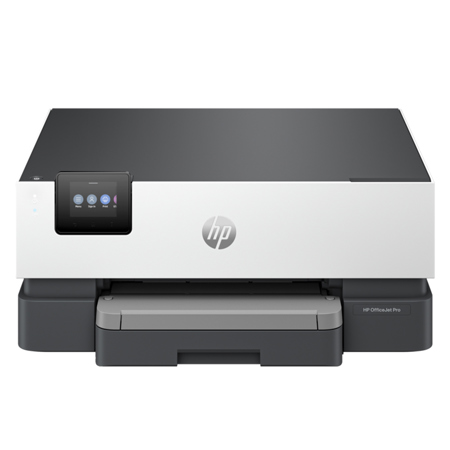
The professional color inkjet printer for distributed offices and hybrid workers from Americas most trusted printer brand for business, paired with our best technology to help manage it all. This streamlines work into any network with extra performance features.
For distributed offices and hybrid workforce who want professional color inkjet printers that easily integrate into any network to streamline work.
This printer is intended to work only with cartridges that have a new or reused HP chip, and it uses dynamic security measures to block cartridges using a non-HP chip. Periodic firmware updates will maintain the effectiveness of these measures and block cartridges that previously worked. A reused HP chip enables the use of reused, remanufactured, and refilled cartridges.
Deploy. Integrate. Customize with ease.
Easily deploy, integrate, and set up your fleet of printers across multiple locations. Seamlessly integrate into any network with HP Universal Print Driver and Page Description Language support. Customize and manage your fleet however you need with easy, remote management and enhanced feature control.
Empower your business with a productivity powerhouse
Always ready for high volumes, get an HP OfficeJet Pro printer equipped with a 250-page input tray. Speed up your printing with a fast inkjet printer - up to 22 pages per minute (PPM). Keep your business moving forward with this productive HP OfficeJet Pro, built on decades of experience.
Our best technology to help manage it all
Stay connected with our most reliable Wi-Fi - dual-band, self-healing - that automatically reconnects. Easily configure, troubleshoot, and manage networks and devices with HP Web Jetadmin. Help keep your networks protected from cyberthreats with HP Wolf Pro Security.
Driving innovation with 40% recycled plastic
Choose printers made with at least 40% recycled plastic. With every page you print, HP invests in helping to protect, manage, and restore forests. Recycle your Original HP ink cartridges after use with the HP Planet Partners program.
Perfect for distributed offices and hybrid workforce
Manage printing like a Pro
Core features
• Print
• Wi-Fi
• Touchscreen display
• Up to 22/18 ppm (black/color)
• HP Wolf Pro Security
Additional features
• 250-sheet input tray
• HP Universal Print Driver
• Automatic 2-sided printing
• Page Description Language support
HP Wolf Pro Security
HP Wolf Pro Security uses a powerful suite of tools that bolsters security and helps keep networks protected
HP Web Jetadmin
Streamline your printer management with HP Web Jetadmin. You can monitor and fix devices all from one place.