2025-08-19T20:00:00
Rated 3 out of 5
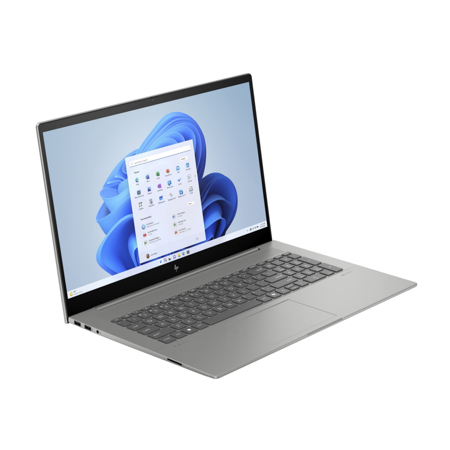
HP 17.3 Laptop with Windows 11
I bought this new HP for 2 reasons. 1) I was a returning HP customer and 2) the announcement that Windows would no longer support Windows 10. My previous laptop was about 9 years old and still running fine. I didn't want a new computer but didn't want to use an unsupported machine. I had a pretty good budget and HP was having a "sale" so I ordered a new one. Unfortunately I didn't notice that the new laptop was not a touch screen like my previous one. This was a huge disappointment but I couldn't blame anyone but myself. The set up was fairly simple even though I'm mostly computer illiterate. I tried to register my new computer but found that the HP site did not recognize my laptop's serial number. That caused me to wonder if I truly received a genuine HP product. I had to have two separate chats with HP online and I still don't know if my laptop is registered or not and this is almost a month after receipt! I'm trying to get used to a non touchscreen and find myself going back to my old computer if I'm in a rush. I wouldn't order a non-touchscreen computer in the future. I feel that the HP website should disclose the fact that an expensive personal computer like the one I bought does NOT have a touchscreen which is customary on the majority of new laptops in today's market.
Shredder52
Originally posted at

2025-08-05T20:00:00
Rated 4 out of 5
Fast battery life
The laptop is nice but battery dies fast.
Angel81
Originally posted at
2025-07-29T20:00:00
Rated 5 out of 5
Quality HP laptop
I rely on HP quality and pricing. This laptop excels at both!
Jefford
Originally posted at
2025-07-29T20:00:00
Rated 5 out of 5
Resources for Independent Living
Very happy with my new laptop- it us just what I needed. Its fast, smooth and I love the display.
K.A W.
Originally posted at
2025-07-23T20:00:00
Rated 3 out of 5
I expected a lot more
For the price, I expected a lot more.
Denise0628
Originally posted at
2025-07-19T20:00:00
Rated 5 out of 5
Personal experience with the product
I switched to HP about 10 years ago and still find them to be excellent with no screw-ups. Keep them in high quality and reliability!
Engineer D.
Originally posted at
2025-07-15T20:00:00
Rated 5 out of 5
HP ENVY 173 inch Laptop PC
Appreciate the quality of the HP Envy - excellent design, and components - glad I updated from my older computer
Deb N.
Originally posted at
2025-07-11T20:00:00
Rated 4 out of 5
big change
Still getting use to it
capt1
Originally posted at
2025-07-08T20:00:00
Rated 5 out of 5
Ahab's Envy 17.3
More than adequate memory, lit keyboard, permits grouping files in folders, excellent speed, and an all around pleasure to work with. Accommodates my big fingers.
pacor
Originally posted at
2025-06-27T20:00:00
Rated 5 out of 5
Outstanding! Buy it now!
This is a very solid unit, the best I've seen in many years. Compared to a ProBook, it has a density and feel of top quality, cool operation, ease of use, and zero-wait speed. The gloss screen is pre-calibrated from the factory, little edge bleed, handsome tonality -- a real treat for the eyes. The CPU is an absolute dream, no tweaking needed. The USB-C ports and power port are tight. There is minimal bloatware, which can easily be removed by searching for "programs" after pressing Window kety+i.
Overall, I could not be happier. Windows 11 is now mature, shares files perfectly with my Windows 10 machines. There have been no frustrations, even after a month of use.
It definitely costs more money, but your time and frustration with a cheaper model are worth every extra penny. You can also expect this model to last 6+ years, more than justifying the price.
Doug R.
Originally posted at
2025-06-17T20:00:00
Rated 5 out of 5
HP ENVY 17: a History of Quality
HP Envy 17":: Setup = easy! 3-step paper pictorial sheet. :: OS Usage = MS windows, dual booting with LINUX Fedora 42. :: favorite features: numerical keyboard, HP 4K UHD display. While I have used 2 other high-quality brands of laptops in a corporate setting, I insist on HP because of sturdiness, build quality, and service. This 2025 HP Envy 17" Laptop is a preemptive replacement for: my HP Spectre 360 Laptop [born 2017-11-27], which I still use daily over seven years for C++ development. The Spectre has LINUX Fedora 41 OS. About 2 years after my Spectre warranty expiration, I contacted HP to pay for cleaning, fan service, etc. The help team supervisor delivered a box to return the Spectre the next day. Cost of the service was ZERO! My initial experience with superior HP quality was in the RPN calculator arena: 15C, 41, 48, PRIME.
P1310
Originally posted at
2025-06-14T20:00:00
Rated 3 out of 5
HP Review from Roger Reisinger
PC works fine. Have Problems with all extra un-needed applications and startup crap. When using PC link to copy files from old computer, it copies files to one-drive and forcing me to by more space, i have a 2TB hard drive. That should have been plenty for all my files. I am dis-satisfied with buying extra products.
Roger R.
Originally posted at
2025-06-10T20:00:00
Rated 3 out of 5
An okay, "settle for" laptop
I was asked to review my "173 inch laptop". 173 inches? Wow. Well, I like my 17" laptop...sorta. The 17" size is slowly disappearing but it is very useful for displaying documents side by side in a reasonable size. Also, for complex user interfaces like Photoshop, 16" is too small for my taste. I like the laptop's dark gray color; I was pretty sick of the shiny, silvery color of my last HP laptop. The keys also are gray with nice backlights when needed. I appreciate the lights on the Caps Lock key, Power key, and Microphone/F8 key, but would like one on the Num Lock key. I would have purchased a better graphics card but better ones were not available for this model. The fan doesn't run often and when it does, it's quiet (unlike my last laptop which, as it got older, had more and more fan noise, like it needed a screw tightened or something). The screen is very good, no black pixels, great color, and plenty bright for indoors (I have not tried it outdoors). The touchpad responds quickly, reliably, and accurately. I absolutely need a number pad and this laptop has one; these are increasingly hard to find nowadays.
Now for what I don't like:
1. The sound is awful; music lacks treble and voices are annoyingly lacking in the non-vocal letters like "b", "p", "d", "s", etc. It sounds like someone talking through a blanket. Try learning a new language when you can't hear half the sounds. There is absolutely no way to adjust sound settings except volume, which at this price, I think is ridiculous.
2. The touchpad is wa-a-ay too big and is not centered below the standard keyboard so my right palm constantly is touching it when I type, causing the cursor to move who knows where a hundred times a day.
3. The keyboard requires very firm typing. I am so used to my last HP which had a very light touch and I could type a mile a minute. This laptop, however, seems to need much more pressure and definitely in the center of the keys or the keypress is not recognized. It is especially annoying on the numpad which I use throughout the day. For games like Sudoku, where you're typing only numbers, it misses about 25% of keypresses and I have to go back and retype the number. VERY annoying and unacceptable in my view. I have tried tweaking the Keyboard settings but the problem remains unsolved.
4. The small, half-size Power on/off key is right next to the small, half-size Delete key. Both keys are above the Backspace key.
5. The CoPilot key replaces the right Control key. This is not just on HP laptops but it is annoying since I use the Rt Ctrl + Enter key combo many times a day. I installed MS PowerToys just to be able to reprogram CoPilot back to right Ctrl. AFAIK, there is no registry key available to alter the key assignment.
6. I never get anywhere near 6 hours of battery run time, more like 3.5-4, and that's just typical browser, email, and minor Excel computation. I don't move this laptop around at all; it is firmly set in the family room. I easily could keep it plugged in but HP's online battery "maintenance" tips say to drain the battery often. It's a pain in the neck to get down on the floor to unplug it every morning and then plug it back in around noon. Rinse and repeat for the afternoon. Needless to say, I don't do it everyday.
7. The only real set-up problem I had was with the warranty which was listed incorrectly and which took multiple customer service contacts before it was fixed. There also was a minor issue with the screen colors initially being practically fluorescent until I adjusted it.
8. HP touts its rewards for purchase but after you wait the mandatory 36 days, you find rewards cannot be used on software. I waited over a month to buy MS Office only to find I could not use the $40+ reward.
9. There is no fingerprint sensor, only facial recognition.
10. The function keys are small, half-size keys that are progressively offset to the left from the number keys below them. The "F_" labels on these keys are extremely small. The offset increases with each key; for example, while the F1 key is right above the "1" key, the F6 key is only half above the "6" key, and the F10 key is almost all above the "9" key.
11. The HP customer support website is a mess. It doesn't recognize the product #/serial # in some pages but does on other pages. Nothing seems organized; it's easy to go down a rabbit hole clicking links, only to end up back at the beginning. It's nearly impossible to talk to a live person and the robot helper is not helpful if your question is outside its decidedly small database of answers.
All in all, if I had been able to go to a physical store to try out this laptop, I would not have bought it, mostly for the keypress issues. Also, since we are stuck with online purchase, it would be nice if HP offered more customization options. I "settled" for this laptop. It did not have all features I wanted and was willing to pay for but it was the best I could find.
pgmr
Originally posted at
2025-06-06T20:00:00
Rated 4 out of 5
Aggravating problems
Experienced 2 on-going annoyances: Cannot connect the new HP laser printer bought recently as the computer refuses to be found by the printer, Secondly, It reports the camera is being blocked. I tried all the suggestions on your website and on Google. So I have to type in my pin constantly.
Dr L.
Originally posted at
2025-06-04T20:00:00
Rated 3 out of 5
For the price, it's a mediocre laptop.
Default power settings are incredibly annoying, like the screen dimming if it thinks you look away. The built-in camera doesn't display color well and often doesn't function properly with Windows Hello. The touch pad is very finicky about exactly where you click and is hard to use. The touch pad definitely needs to be improved. The main redeeming feature is the 4K display, which I consider to be the minimum acceptable resolution for any computer monitor.
Alan83
Originally posted at
2025-06-04T20:00:00
Rated 5 out of 5
Has Everything You Need
The second Envy I've purchased. Still using my original as a back-up. Great computer for power or want-to-be power users. Has all the fun extras you want
LA A.
Originally posted at
2025-03-05T19:00:00
Rated 5 out of 5
New Dog has New Tricks
Replacing two HP Laptops that are over ten years old, going back to HP was a no-brainer. Some of the new features will take a little time to get use to, but we are extremely satisfied with our purchase of these two laptops. Combined with our MS Software we have our computer needs completed.
Rex C.
Originally posted at
2025-03-02T19:00:00
Rated 2 out of 5
DISAPPOINTED
Poor user manual. Poor customer support.
LLOYD25
Originally posted at
2025-02-23T19:00:00
Rated 2 out of 5
Worse shipping I have ever seen
The laptop is good but there shipping is scrapping the bottom of the barrel.
Noneja
Originally posted at
2025-02-18T19:00:00
Rated 1 out of 5
Terrible PC
Very bad, battery would not last longer than 15 mins
ChrisBuss
Originally posted at
2025-02-12T19:00:00
Rated 5 out of 5
LOVE THE KEYPAD!
I had a hard time setting up as I never received the email with the code for the Office program I paid for. I finally had to have that cancelled and refunded, then order it again. It was hard to get that situation finally organized with HP as they kept saying they were sending me a code and it never came. Somehow, I was finally able to actually talk to a real person, who solved the problem. The actual computer is great, and I love the keyboard, as It has white letters on dark gray keys, so I can see them. I also love the ability to use
"touch screen,"
Elkriver3
Originally posted at
2025-02-09T19:00:00
Rated 5 out of 5
Nice Laptop
Really like the features of the laptop
Grand S.
Originally posted at

2025-02-07T19:00:00
Rated 5 out of 5
Best laptop I've ever bought
Was able to customize the specs, and it is...awesome! Touchscreen too?! Well worth what I paid.
Nick
Originally posted at
2025-02-06T19:00:00
Rated 3 out of 5
The only current gen CPU 17" 4K laptop on the market
Pros: Absolutely stunning display. Thin. Gorgeous design. 2 Thunderbolt 4 ports. Upgradeable RAM. Keyboard with automatic backlight. Excellent price for the specs ($1209). Relatively quick warranty repair that actually follows user instructions.
Cons: No Core Ultra 9 option. The Core Ultra 7 155U is no slouch, but with only 2 performance cores it'll likely be too slow within a couple years. Nvidia 30series dGPU is 2 generations old and choosing it requires choosing a slower CPU. Laptop won't POST with more than 64 GB RAM despite the CPU supporting 96 GB. BIOS looks straight out of 2001 and is unbecoming of the Envy brand. A simple DIY upgrade while following the user manual bricks the PC, resulting in a warranty repair <- this is the only laptop I've ever experienced this with. Product registration is difficult, it took forever for the laptop to show up under my account. HP store accounts and HP user accounts are somehow separate. 3rd party 64 GB RAM upgrade is relatively hard to find. While the warranty repair itself is quick, shipping is too slow for the Envy brand.
Main reason I bought this laptop is I wanted a 4K display and have difficulty using 4K displays at pixel densities less than 17 in. Alas, this is the last laptop on the market with Core Ultra or newer CPU and that kind of display. If you can handle 16" 4K, there are definitely faster and better options.
jdrch
Originally posted at
2025-02-06T19:00:00
Rated 4 out of 5
review of HP laptops and ads
The computer is fine. HP continues to make good products. The computer does what computers are supposed to do. I do have a problem with constant and insulting and annoying ads and prompts and 'we recommend using HP ink, HP plug ins, HP condoms, whatever. It is annoying, and it certainly won't make me by HP products. You make enough money. Relax and treat your customers a little better than shills. thanks for making good computers and printers.
jpmcnam
Originally posted at
2025-01-30T19:00:00
Rated 4 out of 5
The Computer is Fine, Except...
There are too many pop ups offering this and that, no matter what I'm working on or doing. Very annoying. Also, there was a time that transferring data from an old computer to a new one went off without a hitch. Now, some info doesn't translate correctly in the new computer and some is just lost. All of that notwithstanding, I still like this laptop and will continue to work on resolving my issues with it.
Catch
Originally posted at
2025-01-27T19:00:00
Rated 4 out of 5
Great Laptop
Took way too long to get the laptop
Queens66
Originally posted at
2025-01-19T19:00:00
Rated 1 out of 5
Laptop stopped charging
Thunderbolt port stopped working. Called customer service and told them that not only does the cord not work but other items I plug into the port won't work. Instead of them addressing my issue of a possible bad port, the lady sent me a new adapter.
Shipping said I would get it the day after my return window closed. Completely unserious company. Unless things change this will be my last HP computer. Do better HP.
20 c.
Originally posted at
2025-01-18T19:00:00
Best laptop I've ever had
Peee
Originally posted at
2025-01-13T19:00:00
Rated 5 out of 5
sid's windows11 laptop upgrade
needed to update my 12 year old upgraded hp 4540s notebook. Followed prices and specs on newer laptops and arrived at this model. Very powerful laptop and fast. Does everything I ask it to do. Great 17.3 inch display screen. Easy to setup but a bit on the heavy side as expected with a larger screen laptop. Was a great buy direct from HP during the black friday special sale. definitely a model that is compatible and competitive with its competition. certainly would recommend
sid n.
Originally posted at