
This item is no longer available.
Review Summary
2010-10-11T20:00:00
I bought this printer a 2 years ago. Loved it when I first received it and got it set up. I started having problems with the paper feeder. When I would print it would take several pages of paper and run them thorough and jam the carriage system. I would clean the area out and go again. I contacted HP support several times and they told me that I was using the wrong paper so, I started using 20-22 lb paper pretty expensive for just daily printing. This worked for awhile--it would still eat several pieces of paper on occasion. I mainly print payroll and a/p checks with it and from time to time it has started to eat the checks. I just hate that due to the fact that the checks are numbered and I have to keep up with the numbers with the accounting system. This morning the print motor gave me an error and would not print at all. Overall I really liked the printer in the beginning but the longer I owned it the less I liked the printer. If you are looking at buying a reliable printer in my opinion look elsewhere. This printer due to the fact it is out of warranty and does not work I took a sledge hammer to it this morning man do I feel better for that. Anyone need print cartridges and print heads.
scottlane

2010-10-07T20:00:00
The interface between Mac computers and HP printers is dismal. Especially with OS 6 (Snow Leopard). The HP drivers for Mac spool the whole document before printing (for a pdf document, there can be a 20-30 minute delay before printing begins. And the job may be terminated without explanation after 1-2 pages.) I dealt with HP support, and they talked me through a fix, but that didn't work. I contacted them again, but never heard back. I'm sorry I ever bought the 2800.
ProudMacUser

2010-05-12T20:00:00
The only BIJ2800 driver available for Win 7 systems is the generic driver that comes with Win 7. This driver does not support 13x19 - the whole reason for buying a large format printer! There are also driver issues when trying to use the 2nd tray. The generic Win 7 driver does not recognize that it's dealing with a printer that has the capability to print wide format from a 2nd tray. Hope HP and/or MS upgrades the generic drive - or better yet - HP should issue a Win 7 driver that allows the BIJ 2800dtn to function as designed. So if you're thinking of spending $1000 on the BIJ 2800dtn to print wide format on a Win 7 system - wait until there is a driver that will actually do what the printer is capable of doing.
ghero

2009-04-16T20:00:00
This is the KING of all printer. I print 10-15 reports that are twenty pages long six days a week. When I first got this printer I had some bad issues with it. Called HP up and they sent me another one same make and model. Now im going to town. Dont waste your money on any other kind of printer. Best printer i'v ever seen. It does not take long for me to print a report with pictures. Over all I give it ten stars. Good Job Hp
EHInspections

2009-01-20T19:00:00
I have loved this printer. I think I've sung the praises of the 2800 for three years. Perfect for churning out flyers, mockups of book covers, marketing sheets, etc. Good color, good speed, good ink economy, huge duty cycle. And the wonderful guarantee that should the printer go down, HP will and does have a replacement in your office the next day. However. As time has gone by I have had to get another and another replacement. They are all refurbished and not so 100% refurbished as formerly. The current one has been behaving very badly this week, and I have become pretty exasperated. Adding to the dismay is that the last 2 new drivers do have what another reviewer calls "bad Y turns" -- favorite, no, essential -- functions simply dropped. Gone. My worst grief is that there really is nothing to match the 2800's (former) glory. I just renewed my replacement carepaq but not sure what the outcome will be. Right now I'm stuck in the middle of a job because --- well, never mind. I hope this is helpful. If this were as it WAS, I'd give a 100% 5-stars. Not sure what HP has in mind for this printer but maintaining it seems not to be high priority.
formerfan

2009-01-15T19:00:00
I have 4 BIJ 2800s. There are month long spurts where they all participate in our print tasks. Overall, balancing ruggedness, speed, print quality, cost of operation and printer features, there is no competiter. We use the printers to print a variety of documents including bookletrs printed on Letter size paper, newsletters on Tabloid size paper and evelopes for the newsletters which are 9"x12". Positives: Print quality Not the best available but very good, Speed Again HP has faster ink printers now but the 2800 is quite decent. Wide format The capability to print on larger stock is, for us, a huge plus Auto-duplexing, We cannot do without it. We never did manage to do it manually. Individual ink cartridges and replaceable printheads, Separate ink catridges reduces the run cost; the large Black cartridge is particularly cost effective. Printheads have to be replaceable! Negatives: Firmware There are a number of annoying glitches in the firmware that were not problems with the ancestral BIJ 2600; for example, if the printer pauses because a cartridge runs out, the printer does not detect the replacement cartridge qnd resume -- one must restart the printer and, of course, lose the print job. There are other quirks some of which are very irritating XP drivers the BIJ2800 driver cannot print esthetically pleasing booklets (Letter size paper folded). IThe previous 2500 and 2600 models did this task perfectly but the 2800 misunderstands the tasks and squeezes and stretches pages in a totally unappealing manner in order to do what it thinks it must do to fit material on a Statement sized page. We cannot use the 2800 driver for printing booklets and so have installed the rather ancient (but correct) 2600 driver in order to perform this task. The 2800 driver is also agonizingly slow when printing larger documents with lots of images (as in newsletter). Our escape from the poor performance is the aforementioned 2600 driver. Ruggedness The 2800 is a couple of steps above the typical home inkjet but there are some hardware weaknesses. These are mostly with paper handling. We have had some replacements though because of the printer losing dot-placement accuracy. We have also had some small paper-quide wheels fall off and the irritating but user-fixable problem of one of the paper-roller wheels causing paper jams because it clicked into an incorrect configuration. ... and now announcing, the NEW, IMPROVED and UNMATCHABLE BIJ 2900 Presumably the new printer in this class (due about now) will pick up on general HP Technology advances and will: be faster -- twice as fast seems possible on their newer printers have corrected drivers -- well they could start by enhancing the 2600 driver since the current 2800 driver is too far gone -- it seems to have taken a bad turn two Y intersections ago. employ better frirmware -- better awareness of the state of the machine, better diagnostics and user-available mechanisms to allow resetting of some aspects of the machine. Perhaps some user available hardware level adjustments could help cut service call frequency. some small improvements in paper handling ink cartridge depot redesign that would allow for the large format colour cartridges (and hence lower run costs) -- there doesn't seem to be room for this without increasing the printer width (No! it is already big enough) but an HP printer engineer may find a clever way of placing larger cartridges into the current cartridge bay.
2800User

2008-12-16T19:00:00
I purchased between 8 and 12 of these printers. I liked them so much that I bought some and put them in storage. I have not had any problems at all. No paper jams, long life on print heads and ink. I personally think that a better printer can not be found for the money. I have not had to do anything to these printers but plug them in. I have recommended them to all of my family that use computers and printers whether for business applications or just personal use.
TMAN

2008-12-14T19:00:00
I purchased this product about a year a go and its broke three times now. First time was paper feed problems, then it was a problem with the printer interacting with the print heads, and now its eating through print heads with in a week. That being said, This product works great when its not broken. I've had no problems with the quality of the prints. The speed is a little slower then I would like but still reasonable. Basically its a great printer IF it works, and if it is expect it to die at any moment without warning.
Rojany

2008-02-13T19:00:00
The 2800 is a very good idea. To have the 4 color ink is a plus, and the two sided printing is great on 8 1/2 by 11. However, the product does not print 13 X 19 inch paper like it should. The paper jams.
Riley

2006-10-22T20:00:00
I purchased the HP 2800dtn a year ago, and my life improved immediately. The work load capability, in particular the capability of printing both sides of a sheet, has eased my efforts in printing. I have also found the different size paper capability to be of enormous help as I run very large spreadsheets that require a lot of paper to be read with ease. The 2800dtn is a workhorse in terms of a large paper production. We have a Wi-Fi system in our place and the printer is hooked up to it. As a result we are both able to print any place in the house or even out on the deck.
Dakota

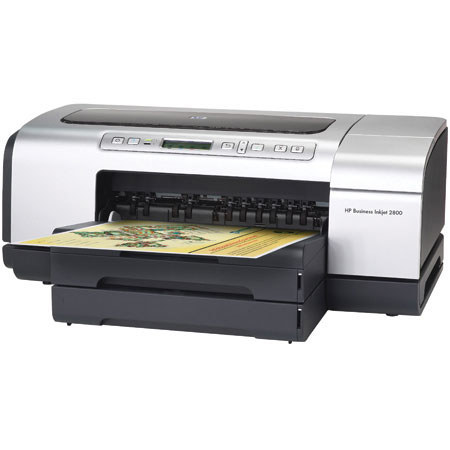
Do more for less with low cost of ownership, flexible features, & simple remote management software. Produce vibrant images & graphics up to 13x19" with up to 4800 dpi printing
Print your color office documents & marketing collateral in house: The HP Business Inkjet 2800 series printer is a low-cost business printing solution designed to print both color & black-only office documents quickly & affordably
The printing system features 4, individual, high-capacity print cartridges you save money by replacing only empty cartridges. You can enjoy the flexibility & convenience of producing high-quality marketing collateral in-house, which reduces costs, saves time, & gives you control over the entire process
Print enlarged or reduced documents with document-scaling technology. Choose HP resizing options before you print to scale print jobs from 25 to 400 percent with virtually no loss in print quality or resolution. Extra training & the purchase of special software is not required, saving you time & money
Print booklets effortlessly with a booklet layout feature that automatically enables appropriate 2-sided printing & reduce-to-fit options. In addition, a collation feature lets you print multiple copies of a single job, so all you need to do is fold & bind the printed pages into a booklet
Support barcode printing from UNIx, SAP R/3, Oracle, Windows & other ERPs Turn this printer into a professional barcode printer with the optional Jetmobile Bar DIMM 3.1 solution, which enables quick & versatile barcode printing from UNIx, SAP R/3, Oracle, other ERPs, Mainframes (SCS), AS/400 (SCS), & Windows. With support for more than 60 barcode types, including 2D barcodes like PDF417, & built-in quality control, you can easily produce barcoded documents without investing in specialty barcode printers
Easily manage your printing costs: The HP Business Inkjet 2800 series printer is designed for sharing. The HP Business Inkjet 2800dtn model features the HP Jetdirect 620n Fast Ethernet print server installed in the EIO slot, which provides high-performance networking with up to 6 MB per second throughput speeds & heightened security
The remote management software included with the printer simplifies printer configuration & lets you easily manage a networked printer from any standard Web browser. In addition, the software includes job accounting, pages remaining, & diagnostics features to help you manage costs
Job accounting allows administrators to track & monitor each users' usage (for example, the type & number of pages printed & black & color ink usage). This information can be used by administrators to track printer deployment, workload, & the purchase of supplies
Pages remaining lets you see the estimated number of pages that can be printed with the remaining ink for full color, business color, or black text documents. You can also determine if the ink levels are sufficient to print your jobs.
Join VIP PRO
Earn 2X Points + Exclusive Perks!
Request a Callback
Chat one-on-one with an expert
Sell or Trade your Gear
Get started in 3 easy steps