
This item is no longer available.
Review Summary
2018-12-23T19:00:00
I have never had so much trouble with a printer. The acanner doesn’t connect with the software, so I gave up trying. Place 1 page on the screen to copy, and the command window where I should be easily able to find the word ‘print’ doesn’t always appear. I can print from my computer- a few pages and that works. But if I print wirelessly, the font changes to HUGE and I get 3 pages for every one I send. This is the worst product ever!
Berman74

2018-09-18T20:00:00
A salesmen talked my colleague to buy a HP MP177 printer. A mistake of our life time !! Hp please discontinue this printer immediately . It is slow to print, scanning is bad and all struggle it wifi connection. I need to change my setting every day for the printer. We will return to use our old one... Will write this one off!! the touch screen feels like it's going to break any second...
Angery001one
2017-07-02T20:00:00
The M177FW is a nice little printer, however the toner cartridges are very tiny. I guess that is why the price is so low. Printing invitations, the yellow toner ran out very quickly. Toner is $50 or $60 but they could have made bigger cartridges. When printing heavy card stock in PHOTO mode, the printer is awfully slow and requires a "cool down" after every print. Otherwise for your basic needs it's not a bad printer.
yashikor
2017-06-16T20:00:00
Got this little printer to help me write a book. It is fast and uncomplicated. Easy to set up. Fast shipping. Appreciate simple technology with user friendly screen. Great features. Highly recommend.
NashvilleGirl11
2017-06-15T20:00:00
The HP Color LaserJet Pro MFP M177fw is a reliable printer, but the touch screen does not have an icon for scanning and using HP Scan and Capture App is inconsistent at best. I often get an error stating that its not set up or can't be accessed. I have dumped the app and reloaded twice. It works intermittently and then fails. I have also tried to scan from multiple paths in my computer, but no go. At this point it is not working at all. My $129 HP deskjet 4630 is more reliable for wireless printing and all scanning functions. It has never failed me in 3-years.
Yatesjlz
2017-06-10T20:00:00
1. The printer with the factory firmware doesn't go in sleep mode after scanning a document. 2. The printer with the updated firmware turns itself off every 8 hours and you can't change this. So, it won't wake up and you have to go to the printer and turn it manually every time when you want to print over network. You shouldn't consider it if you want to use network printer that wakes up automatically. It won't! 3. After 1 year of use Wi-Fi and display issues appeared. 4. It doesn't print anything for a long period of time if you print too much. It took me about 1 hour to print about 100 pages. So, it even doesn't print sometimes.
MrDmitry
2017-05-30T20:00:00
Has all the features we required and works well for our business
mackie
2017-05-18T20:00:00
I work from Home and the HP is not reliable. Setup via CD (from 2013) did not find the printer even though Network test has been passed. Wireless needs to be reconfigured always as HP seems to loose memory. In a semi professional environment absolutely not a good printer. Lucky the printer was cheap. But I would not recommend to buy it
MCH2017
2017-03-25T20:00:00
This is 1st color Laser product I have purchased, and all my works are easily when using this. However it is heavily and slow as its design, but I feel the low price sounds reasonable for such home printers.
PickyCustomer
2017-02-01T19:00:00
Pro- easy to install, easy to connect to wireless Con- Very Slow performance , snail slow. Very noisy.
Mumsy89
2016-10-09T20:00:00
This is a conflicted review. I give this printer outstanding ratings on performance and features and an over all 4 stars. So, how can I not recommend it to a customer? After several months effort with HP's outstanding customer service group I still cannot believe that the primary issue cannot be resolved, other than for me to purchase another product. The problem appears to be in the printer design or assembly: it won't scan documents through the ADF without skewing the resulting image. HP has provided 4 different printers (including the original last May) and all had the same issue. HP has refunded my entire purchase price including cost to ship this last one back. Seems simple, right? figure out the problem and return a product that works. But in today's economic climate it is easier to send it on to someone else in hope they won't notice it until it is at least not until it is out of warranty. So, my concern is not with the product, or the customer support, or their commitment to keeping me satisfied. I am more concerned that this is the 'new' HP and should I expect this level of quality with their products going forward? Don't fix it, just toss it?
aVeryPickyConsumer
2016-10-03T20:00:00
I Have HP Laserjet Pro MFP M177fw Its printing speed is very slow tell mee about the soloution and also tell mee how to remove toner and install again
uziii96
2016-09-15T20:00:00
I've had this unit over a year and considering it's pro's & con's, I would say it's OK for light usage - not a great performer but not terrible. The ADF stopped working properly after about a month, which means scanned or copied multi-page documents come out crooked, so I must use another copier/scanner for documents with 2 pages or more. Probably some 15 cent piece of plastic failed, but I notice that in other models & brands, the ADF fails early. I'd rather pay a little more for a reliable ADF. Color crispness has declined over time - but I guess these products weren't designed to last longer than a few months.
PowerDesk
2016-09-05T20:00:00
This printer is great.Don't pay attention to the bad reviews .It has every thing that you want from a printer.Even more things that you expect.The print speed is perfect and the wireless system is amazing.You can do your work in less than 1 minute.I highly recommend this printer
ROkhii001
2016-08-29T20:00:00
Problem started with a damaged toner cartridge, then after interminable time on the phone with customer support they sent a replacement. PDF's won't print in correct layout when you set them to auto and I'm not finding any fix for this online. So I print colour documents and then have them wasted because what should be landscape comes out as portrait. Come on this is the most basic command and inexcusable. Overall it is slow and not user friendly and I wasted my money
Jim04
2016-07-03T20:00:00
Garbage, brutal to connect to,connects some days not others. Not really a scanner unless you download softwater and that rarely connects. I have a HP 276 which works great, I wish I had never bought this, junking it.
PFWS
2016-04-06T20:00:00
Three separate suppliers provided SEALED cartridges, allegedly not refurbished, but in spite of packaging label and LABEL on the Cartridge, two cartridges Labelled Magenta were Yellow toner, and one labelled Cyan was also Yellow. Something is wrong in the supply chain, and no-one will admit it. :( Getting a new printer, apparently. What a waste of time and $$$$!
lostinlibraryland
2016-01-15T19:00:00
Printer wouldn't turn on, brand new and right out of the box. Tested multiple outlets to no avail.
Schultzy
2016-01-04T19:00:00
This is the lowest quality HP printer I've owned or worked with. It prints two pages and then goes into some kind of re-calibration mode for a long time then it prints the next two pages. The most annoying problems involve the paper feeding. Many times it fails to feed a sheet. Sometimes it feeds an extra sheet. Right now it's printing off registration, everything is 1/2" high on the form - trying to find a fix. This printer is junk.
BobMadBeach
2015-12-14T19:00:00
High learning curve. Very little support.
Gary45
2015-11-11T19:00:00
There is no scanner function present on this unit. You put something on the glass or in the feed tray, but your only options are to copy or fax. There is no discussion of scanning in the manual except for scanning resolution, which could apply to copy and fax, I suppose, but the website clearly lists this unit as a print, copy, scan, fax unit. The scan implies that a digital picture file will be created. I have no flipping clue and I'm really tired of trying to make it scan.
mmp25
2015-07-15T20:00:00
I bought this new and out of the package the system was making a terrible noise and we could not get it to print. HP services sent us a replacement base and we had to ship back the bad system. The new one came and it was a remanufactured unit. Got it set up and it worked for a couple of days. After a couple of days we started getting messages the paper tray was empty but it was not. after realigning paper it started working again but not for long. Now 3 months into this the error keeps coming back and we need to restart the unit sometimes multiple times to get it to print anything. When I bought this unit we bought extra ink so what a waste. I am going to get on the phone with HP support again but what a piece of junk this printer is.
billb123
2015-05-10T20:00:00
Very easy to setup & works as advertised.
Dinkar
2015-04-28T20:00:00
This printer is excellent for the money, you can fax, scan, copy and print documents from your computer or independently without it. You can feed from the flatbed scanner or multiple pages from the feeder up top. All you have to do to send a fax is enter the number and place your document on the flatbed scanner or load it in the feeder up top. It has plenty of memory as I sent an 11 page fax and it did not say "memory full" or some such error. It prints and copies in color which is quite useful and because it is a laserjet, I expect the toner cartridges to last a long time, haven't had to replace them yet, so I don't know exactly how long they will last. The only negative thing I can say about this printer is, it goes through quite an initialization process when you first turn it on, it takes a full minute to go through all its changes before it is ready to work. Other than that this printer has been great so far! Quite useful! The copy and scan quality is quite good and is not blurred at all.
xaxo700
2015-04-28T20:00:00
My printer is very user friendly. I like the alert systems.
Sunset2002
2015-04-28T20:00:00
good quality of documents produced, but a little slower than expected. It takes a while to print or copy. Reminds me of inkjet slow speed (and sounds) but with quality of laser jet printouts. For the price and for home usage, it's okay.
ramsv
2015-04-28T20:00:00
Received 1st one. Was able to print a test page before it quit working. Sounded horrible. Sent it back--they sent me another one. It wouldn't even print a test page, not a copy. Needles to say between the two, I spent hours on the phone with tech support and with sales to return them. A month and a half later after they both were returned I got my money back. Very disappoint with this as I really wanted a color laser printer. Don't know what I will do now.
Jeanneak
2015-04-27T20:00:00
I work out of a home office and I would not be as productive as I am with any other printer. I am very pleased with my HP Color LaserJet Pro Multifunction Printer M177fw
DLBrown106
2015-04-27T20:00:00
I got this all in one for the price of an inkjet. It is great and meets all my needs. Very impressed with this all in one!
htlba
2014-08-14T20:00:00
I bought this for home use and wife's grad school projects. I wanted to get away from the inkjet and ink smudging when touched wet or damp. Works very well does not print pictures as well as some of the dedicated photo printers (not tacky though) but everything else very good. It would be nice if printed in fast draft or grayscale for all documents. Definitely an upgrade from inkjet. Fax and scan work well.
dan111

Accidents happen where life happens. Protect your favorite Adorama products and purchase a protection plan to stay covered from accidental damage, mechanical or electrical failure, and more.

If we can’t fix it, we’ll replace it at no additional cost.

Protect your product from drops, spills, and more.

Enjoy your gear without fear. We have you covered!

When regular use of your product over time results in mechanical or electrical failure.

We will never charge you a deductible after the purchase of a plan.

Our claims process is simple & easy and our customer service team is happy to help.
Adorama Protect powered by Extend is available for purchase to customers in the United States. Not available for purchase Internationally or in U.S. Territories.
Browse our FAQ
Yes
Normal: Up to 16 ppm
Normal: Up to 4 ppm
Black: As fast as 16 sec
Color: As fast as 27.5 sec
Up to 20,000 pages
250 to 950
Laser
Up to 600 x 600 dpi quality (2400 dpi effective output with ImageREt 2400)
Up to 600 x 600 dpi quality (2400 dpi effective output with ImageREt 2400)
PCLm/PCLmS
3.0" (7.62-cm) touchscreen CGD (Color Graphics Display)
600 MHz
No
Yes
HP ePrint, Wireless direct printing, Apple AirPrint, Mobile Apps
Yes, built-in Wi-Fi 802.11b/g/n
Hi-Speed USB 2.0 port
Built-in Fast Ethernet 10/100Base-TX network port
Wireless 802.11b/g/n
Standard (built-in Fast Ethernet, Wi-Fi 802.11 b/g/n)
Windows 8 (32/64-bit), Windows 7 (32/64-bit), Windows Vista (32/64-bit), Windows XP 32-bit (SP2 or higher); Minimum hard disk space required (CD and Web Package) 200MB; Minimum hard disk space required (Box Spec for Smart Install) 400MB; Minimum RAM installed 512MB CD-ROM/DVD or internet, USB or Network port; Mac OSX v 10.6; PowerPC G4, G5, or Intel Core Processor; 500 MB available hard disk space; CD-ROM/DVD-ROM or Internet; USB or Network port
Full software installs supported on: Windows 8 (32-bit/64-bit), Windows 7 (32-bit/64-bit), Windows Vista (32-bit/64-bit), Windows XP (32-bit) (SP2 or higher)
Driver only installs supported on: Windows 2012
Windows Server 2008 (32-bit/64-bit), Windows Server 2008 R2 (x64) (SP1), Windows Server 2008 (Standard Edition), Windows Server 2008 (Enterprise Edition), Windows Server 2003 (32-bit/64-bit) (SP1 or higher), Windows XP (64-bit) (SP2 or higher)
Mac OS X v 10.6.8 or higher
Standard: 128MB
Maximum: 128MB
Hard Disk: No
Standard: 150-sheet input tray
Standard: 50-sheet face-down bin
Manual (driver support provided)
A4; A5; A6; B5; 16k; 10 x 15 cm; post cards (JIS single and double); envelopes (DL, C5, B5)
76 x 127 to 216 x 356 mm
Paper (bond, brochure, colored, glossy, letterhead, photo, plain, preprinted, prepunched, recycled, rough), postcards, transparencies, labels, envelopes
Cut sheet paper: 60 to 120 g/m2 (Stretch Goal:-163g/m2); Envelopes: 60 to 90 g/m2; Post Cards: 135 to 176 g/m2; HP glossy media: 130 to 220 g/m2
Flatbed, ADF
Windows Scan Software supports file format: JPG, RAW (BMP), PDF, TIFF, PNG; Mac Scan Software supports file format: TIFF, PNG, JPEG, JPEG-2000, PDF, PDF Searchable, RTF, TXT
Optical: Up to 1200 dpi
Maximum: 216 x 297mm
Maximum: 216 x 356mm
Up to 7.5 ipm (b&w), up to 5.5 ipm (color)
No
Standard, 35 sheets
Scan to E-mail by HP Software; scan to application by HP Software; scan to file by HP Software
PDF
TIF
BMP
PNG
JPG
Black: Up to 16 cpm
Color: Up to 4 cpm
Up to 300 x 300 dpi
Up to 300 x 300 dpi
25 to 400%
Up to 99 copies
Yes
33.6 kbps
Based on standard ITU-T test image #1 at standard resolution. More complicated pages or higher resolution will take longer and use more memory
Up to 500 pages
Up to 300 x 300 dpi
Up to 100 numbers
100 locations
Input voltage: 110 to 127 VAC (+/- 10%), 60 Hz (+/- 2 Hz); Input Voltage: 220 to 240 VAC (+/- 10%), 50/60 Hz (+/- 2 Hz) (Not dual voltage, power supply varies by part number with # Option code identifier)
290 watts (Printing), 200 watts (Copying), 9.2 watts (Ready), 1.3 watts Sleep/Auto-Off), 0.2 watts (Manual Off)
ENERGY STAR qualified
Blue Angel
50 to 86deg.F
30 to 70% RH
Minimum: 423 x 425 x 335mm / 16.65 x 16.73 x 13.19"
Maximum: 423 x 484 x 335mm / 16.65 x 19.06 x 13.19"
16kg / 35.27lbs


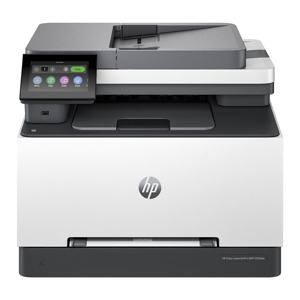
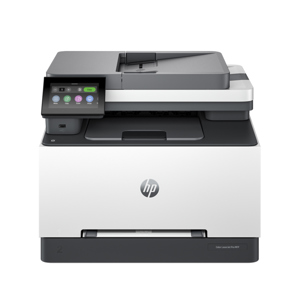
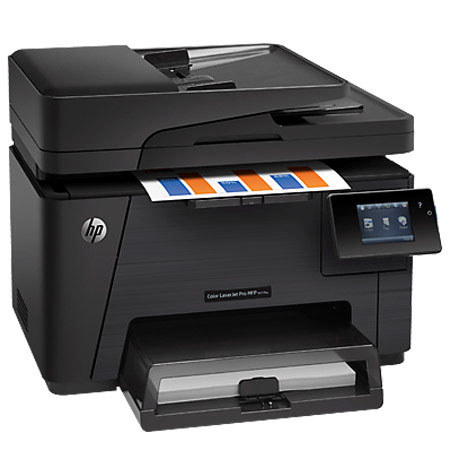
The Hewlett Packard LaserJet Pro M177fw Color Multifunction Printer brings vibrant color printing in-house and boosts productivity with Ethernet connectivity. Enable easy printing at work, home, or on the go with mobile printing features. Boost productivity and print vibrant color marketing materials in-house with a networked Multifunction Printer that prints, copies, scans and faxes.