


This item is no longer available.
Review Summary
2009-12-17T19:00:00
This is the worst HP product I have ever owned. Errors and takes forever to start-up and shut down. The cd/dvd part of this printer is the worst. More work needs to be done by R&D before you roll anymore products like this out!
vicmor

2009-12-08T19:00:00
I got this printer at Office Depot for $29.99 + tax on Black Friday. I have printed less than 75 pages and the standard HP 544 black cartridge is empty and the other 4 cartridges or half full. I need to replace the cartridges now and they are the minimum of $11.99 a cartridge, so they will cost me $60. That is twice the cost I payed for the printer with ink to start with. This printer drinks a lot of ink. It quality of print is very good. It prints on CD/DVD labels you put on a CD/DVD. I would just prefer to print on a CD/DVD page and then apply the label to the CD/DVD. I recommend you check out the other brands. I think a all-in-one would be your better choice.
jimmycarol
2009-10-12T20:00:00
nice printer all round but expensive to run as it drinks ink previous machine -7160 was as good and ink lasted 3 times longer on pric comparison. stay away from 5460 am going for a cheaper to runpiece-still HP
mikecplanes
2009-08-11T20:00:00
Fast, easy, simple and it works. Ink replacement is painless. Photos are crisp and the color is right on. Speed is very good. The pinter's sounds are not a bother for me.
roylg
2009-06-16T20:00:00
Everytime you print, the machine goes through 30 seconds of wheel turning, cartridge spinning nonsense. After you print, it goes through the same noisy nonsense ! Very annoying. And this goes on after every print, not just the first of the day. I will lhave to que my jobs and print once or twice a day. RB
RB2009
2009-05-29T20:00:00
this printer is the best i bougt it two days ago and i love set up was very fast and this printer is very nice for arts and craft
kevin123
2009-05-22T20:00:00
Disc printing was a big feature for me, as I do quite a bit of it. I think the hardware is quite good, and print quality is very respectable, and it's pretty quick too. Unfortunately, the included disc printing software will only allow you to print using pre designed templates. In addition, you cannot adjust the inner and outer diameter of the print. I finally had to resort to spending another $30 for third party software in order to get the functionality that should have been included. To add insult to injury, it still launches the HP software when I insert the disc tray. I finally removed the HP application.
amadeusm
2009-04-07T20:00:00
I purchased the HP Photosmart D54560 about 6 months ago, primarily to print labels directly to CDs and DVDs. The labels are printed fast and are very good quality. But, if your doing a series of disks, changing the label for every disk, the D5460 is awful. After every single label, the printer tells you to close the CD tray and you wait while the printer recycles itself. Ink use is not one of it's good qualities. If your looking for a printer to print labels on CDs and DVDs, look else where. This D5460 is not for you.
hyrral37
2009-03-28T20:00:00
If you only want to print pictures or cds then this is an ok printer. however if you want to print text or letters forget it. It is the worst printer I have ever owned. Do not recommend.
chasmo
2009-03-08T20:00:00
If you are looking for a quiet machine this isn't it. It makes a lot of noise both before and after printing a page (and not just that first page of the day - every print job). I'm also having difficulties printing on "custom" sized papers. I do a lot of crafting and this machine is difficult when it comes to setting up and printing custom papers. If I hadn't of gotten a really good deal (after sale price and rebate offer was $40) I would be really frustrated with this purchase.
DLynn
2009-01-20T19:00:00
Hope HP will read this and make some changes. The printer has very small ink storage and flies through black ink. The print quality is very good, but the cost of ink is an issue. Two other major problems. The printer will not adjust to the document orientation. In other printers the orientation is set depending on how the paper is inserted, usually portrait. Then if an application sends a portrait document the printing is straight out. If the application sends a landscape document the printer adjusts and prints sideways to produce a landscape print using the prorate format. Not this printer. It issues an error message that says that the printer orientation does not match the application document and refuses to print. It takes going into the printer set-up to change orientation to get a print. Very time consuming and useless. If the printer is smart enough to know that there is a conflict, correct and print! The second issue is an out of memory error received when the print button is selected. The computer has 384 kb of memory and works well with other printers, but not the D5460. Tried removing the HP software and only installing the basic driver, same problem. Using WIN XP SP3 Home. There seems to be a memory hog in the driver.
RCC344
2008-12-13T19:00:00
I purchased this printer on sale to replace my very old Photosmart 7350. Setup was a breeze even with the added step of installing the print head, which I hadn't ever had to do on a printer before. At this price, this printer is a real bargain. The print quality is outstanding, especially compared to older models. I was skeptical that these new Viviera inks really were different, but after a side by side comparison I can say they are a definite improvement. It also prints noticeably faster. I haven't used the mode for printing on CD/DVD yet but looks easy to do. This does have separate cartridges for each ink color but I think this is a good thing since you can replace them individually. On a Tri-Color cartridge I was always having to replace it because only 1 color was empty. Such a waste since I still had ink left in the other colors. It may seem more expensive to do the individual cartridges but in reality it is a money-saver in the long run.
Amber565
2008-11-23T19:00:00
On initial setup there were a couple of problems with the printhead, but HPs excellent on-line help solved the problem. Otherwise setup and installation went very smooth. The Start Here foldout was clear and straight forward. Performance and print quality are way past what you would expect from an inkjet at this price. I wouldn't recommend it as your every day printer because of the multiple ink cartridges and their price; but as a dedicated photo printer it is an outstanding addition. Be sure to buy the HP USB cable; the printer connection is unique.
GeorgeW
2008-10-30T20:00:00
I just purchased this to replace my Photosmart 8250 and have had trouble with it ever since I installed it and got it running. It prints when it wants to. I thought it was because I have it connected to a print server but it makes no difference. I use Quicken and it does not print checks correctly unless I request it to "print preview". I printed off a couple of pictures to test it and they are fine. It just doesn't work as well as my 8250. When I look into the HP Solution program, it shows that the 5460 is disconnected but it's not. It won't show the ink levels for it. We own an J6480 and have no trouble with that printer at all. The 8250 had a menu on the display directly on the printer. The 5460 does not. I don't care for the printer at all.
Sam58

Accidents happen where life happens. Protect your favorite Adorama products and purchase a protection plan to stay covered from accidental damage, mechanical or electrical failure, and more.

If we can’t fix it, we’ll replace it at no additional cost.

Protect your product from drops, spills, and more.

Enjoy your gear without fear. We have you covered!

When regular use of your product over time results in mechanical or electrical failure.

We will never charge you a deductible after the purchase of a plan.

Our claims process is simple & easy and our customer service team is happy to help.
Adorama Protect powered by Extend is available for purchase to customers in the United States. Not available for purchase Internationally or in U.S. Territories.
Browse our FAQ
Up to 33 ppm
Up to 11.5 ppm
Up to 2.9 ppm
Up to 31 ppm
Up to 9.2 ppm
Up to 2.7 ppm
As fast as 18 sec (color photo, draft quality on photo paper, 10x15)
As fast as 30 sec (color photo, normal quality on photo paper, 10x15)
As fast as 60 sec (color photo, best quality on photo paper, 10x15)
Up to 600 x 600 rendered dpi
Up to 9600 x 2400-Optimized dpi color (when printing from a computer on selected HP photo papers and 1200-input dpi)
Up to 2500 pages
CompactFlash, Memory Stick, Memory Stick Duo, Secure Digital/MultiMediaCard, Secure Digital High Capacity Card, xD-Picture Card
Yes (up to panorama, A4 and more)
2
1 plus automated photo tray
Up to 125
Up to 60
Up to 15
Up to 40
Up to 40
Up to 50
Manual (driver support provided)
Main Tray: A4 (210 x 297 mm), A5 (148 x 210 mm), A6 (105 x 148 mm), B5 (176 x 250 mm), B6 (125 x 176 mm), B7 (88 x 125 mm), C5 (162 x 229 mm), C6 (114 x 162 mm); JIS B5 (182 x 257 mm), JIS B6 (128 x 182 mm), JIS B7 (91 x 128 mm); Photo Tray: A6 (105 x 148 mm), B6 (125 x 176 mm), C6 (114 x 162 mm) B7 (88 x 125 mm), JIS B6 (128 x 182 mm), JIS B7 (91 x 128 mm), 100 x 150 mm, 130 x 180 mm
88 x 127 to 216 x 356 mm
Paper (plain, inkjet, photo), envelopes, labels, cards (index, greeting), CD/DVD
60 to 280 g/m2
Dye-based (color), pigment-based (black)
64 MB
64 MB
HP PCL 3 GUI
2 USB
HP Bluetooth dongles
Windows XP Home and Windows XP Professional: Microsoft Internet Explorer 6 or higher, Intel Pentium II, Celeron or compatible processor, 233 MHZ or higher, 128 MB RAM, 450 MB hard disk space, CD-ROM, USB port; Windows Vista Ready: Microsoft Internet Explorer 6 or higher, 800 MHZ 32 or 64-bit processor, 512 MB RAM, 850 MB hard disk space, CD-ROM, USB Port.
Microsoft WindowsXP Home, XP Professional, Windows VistaReady, Mac OS X v10.3, v10.4, v10.5
42 watts maximum, 24 watts maximum (active/printing), 3.61 watts maximum (ready), 2.7 watts maximum (sleep), 0.5 watts maximum (off)
Input voltage 100 to 240 VAC (+/- 10%), 50/60 Hz (+/- 3 Hz)
5 to 40° C
15 to 32° C
15 to 80% RH
15 to 80% RH
5 to 90% RH
6.8 B(A) (active/printing)
54 dB(A) (active)
Yes
18.03 x 15.18 x 7.21 in
12.75 lbs
HP 1 year limited warranty


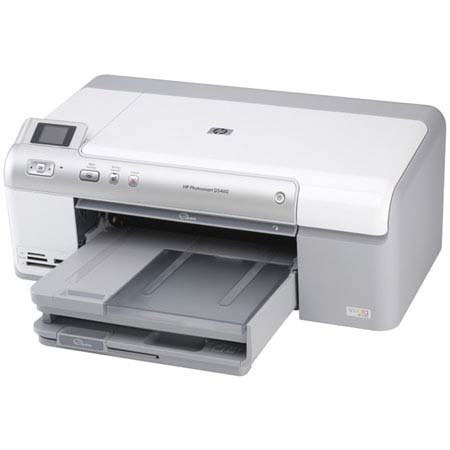
The HP Photosmart D5460 Compact 4" x 6" Photo Inkjet Printer prints documents at fast speeds of up to 33 ppm black and up to 31 ppm color; 4 x 6" snapshots in as little as 17 seconds. The PhotoSmart D5460 prints with color print resolution of up to 9600 x 2400 optimized dpi when printing from a computer on selected HP photo papers and 1200 input dpi.
With HP's Vivera inks and Advanced Photo Paper, you can expect smudge-resistant photos that last for generations. No PC is necessary, as you can pop in a memory card, view, edit and print photos and on CDs/DVDs. The PhotoSmart D5460 also supports Pictbridge cameras for your convenience. It prints lab-quality photos, colorful creative projects, sleek documents and crisp Web pages.
Join VIP PRO
Earn 2X Points + Exclusive Perks!
Request a Callback
Chat one-on-one with an expert
Sell or Trade your Gear
Get started in 3 easy steps