


This item is no longer available.
Review Summary
2011-03-28T20:00:00
Lasted 16 weeks. Nothing but fatal error blinking lights. Cheap. will/would not buy again.
passonthisone

2011-01-18T19:00:00
It's your $30. Printed about 10 pages over the course of two months. It is now worthless. Good news is the ink outlasted the printer. I went the cheap route because i don't print that much at home, but this product is just a waste.
seewhy6
2011-01-06T19:00:00
Junk...it rarely worked. Most times I'd have to restart my computer, unplug the printer power or USB cord to get it to print. Very often items would hang in the print que and couldn't be canceled. After several downloads, unintall/reinstall of new driver it ultimaltely didn't work. I'm back to my old Canon 2110....never a hint of a problem! The HP went to Goodwill
user2
2011-01-03T19:00:00
This has been the worst printer I have ever owned! When it actually works, it does a pretty decent job... but 95% of the time it jams and the print job gets stuck in the queue so I have to restart everything before trying again because canceling or restarting the print job never helps. Don't waste your money or time, it's nothing but headaches!
iheartmy2dogs
2011-01-03T19:00:00
This printer is very unreliable. Each day I wonder if the thing will print today! I have always had HP printers in the past but this printer never stays online! I have to go into my computer control panel every other day and reset the print spooler. I will give HP printers one more try, hoping to renew my faith in these printers because the HP 2680 is NOT good!
Wilco
2010-12-09T19:00:00
I have owned this for 45 days but have used for less than a month since I was waiting for my new G72 HP Laptop to arrive. The PC has been great but the printer never has worked properly. I have talked to tech but since the printer is over 30 days old it is considered out of warranty. It never turned on or off using the power button (you had to unplug it) and the software which came with it did not work on Windows 7 so I was advised to delete it and download from HP's site which I did but it still only worked occasionally. It constantly took itself offline and I would receive messages from Windows 7 that it was shutting the printer down due to malfunctions. It is a BIG PIECE OF Garbage with a Lousy WARRANTY!!!!
wildcats623
2010-12-02T19:00:00
I encountered two problems right away after purchasing this product: 1) The power button depressed too far and is no longer useable 2) It didn't support Windows 7 when I got it. Just about every other print job wouldn't print, and I had to download a tool just to clear the print que before trying to print again. Finally I found a Windows 7 download, and the printer is performing much better now.
Chuck123
2010-11-16T19:00:00
This thing gave me trouble from the beginning--uses tons of ink--does not start up right hardly ever---must troubleshoot almost everytime just to get it to work ---- when it does print the copys are OK---I tried to work with HP and they did not solve the issues or offer an exchange Watch out DO NOT BUY one
sailwinds
2010-09-01T20:00:00
I need an inkjet printer. I print 1,000 pages a month. I had 3 HP printers before this one. One hp 1500 and 2 1660's. The 1660 is a real pain to operate. It always has a problem. The print queue does not clear. The cartridge gets stuck. The paper jams. a real nightmare I have Dell/Inspirion with Vista. The CD with BOTH 1660's did not work. The second 1660 lasted less than 3 months. On the other hand this 2680 printer worked from day 1 . Easy installation. Runs great. Quiet and efficient. I definately would recommend the 2680.. The 2680 inkjet is the best inkjet I have owned so far. (I had 2 Epson and 2 lexmarks before three 1660 hp printers)
reese
2010-08-25T20:00:00
The real virtue of this printer is that the printer is inexpensive and yes, it does print reasonably well when it is working. Its durability is questionable however. Mine broke after just a few months and had to be replaced. Cartridges seem to last for a very short time. The lack of a supplied USB cable is a bother. I didn't miss that fact when I bought it but other customers may. I fail to understand why HP would sell its product this way. The product comes with software that takes a long time to load, kept giving off error messages, and comes with marketing gimmicks that the user has to be careful to turn off. HP also insists that its software load on startup with, of course, an advertising message which has to be turned off. HP's hard sell is counter productive.
AlanCa6326
2010-08-15T20:00:00
This was a decent printer for what I needed. I usually just print spread sheets and e-mail docs.,occasionally I will print a photo. But this printer is not Windows 7 compatible and I had trouble with the spooler getting jammed and having to restart both the computer and the printer. I tried several different settings and reloading the software. Finnally after working with an HP rep. we found there was no solution to the problem yet. The HP customer Service team was very helpful in getting me set up with a printer that would work for me. I currently am using the Photosmart D110 and it has been working great. I am happy with the HP customer service team in helping me to find the right solution for me.
wrong1
2010-08-05T20:00:00
Don't get me wrong it prints great and it prints fast! but if you are looking for one that utilizes ink don't buy this one, I am unable to adjust how dark or light it is and it prints to dark. I print coupons and don't like them printed dark to hard to scan at the store. but if that is not your problem and you just want one that is fast and clear this would be it.
me55
2010-07-05T20:00:00
The HP Deskjet D2680, is a great little hard printer, works great and prints great, if you need a good printer this could be the one for you..
Wheels
2010-06-03T20:00:00
I got this product on a deal with Staples. What the HP store conviently forgets to mention is that if this printer is not wireless you need to buy the USB cable. Now when you go to buy the cable, they make you jump through hoops just to figure out where you can buy the cable. Talking to the online technician and they insist on calling you back, when all you want is to buy the cable and not speak to a real person on the phone! Oh, and I still can't find the USB cable on the HP store website.
Rachel1889
2010-03-20T21:00:00
Great for home use. Prints fast
Lady L.
2010-03-08T19:00:00
It prints, that's all it's required to do.
Claude
2010-02-05T19:00:00
I got this printer promptly with a new HP desktop. It lasted less than a month as the power button stuck in the depressed position when I attempted to turn it off. It did not turn off so I have to unplug it now to turn it off. The print quality was fine for the few times I used it. I did not ever try a photo or use the color ink at all. I tried to get it replaced and the guy told me they did not have any to replace it with, even though I see it here in the quick ship section of the website. They sent me an email value coupon to use on the site after telling me it would be a Staples or Best Buy credit. Live and learn, but I have had 3 HP desktops in the past 10 years and they have all been GREAT. None ever failed, I just outgrew them. This seems to simply be a power button problem. I'm not unhappy just confused.
honeylyn
2009-12-06T19:00:00
I find the printer ok, but the first one I got proved to have too flimsy an on-off button, so I got a replacement unit. That one has worked ok , except for a tendency to lock up and be unable to clear the print queue. The on-off button for this unit has also begun to fall into the machine, and I can only hope that it doesn't also break. Would not replace with the same model because of fragility. Initially bought this unit to replace another brand for space reasons. Can't say I'm happy with the decision.
jimbear
2009-10-08T20:00:00
My friend got this printer dirt cheap for our dorm. I'm not sure how reliable it will be but its freaking loud; makes a BAM SLAM type of sound. It literally sounds like its breaking. Sometimes it jams paper, but other than that i have printed out 2 papers this week, so i guess its a last resort printer. HP, step up to your name
Skeptical
2009-09-18T20:00:00
Overall, this is a good printer. Because of the price (this is cheap for the specs...) I expected it to be a worthless piece of plastic. This printer prints fast, and takes up very little space on my desk. The paper tray folds up to use even less space. Every inch of this printer is high quality. The only problem is the software required to run the printer. To run the printer, you have to install a couple of programs, and an icon on the bottom of your screen. Overall the printer is very good, but the software is ok.
planetX
2009-09-08T20:00:00
Everything was fine with the printer outside of it not coming with a USB cable to hook up to the computer, which is my fault for not reading the FINE PRINT. Otherwise a good overall printer, no problems....yet.
JakeFL352
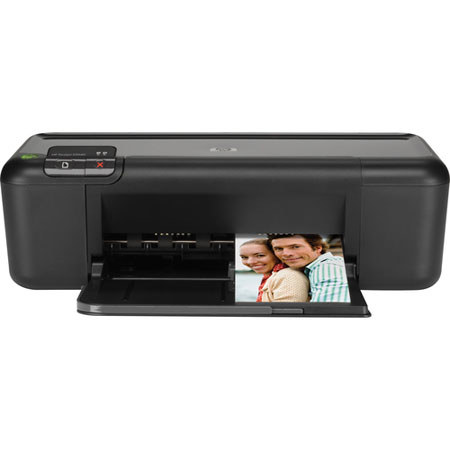
The HP DeskJet D2680 Color Inkjet Printer is affordable and simple to use. It yields draft quality, letter size prints at speeds up to 28ppm (pages-per-minute) in black and up to 21ppm in color. It delivers output resolutions up to 4800 x 1200dpi (optimized) in color and up to 600dpi in black when printing in Best Mode.
Using single black and tri-color standard-volume ink cartridges, the D2680 will yield approximately 200 pages in black and 150 pages in color. It will accommodate money-saving high-yield cartridges, which yield approximately 600 pages in black and 420 pages in color.
The D2680 comes with an 80-sheet input tray, which accepts a variety of plain and photo papers in letter, legal and executive sizes plus custom sizes from 3.5" to 8.5 x 11". It can also print on envelopes, transparencies, cards and iron-on transfers. It is easy to set up and it is compact, so it will fit into a variety of locations. The DeskJet D2680 is Energy Star qualified, which means it is designed to help save both resources and money.
Join VIP PRO
Earn 2X Points + Exclusive Perks!
Request a Callback
Chat one-on-one with an expert
Sell or Trade your Gear
Get started in 3 easy steps