2023-03-06T19:00:00
Rated 1 out of 5
The most infuriating piece of junk I have ever had to put up with
It sucks. The setup is complicated and confusing. After not too long it just stopped printing properly and now we can't use it for that. For a while I've just been using it as a scanner but even then I have to jump through hurdles to make that work. Connecting it to the Wi-Fi was like solving the millenium puzzle. It keeps on creating fake issues that I have to solve. It will have been working just fine the previous day, and then there's some reason it suddenly can't connect or needs extra setup or some other nonsense. It is the most infuriating piece of junk I have ever had to put up with. It's also my first printer, so maybe printers are just like that. God help me if they are.
AnnaBishop
Originally posted at

2023-02-13T19:00:00
Rated 1 out of 5
worst printer ever
worst printer ever. after one print, it says printer offline and its so difficult to figure out how to fix it.
felly
Originally posted at
2022-10-30T20:00:00
Rated 1 out of 5
Did not last a year
Printer just went offline one day, spent hours with tech trying to fix it to no avail
Geegee1
Originally posted at
2022-10-23T20:00:00
Rated 1 out of 5
Poor Quality Print
bought HP 2755 about 1 year ago, it was always very slow. Now, print quality is terrible, some times it only prints the middle portion of a word (cut off top or bottom of letters). Not likely to buy an HP printer again.
hp2755
Originally posted at
2021-12-04T19:00:00
Rated 1 out of 5
Excellent Printer, but invasive interface
This printer is great for the price point, but if you want to scan or do anything with your computer, you have to create an HP account. This is a HUGE invasion of my privacy. I just want to scan something into my computer without HP looking over my shoulder. DO NOT GIVE THEM THIS POWER.
MissLariss
Originally posted at

2021-11-28T19:00:00
Rated 5 out of 5
replacement printer
replaced older hp printer started giving errors - this new one was a good price
woody92
Originally posted at
2021-10-21T20:00:00
Rated 1 out of 5
A FAILURE BUT INEXPENSIVE.
DIFFICULTY INSETTING UP THIS PRINTER WITH IMAC . UNABLE TO CONNECT TO MY I PHONE. AIR DROP DOES NOT EXSIST. NO FAX SET UP.
FREDZIUAL
Originally posted at
2021-10-15T20:00:00
Rated 5 out of 5
Good printers
Awesome all in one printer. I am able to do what is needed for my sons learning and my personal home office.
Al C.
Originally posted at
2021-10-06T20:00:00
Rated 4 out of 5
Does what it is supposed to.
Purchased two of these, one for work office and one for home office. They work fine, however they print terribly slow. I did adjust some settings and it seems to have gotten better, but is still super slow.
meli22a
Originally posted at
2021-09-23T20:00:00
Rated 3 out of 5
Okay for the orice.
Okay for the price. Should have opted for a different model. For two sided printing..it's back to old school with reloading the paper.
Zanne17
Originally posted at
2021-09-20T20:00:00
Rated 2 out of 5
Got What I Paid For
Didn't realize that set up directions were going to be so difficult. I wish I could print on photo paper other than 8.5" X 11".
Wishful C.
Originally posted at
2021-09-18T20:00:00
Rated 4 out of 5
My Printing partner
My HP Deskjet 2755 AIO Printer is my new partner. I am also enrolled in the Instant ink program which is also a wonderful addition. With these HP tools my printer capability is unlimited. Just think , I ran into a problem two weeks ago. I needed to print 33 pages of a 300 page document. I called HP agent and they walked me through the process. I am so very happy that I have the power of HP with me in all of my printing task.
Hometown
Originally posted at
2021-09-08T20:00:00
Rated 1 out of 5
HP2755 all in one printer
I bought this printer about a month ago and still have not been able to use it. I cannot get to connect with my wi-fi. My previous printer worked just fine until it quit copying. It was a 2600 series. I have used the HP assisant to try to install my 2755 all in one and have had no success at all. Is it possible to return the printer and purchase a different one?
Fieldgirl
Originally posted at
2021-08-27T20:00:00
Rated 5 out of 5
Easy wireless set up ... works perfect
The easy to follow instructions (both on screen & printed) make wireless setup a breeze. It worked almost instantly on both of my desktop computers. Both printing and scanning are flawless. [I keep two printers "on tap" due to essential services I render for others. The other printer was another brand and it was difficult to set up and wireless connection would not work. Stick with HP.]
Paul1792
Originally posted at
2021-08-19T20:00:00
Rated 5 out of 5
Works great!
I have been using this printer for several weeks now and am very pleased. Set up was relatively easy. I love being able to print from my iPad.
Alpinequilter
Originally posted at
2021-08-13T20:00:00
Rated 3 out of 5
Decent Printer
I want to love the printer, but it keeps having issues with going on and offline. Other than that, we do like it a lot.
Tracy 1.
Originally posted at
2021-08-12T20:00:00
Rated 4 out of 5
SWEET little printer.
We are full-time RVers. I needed a small all-in-one printer. This fills the bill. It is a little slow, but the print quality is good. Changing print cartridges is awkward. Absolutely no directions are provided with the printer on how I install the cartridges or set it up. We do not have any wifi service where we are parked so I could not get directions either.
Nanni70
Originally posted at
2021-08-08T20:00:00
Rated 5 out of 5
This printer does each task easily
The HP Deskjet 2700 series printer prints and copies clearly and rapidly, as well as scans to our desktop and laptop with ease. My previous Epson printers took a long time to warm up for use.
Brudski
Originally posted at
2021-08-07T20:00:00
Rated 4 out of 5
Lightweight and compact.
Makes a nice copy-reasonably priced. Nice for home use.
legs1212
Originally posted at
2021-08-06T20:00:00
Rated 2 out of 5
Great printer if you're not in a hurry
The printer is extremely slow! It is so slow that I'm thinking of plugging in my old printer (HP 4500 series) for normal (i.e. fast) printing. I guess I didn't read the fine print when I purchased the new one. Very disappointed overall.
waterandtrees
Originally posted at
2021-08-05T20:00:00
had a hard time setting it up. It does a good job of printing, however it is slower than slow.
fayebabay
Originally posted at
2021-08-05T20:00:00
Rated 5 out of 5
Fabulous printer
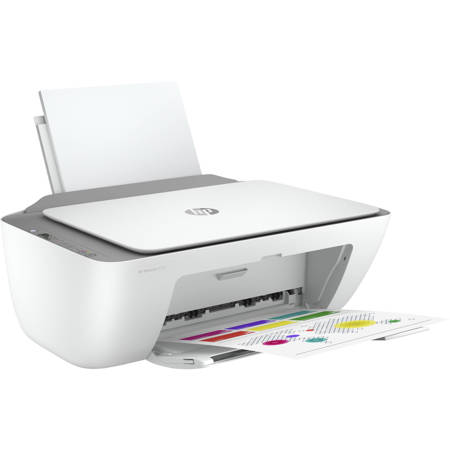
I?ve had HP Printers for quite a few years and they get better and better! More features and such smooth printing right out of the box. And the exterior design is very attractive in white and silver.
Lpauly
Originally posted at
2021-08-05T20:00:00
Rated 5 out of 5
It is great to look at and prints anything I put
I thought this printer would come with a disk to install it on my computer, but it does not. I tried to do this following your very confusing instructions but could not complete. I am too old and too ignorant of computer stuff so I still do not have a printer installed to my hard drive so I can print from computer information. I went to your site and tried but to no avail. I will have to go elsewhere and get an old fashioned printer that I can install on my pc and use.
DinoDee33
Originally posted at
2021-07-15T20:00:00
Rated 5 out of 5
HP Deskjet 2755 All in one is SIMPLICITY
Excellent small frame home printer with easy set up, reasonable print ink cost (buy the XL). We had a larger more expensive all-in-one. Compared to this model, I love this model. I no longer fax or have top feeder option I no longer need. This is a great cost effective little printer. I recommend it.
Color is beautiful and fairly fast print. You do not need photo paper this gives
quality color prints.
CharlestonSC
Originally posted at
2021-07-15T20:00:00
Rated 1 out of 5
Doesn?t work
I had just bought this and setting this printer up was very difficult and not successful. Printer couldn?t connect to wifi and direct wifi didn?t work either. Didn?t print the whole page either. Will be returning. DONT BUY THIS! go for the newer models of printer.
Breezyfox
Originally posted at
2021-06-27T20:00:00
Rated 1 out of 5
DO NOT BUY
This is the most garbage printer I have ever had. HP should be ashamed for allowing this product to hit the market. It?s next to impossible to connect it to wifi, and you can?t print unless it?s connected. I WOULD GIVE 0 STARS IF I COULD
Camden
Originally posted at
2021-06-16T20:00:00
Rated 5 out of 5
Deskjet 2755
Excellent quality printing. I had a few irritations with the lack of immediately available instructions. Excellent quality.
Watney
Originally posted at
2021-06-09T20:00:00
Replaced old 5500 all-in-one with this 2700 all-in-one. It is difficult to install and additionally does not print in color. Have attempted to connect with HP for support but unable to get a service rep. Actually purchased another HP all-in-one and that was difficult to install as well.
Noella
Originally posted at
2021-06-07T20:00:00
Rated 5 out of 5
Love ?? it
Easy to use and great look and love HP products thank you for sharing
Just R.
Originally posted at
2021-06-03T20:00:00
Rated 2 out of 5
Never used!
I can not get it corrected to computers. It keep telling it is offline.
1JackieD
Originally posted at