


This item is no longer available.
Review Summary
2011-09-02T20:00:00
I confess that I did not buy this from HP directly but at the Apple Store with my Macbook Pro. (The printer rebate came in handy) My last inkjet was an Epson Stylus CX7400--a workhorse printer--that I am comparing this little guy to. I say "little guy" because it almost 1/2 the size of my last inkjet. Things I liked.... a) I love the Wireless printing feature....it works, and works well. Setup was less than 5 minutes on all the Macs in our home. (Gotta love Apple-supplied drivers via Software Update) b) Scanner works really well. In order to use the "Scan To" feature, one must use the HP-supplied drivers over the Apple-supplied ones. No biggie, however, the HP supplied drivers will run a persistent app called "HP Device Monitor" that consumes 0.1%-2% CPU utilization and 31-50MB of RAM on average. However, installing the Apple-supplied stack will *NOT* include the HP Device Monitor so I use Apple-supplied drivers on laptops and the HP-supplied drivers on the iMac. c) Print Quality is surprisingly good. I've always been an Epson snob for printing but my wife uses HP at her school primarily without an issue. The print quality for B&W plain paper is pretty good, however, it tends to crumple the paper if using a lot of ink (because of its wetness). My Epson Stylus never did this. However, allowing the paper to dry for a few minutes seems to even it back out slightly. Photo quality is arguably as good (if not better) than I had on my Epson, that says a lot. The box had two complimentary starter packs of HP Photo Paper and the photos look beautiful on it. d) Prints very quickly and is very capable at handling large print jobs. e) Sleep mode. I can leave the printer on all day and night, it goes into sleep mode and is ready at a moment's notice. Very handy. f) Mac support is pretty good. Built-in web interface for the print server is a nice touch. Things that could be better.... a) Borderless printing is something I miss from my Epson days....granted the print quality on the HP is excellent for photos but having to crop is a pain. b) Draft printing is "ok" but seems to leave smudges... I realize it is "draft printing" for a reason but smudges and leaving ink residue on my finger is not something I expected. Not a big issue but something I wasn't expecting. c) Photos tend to bind on the paper tray below.... make sure to leave a piece of paper in the tray if you are printing photos on photo paper. I notice some of the photos were binding on the bottom tray right where the tray separates. d) Wish it supported AirPrint.
OsoGrande

2011-08-31T20:00:00
So far, so good. Set up was easy. The quality of the printing is good , especially considering the price.
Jenc
2011-08-29T20:00:00
This was a replacement for my HP Deskjet 840C, so you can figure that I'm no techie. The unit was easy for me to set up. I had it working very quickly. It is fast enough for what I need. The quality of printing is very good. I like the fact that it scans and copies. Using it is rather intuitive. The only problem I had was that I chose the wrong language at setup. The online help site gave clear instructions on how to correct my error. This is an excellent all-in-one printer for the price.
Morticia60
2011-08-28T20:00:00
I bought this hoping to use it right away but set up was too difficult without proper illustrations. I left it until about six months since I did want to go through the ordeal of returning an opened machine. Now I was able to get it to work with my laptop not my Desktop and yet I could not print black and white document even though I have both black and colored in in the machine. It is very frustrating having a scanner, printer and fax combo in the house and spending money everyday to print things aoutside. The scanner is working after a rigorous set up and I have not tried faxing but printing is a nightmare.
Willismile
2011-08-24T20:00:00
Rear feed great for photo paper. Printing very fast.
landar
2011-08-22T20:00:00
Having bought the printer at 9am this morning 23/Aug/2011 it has taken four hours to install and get the wireless option working through my Mac-book pro ox 10.6 There is very little useful written information given and what is given might as well not be there that way HP could lower its own carbon footprint.. The so-called install CD took 17 attempts to load properly without it I could not access the right WIFI IP address page.
jacmarczacc
2011-08-21T20:00:00
Very good value for money. Printer provides all I expected to get. Wireless connection to pc, printing quality and color resolution are fine. I recommend it for personal use.
georic
2011-08-19T20:00:00
Fairly easy to set up and get going. I have had it for about 2 weeks with no problems, I hope it continues that way. It is a little loud but who needs to print quietly anyway?
pumpkinqueen
2011-08-11T20:00:00
the printer is limited, but fairly good.
barb400
2011-08-08T20:00:00
First of all, it works fine with Microsoft Windows 7, Vista, and XP. So the complaints that it does not work with Windows 7 are nonsense, the complainer's computer is more than likely the problem and not the 3050. I also live in an large apartment complex (a couple HUNDRED units) that is WiFi polluted. I can see at least 40 WiFi Access Points, 15 of them wide open not even using WEP. I followed the setup instructions, set up the 3050's wireless by connecting the USB cable to my laptop, and it was done. I turn it off for days at a time, have power outages ... it never loses its connection to my off-the-shelf LinkSys router and never tries to connect to my neighbors' routers. And it prints faster via WiFi and crisper than my USB connected Epson. So - slow printing is not a fault of the printer like others claim. There's no SD slot ... big deal ... the next model up and additional $20 tacked onto the price tag gets you that. I've never used SD features on a printer anyway so it's no loss to me. The printer DOES suffer from a copier function ANNOYANCE that HP hasn't fixed yet from it's earlier models of All-In-One printers - the last bottom line of a sheet of paper being copied will not be printed. Unlike most printer mfgs who cut costs everywhere, HP has gone back to providing a USB printer cable and full ink cartridges (instead of 30 page trial ink cartridges). This is not your end all, do all printer. I use it with my laptops downstairs in my home for quick WiFi printing, scanning (which it does very well), and copying. And the earth-friendly tote bag used to pack the printer in was a nice, earth responsible touch. The 3050 is a printer that does what it says its does ... no more, no less. I question the computer technical capabilities of some of the reviewers who gave the 3050 a thumbs down, because it works out of the box like it's supposed to do. :^)
BetaTest
2011-08-03T20:00:00
We bought this printer in a package so it was only half price at like $30 I believe. We always wanted a wireless and a scanner but we could never afford one but now we could so we jumped at the opportunity. It was very fast to set up. Only a wire which hooked into the computer and wall. Took me less than 2 minutes. We used the printer and the first thing I did was scan some pages of my Microsoft book for further references and it was very fast and easy. I just had a little trouble finding how to actually scan but that is just my low knowledge on scanners so I am not going to blame it on the printer. I have no problems with like the Wireless connection. Just sometimes when you are using it wirelessly it is a little bit slower but I do not know if that is just how wireless works. The quality is very nice in my opinion. On the lowest 75 dpi it is very good. I can read the words and such and the quality is amazing and 1200 dpi is extremely good quality so quality is not an issue with this printer. I would definitely get this printer. It is worth the $70 or if you get it for cheaper.
Tristen
2011-08-01T20:00:00
I would never recommend Deskjet 3050 or 1055 to anyone because they share the same problem that is they do not copy to the end of the page. unlike my older adorable Deskjet F4480 the quality of new Deskjet series are getting worst!
CCE76
2011-07-29T20:00:00
I paid extra for a wireless printer...that I can't use wirelessly. It is too busy trying to connect to my neighbor's secured wireless connections, that it forgets to connect to the one it was programmed to connect to. Connected to the computer via cord it's a great printer. My suggestion: if you live in an apartment building, don't bother with the wireless feature, you'll be wasting your money.
gabi84
2011-07-29T20:00:00
Easy to set up. My only problem is printing from the computer it is difficult to get it to print in black & white only. Keeps printing in color almost all the time. That could get expensive.
patnat
2011-07-27T20:00:00
This machine provides me with ease and functionality.
rv10
2011-07-24T20:00:00
Not only does it take forever to print something after I hit PRINT, IT DOESN'T WARN YOU THAT YOU ARE LOW ON INK! YOU JUST RUN OUT! SUPRISE! Every printer I have ever owned always warns me when my ink is low...NOT THIS ONE!
Gabe
2011-07-22T20:00:00
I bought the 3050 deskjet for my daughter as a gift and she loves it for printing a lot of documents. I don't know how it is as a photo printer because I didn't buy it for myself but I kind of wish I had now because the cartridges are alot cheaper than the Epson I have.
wyvernlady
2011-07-19T20:00:00
I bought this printer at Target a few months ago and love it. The wireless option works great. I have it set up in my sunroom and can print from anywhere in the house. It was easy to set up and haven't had any issues with the printing.
Keepsakes
2011-07-12T20:00:00
I have a Cannon MP 830..needed ink so i went to Best Buys to get the ink...to my surprise the ink was going to cost $65.00 plus tax......uncle sam...came across this Deskjet 3050 wireless for the price of $59.00 plus tax...guess what?.....i bought the wireless HP...went home, 15 min later....I had not only my Laptop but my Granddaughter Laptop running the wireless printer......easy....easy....to set up! Cannon MP 830 setting in the storage unit collecting dirt.....lol
akibo
2011-07-10T20:00:00
Being my first printer it is the best one, it does everything i need. it prints very fast and prints Bold colors. very easy to install. once again best printer ever had!!!!!!!!!!!!!!!!!
Jesse12
2011-07-01T20:00:00
I have no issue with the printing, copying or scanning functions of this printer. All are very good for the price you pay. The problem is the connectivity of the wireless function. Every time there is a power outage or even a blink, I have to reinstall the printer. If the printer is turned off for ANY reason, I have to rerun the installation for it to reconnect. I finally gave up and now leave it connected all the time with a USB cable.
Chipinbama
2011-06-29T20:00:00
Not a bad printer, but the copy function is not good. I do not get good copies. Also, disappointed that it does not have a SD slot.
TillieTurkey
2011-06-26T20:00:00
Only bought it for the wireless capability, and although all the setup runs and network test reports congratulate me on the successful wireless setup, it will not print wirelessly. Tried it with different routers, different PCs, no firewalls etc. I have lost count of the hours I have spent install and uninstalling this product. Absolute waste of time, would recommendit to anyone. Last time I buy HP
lllllllllllllllllllllll
2011-06-15T20:00:00
i wont work with windoows 7 wireless dunno why its seeing the printer/scanner but cant find a driver for it. :( is there a sullution for it ?????
Geert
2011-06-13T20:00:00
I just received my printer!!! I thought setting it up would take forever but it was amazingly fast. It must have taken about 15 minutes tops to print the sample page, install the software, and connect it to the network for wireless use. My printer was ready to go! I had to test it myself by printing out my own samples. It worked perfectly and it prints SO fast! I love it! I also love the size of the printer and how light it is. It is great if you are a college student because it won't take up a lot of space and it's easy to carry and move around. The wireless connection and the super fast printing makes it a dream!!! No tripping over wires, and for those last minute papers, it will be helpful =] .... I recommend this printer to everyone because of its simplicity and great value. It won't let you down!
mini422
2011-06-11T20:00:00
I bought this printer for my son's school work and really liked the fact it had wireless capabilities printed in black & white or color, copied and scanned but from the moment I set it up, I had problems with the paper feeding. It always gave an out of paper message even though there was paper and I had to pull out and reinsert the paper several times before it recognized it and printed. After just a few months, it gave me a paper jam error which could not be cleared even though there was no paper or debris. I did trouble shooting on the HP website and on line with a tech with no success. HP was great with replacing the printer with a different model as it was still under warranty. After reading other reviews most people have had good luck but my printer had issues. I will be trying a different model to see If I have better luck.
KayD22
2011-06-10T20:00:00
Great printer, great copier but this printer is nearly impossible to integrate into a secure wireless network when using the instructions, drivers and software included. The only way we could get this printer to work with our router was to eliminate our secure connection with the router. I was disappointed in this situation in that we only have HP laptops and desktops and I was hoping that we would realize something like "seamless compatability" but we now have to use an unsecure home network if we want to use this printer.
stilbo
2011-06-08T20:00:00
I am having a big problem with this printer. It won't stay connected to my Netgear router. My solution is to power off the printer and then power it back on. Then it reconnects with the router. Until this is fixed I can't recommend that anyone buy this printer.
JamesPhin
2011-06-08T20:00:00
I bought this printer in April and by June the printer stopped printing. I would try to print and the printer would not take the paper completely. There would be an error on the printer saying paper jam and when I would turn it off and on, the paper still wouldn't go in the printer. I called the customer services and did the trouble shooting tactics but it still didn't work. They ended up giving me an E-Gift card for more than what I bought the printer for. So I give the Printer a 1 Star and Customer service a 5 Star. Hopefully all there products aren't as bad as this printer.
TrumpetManChico
2011-06-07T20:00:00
I picked mine up at walmart....It took me about ten minutes to set up and get priinter working. Very smooth setup. l love the wireless feature on the hp 3050. This printer for the money is well worth it.
gyjerry
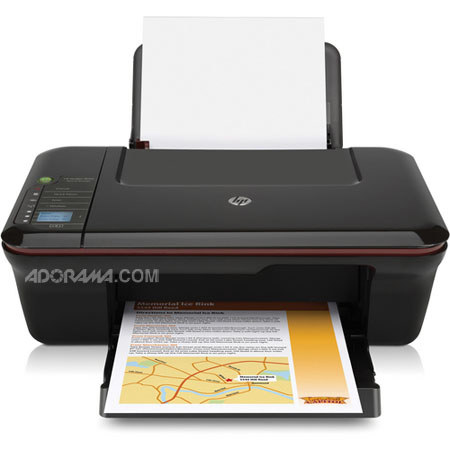
Print, scan and copy. Wirelessly print documents, Web pages and homework. Designed for fast dependable performance and with the environment in mind, Deskjet 3050 All-in-One is ready for service.
Join VIP PRO
Earn 2X Points + Exclusive Perks!
Request a Callback
Chat one-on-one with an expert
Sell or Trade your Gear
Get started in 3 easy steps