2013-04-01T21:00:00
Rated 3 out of 5
Alright Printer
I like the printer and it's design, but when something goes wrong with it, it is not the easiest to figure out. The product can than become useless even when troubleshooting with it. I found the product when working properly is wonderful, but if there is an issue it becomes time consuming and can be frustrating. The product is great, but maybe not good for business use.
Sdog
2011-03-03T19:00:00
Rated 2 out of 5
Somewhat Disappointed
We owned a 30n for 6 years and loved it totally! It was quiet, and did every job superbly. Recently the black printhead would not print and there was no help from HP so we had to purchase another printer and our choice was the 130nr. It is very loud and did not come with RIP software, so we have to do without until that big purchase can be saved for.
I contacted HP twice about the RIP software since we had it with the 30n and asked if they would sell up a upgrade. But they never replied.
ProofStation
Originally posted at

2011-02-24T19:00:00
Rated 5 out of 5
Should Have Bought it a Long Time Ago
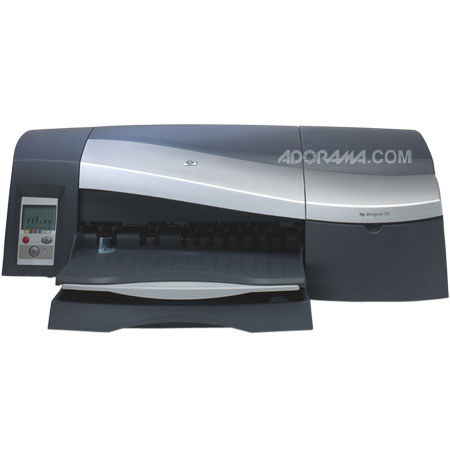
Just bought the HP Designjet 130 Printer, and I love it. The set up of the machine was a breeze and I was printing within 2 hours. Had some issues with installing the drivers but nothing to troublesome. Loading a single sheet from the rear was the only thing I had trouble with, alignment issues. Love this printer, quick, quiet and beautiful color…
DaneKeeper
Originally posted at
2010-07-07T20:00:00
Rated 5 out of 5
Great Option!
I've had my 130 for about two years now and it has certainly surpassed my expectations. The biggest surprise is in the print quality which matches that of many far more expensive printers I've used. I wish it had two black inks which would improve the darkest areas on matte prints but considering the price I feel guilty complaining. This printer prints well on canvas and most high end artist papers. For glossy prints I recommend you stick with hp paper as other types are a bit hit and miss. Ink usage has been an improvement over my last (Epson) printer. Another thing I love is that I can let the 130 sit for weeks at a time and then when I need it it is ready to go without a problem. My Epson didn't like to go long periods without printing as the ink would dry and it would clog, forcing me to go through many cleaning cycles and to often have to replace cartridges. The biggest knock I find on this printer is that getting the paper to feed correctly is harder than with some other large format printers. I often reload four or five times with certain types of paper before it accepts it and it spits out back loaded canvas unless it is fed perfectly straight. I created a special grid marked board that helps. I'd recommend you get the roll feeder if you plan to use the same type of paper over and over as I'm sure it helps with the feed problem. Still I highly recommend this printer!
KCBrando
Originally posted at
2010-05-06T20:00:00
Rated 5 out of 5
Love this printer
I was skeptical spending so much money, but love the quality of the photos and the range in sizes. Delivery was quick, and set up was easy.
photoplay
Originally posted at
2009-10-09T20:00:00
Rated 5 out of 5
Simple printer to use.
This printer is a work horse. I print plans for my design company. It has great detail, even on the smallest object, sometimes the page I print looks better than my moniter.
slimjim
Originally posted at
2009-04-13T20:00:00
Rated 5 out of 5
I love it
I have had this printer since 2004 and love everything about it. I use it with the HP Rip, HP Inks and HP media and have had such good experience with it's versatility, its print-out quality, it's hard work, (and no repair problem!) It's footprint is just right for my small studio. It's function is precise and smart enough to correct me if I try something incorrectly. I get so excited with anticipation when a print comes out and see the perfect results, especially when its on canvas! I have had experiences where I had to call Support, either in the set-up in the beginning or recently due to a computer glitch---no fault of the printer---and the HP support is OUTSTANDING! I have recommended this printer to many colleagues as a best buy and smart choice if their work takes on the variety as I do, from commercial graphics to fine art. I look forward to the next generation to be as equal as this.
Cameo
Originally posted at
2009-02-08T19:00:00
Rated 4 out of 5
Excellent wide format printer for pricve
This is an excellent fine art color printer with archival life that's much better than average for an inkjet printer. It's the least expensive 24" printer on the market and used properly with a calibrated system is capable of gallery quality color prints. Black and white work is average at best because of only one level of black ink. Overall, an excellent buy and economical to use when used with roll paper. It tends to scratch or jam cut sheet paper.
Joseph K.
2009-02-03T19:00:00
Rated 4 out of 5
Good quality color, decent price
Used with the roll feed and Premium Plus Photo Satin paper and best quality, maximum detail, this printer produces excellent lab quality photo prints up to 24" wide.
The printer is quite economical on very large prints once your system is calibrated but erratic if not calibrated. Roll paper is pretty reasonably priced and ink goes a long way.
Permanence is rated at 82 years by Wilhelm. The Premium Plus photo satin finish on the roll paper stock is quite tough to abrasion but very vulnerable to moisture.
You will need to color calibrate your monitor and run the color calibration on each new roll of paper for best results and adequate repeatability.
Do not under any circumstances let the HP driver make color decisions. Instead, let Photoshop or Lightroom control the color and simply choose the paper's profile from those included by HP.
This printer is not the best on true neutral tone black and white but excels in color.
Cut sheet paper tends to have feed and scratch problems but roll paper feeds very well. You will need either the optional roll feed or the more expensive version with the roll feed built in. It's definitely worth it.
Update the firmware and the driver to the latest 2008 specs.
Joseph K.