
This item is no longer available.
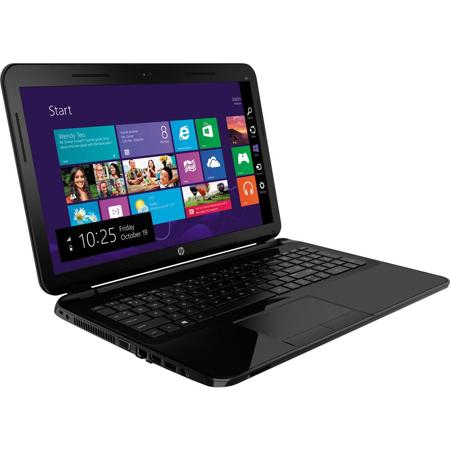
The HP 15-d030nr 15.6" Notebook combines performance and reliability. The 15.6" HD BrightView display has LED backlighting, a 16:9 aspect ratio and a 1366 x 768 native resolution supported integrated Intel HD Graphics. This HP notebook comes with a sparkling black HP finish. It features a large keyboard with a numeric keypad and a touchpad with multi-touch gesture support. Its 3-cell lithium ion polymer battery provides plenty of power to keep you connected while on the go.
The system is powered by a quad-core 2.0 GHz Intel Pentium N3510 processor. It also has 4GB of DDR3LRAM, a 500GB 5400 rpm hard drive, a SuperMulti DVD burner, a Secure Digital media card slot, a 10/100 Mb/s Gigabit Ethernet RJ-45 LAN jack, 802.11b/g/n Wi-Fi connectivity, an integrated webcam and microphone. There are also built-in stereo speakers with HD audio technology.
Windows 8.1 (64-bit) improves the user experience of Windows 8 with several additions and changes. Windows 8.1 Pro rolls out the Start button (although its functionality differs from its predecessor) and you will also be able to boot directly to the traditional desktop screen instead of the Windows 8 Start Screen. Windows 8.1 Pro introduces a redesigned Start screen with tiles that update in real-time. Windows 8.1 Pro also focuses on cloud storage as well as offers various apps through the Windows Store. Windows 8.1 Pro provides a unique user experience that differs from previous versions of Windows.
Quad-Core Intel Pentium Performance
The HP 15-d030nr notebook houses an Intel Pentium N3510 processor. Its quad cores can reach a stock speed of 2.0GHz. With a dedicated 2MB L2 cache and 4GB of DDR3L RAM, you'll be able to multitask between applications quickly and efficiently.
15.6" BrightView LED-Backlit Display
The 15.6" widescreen display features LED backlighting for lower power consumption and better energy efficiency than their CCFL counterparts. The screen also has a 16:9 aspect ratio and the 1366 x 768 native resolution is powered by integrated Intel HD Graphics. The screen also has a glossy finish for displaying vibrant color. You can also output video to an external display in high definition quality via the HDMI port.
Stay Connected
The HP 15-d030nr notebook can be connected to the Internet via a wired Ethernet cable thanks to its 10/100 Mb/s Fast Ethernet RJ-45 LAN jack. If you prefer to be untethered, you can utilize the 802.11b/g/nWi-Fi connectivity of the HP 15-d030nr notebook.
SuperMulti DVD Burner
The HP 15-d030nr notebook has a SuperMulti DVD burner, which allows you to burn data or media files to a CD or a DVD. You can also play CDs and DVDs as well (additional software may be required).
Box Cloud Service
With the purchase of this HP 15-d030nr notebook, you'll gain access to free 25GB of lifetime cloud storage from Box, an online file sharing and Cloud content management service.
Eco-Friendly
The HP 15-d030nr notebook promotes an eco-friendly design as well as energy efficient performance. The HP 15-d030nr notebook is ENERGY STAR qualified and EPEAT Silver registered. It uses low halogen, mercury-free display backlights, arsenic-free display glass and even recycled packaging.
Windows 8.1
The Return of the Start Button
After many requests from Windows users, the Start button makes its triumphant return in Windows 8.1. While it may not be exactly the same as its predecessor in Windows 7, the Start button has two core functions. A left click on the Start button will take you to the Windows 8 Start screen featuring live tiles. A right click on the Start button brings up an advanced menu where you can access the Device Manager, Control, Network options and more.
Boot Directly to the Desktop
Windows 8.1 gives you the choice of booting to the Windows 8 Start screen with live tiles or booting to the familiar desktop screen of Windows 7. Users can also boot directly into an app or app view if they choose to.
The Redesigned Start Screen
Windows 8.1 introduces a new Start screen, which has all the information you need in one place. The traditional Windows desktop screen has been replaced with a tablet style design featuring tiles. Tiles are customizable as well as update in real time. News, weather forecasts, sports, contacts, apps and more are available for you to use. It's all right there on the Start screen.
To the Cloud
With Windows 8.1, when signed in using your Microsoft account, you'll have instant access to your personal Start screen, themes, language preferences, browsing history and browser favorites. You can also connect to services such as Microsoft Outlook, Facebook, Linkedin, Twitter and more.
Windows Store
In the Windows Store, you can search for or browse thousands of apps. Choose from the featured apps or grab one of the most frequently downloaded apps to see what all the hype is all about. You can also see how other people rate apps. For certain apps, you can try it out before you buy it so you can make sure you absolutely want an app before you spend your hard-earned money on it.