Orders placed during Passover Holiday (Wed 4/1 after 4PM ET – Thurs 4/9) will ship Fri 4/10. View our holiday shipping schedule.

Overview
Compare
Accessories
Specs
Protection
Q&A

Questions & Answers

FAQ

What is the maximum printing speed of the DeskJet 3755 All-In-One Wireless Inkjet Printer?

The DeskJet 3755 can print up to 8 pages per minute in black and 5.5 pages per minute in color.

Is this printer compatible with mobile devices?

Yes, the DeskJet 3755 allows for easy printing and scanning from a variety of smartphones and tablets via the HP All-in-One Printer Remote mobile app.

What is HP Instant Ink and how does it benefit me?

HP Instant Ink is a subscription service where the printer automatically orders new ink when it's running low. This can save you up to 50% on ink costs.

What is the HP Scroll Scan feature?

HP Scroll Scan is a feature that simplifies scanning tasks, accommodating a variety of media types and sizes with ease.

How does the HP Planet Partners program work?

The HP Planet Partners program is an initiative by HP to facilitate free and easy recycling of Original HP cartridges, contributing to a more sustainable environment.

Shopper : Glossy labels and transfer paper?
Angela S : Is the printer brand new?DONNA J : Mine was, yes. But, I have never been successful hooking it up. Perhaps the problem was me, but I think I followed the instructions.JUDY J : I don't know I need help with my computer.JUDY J : I am having problems with hooking up my printer. How do I get help
Angela S : Is the printer brand new?JAYE K : Greetings, Yes. The printer I purchased was brand new. I am very happy with it. I don't use it for heavy duty printing but for the occasional printing I need to support my online teaching during the pandemic. JTAMEKA H : Yes

Reviews about this item

Review Summary

2024-01-26T19:00:00

Rated 5 out of 5

Great printer

This printer is amazing in what you can do with it for such a small and compact machine.

RCMcC

2024-01-02T19:00:00

Rated 2 out of 5

Returned

Returned, not what I expected

Anne52

2023-12-21T19:00:00

Rated 4 out of 5

Good for old folks

Works seemlessly on wifi.

Skipper88

2023-12-10T19:00:00

Rated 5 out of 5

BEST MONEY I EVER SPENT...!

Best money I ever spent. It's small but sturdy. Got an amazing amount of ink out of the starter cartridge, too. If you only need black, remove the color cartridge and print away on just black. Do this because occasionally it will print color if you are not vigilant about clicking black only. Very fast, beautiful copies. On the downside, it does not print 2-sided and it makes a bit of noise printing. But I am beyond happy.

J H.

2023-12-03T19:00:00

Rated 4 out of 5

HP DeskJet 3755

I love the size of this printer. Prints well. The only concern is the power cord. It disconnects easily.

Jackieboo

2023-11-25T19:00:00

Rated 5 out of 5

good buy

It prints well and doesn't take up a lot of room.

Kgon

2023-10-27T20:00:00

Rated 5 out of 5

Light and small

I purchased the printer on recommendation from a friend of mine . I will say the set up was easy and for me this is sufficient for what I use it for , however printing letters or recipes is painfully slow .

Rosaleen

2023-10-04T20:00:00

Rated 4 out of 5

Printer working for now

So far so good.

bearcat245

2023-08-31T20:00:00

Rated 1 out of 5

Only prints when it wants to

Printer pulls 2-3 pages at a time when printing. Also doesn't like to print emails, only prints partial lines. Sometimes the printing is fine. Other times only pieces of words /sentences are visible.

JBoone

2023-08-22T20:00:00

Rated 4 out of 5

Mixed Review

The printer itself does a wonderful job printing, however, it keeps disconnecting from it's driver. Twice I had to call hp support and twice I was scammed. They asked to access my computer and to make a long story short asked for over $400 to correct my problem. I could have purchased 3 new printers for that amount. It doesn't make sense but I love the printer itself just not the stress that has come with it.

hp c.

2023-08-11T20:00:00

Rated 5 out of 5

HP Deskjet 3755 All in One printer

Arrived quickly. Was easy to connect to my computer and wifi.

Gwen

2023-07-23T20:00:00

Rated 3 out of 5

HP DeskJet 3755 All-in-One printer.

HP DeskJet 3755 printer is slower than I expected, otherwise works fine. I was disappointed the two-sided printing is a manual operation, not automatic. I suppose that is a compromised required for the lower price.

Bill A.

2023-07-23T20:00:00

Rated 3 out of 5

Needed to Read Specs More Closely

First I love the color of the printer and the instruction sheet I was able to print was beautiful- clear and strong print. It does not work with my 5 G network so I returned. HP tried to be very helpful. It took three days to get it figured. Probably a good choice of printer to use with a 2.5 or smaller WIFi network. Also takes a lot of ink and color cartridge has all three colors in one cartridge so must be replaced when any one color runs out. Doesn't print many copies in a minute and stand up paper feeder only holds a few sheets. So just be sure you read all the specs and see if this really good looking and light weight printer works for you.

MDoran

2023-07-16T20:00:00

Rated 5 out of 5

Best little printer

this is my second "3755"..best little printer ever!

Susie W.

2023-07-13T20:00:00

Rated 1 out of 5

Morass

I have been prevented from using the hp 3755 printer at all, because my iPad will not recognize the existence of the printer even although both wifi and Bluetooth are enabled and functioning. I have contacted hp service online but gotten no answer. I have telephoned the 1-888 number several times, during business hours, and each time I hear the hp recording but when the call is transferred I am cut off. Always. I intended to try to print and complete certain forms to send to government offices including but not only the American irs where I am required I believe to complete the paper form, but I am prevented from doing so because the printer with wifi is not functioning.

Mme S.

2023-06-04T20:00:00

Rated 5 out of 5

Great Product

Very lightweight. Works wonderfully.

Verjim

2023-05-21T20:00:00

Rated 5 out of 5

Review of HP 3700 DeskJet All-in-one Printer

Excellent product

satisfiedbuyer

2023-05-20T20:00:00

Rated 5 out of 5

Amazing printer

Amazing product

Jones0912

2023-05-02T20:00:00

Rated 5 out of 5

HP DeskJet 3755 All-in-One printer

Easy set up

BHulb

2023-04-28T20:00:00

Rated 5 out of 5

Printer

This small printer is great. I have a larger Envy but this one does everything as well, fits into my small area and l love. Very easy to set up and use.

Jenie

2023-04-01T20:00:00

Rated 1 out of 5

Awful product! We upgraded our home network and it knocked the printer off its wifi connection. I have done EVERYTHING I can think of to reinstall the printer and it won't work. It says it's missing the driver, then it can't find the printer and then the spinning wheel of death. It shouldn't be this hard to use a product. I've tried installing the self-help tool...nothing.

Awful P.

2023-03-27T20:00:00

Rated 1 out of 5

Maybe OK - who knows?

The machine may be OK but I cannot use it at all. There is no manual and when I have tried to access methods online, I cannot do anything with this machine, apart from printing the odd document from my computer. Also, any online help is extremely limited. I would never buy HP again and regret buying this machine. They must be aware that some of us are old and need step-by-step instructions.

kikinaff

2023-03-26T20:00:00

Rated 3 out of 5

HP 3755 Printer

I contacted the help desk and they worked for there hours to try and hook it up wireless and it didn't work. i tried to set it up with the usb cord and it didn't work either. I had to go and buy another printer so mom could have a printer.

memorable

2023-03-16T20:00:00

Rated 4 out of 5

Decent printer for the price

Does what its suppose to do.

Peggypoo

2023-03-14T20:00:00

Rated 1 out of 5

Don't work can't connect to my phone

I can't connect it they shows errors

Matthew 1.

2023-03-07T19:00:00

Rated 3 out of 5

Set up clumsy

Took me a couple of times to set up the printer. I had to call HP as it was asking for an administrator password to set up for automatic updates. I had to print a couple of test pages. Quality was good. Would recommend HP puts 2 black ink cartridges and a color in their next design

Dyfj

2023-03-05T19:00:00

Rated 3 out of 5

Disappointing.

Can't find a way to print from magazines or books. Feeding the page to be copied is not easy. I love my HP5255. Not much the 3755.

Norris F.

2023-03-02T19:00:00

Rated 3 out of 5

Serves the purpose

Small & compact... I am not tech savvy at all & this connected to Mac ,Ipad & iPhone with no problem at all. Prints great... The only negative for me is not having the flatbed scanner which I knew going in. Does scan great but like scanning anything other than paper (cards, etc) could be an issue. Overall very pleased so far.

Argroomer

2023-02-17T19:00:00

Rated 5 out of 5

Needed a small printer

Bought small printer for a vacation home. One that we can easily transport . So far It is excellent for printing and copying. It needs our needs perfectly.

Gates

2023-02-17T19:00:00

Rated 5 out of 5

great price/value

Easy set up. Good print quality. Love the compact size.

sMccL

HP DeskJet 3755 Specifications

  • Functions

    Print, copy, scan, wireless

  • Copies, maximum

    Up to 9 copies

  • First page out (ready) black

    As fast as 15 sec

  • First page out (ready) color

    As fast as 18 sec

  • Resolution (black)

    Up to 1200 x 1200 rendered dpi

  • Resolution (color)

    Up to 4800 x 1200 optimized dpi color (when printing from a computer and 1200 input dpi)

  • Monthly duty cycle

    Up to 1000 pages

  • Print speed

    Black (ISO, laser comparable): Up to 8 ppm
    Color (ISO, laser comparable): Up to 5.5 ppm
    Black (draft): Up to 19 ppm
    Color (draft): Up to 15 ppm
    Color (normal): Up to 5.5 ppm

  • Recommended monthly page volume

    50 to 200

  • Print Technology

    HP Thermal Inkjet

  • Display

    7 segment + icon LCD

  • Processor speed

    360 MHz

  • Number of print cartridges

    2 (1 black, 1 Tri-color)

  • Replacement cartridges

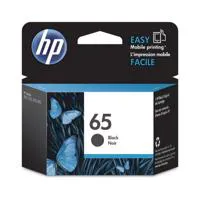
    HP 65 Black Ink Cartridge ((Approx.) 120 pages); HP 65 Tri-color Ink Cartridge ((Approx.) 100 pages); HP 65 XL Black Ink Cartridge ((Approx.) 300 pages); HP 65 XL Tri-color Ink Cartridge ((Approx.) 300 pages)

  • Compatible ink types

    Dye-based (color); pigment-based (black)

  • Print languages

    HP PCL 3 GUI

  • Paper trays, standard

    1

  • Paper trays, maximum

    1

  • Mobile Printing Capability

    HP ePrint; Apple AirPrint; Wireless Direct Printing

  • Connectivity, standard

    1 Hi-Speed USB 2.0

  • Network ready

    Standard (built-in Wi-Fi 802.11b/g/n)

  • Ports

    1 Hi-Speed USB 2.0

  • Minimum system requirements

    OS X v10.11 El Capitan, OS X v10.10 Yosemite, OS X v10.9 Mavericks, 1GB HD; Internet; USB

  • Minimum system requirements (Cont)

    Windows 10, 8.1, 8, 7: 32-bit or 64-bit, 2GB available hard disk space, CD-ROM/DVD drive or Internet connection, USB port, Internet Explorer. Windows Vista: (32-bit only), 2GB available hard disk space, CD-ROM/DVD drive or Internet connection, USB port, Internet Explorer 8. Windows XP SP3 or higher (32-bit only): any Intel Pentium II, Celeron or 233 MHz compatible processor, 850MB available hard disk space, CD-ROM/DVD drive or Internet connection, USB port, Internet Explorer 8

  • Compatible operating systems

    Windows 10, Windows 8.1, Windows 8, Windows 7, Windows Vista, Windows XP SP3 (32-bit); OS X v10.8 Mountain Lion, OS X v10.9 Mavericks, OS X v10.10 Yosemite

  • Memory, standard

    64MB Integrated DDR1

  • Memory, maximum

    64MB Integrated DDR1

  • Supported network protocols

    TCP/IP

  • Paper handling input, standard

    60-sheet input tray

  • Paper handling output, standard

    25-sheet output tray

  • Duplex printing

    Manual (driver support provided)

  • Envelope input capacity

    Up to 5 envelopes

  • Borderless printing

    No

  • Finished output handling

    Sheetfeed

  • Media sizes supported

    A4; B5; A6; DL envelope

  • Media sizes, custom

    3 x 5 to 8.5 x 14 (7.62 x 12.70cm to 1.59 x 35.56cm)

  • Media types

    Plain paper, Matte Brochure Papers, Glossy Brochure Papers, Photo papers, Envelopes, Other specialty inkjet papers

  • Recommended media weight

    20lbs (9.07kg)

  • Supported media weight

    Letter: 16 to 32lbs (7.26 to 14.52kg); HP envelopes: 20 to 24lbs (9.07 to 10.89kg); HP cards: up to 110lbs (49.90kg); HP 4 x 6" photo paper: up to 145lbs (65.77kg)

  • Media weights by paper path

    A4: 60 to 90 g/m2; HP envelopes: 75 to 90 g/m2; HP cards: up to 200 g/m2; HP 10 x 15 cm photo paper: up to 300 g/m2

  • Scanner type

    Single-page document feeder

  • Scan file format

    Scan File Type supported by Software: Bitmap (.bmp), JPEG (.jpg), PDF (.pdf), PNG (.png), Rich Text (.rtf), Searchable PDF (.pdf), Text (.txt), TIFF (.tif)

  • Scan resolution, hardware

    Up to 1200 dpi

  • Scan resolution, optical

    Up to 600 dpi

  • Scan size (ADF), maximum

    8.5 x 14"

  • Digital sending features

    No

  • Copy resolution (black text)

    Up to 300 x 300 dpi

  • Copy resolution (color text & graphics)

    Up to 300 x 300 dpi

  • Power

    Input voltage 100 to 240 VAC (+/- 10%), 50/60 Hz (+/- 3 Hz). High voltage: Input voltage 200 to 240 VAC (+/- 10%), 50/60 Hz (+/- 3Hz)

  • Power consumption

    0.06 watts (Off), 2.2 watts (Standby), 0.69 watt (Sleep)

  • Energy efficiency

    ENERGY STAR qualified

  • Operating temperature range

    41 to 104 deg. F (5 to 40 deg. C)

  • Operating humidity range

    20 to 80% RH

  • Software included

    HP Printer Software, HP Update, HP Photo Creations

  • Dimensions (W x D x H)

    15.86 x 6.97 x 5.55" (40.28 x 17.70 x 14.10cm)
    Maximum: 15.86 x 17.75 x 10.39" (40.28 x 45.09 x 26.39cm)

  • Weight

    5.13lbs (2.33kg)
  • UPC Code

    889899920602

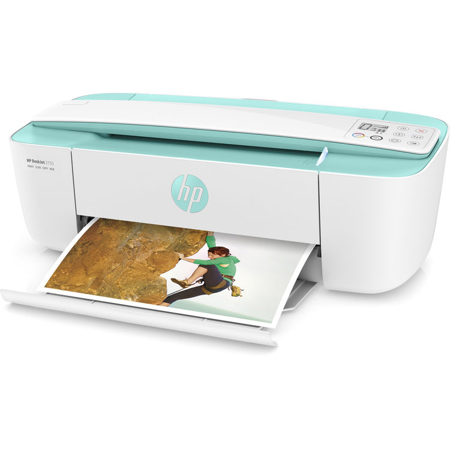
8 Accessories for HP DeskJet 3755 All-In-One Wireless Inkjet Printer, Up to 8ppm Black/5.5 ppm Color, Up to 4800x1200dpi, 60 Sheet Standard Input Tray - Print, Scan, Copy, Sea Foam Green

  • All Accessories (8)
  • Ink & Toner (2)
  • Copy Paper (1)
  • Cables & Adapters (3)
  • Cleaning Accessories (2)

About HP DeskJet 3755

Compact and wireless, this printer is designed to fit your space and life and save you up to 50% on ink with HP Instant Ink. Get vibrant color and power in the world's smallest all-in-one for home. HP Photo and Document All-in-One Printers are designed for families and other home users who want a device capable of printing everything from documents, email and web pages to rich, bright lab-quality photos - with copy and scan tools too.

The tiny all-in-one that packs a punch
• Save space and get the power you need with the world's smallest all-in-one for your home
• Show your style with a sleek design and a variety of head-turning hues
• Any room, any spot-this ultra compact all-in-one is designed to fit where you need it
• HP Scroll Scan helps you easily handle most scan jobs, from plain paper to stiff media

The most affordable way to print in style
• Save up to 50% on ink and never run out. Print color or black-and-white for the same low price
• Easily recycle your Original HP cartridges at no charge through HP Planet Partners
• Wirelessly print, scan and copy what you need quickly and easily with this affordable all-in-one
• Print 2.5x as many pages with optional Original HP high-yield ink cartridges

Quickly print right from your mobile device
• Easily print anything you need from a variety of smartphones and tablets
• Scan any object on the go with the HP All-in-One Printer Remote mobile app for your smartphone or tablet
• Get connected quickly and start printing fast with easy setup from your smartphone or tablet
• Connect your smartphone or tablet directly to your printer and easily print without a network.

HP DeskJet 3755 Features

  • Functions Print, copy, scan, wireless
  • Copies, maximum Up to 9 copies
  • First page out (ready) black As fast as 15 sec
  • First page out (ready) color As fast as 18 sec
  • Resolution (black) Up to 1200 x 1200 rendered dpi
  • Resolution (color) Up to 4800 x 1200 optimized dpi color (when printing from a computer and 1200 input dpi)
  • Monthly duty cycle Up to 1000 pages
  • Print speed Black (ISO, laser comparable): Up to 8 ppm
    Color (ISO, laser comparable): Up to 5.5 ppm
    Black (draft): Up to 19 ppm
    Color (draft): Up to 15 ppm
    Color (normal): Up to 5.5 ppm
  • Recommended monthly page volume 50 to 200
  • Print Technology HP Thermal Inkjet
  • Display 7 segment + icon LCD
  • Processor speed 360 MHz
  • Number of print cartridges 2 (1 black, 1 Tri-color)
  • Replacement cartridges HP 65 Black Ink Cartridge ((Approx.) 120 pages); HP 65 Tri-color Ink Cartridge ((Approx.) 100 pages); HP 65 XL Black Ink Cartridge ((Approx.) 300 pages); HP 65 XL Tri-color Ink Cartridge ((Approx.) 300 pages)
  • Compatible ink types Dye-based (color); pigment-based (black)
  • Print languages HP PCL 3 GUI
  • Paper trays, standard 1
  • Paper trays, maximum 1
  • Mobile Printing Capability HP ePrint; Apple AirPrint; Wireless Direct Printing
  • Connectivity, standard 1 Hi-Speed USB 2.0
  • Network ready Standard (built-in Wi-Fi 802.11b/g/n)
  • Ports 1 Hi-Speed USB 2.0
  • Minimum system requirements OS X v10.11 El Capitan, OS X v10.10 Yosemite, OS X v10.9 Mavericks, 1GB HD; Internet; USB
  • Minimum system requirements (Cont) Windows 10, 8.1, 8, 7: 32-bit or 64-bit, 2GB available hard disk space, CD-ROM/DVD drive or Internet connection, USB port, Internet Explorer. Windows Vista: (32-bit only), 2GB available hard disk space, CD-ROM/DVD drive or Internet connection, USB port, Internet Explorer 8. Windows XP SP3 or higher (32-bit on
  • Compatible operating systems Windows 10, Windows 8.1, Windows 8, Windows 7, Windows Vista, Windows XP SP3 (32-bit); OS X v10.8 Mountain Lion, OS X v10.9 Mavericks, OS X v10.10 Yosemite
  • Memory, standard 64MB Integrated DDR1
  • Memory, maximum 64MB Integrated DDR1
  • Supported network protocols TCP/IP
  • Paper handling input, standard 60-sheet input tray
  • Paper handling output, standard 25-sheet output tray
  • Duplex printing Manual (driver support provided)
  • Envelope input capacity Up to 5 envelopes
  • Borderless printing No
  • Finished output handling Sheetfeed
  • Media sizes supported A4; B5; A6; DL envelope
  • Media sizes, custom 3 x 5 to 8.5 x 14 (7.62 x 12.70cm to 1.59 x 35.56cm)
  • Media types Plain paper, Matte Brochure Papers, Glossy Brochure Papers, Photo papers, Envelopes, Other specialty inkjet papers
  • Recommended media weight 20lbs (9.07kg)
  • Supported media weight Letter: 16 to 32lbs (7.26 to 14.52kg); HP envelopes: 20 to 24lbs (9.07 to 10.89kg); HP cards: up to 110lbs (49.90kg); HP 4 x 6" photo paper: up to 145lbs (65.77kg)
  • Media weights by paper path A4: 60 to 90 g/m2; HP envelopes: 75 to 90 g/m2; HP cards: up to 200 g/m2; HP 10 x 15 cm photo paper: up to 300 g/m2
  • Scanner type Single-page document feeder
  • Scan file format Scan File Type supported by Software: Bitmap (.bmp), JPEG (.jpg), PDF (.pdf), PNG (.png), Rich Text (.rtf), Searchable PDF (.pdf), Text (.txt), TIFF (.tif)
  • Scan resolution, hardware Up to 1200 dpi
  • Scan resolution, optical Up to 600 dpi
  • Scan size (ADF), maximum 8.5 x 14"
  • Digital sending features No
  • Copy resolution (black text) Up to 300 x 300 dpi
  • Copy resolution (color text & graphics) Up to 300 x 300 dpi
  • Power Input voltage 100 to 240 VAC (+/- 10%), 50/60 Hz (+/- 3 Hz). High voltage: Input voltage 200 to 240 VAC (+/- 10%), 50/60 Hz (+/- 3Hz)
  • Power consumption 0.06 watts (Off), 2.2 watts (Standby), 0.69 watt (Sleep)
  • Energy efficiency ENERGY STAR qualified
  • Operating temperature range 41 to 104 deg. F (5 to 40 deg. C)
  • Operating humidity range 20 to 80% RH
  • Software included HP Printer Software, HP Update, HP Photo Creations
  • Dimensions (W x D x H) 15.86 x 6.97 x 5.55" (40.28 x 17.70 x 14.10cm)
    Maximum: 15.86 x 17.75 x 10.39" (40.28 x 45.09 x 26.39cm)
  • Weight 5.13lbs (2.33kg)
Product Documents

User Manual

What's in the box:

  • HP DeskJet 3755 All-In-One Wireless Inkjet Printer
  • 65 Setup Black Instant Ink Ready Cartridge (Approx. 120 Pages)
  • 65 Setup Tri-Color Instant Ink Ready Cartridge (Approx. 100 pages)
  • USB Cable
  • Power Cord
  • Setup Poster
  • Software CD-ROM
  • HP 1 Year Limited Warranty