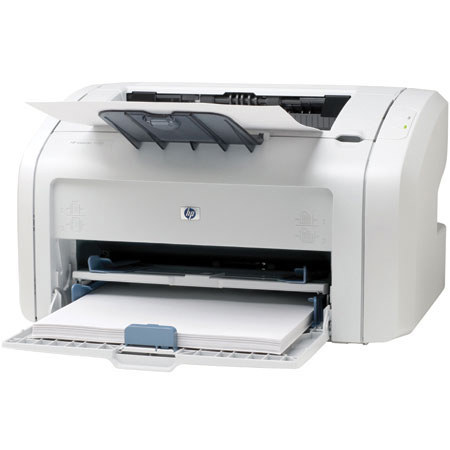
HP 1018 Monochrome LaserJet Printer, with USB Interface
SKU: IHPLJ1018
This item is no longer available.
Share:
Overview
Compare
Accessories
Specs
Protection
Reviews about this item
Review Summary
2021-04-02T20:00:00
Rated 4 out of 5
Super printer, but has no driver for Windows10...
The printer is super, cheap cartridges without chip, working more than 14 years !!! But can't find stable driver for Win10... New printers did not interresting for me. Please issue the workable driver for Win10!
Vasiliy
Originally posted at
2007-12-01T19:00:00
Rated 5 out of 5
HP 1018 LaserJet
What a great printer !. Always reliable, easy to use, very good quality, instant start-up, works well on our in-home wireless network. We've bought 4 for home, the kids at college and grandma. After rebates, the cost including toner cartridge is about the same as a pair of inkjet cartridges.
APCCPA
Originally posted at
2007-11-09T19:00:00
Rated 2 out of 5
lots of problem during installation
i usualy buy HP and trust them as a printer, but this one is realy stupid, for the first time in my life i'm facing such problems, it been 15 years dealing with computers and printer, i failed to install this printer driver, this printer should accept USB 2.0 but it doesnt i should have disable this feature from my motherboard to start printing :(, i searched everywhere for a solution but no response. i dont recommend this printer
mostafa
Originally posted at
2007-10-24T20:00:00
Rated 5 out of 5
Thrilled
This printer is awesome. I love the manual settings. There is a setting for printing on vellum, which turned out fantastic for the baby shower I'm hosting. When printing labels, I noticed you can specify which row to start on - handy for those labels you didn't use at the bottom of the sheet. This printer is very quick too. Also, the manual feed is awesome at handling awkard sizes, and what's more is that you can save your settings under a chosen name, so if you're going to print frequently on your odd sized paper, you don't have to type in the dimensions every time you print. The only thing that would have made it sweeter is the rebate they're now offering!
Happytobeprinting
Originally posted at
2007-10-12T20:00:00
Rated 3 out of 5
I dont like printer
because if i give print from pagemaker or microsoftword in the LEGAL paper size. it does not come propely. A4 paper printing should not come in correct margine it will be printed minus 5 mm margin If i give print more than 50 papers printing errors come
udhaya
Originally posted at
2007-10-04T20:00:00
Rated 5 out of 5
1018 printer
Am only sorry I didn't have a 1018 sooner in life. What I like about it most is that it is a fast responder to the PRINT command.
Pittsburgh
Originally posted at
2007-09-25T21:00:00
Rated 5 out of 5
A great printer and very affordable
I took it out of the box, used the easy to follow instructions and had it running in less than 15 minutes. Very compact, quiet, fast and produces excellent images. If all you need is black and white copies, this is an excellent inexpensive and reasonably high output machine for a small or medium size office. For me it ia a giant step beyond ink jet printers.
Braumeister J.
2007-09-13T20:00:00
Rated 2 out of 5
Only Compatable with windows
I am one of those that choses to run an os other than Windows, The Printer does not work with other operating systems such as Mac, Linux, etc I did not realize this until I had sent my rebated for it in because I did not need it for a week. It was on sale that is why I bought it. never had so much trouble geting a laserjet by hp to work. it also has very few options exept on or off as a replacement to our 3p it is sad, and our old 3p we can no longer get ink for, not that it works any longer now that we've tried to get this one working.
Opal
Originally posted at
2007-09-09T20:00:00
Rated 4 out of 5
Great local USB laser budget solution
Printer is very low on features. If you plan to use it as network printer using USB print server or router with USB port - you may spend some time to make it print. It more likely will not print after power cycle if connected to non-Windows based PC. I have setup where it connected via USB to my router (DD_WRT v23 SP2). Any time after power loss I have to connect printer to my Windows based laptop directly, print test page, and only then I can plug it back to USB port on my router. One may experience same issues on linux based PC's Performance: Performance is really 5 star for entry lever laser printer. Print quality: Print quality is excellent when compared to other brands in the same category. However, I still will rate it 4+ star only. One may also like to use just a driver, not a huge application suite from HP. Summary: Excellent choice for home or small office use (windows based)
oleg
Originally posted at
2007-09-09T20:00:00
Rated 4 out of 5
Very nice, but doesn't work with a print server
Attached directly to my desktop computer it printed fast and beautifully. Reading all the other glowing reviews I was anxious to buy it to replace my ancient but still on-the-job HP 4ML after nearly 10 years (!!!!) But since my home has a network with a print server, I was dismayed to find that my print server refused to recognize the new printer, and checking here on the website, I found that it does indeed say that this printer is not attachable to a print server on a network. Very odd, but worse is that it doesn't say this somewhere on the box, as I wouldn't have bothered to buy this model if I knew. Now I must go to the trouble of returning it. A shame, as I like it.
HomeNetworkUser
Originally posted at
2007-08-30T20:00:00
Rated 5 out of 5
Laser Jet 1018
A great printer for the money. Setup took less than 5 minutes. Also is plenty fast enough. First page comes out in about 5 seconds. Quality is crisp and clear.
jeffry
Originally posted at
2007-08-14T20:00:00
Rated 5 out of 5
Great printer for home use!!!
I switched from HP DeskJet to LasetJet printer. I should have done it sooner. It is easy setup, fast printing, and very compact. The quality of the print is good for the money. No need to worry about buying expensive ink cartridge anymore.
Vinny
Originally posted at
2007-08-09T20:00:00
Rated 4 out of 5
Great Printer/Great Price, but . . .
It's not made to be used with a MacBook. I didn't realize that when I got it for my daughter to take to school. (After some searching I read about an alternate way to install it, but the average person would have a hard time understanding it.) I am now using it with my home computer, and it's great! It was easy to install and is much faster than my old HP LaserJet 4L.
Anonymous1
Originally posted at
2007-06-23T20:00:00
Rated 5 out of 5
general comment
Just purchased the hp1018 and it is excellent. Easy set up, prints in a flash, very good quality. Prints faster than my printer at work which is a much larger model. I would highly recommend this printer, price was great and with the rebate it was even nicer.
grammatt
Originally posted at
2007-06-20T20:00:00
Rated 3 out of 5
Disappointed
The print quality is great but I was disappointed to discover that there is no cancel button to cancel a print job. Even my less expensive ink jet printer has a cancel button.
missy
Originally posted at
2007-06-10T20:00:00
Rated 1 out of 5
DO NOT WORK FOR MAC
I was not told, and I did not check up before, but assumed that any laserprinter bought in an ordinary store would be possible to use with other operating systems than microsoft windows. Apperently, it might be possible to get it to work on the mac and linux, but only if the firmware is reuploaded to the printer every time power is turned on! Furthermore, I have not got the fix to work - so I have a printer, where at least in the sales information from the store I did not get the information that it only works for an operating system that certainly not suits my demands.
jkleis
Originally posted at
2007-05-26T20:00:00
Rated 5 out of 5
Does many things well for a low price
I love this little printer. Other printers have more features, but here you get a lot for the money. It's also very easy to use. I can easily feed almost any size paper into this printer. Printing on 3x5 cards is especially useful. I can print close to the margins, too. Envelopes are easy to position properly. I do (manual) two-sided printing without too much difficulty. I bought two full-sized cartridges, but my starter cartridge hasn't run out after 6 months (home office user). If you print a lot of images, it would probably be best to buy a more expensive printer. Occaisionally I get faded spots on full-page images, but I've never noticed it on text pages. If you don't have any exotic needs and don't want to have to think about your printer, you'll probably like this printer.
Zork
Originally posted at
2007-05-20T20:00:00
Rated 4 out of 5
Excellent for Windows XP - not Vista
This in a great little printer that double sided print jobs and toner control but unfortunately is not yet supported within Vista. If you PC configuration plans are to upgrade, consider a different HP model with Vista support.
smrtcar
Originally posted at
2007-04-18T20:00:00
Rated 5 out of 5
A true "Best Buy"
This is one of the best values in my 25 years of purchases of computer related items. Although we have other printers in our home, this has become a favorite for e-mails and other general purposes.
Pavel
Originally posted at
2007-04-18T20:00:00
Rated 5 out of 5
Cheaper than Ink Jet!
Considering the price of Ink Jet printers, the cost of cartridges, then consider the high quality and speed of the laser printer, within a very short period of time, there is no question. LASER PRINTERS! Cheers! ...frm the forest!
AHermit
Originally posted at
2007-04-18T20:00:00
Rated 5 out of 5
Excellent printer!
This printer is great. Has an automatic power saver, so I can leave it on all the time for everyone in the house. The toner lasts a very long time which lowers cost vs all the ink. Highly recommend it to anyone for home or light business use.
freewave
Originally posted at
2007-04-18T20:00:00
Rated 5 out of 5
HP LaserJets Rock!
My very first printer was a LaserJet I bought years ago. As I recall, I paid in the neighborhood of $800.00. The LaserJet 1018 is equal to that printer. I fooled around with color inkjet printers for a few frustrating years, and when I saw the 1018 I decided to give it a go. Unless you REALLY need color, the 1018 is your best all-around buy. I only wish they had a $30.00 rebate when I bought it. It was a good buy at $129.00 and a steal at $99.00!!!
Bartski
Originally posted at
2006-12-28T19:00:00
Rated 5 out of 5
Newly baugt
After having successfully connected my HP Laserjet 1018 to my Windows XP-equipped dator everything seems to be OK. I am happy!
spaceinvestigator
Originally posted at
2006-12-20T19:00:00
Rated 4 out of 5
Set Up
1018 set up in and runing in less than a half hour. First print out was there. I ca't wait to start a big print job and looking forward to the cost savings over my bubble-jet ink cartridge gobbler. Thom
Thom
Originally posted at
2006-10-23T20:00:00
Rated 5 out of 5
HP LaserJet 1018 Desktop Printer
Great printer - compact size, small footprint, paper handling tray folds up to minimize the space taken up by the machine. Print quality is the best. Speed of printing is very fast. An outstanding value!!
Greg
Originally posted at
2006-10-23T20:00:00
Rated 5 out of 5
HP LaserJet 1018 Printer Review
The LaserJet 1018 meets over 90% of our printing needs and requirements. The best feature is that the LaserJet 1018 will print a black & white document in seconds rather than minutes as compared to our old laser printer. With the USB 2.0 connection, it is very versital and easy to transport from one location to another. Finally, we consider the price of the printer along with the print cartridge to be excellent values in the monochrome printing market.
Cloyce
Originally posted at
2006-10-22T20:00:00
Rated 5 out of 5
Printer
It is a great printer for the money. Not color but great for the price.
Dave
Originally posted at
2006-10-09T20:00:00
Rated 5 out of 5
Good
Good one to use and i will advice my friends to use this printer
Good
Originally posted at
2006-09-24T20:00:00
Rated 4 out of 5
Great Printer for Multipile Computers
We have this printer on our home network, it's just great!
leslie
Originally posted at
2006-09-15T20:00:00
Rated 4 out of 5
Great compact printer
It get's whatever job you want it to get done without having to buy an expensive printer with all those useless extra features. It prints in great quality and I use mine all the time. I still can't believe how small it is, and it does a terrific job.
Jake
Originally posted at
Select a plan in the Add Protection section above and purchase with this product by clicking “Add to Cart”.

TRUSTED PROTECTION PLANS, EXCEPTIONAL SERVICE.
Invest In Your Gear and Peace Of Mind!
Accidents happen where life happens. Protect your favorite Adorama products and purchase a protection plan to stay covered from accidental damage, mechanical or electrical failure, and more.

Repair or Replacement
If we can’t fix it, we’ll replace it at no additional cost.

Accidental Damage
Protect your product from drops, spills, and more.

Peace of Mind
Enjoy your gear without fear. We have you covered!

Malfunction Protection
When regular use of your product over time results in mechanical or electrical failure.

Zero Deductible
We will never charge you a deductible after the purchase of a plan.

Customer-Focused Support
Our claims process is simple & easy and our customer service team is happy to help.
Adorama Protect powered by Extend is available for purchase to customers in the United States. Not available for purchase Internationally or in U.S. Territories.
Browse our FAQ
HP 1018 Monochrome LaserJet Printer, with USB Interface Specifications
Print Speed
Up to 12 ppm letter
First Page Out
Less than 10 seconds
Resolution
1200 dpi effective output quality (600 by 600 dpi with HP REt and FastRes 1200 technology)
Processor
234 MHz
Memory
2 MB RAM
Duty Cycle
3,000 pages per month
Media Input
150-sheet input tray, single-sheet specialty paper input slot
Media Output
100-sheet face down bin
Media Sizes
Main tray: 5.8 by 8.27 to 8.5 by 14 in (147 by 211 to 216 by 356 mm); input slot: 3 by 5 in to 8.5 by 14 in (76 by 127 mm to 216 by 356 mm); letter, legal, executive, postcards, envelopes (No. 10, Monarch)
Media Weights
16 to 43 lb bond (60 to 163 g/m2)
Media Types
Paper (plain, LaserJet, photo), envelopes, transparencies, labels, cardstock, postcards
Interfaces
Hi-Speed USB 2.0 port
Languages
Host-based printing
Client Operating Systems
Microsoft Windows 98 SE, Microsoft Windows ME, Microsoft Windows 2000, Microsoft Windows XP 32 bit, Microsoft Windows Server 2003 (print driver only)
Dimensions (W by D by H)
14.6 by 9.5 by 8.2 in (370 by 242 by 209 mm)
Weight
11 lb (5 kg)
Operating Temperature
50 to 90.5 degrees F (10 to 32.5 degrees C)
Storage Temperature
32 to 104 degrees F (0 to 40 degrees C)
Operating Humidity
20 to 80 percent relative humidity, non-condensing
Storage Humidity
10 to 80 percent relative humidity, non-condensing
Acoustics
Sound Power Printing: 6.2 B(A)
Power Specifications
110 to 127 VAC (+/- 10%), 50/60 Hz (+/- 2 Hz), 3.5 amps
220 to 240 VAC (+/- 10%), 50/60 Hz (+/- 2 Hz), 2 ampsPower Consumption (Printing/Off )
Printing 220 watts/Off 0 watts (Energy Star compliant)
Warranty
HP 1 year limited warranty
2 Accessories for HP 1018 Monochrome LaserJet Printer, with USB Interface
- All Accessories (2)
- Cables & Adapters (1)
- Cleaning Accessories (1)

Hosa Technology 6' SuperSpeed Type A to Type B USB 3.0 Cable
$14.95

Adorama Microfiber Cleaning Cloth, Small, 5.8x5.8"
$1.79
About HP 1018 Monochrome LaserJet Printer, with USB Interface
HP LaserJet 1018 printer delivers a simple, compact design and reliable, consistent results at an ideal price for personal users. Step up to HP LaserJet printing. It's never been more affordable to own HP quality.
The HP LaserJet 1018 printer prints impressively. Meet all your personal printing needs with this affordable printer. A 150-sheet input tray, a single-sheet priority input slot for specialty paper, and a 100-sheet output bin provide the flexibility to print the documents you need.
The printer supports plain and specialty paper up to legal size, as well as envelopes, transparencies, card stock, postcards, and labels. Why give up more desk space than required It's easy to find just the right spot for your printer. Its sleek, compact design makes it an ideal fit for any desktop, shelf, or other small, convenient spot.
HP 1018 Monochrome LaserJet Printer, with USB Interface Features
- Smoothly print documents containing text, images, and graphics with the 234 MHz processor and 2 MB of memory
- Print fast, at up to 12 pages per minute
- Waste less time standing at the printer: the first page emerges in less than 10 seconds with HP's "instantly on" technology
- Automatically adjust for optimized print quality with HP's Smart printing technology
- Fit the compact, space-saving design on any desktop, shelf, or other convenient surface
- Keep paper stacked and flowing with the 150-sheet input tray, single-sheet input slot for specialty papers, and 100-sheet output bin
- Quickly set up with the Hi-Speed USB 2.0
- Stay on top of toner replacement with HP SureSupply: receive alerts when a cartridge is low, monitor its remaining life, and enjoy easy online ordering or check stock and prices at nearby stores
- Access printing supplies in one click: sign up at My Print Rewards and save a list of your printers for hassle-free, toner, and paper reordering
Join VIP PRO
Earn 2X Points + Exclusive Perks!
Request a Callback
Chat one-on-one with an expert
Sell or Trade your Gear
Get started in 3 easy steps
What's in the box:
- HP Laserjet 1018 Printer
- 1,000-Page HP Laserjet Black Print Cartridge
- Welcome Mat
- CD (Includes Software And User's Guide)
- Power Cable
- HP 1 Year Limited Warranty