Orders placed during Passover Holiday (Wed 4/1 after 4PM ET – Thurs 4/9) will ship Fri 4/10. View our holiday shipping schedule.

Overview
Compare
Accessories
Specs
Protection

Reviews about this item

Review Summary

2015-04-27T20:00:00

Rated 5 out of 5

Great value

Speed, duplex, network connectivity and laser all in a very affordable printer. Great value.

WisconsinCPA

2015-04-27T20:00:00

Rated 4 out of 5

Great product for the office.

I have been using this product now for about three months with daily use and a high volume of printing. Its a great all round printer with nice crisp print. Because I do a high volume of printing, I find that this printer goes through ink cartridges much faster than the old LaserJet( using the smaller cartridge). I have recently purchased the X80 cartridge and hope it will last much longer. The only other comment I might have is that I do a mix of printing (i.e., letter and envelopes) and the envelope print feature is in the middle of the feed tray. The guides for envelope printing are of no use to me as they would be too time consuming to adjust. I have to guide the envelopes with my hand which I also did with the old LaserJet but on that one, the envelope printing was all the way to the left of the feed tray and a thumb against the envelope was all that was needed. Those are the minor "cons" that I would mention. Otherwise, this unit is beautifully fast and I would recommend it to anyone.

Cheryl72

2015-04-27T20:00:00

Rated 4 out of 5

This copier has been fast and reliable.

I would recommend this copier. It has made fast and clean copies. I have nothing negative to say about it.

kwhit62

2015-04-27T20:00:00

Rated 4 out of 5

GREAT TWO SIDED PRINTING

WOULD BE BETTER WITH WIRELESS PRINTING.

OKII

2014-06-24T20:00:00

Rated 5 out of 5

Easy to install and quiet

Easy and quick to install and much quieter than my old laser jet printer.

LadyKate

2014-06-08T20:00:00

Rated 2 out of 5

No wireless

Works OK but who makes a printer in 2014 without either wireless capability or a USB port? Not happy.

Hypnos68134

2014-05-09T20:00:00

Rated 5 out of 5

Great Printer

This is a no-frills laser printer of good quailty. It was very easy to setup and has an extra large paper tray. It meets my needs perfectly.

lakemel

2014-04-08T20:00:00

Rated 5 out of 5

LOVE THIS PRINTER!!

I ordered 3 printers for our department in order to avoid replacing the "community" printer. We all LOVE these printers. In fact, I am order more of them today for other departments. We have not had one jam, error, or anything else happen - they simply print... every time! Best choice, especially for the money.

Sheila2014

2014-03-18T20:00:00

Rated 1 out of 5

Major Issues !!

Issues This printer had issues before it even had printed 2 pages out of it. We had one hooked up at one workstation and we could never get it to work. We then ordered another one and we are still having major issues with the Firmware !! Windows 7 is not compatible..

hpatterson

2014-03-07T19:00:00

Rated 5 out of 5

Sleek and efficient

All of our printers, scanners, fax machines are HP, but I was missing this Pro Printer--now I have a row of black boxes in a row on a cabinet in my office. This printer delivers everything that it promised: it is quick, efficient and easy to operate. It also offers front and back of page printing, which is something my earlier printer was missing. I'm just sorry I didn't buy it sooner. I also find it a jewel in terms of design; futuristic, simple, elegant.

pastadiva

2014-02-18T19:00:00

Rated 5 out of 5

Excellent Network Setup...

I've owned HP Printers since the early 90s and I've always been disappointed in the driver installation process (mostly that they don't have drivers ready for new operating system versions). Not so with this Printer! This has been by far the easiest and best setup ever. Works on all devices, Windows 7x, 8x machines and tablets, as well as all of our iDevices (iPhones/Pads). The wired/wireless setup worked flawlessly, and printing over the Internet was simple.

DrLaBrie

2014-01-20T19:00:00

Rated 2 out of 5

Blank lines not print

This printer omit blank lines in my pdf documents. The same pdf documents printed fine to the HP P2055dn printers. The original excel documents also printed fine to this M401dne printer. Unable to reach HP support (online and via phone) for help.

TmdnM

2014-01-11T19:00:00

Rated 5 out of 5

Great Printer for my Home Office

I ordered the Laserjet 400 (M401dne to be precise) to replace my old HP Laserjet 2420 in my home office. My primary reason was the larger amount of on board memory. The old printer (32mb) was choking on large or complex PDF and JPG files (w/ complex background pattern or linework). The new printer (256mb) churns them out without hesitation. It seems like a perfect replacement for the old one. Roughly the same footprint, all the same features like knowing to ask for an envelope in the top feeder rather than just printing on regular paper. And it's much faster, and quieter than the old one. I have not had any of the problems that I read about in other reviews (hot paper, electrical spikes on wake up, etc) but I do have my equipment running through a good size backup power unit that supposedly 'cleans' power spikes. My printer connected to my iMac w/ OSX Lion flawlessly and it prints through Win7 running in a Parallels virtual machine. I'm very happy…..

klavenson

2013-12-01T19:00:00

Rated 5 out of 5

Great printer for network

It will print and do it very quickly and not any noises

skimouse

2013-11-14T19:00:00

Rated 5 out of 5

Very Fast

I've bought two of these so far and i'm really pleased with the easy set-up and the amazingly fast output. I'm in a busy office and these are in constant use, so far no issues.

ironmac

2013-05-29T20:00:00

Rated 5 out of 5

Great printer!

I replaced an old HP 2300 with this. It is much faster and quieter. It duplexes and has great functionality. Installation only took a few minutes. Very pleased!

CathyAMP

Select a plan in the Add Protection section above and purchase with this product by clicking “Add to Cart”.

image-protection

TRUSTED PROTECTION PLANS, EXCEPTIONAL SERVICE.

Invest In Your Gear and Peace Of Mind!

Accidents happen where life happens. Protect your favorite Adorama products and purchase a protection plan to stay covered from accidental damage, mechanical or electrical failure, and more.

Repair or Replacement

Repair or Replacement

If we can’t fix it, we’ll replace it at no additional cost.

Accidental Damage

Accidental Damage

Protect your product from drops, spills, and more.

Peace of Mind

Peace of Mind

Enjoy your gear without fear. We have you covered!

Malfunction Protection

Malfunction Protection

When regular use of your product over time results in mechanical or electrical failure.

Zero Deductible

Zero Deductible

We will never charge you a deductible after the purchase of a plan.

Customer-Focused Support

Customer-Focused Support

Our claims process is simple & easy and our customer service team is happy to help.

Adorama Protect powered by Extend is available for purchase to customers in the United States. Not available for purchase Internationally or in U.S. Territories.

HP Pro 400 M401dne Specifications

  • Duplex Print Options

    Automatic (standard)

  • Standard Print languages

    HP PCL 5e, HP PCL 6, HP Postscript Level 3 emulation, direct PDF (v 1.7) printing

  • Print Speed

    Black (normal, letter): Up to 35 ppm
    First Page Out Black (letter, ready): As fast as 8 sec

  • Print Resolution

    Black (best): Up to 1200 x 1200 dpi
    Black (normal): HP FastRes 1200

  • Print Resolution Technologies

    HP FastRes 1200, HP ProRes 1200, 600 dpi

  • Print Technology

    Laser

  • Printer Smart Software

    HP ePrint, Apple AirPrint, HP Auto-On/Auto-Off, 2-line LCD backlit control panel, Gigabit networking, Automatic two-sided printing

  • Mobile Printing Capability

    HP ePrint, Apple AirPrint

  • Standard Connectivity

    Hi-Speed USB 2.0
    Ethernet 10/100/1000T network

  • Network Capabilities

    Via built-in 10/100/1000T Ethernet network port

  • Processor Speed

    800 MHz

  • Memory

    Maximum/Standard: 256MB

  • Duty Cycle

    Monthly: Up to 50000 pages

  • Recommended Monthly Page Volume

    Up to 750 to 3000 pages

  • Paper Handling

    50-sheet multipurpose tray 1, 250-sheet input tray 2, automatic duplexer for two-sided printing
    Input Capacity: Up to 300 sheets, Up to 10 envelopes
    Output Capacity: Up to 150 sheets, Up to 10 envelopes, Up to 75 sheets transparencies

  • Media Type

    Paper (plain, Green mode, light, heavy, bond, color, letterhead, preprinted, prepunched, recycled, rough)
    Envelopes
    Labels
    Transparencies
    Cardstock

  • Media Weight

    Tray 1: 16 to 43 lb (60 to 163 g/m2 ) straight through paper path for special media
    Tray 2: optional 500-sheet tray 3: 16 to 32 lb (60 to 120 g/m2)

  • Media Sizes Custom

    Multipurpose tray: 3x5 to 8.5x14" (76x127 to 216x356mm)
    Tray 2 and optional 500-sheet-tray 3: 4.1x5.8 to 8.5x14" (105x148 to 216x356mm)

  • Network Compatible Operating Systems

    Full software installs supported on: Microsoft Windows 7 32-bit and 64-bit
    Windows Vista 32-bit and 64-bit
    Windows XP 32-bit (SP2 or higher)
    Driver only installs supported on: Microsoft Windows Server 2008 32-bit and 64-bit
    Windows Server 2003 32-bit (SP3 or higher)
    Mac OS X v 10.5, v 10.6, v 10.7; Linpus Linux: 9.4, 9.5; Red Hat
    Enterprise Linux: 5.0, 6.0; OpenSuSE: 11.3, 11.4; Fedora: 14, 15
    Ubuntu: 10.04, 10.10, 11.04; Debian: 5.0, 6.0 and HPUX11i

  • Minimum System Requirements 1

    PC: Microsoft Windows 7 (32-bit/64-bit)
    Windows Vista (32-bit/64-bit): 1 GHz 32-bit (x86) or 64-bit (x64) processor, 1 GB RAM (32-bit) or 2 GB RAM (64-bit), 400 MB hard disk space, CD-ROM/DVD-ROM or Internet, USB or Network port
    Windows XP32 SP2 (32-bit): Pentium233 MHz processor, 512 MB RAM, 400 MB hard disk space, CD-ROM/DVD-ROM or Internet, USB or Network port

  • Minimum System Requirements 2

    Mac: Mac OS X v 10.5, v 10.6, v 10.7; PowerPC G4, G5, or Intel Core Processor; 500 MB hard disk; CD-ROM/DVD-ROM or Internet; USB or Network

  • Fonts and Typefaces

    84 scalable TrueType fonts

  • Control Panel

    2-line backlit LCD graphic display; buttons (OK, Menu, Cancel, Back)
    LED indicator lights (Attention, Ready)

  • Display

    2-line LCD (text and graphics)

  • Power

    Power supply type: Built-in power supply
    Power requirements:
    Input voltage: 110 to 127 VAC (+/- 10%), 50/60 Hz (+/- 2 Hz)
    Power Consumption: 570 watts (Printing), 7.3 watts (Ready), 6.2 watts (Sleep), 0.1 watts (Off)
    Typical Electricity Consumption(TEC) Number: 2.08 kWh/Week

  • Acoustic

    Acoustic Power Emissions: 6.4 B(A)
    Acoustic Power Emissions (Ready): Inaudible
    Acoustic Pressure Emissions Bystander (Active, Printing): 51 dB(A)
    Acoustic Pressure Emissions Bystander (Ready): Inaudible

  • Operating Temperature Range

    59 to 90.5deg. F (15 to 32.5deg. C)

  • Recommended Operating Temperature

    63.5 to 77deg. F (17.5 to 25deg. C)

  • Storage Temperature Range

    -4 to 104deg. F (-20 to 40deg. C)

  • Non-Operating Humidity Range

    10 to 90% RH

  • Operating Humidity Range

    10 to 80% RH

  • Recommended Humidity Operating Range

    30 to 70% RH

  • Security management

    Password-protected network embedded Web server; enable/disable Network protocols
    SNMPv2 community password change; SNMPv3
    802.1x
    SSL cert management
    Firewall
    Access Control List

  • Dimensions(WxDxH)

    Minimum: 14.35x14.49x10.53" / 364.5x368.05x267.5mm
    Maximum: 364.5x633.5x308.4mm / 14.35x24.94x12.14" (multipurpose tray and foldup cover extended, tray 2 extended to legal-size)

  • Weight

    23.5lbs / 10.65kg

  • UPC Code

    887111463067

6 Accessories for HP LaserJet Pro 400 M401dne Monochrome Printer, Upto 35ppm Letter Print Speed, 1200x1200 dpi Print Resolution, 50000 Pages Duty Cycle, USB 2.0

  • All Accessories (6)
  • Ink & Toner (1)
  • Cables & Adapters (1)
  • Cleaning Accessories (1)
  • Photo Paper (2)
  • Albums & Frames (1)

About HP Pro 400 M401dne

FEATURED REVIEWS

Great value

By WisconsinCPA

Speed, duplex, network connectivity and laser all in a very affordable printer. Great value.

Easy to install and quiet

By LadyKate

Easy and quick to install and much quieter than my old laser jet printer.

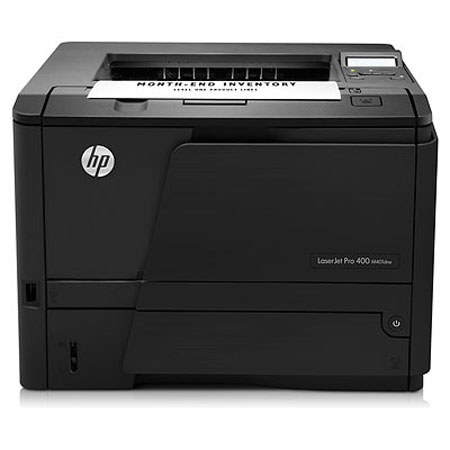
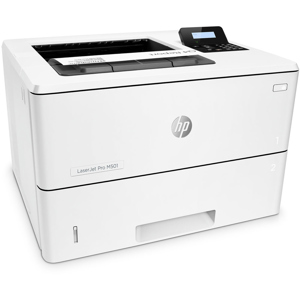
Optimize your day-to-day workflow with HP LaserJet Pro 400 M401dne Printer that shares the printing resources on an Ethernet network and takes advantage of fast print speeds. Be productive and save paper using automatic two-sided printing. It prints professional-quality documents at a great value, with outstanding networking and paper-saving features. It produces professional-quality business prints with bold, crisp text and sharp images. Set up this printer quickly in your IT environment, using the HP Universal Print Driver. Receive consistent results with Original HP LaserJet toner cartridges and reorder with HP SureSupply. Save IT time and costs by centralizing printer management with HP Web Jetadmin. Depend on a printer with up to 3000-page recommended monthly page volume - the ideal fit for reliable printing.

HP Pro 400 M401dne Features

  • Use business apps and the 3.5-inch (8.89 cm) color touchscreen to access and print from the Web
  • Operate your printer with ease, using the 2-line display
  • Save money by saving energy-HP Auto-On/Auto-Off Technology powers your printer up and down automatically
  • Save time with easy-to-install Original HP cartridges and save more with high-capacity cartridges
  • Share printing resources with an Ethernet network. Automatic two-sided printing helps save paper
  • Boost productivity with print speeds up to 33 ppm (A4) and 35 ppm letter. Do more with the 800-sheet maximum paper capacity
  • Set up and share anywhere in the office with wireless connectivity. Configure wireless networking fast
  • And with AirPrint you can simply print wirelessly from your iPad, iPhone and iPod touch
  • Reload paper less often with up to 300-sheet paper capacity

What's in the box:

  • HP LaserJet Pro 400 M401dne Printer
  • HP 80A Black LaserJet Toner Cartridge (Yield: 2700 pages)
  • Power Cord
  • HP 1 Year Warranty