
This item is no longer available.
Review Summary
2015-02-26T19:00:00
I bought this to replace an old Xerox Phaser 7300DN when it finally died. After careful consideration, I decided we no longer needed a tabloid size printer and decided on this M551dn. I plugged it in, set it up, networked it into our system and dtarted printing in about 25 minutes. We had a problem right away but a simple "Color Alignment Calibration" solved it... it's been running fine ever since. Also, a "Well Done" to Adorama for the quick, effortless sale and shipping!
JimD1050
2015-02-20T19:00:00
Well, so far, the first two we have are working perfectly. They can handle any printing task you throw at them. They have a 500 Sheet Tray STANDARD (so you can put in the whole ream of paper, smaller trays are so annoying) and they are much quicker than any of the other HP Lasers we have around the office. Double-sided is no issue, and works like a charm. The only thing I can say is that if you print on cheap paper, your output will look like you printed it on cheap paper. Better bonds work wonders (smoother faces on the paper make it look much better), and the glossy laser photo paper makes photo prints look awesome compared to any other laser I have ever worked with (HP, Brother, Xerox, Samsung, and Lexmark). The one thing the printer lacks is WiFi, so if you are looking for that, it's not here. Toner prices are inline with everything else, and the cartridges that come with the printer are FULL cartridges, not the startup ones some printers come with. Haven't had the chance to use refilled cartridges yet (and probably won't for a couple of months, the carts hold a lot of toner), but have talked with others that have and they have seen no issues. HP has a real winner on their hands with the 500 series!
DAVID H.
2014-07-30T20:00:00
This is the first enterprise printer I have ever purchased. Customer Service was really easy to use, the product selection process is well outlined online pricing was great and the product shipped immediately. The print quality is excellent and we will be using this printer hopefully for a good 10 years. I would highly recommend this printer to anyone who had high volume printing needs and didn't want to go outside to a printer.
lpliv

2014-05-24T20:00:00
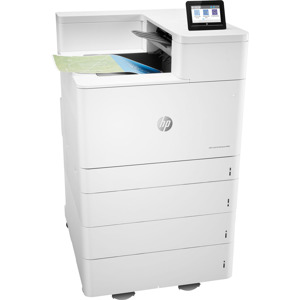
We needed a high quality laser color printer for our double home office. The quality is superb, producing sharp, crisp publishable documents that make our business look as professional as the "big boys." I have no idea where this one was made, as it doesn't say, but I truly hope this printer works as long and hard as my USA made, 1998 model 4000TN (B&W), which is STILL running strong. One more thing: We purchased the single drawer model and then found the accessory drawer on Amazon for only $240. This made it far less expensive than the two drawer model. Get it while you can! (May 25, 2014)
David99
2014-04-09T20:00:00
Very impressive printer. Setup to network was smooth. Printing speed and quality is excellent. We upgraded from HP Laser 2055dn to get color for larger jobs. Make sure you plan ahead for location and space requirements. Printer is heavy and alternative paper slot opens out to the side. Also, know that paper goes in face down. So if you're ordering checks or preprinted forms that are numbered, get them in reverse order. I called HP and had all questions answered thoroughly before ordering.
CarrFarms
2014-03-17T20:00:00
I am impressed with the performance of the printer and quality of construction. The printer is very user friendly, easy setup, cartridge access, paper usage and display panel information. No difficulty in installing the printer in my 1ghz network. Another important feature is the standby mode with quick print recovery. Flexibility in paper type selection was an important feature as well as double sided printing.
Ignt
2013-12-02T19:00:00
This is an outstanding printer. It is easy to setup - CAVEAT - this printer has a larger foot print than the HP 3600dn Color LaserJet it replaced. Two people are recommended for lifting as it weighs almost 80 lbs. Packaging allows for slide out. The printer will fit on a typical particle-board self assembly printer table. You will want clearance on the side for tray 1 envelopes, etc. and on the front to open tray 2 for paper. It holds an entire ream 500 sheets in the standard tray. Also, a 500 sheet output bin. Nice when printing multiple copies of books or long documents. Configuration is an easy straight-forward process. Just follow the directions. Power on, then connect your ethernet cable. USB is supported, although I did not need it. Easy to set a manual IP, or it defaults with an assigned IP address. Allows for printing from the internet. I did have an issue with the HP Connect, but was able to add my device. I expect it will work after my password issue with HP Connect is resolved. Speed is fantastic - as advertised! First page out in 11 seconds. Comes with a setup and driver disk . Allows for HP WebAdmin as a download. This unit has a tremendous amount of information with the embedded web server. Just type the device IP address into your browser and it is all there. Supplies, security, ePrint setup, and much, much more! The most extensive web menus I have seen with many years of experience and setup of other printers.
PunchCardCharlie
2013-11-11T19:00:00
I purchased this printer for home use so I don't have to be at work to print out contracts and emails. The printer is FABULOUS! The speed is great and print quality is beautiful. I think my printer is superior to the ones we have at work (I work at a mid-size company with $2B+ market cap). I am having some troubles with my VPN access, but IT is helping me sort that out. I purchased the JetDirect 2700W device to make it a wireless printer. It doesn't fit into the back USB slot and is in the front of our printer, but is working out just fine. I love the AirPrint capabilities and have been printing from my phone -- no problem. AMAZING. Hubby was reluctant to purchase thinking we didn't need to improve print quality. He is impressed compared to our junk/slow inkjet printer and now he is sold. Can't believe how fast first page comes out and full documents are printed (I regularly print documents > 100 pages).
PrintOLot
2013-09-18T20:00:00
Laser Jet 500 color M551 has great capacity, terrific speed and expanded features, these include: remote access port, continuous internet support to maximize printing capabilities, easy digital readout, instant toner status, auto 2-sided printing ,prints both color and black and white in the same file and adjustable tray for envelopes and cards. M551 is a joy to use! esp. with large volumes.
June29
2013-09-05T20:00:00
I did a lot of research on color laser printers before picking this model, so my decision was not light-hearted. I demoed models from all the major companies and found this one to be the best in its class for the price. I use this printer for printing flyers on glossy paper, and unlike many laser printers out there, this one can handle all types of glossy paper with no problem. The auto-duplexing works quickly and doesn't jam which is another great feature I needed. The resolution and color look great, and it ships with FULL color ink cartridges, not starter packs like most printers. I installed it as a network printer and setup was a breeze! The only issue I encountered was my virus protection program had to be temporarily shut off in order for the setup to work. I'm very impressed by how quickly the first page prints out of sleep mode. I would definitely recommend this model.
Marketing
2013-02-19T19:00:00
Just purchased this printer. It works great, I would recommend it to anyone looking for a color laserjet. The price is a real bargin (see discussion below). However, I'm going to be picky picky. The drivers for the Mac (OX 10.6.x) are wanting. Some applications do not use the duplex, two-sided printing. That works (mostly) with MS Word and Acrobat. It would be great if HP would post those appications that do not print in the duplex mode. The colors from this mode are not as true as my $100 HP inkjet. Pantone maroon prints a little darker, almost black, on this printer out of the box. Possibly this is an issue with any laserjet using this technology (versus something like the inkjets or the Xerox Phaser wax-based technology). Now the price point. Here's a fact. the printer is priced currently at $899. If you purchase the cartridges, all five, you pay $1096. Even if you include the 10% discount, the cost of the cartridges are more than the cost of a new printer!! Really? So, if you purchase this printer, instead of buying toner, just buy a new printer when the cartridges expire. You'll save money, and you get new fusers, which are also very expensive!
Rexx2
2013-01-22T19:00:00
The only negative was I thought we were getting a wireless unit. However, quick call to customer service (talked with an agent immediately) and realized we needed an ethernet connection. Installed the ethernet and were off and printing. We bought HP because we've had a 2200D for more than 10 years. It still works dependably (use it now for smaller jobs). It is also very slow in printing pdfs. The new one is much faster. Color separation is excellent. So far after two weeks the 550 is highly recommended.
Fishingman
2013-01-06T19:00:00
I really like this printer, but quite frankly am surprised that a printer of this cost does not support legal paper. I thought the specs I read online indicated that it did, but does not right out of the box. It is very fast on duplexing and prints nice quality color. A little noisy, but does the job. Not sure how the toner will last, but I do know the replacement toner is expensive.
jaycee1444
2012-12-10T19:00:00
This is THE printer I need but there is a show stopper. First off, there should be wireless networking built in. Yeah you can add a wireless print server but it should be built in. Second, this is the show stopper, there needs to be Airprint built in as well. Not the HP ePrint; it needs Apple's Airprint. We use iPads heavily around here. They are becoming more and more common. The suggested JetDirect printer server add-ons don't have Airprint capability either. I need a 1200x1200 color laser printer that is not MFP that can do Airprint. Build a version for this with wireless and Airprint built in.
Mahkno
2012-08-25T20:00:00
Sorry this is a long story. It is based on years of frustration with ink jet color printers, a poor quality, non-HP color laser printer I bought, partial success with the M451 and then finding its enterprise, 'super-duper' version that is a serious printer for serious people, the M551. My wife and I own an invitation store. Most of our business has to do with wedding invitations, ceremony programs, shower invitations, and various related stationery needs and accessories. Quality is our number one criteria and printer reliable to a close second on my rank-ordered list of requirements.. We can't afford to have a back-up color laser.. A few years ago, in spite of my continued success with HP B/W laser printers, I bought an attractively priced, color laser printer made by an HP competitor in Europe. Bad move. Poor coverage of inks, manual feed tray was truly manual feed -- I had to insert each sheet individually and very precisely in to Tray 1?what a joke! As a result, I hated the printer, rarely used it, and sent out most of my color work a 3rd party, which became very expensive! For the last 2-3 years, I have been waiting patiently for a hi-res (i.e., at least 1200 by 1200) HP color laser printer that would meet my needs. I could not afford a $1200-$25000 printer. I initially bought the M451dn, but it did not meet my rigid needs in terms of color coverage. I called HP about my experience and they told me that the M551dn was what I needed. The agent said they had one in their office and to quote him, "?the vivid colors jump off the page." Taking his comment literally, in spite of the $400+ higher price for the M551dn, I took a risk - I needed an in-house hi-res color printer, and this was my last hope. With only 100+ clicks on the M451, HP gladly took back my M451dn and I trades-up to the highly touted, M551dn. They paid for all shipping and honored my M451 discounts on the M551. Thanks HP!) When I received it, I was surprised at the added heft of the M551dn. Since I had possession of both printers, I can personally attest that the M551dn weights at least 25-35 pounds more than the M451dn. As I had hoped, and as the HP customer service agent told me, the M551 is truly a great printer and, better yet, comes with full-capacity toner cartridges. As noted in other reviews, the color coverage is 100% solid, with rich, vibrant high-resolution color text and images. We do not print many photos, but my tests photo prints were eye-popping, as I expected. My brides love the items we print for them - the print quality, ink coverage, look and finish of our items are almost indistinguishable from those of some of my commercial invitation companies' digital printing. We have a lot of confidence and pride with the M551dn. I am no longer sending work out to 3rd parties, I am printing more items than ever before, and in terms of ROI, in spite of its higher price, I have paid for the M551dn in ~6 months. I am one happy camper with our M551dn, or did you already sense that? Buy HP. P.S. I am not an HP employee.
Danushie
2012-08-21T20:00:00
Loving this product, I had two criteria automatic duplex printing and 500 page single paper tray. This was the only model I could find that had both. Loving the duplex, really saves on paper when printing long reports. Our office is considering buying another one to use as the shared printer. My only complaint is it is a little loud when it prints and then cleans itself. But I can live with that. My last HP printer was 15 years old, hope this one lasts as long.
Julie777
2012-01-30T19:00:00
The quality of this printer is so clear and vibrant it's hard to believe. I love this printer so much I bought one for my home office as well.
bookguy
2012-01-15T19:00:00
I am not pleased at all with this printer. There are error messages that are popping up frequently. There is nothing stuck in the printer. The printer has been too tempermental. I do not like it. I have been in the technical field for over 16 years, so I understand how printers are supposed to work. It was a waste of my money. I haven't even printed 300 pages. Then there was not good instructions to show how to work around the firewall. Next time I will not be buying HP. I have purchased printers for the last 16 years or so, and this one takes the cake. I have never seen a printer be so problematic. It looks new, but I find it to be trouble.
Rev1
2011-11-29T19:00:00
The printer is very fast and that is why I bought it. Quality is excellent. Color is great. I like that it can be accessed from other devices. I wish it had wireless networking. I experience slight paper curl, it has a setting to reduce curl, this helped, but did not eliminate it. The problem might be the Costco paper I have. The printer is heavy, 80 ounds at least, and it is large, much bigger than my now retired HP4100. I needed more speed and color. All our reports these days must include color maps, photos, etc, so this is the way to do it. I tried to buy this printer in Honolulu, and could not find it anywhere.....seems all the retailers are selling low-end equipment these days. I checked the HP website and found their offer of free shipping....I ordered this printer on Saturday and got it Wednesday just before Thanksgiving....and I really needed it over the long weekend to get a big job out. Thanks HP.....your service is great and I love your products. One thing, please bring back laptop displays which are WUXGA or UXGA. For my work, I need to see two pages on the display. 1080p does not cut it for a business machine.....do you think we watch movies? I need a windows machine for my ArcView software and only Macs have hi res displays. Aloha from Honolulu.
Kukui
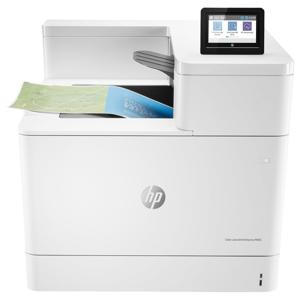
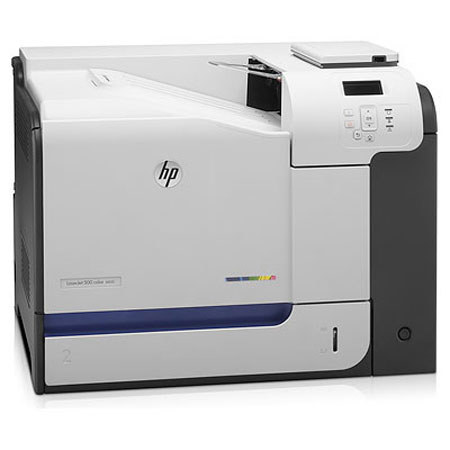
Produce many high-quality prints fast and easy with the new HP 500 M551dn LaserJet Enterprise Color Printer. Make as many as 75,000 pages of quality, 1200 x 1200dpi resolution, results per month with this LaserJet printer. It offers fast printing delivery, 33ppm for both black and colored results with an 11-second delay per page to prevent ink smudging. The HP 500 M551dn LaserJet Enterprise Color Printer can store copies of your prints in its 1024MB memory and allows online networking with an Ethernet connection and device integration via USB. Whether it be letter, legal, executive, statement, double postcard, or monarch, this HP 500 M551dn LaserJet Enterprise Color Printer can print in varying sizes.