



This item is no longer available.
Review Summary
2012-05-26T20:00:00
Wow, why is this unit so noisy when it prints?? Also, if you have Windows 7, don't bother with the disc that is included to set the unit up. You have to go online, search and download the drivers for Windows 7.
afjung

2012-04-16T20:00:00
Very fast. I bought this printer to replace an old HP LaserJet 4050N on a 2 computer network. I wanted a simple black and white printer. Easy to set up. The only problem I had with it is that the instructions said that the software disk was not required with Mac OS 10.6. Even though I have the latest version of 10.6, I had to load the CD to get the printer to work - a little confusing, but works fine now.
CWTJR
2012-02-08T19:00:00
This little printer was very easy to setup and makes great copies...I would recommend it for anyone needing a good basic unit!
ShoreGirl
2012-01-31T19:00:00
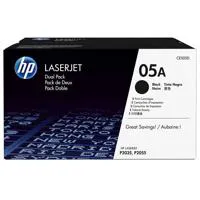
This printer is very economical to operate in terms of toner use, and it also prints on two sides if that is needed. The 2300 page rating for a toner cartridge is fairly accurate. Highly recommended for basic printing.
Rarebooks
2012-01-22T19:00:00
I like the duplex feature of this printer and the features compared closely with those of my previous HP 2100 printer, which I loved. The size is great as it fits on a shelf in my work area. The print driver disk that comes with the printer is old and does not include Windows 7. So the HP technician, who did my install had to download the correct drivers from the HP site to get the duplex feature to work.
Helenes1
2012-01-14T19:00:00
this is far too noisy - why is this?
robinp
2012-01-03T19:00:00
This printer is just what I was looking for. I finally retired my LaserJet 2100 after 10 years or so and wanted another workhorse printer for my home office. The 2055dn is performing flawlessly. The auto duplexing feature is most welcomed.
JimAZ
2011-12-27T19:00:00
I don't know it this is common, but this printer is so loud when it prints that I can't hear a person I'm talking to on the phone. Is this normal? This is used for a business and is disturbing the operation of the work. Nice printer, just too loud.
ownerinIndependence
2011-11-08T19:00:00
Do yourself a BIG favor and install the driver for Windows machines via Add a Printer. The driver disk that comes with the printer is incompatible with Windows 7. The "Default" driver that you can download from the HP website causes documents to sit in the print queue for a minute before the printer starts printing. The driver that works perfectly is the Universal Print Driver (UPD), but you must install it via Add a Printer in Devices and Printers or you will loose duplex printing. It's a good printer once you get the driver installed, but installing the driver is NOT as easy as putting a disk in your disk drive and following the directions.
KenWest
2011-10-18T20:00:00
We purchased this printer to replace an old HP LaserJet printer. We needed a printer that was speedy, quiet, and could duplex. We are so pleased we found it all in the P2055dn. It was easy to set-up on the network. I didn't need my "network engineer husband" to install it. I was able to do it myself. We print for entire classrooms (booklets, tests, study material, etc.) and need to print double-sided. Our old printer did not duplex, and I found myself printing one page at a time then turning the pages over and printing the next page. What a mess. Other times I am printing accounting/tax documents and need the speed without a lot of noise. Thank you!
661TaxLady
2011-09-21T20:00:00
I bought a 3rd tray for this printer because I print documents that contain both legal and letter size pages. I had no trouble setting up the printer until it came to designating paper size to each tray and having the computer recognize the correct tray and paper size. It took the tech over an hour to complete the setup. Everything is working fine although it takes my computer a long time to send the document to the printer. There was no such delay with my 1320 which is no longer available. This printer is a little louder than the 1320 and has print delays which coincide with the computer delays when sending large documents. Tray 2 is a little smaller than the tray in the 1320, about 200pp compared to 250. Tray 3 is double size--500pp which is really nice.
LAH1
2011-09-18T20:00:00
I have tried other brand name printers with great disappointment on their performance. I have 3 HP printers (includes new 2055dn) and have found them to be superior over the other printers I have tried. I use my new printer in my tax business and I love the duplexing and the print speed. HP printers work for me.
MMSP1
2011-09-16T20:00:00
Printer works great prints fast. Just one thing you have to be sure to know how to set you settings right to get double sided printing. I used this printer mostly for booklet printing. It has a problem of printing booklet one side up, and the other side, upside down. To overcome this print pdf booklet one at a time. When printing booklet with microsoft word. Go in print then properties then printing shortcuts. Chosse Two sided printing, for Orientation leave that just how it is(Portrait). Change the option (Print on Both Sides) to Yes flip up. If this is not done, then one side of your paper will be right side up then when you turn over it will be upside down. Save a profile when you get it done. Something is wrong with the driver for this printer sometimes it comes out wrong though you set it right. So check to see the first page is right or cancel print and start again. Restarting computer does help. Then print again
Exodus
2011-09-08T20:00:00
Would purchase online from HP again.
WDale
2011-07-08T20:00:00
Great Printer but no cd for software for Windows 7. I'd really like to use the double sided print function but its too much trouble to figure out. Support from HP is virtually non existent. You would a company as advanced as HP would be a little more user friendly in regards to software and support
aclearspot
2011-05-05T20:00:00
Good quality printing. Fast. Doesn't always print the first time, sometimes requires turning the printer on/and off and resending in order to print.
Manyara
2011-05-05T20:00:00
Very good and reliable printer if you don't need color.
jagoff
2011-03-03T19:00:00
This is the fastest printer I have ever used from a cold start to first page out. It will start printing in less than 5 seconds after you click ok. The only flaw I see is the pages come out with a slight curve to them. This must be due to my economy paper and the heat of the imaging unit.
dnixon
2011-03-03T19:00:00
This 2055dn replaced a much older 5P LaserJet at half the original cost of the 5P. The installation said it was OK to use Windows 7 driver. It is not, as that driver did not support two sided printing. I had to remove the printer and reinstall using downloaded full driver from HP. Installation froze in the very last step on Windows 7 computer, but the installation seems to be complete. (Full installation on a Windows XP computer went all the way through smoothly.) I got this model specifically for the network port, and it works graet from three different home computers. The rear exit paper feed is great for envelopes, but I prefer the larger rear output pull down trays that were on the 2100 and 2200 models. I did have one problem printing on a 3x5 index card. The first time I tried this, the toner was not bound to the card and it smeared. I tried a different brand of index casrds, and it seemed to work fine. Overall the speed, quality and feastures are excellent.
TUMath
2011-02-08T19:00:00
I have purchase several of the dn units and currently purchasing another one. The printer fits great in every office not taking up much space and still has a fold down manual feed tray and display screen. Great affordable compact unit with the speed to please the end users.
Brenc
2011-01-07T19:00:00
I just ditched my expensive and trouble-plagued Canon all-in-one for this simple, basic B&W printer. It's been seven months and I'm still in love. Gorgeous print quality every time. Never a jam. It's not fussy about paper. And it's much MUCH faster than my Canon was. I recommend it without reservation. It's a workhorse!
Guerita
2010-12-23T19:00:00
I have owned the HP P2055dn printer for over 8 months and it is working well in a home network. The printers USB port is hooked up to a Windows 7 computer and the network connection is hooked up to Windows 7, Vista and XP computers. I have 5 people in our family using the printer locally and on the wired network. It is used for printing out teaching materials, printing study materials and general printing. We average between 1000 and 3000 printed pages per month on the home network. I have had no problems with the printer making printouts and the double sided feature does save money in paper costs. The printer is a bit noisy as it starts up and then the printer quiets down.
Jim126
2010-12-12T19:00:00
Just purchased this product to replace the 2420d. The memory is apparently limited so I've had to feed jobs in pieces, it's noisy, and slower than expected. I will have to buy another machine for the tax season and ditch this one. Print job is good however.
ladytax
2010-12-06T19:00:00
I had owned HP's laserjet 4L back in the day - wonderful printer. When I had to replace it (after many years of service), opted to save some money and purchased a competitor's desk jet. I use a speciality transcription paper and while some of these printers were good, I was either dealing with paper jams or high ink usage. Finally bit the buttet and came back to HP and purchased the P2055dn. Should have done this sooner. Since I do a high volume of printing, it is much more economical. I put it on quiet mode, and while it's just a tad slower, made quite a bit of difference. I'm a medical transcriptionist, so noise is a big thing for me. Just used the double-sided feature a few days ago and worked like a charm. I do quite a bit of "straight-through" printing, and it too works very well. I do wish there was a tray for this, but I just turned it sideways on my desk - problem solved. Great product!!!
byrdsword
2010-11-09T19:00:00
Perfect machine for small office but... ...but the cartridges are hellishly expensive here for an average of only 2100 pages in real life - about €0.035 per single-sided page for the toner.
Devil
2010-11-04T20:00:00
I received this printer to replace a very old HP 1200 which started to fail moving paper through the printer and the cartridges were no longer available from HP. The 2055 dn is extremely fast and can be programmed to print with less noise. The automatic double-sided printing is a great option to save paper which is a major reason for getting this printer. I originally installed the printer with the installation CD under Windows Vista. Unfortunately, after upgrading to Windows 7 (a much improved OS), the generic printer driver no longer allowed automatic duplex printing; has to be done manually. The manual reload is not big deal but the lack of support by HP for Windows 7 is disappointing and hard to comprehend given this is a relatively new printer.
DoctorK
2010-08-05T20:00:00
Replacement for a 15 year old laserjet (speaks loudly for HP reliability). Noisy upon start up but print quality and spped are excellent. Great buy with the HP printer trade in and rebates. Love the networking capability - could be easier to set up (had to use the HP install disk on all computers on the network as the XP install manager could not find the network attached printer). I would definately recommend this to anyone needing "mid range speed" (35 ppm)
Billsyd
2010-08-05T20:00:00
This printer doesn't do envelopes. HP says it does, so I took it back to Staples 3 times, but they were all the same. It doesn't do envelopes.
billingclerk
2010-06-03T20:00:00
Our office bought two of the "dn" models June 2009 and they have performed very well. We are now (June 2010) buying a third, a "d" model. Fast and not too loud. Great for small or large print jobs, even when duplexing.
StatAnalyst
2010-06-02T20:00:00
We have 4 of these printers and have had nothing but problems with them. We have had to cook the circuit board to reseal the solder. All of our printers in our agency are HP. We are a large Homeless Agency in San Diego, We have always bought HP because of the quality. We now are only buying HP printers that are in the 4 series. My recommendation is to spend the extra dollars in the beginning. You will get more value out of it in the end.
ITDirector

Accidents happen where life happens. Protect your favorite Adorama products and purchase a protection plan to stay covered from accidental damage, mechanical or electrical failure, and more.

If we can’t fix it, we’ll replace it at no additional cost.

Protect your product from drops, spills, and more.

Enjoy your gear without fear. We have you covered!

When regular use of your product over time results in mechanical or electrical failure.

We will never charge you a deductible after the purchase of a plan.

Our claims process is simple & easy and our customer service team is happy to help.
Adorama Protect powered by Extend is available for purchase to customers in the United States. Not available for purchase Internationally or in U.S. Territories.
Browse our FAQ
Up to 1200 x 1200 dpi
HP Prores 1200, HP Fastres 1200
1 (black)
Up to 35 ppm
Up to 35 ppm
As fast as 8.0 sec
Up to 50000 pages
750 to 3000 pages
2
2 plus 50-sheet multipurpose input tray
Up to 250 sheets
Up to 800 sheets
Automatic (standard)
Tray 1: Letter, legal, statement, executive, index cards, envelopes (No. 10 (Com), No. 7-3/4 (Monarch)); Tray 2: Letter, legal, executive; optional Tray 3: Letter, Legal, Executive
Tray 1: 3 x 5 to 8.5 x 14 in; Tray 2: 4.1 x 5.8 to 8.5 x 14 in; optional Tray 3: 4.1 x 5.8 to 8.5 x 14 in
Paper (bond, light, heavy, plain, recycled, rough), envelopes, labels, cardstock, transparencies, heavy media
Automatic duplexing, manual feed, sheetfed, straight-through paper path
128 MB
384 MB, 128MB on board, 256 on DIMM
600 MHz
HP PCL 5e, HP PCL 6, HP Postscript level 3 emulation with automatic language switching
Fast Ethernet 10/100/1000, Hi-Speed USB 2.0
HP Jetdirect en3700 Fast Ethernet Print Server, HP Jetdirect ew2400 802.11g Wireless Print Server
Windows 2000 (drivers only), Windows XP Home, Windows XP Professional: 512 MB RAM; Windows Server 2003: 512 MB RAM; 350 MB available hard disk space (all systems); 512 MB RAM (Windows Vista(R), 32/64 512 MB RAM; 350 MB available hard disk space, CD-ROM, USB
Mac OS X v 10.3, 10.4, 10.5; 256 MB RAM minimum, 150 MB available hard disk space, CD-ROM, USB
Yes
Windows 2000; Windows XP Home; Windows XP Professional; Windows Server 2003; Windows Vista(R); Mac OS X v 10.4; Mac OS X v 10.5; UNIX; Linux
63.5 to 77° F
No
HP printer software on CD-ROM: installer/uninstaller, drivers ( HP PCL 6), HP Toolbox FX for diagnostic status and configuration, HP Embedded Web Server, help, documentation
14.4 x 14.5 x 10.6 in
14.4 x 26.7 x 10.6 in
23.6 lbs
HP 1 year warranty

Required

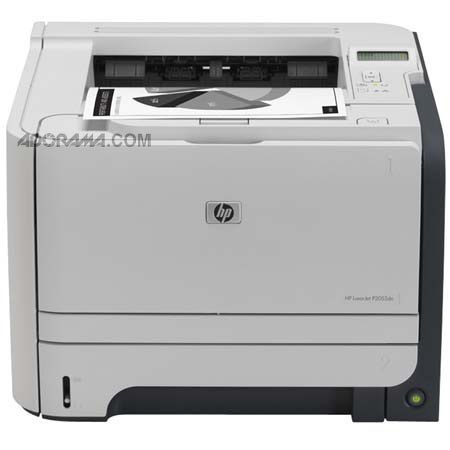
The HP LaserJet P2055DN Monochrome Duplex Laser Network Printer is fast, reliable and easy to use. It lets you print at 35 pages per minute as well as connect via USB or share with a group via built-in Gigabit networking. Plus, you'll save paper with the built-in, automatic double-sided printing.
It saves space in your work area with the compact design and spends less time waiting for documents: the first page prints in less than 8 seconds from ready mode. Print complex documents with text, images and graphics using the powerful 600MHz processor and 128MB memory (expandable to 384MB).
Join VIP PRO
Earn 2X Points + Exclusive Perks!
Request a Callback
Chat one-on-one with an expert
Sell or Trade your Gear
Get started in 3 easy steps