2023-02-11T19:00:00
Rated 1 out of 5
Not user friendly
*I set up with HP Smart. Worked for a while. Now it's forgotten everything.
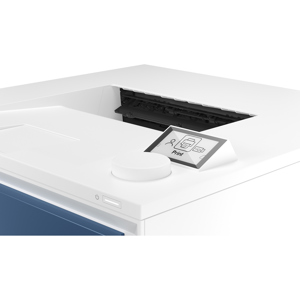
*Control panel is NOT intuitive. How about a "PRINT" button?
*Now it's printing blanks.
*Original toner cartridge doesn't last long, but a new one is $50ish - fair.
Have spent over an hour on this today, trying to get my taxes off my desk. Eventually I'll try (800)474-6836. Too frustrated to deal with it further today.
ColdVermonter
Originally posted at

2022-07-13T20:00:00
Rated 2 out of 5
very annoying
Always goes off line-off line now-hate it- cust # 5086785920-Does print well..cust service really tried to help
richmond4
Originally posted at
2022-07-07T20:00:00
Rated 1 out of 5
Mindblowingly terrible printer
HP, as a rule, manages to produce awful products with terrible user experience. This printer is no different. From its hieroglyphic interface to its indecipherable faults and connection problems, you can be sure that this printer will fail you when you need it most. HP's useless "Smart" app will provide no assistance, nor will HP's customer service. Enjoy!
RegretHPAlways
Originally posted at
2022-05-23T20:00:00
Rated 5 out of 5
Perfect for me.
This little printer is exactly what I needed. I haven't had it long enough to know how long the toner lasts but it was easy to set up and prints quietly and quickly. Copies are perfect. It's easy to use and doesn't take much space.
Judy J.
Originally posted at
2022-04-24T20:00:00
Rated 4 out of 5
Decent Printer - Installation a Pain
Installation without having to sign up was a real pain (minus 1 star). I almost returned it due to that fact. I eventually got the direct driver working, scan and print, manually without having to sign up. I do like the printer as first page to print is almost immediate versus the epson inkjet where I need to hear it rattle for 2 minutes before I get that first page when I only need B/W. After I got it successfully installed , I was able to print (but not scan) from other PCs on my network without special installation.
DA N.
Originally posted at
2022-04-13T20:00:00
Great printer. Laser printer is much better than inkjet for occasional use.
Fedleo
Originally posted at
2022-03-24T20:00:00
Rated 1 out of 5
The worst printer ever
I bought this about 6 weeks ago and there's
no way i can figure out a conexion.
I had a few hp printers before and they were always easy to connect.
I've tried everything but there's no way my wifi detects it.
Very dissapointed and I don't know wether i could return it.
Josse
Originally posted at
2022-03-14T20:00:00
Rated 1 out of 5
Mac Users: Don't Bother
After eight hours of frustration l couldn't connect this to our WiFi. HP chat assistant was abrupt and smug. Returned this printer and purchased a Brother laser three in one. From opening the box through WiFi setup, I was printing documents in less than 2.0 minutes. (I am a Mac OS user).
SCLYNNIE261
Originally posted at
2022-03-12T19:00:00
Rated 5 out of 5
HP LaserJet Pro MFP M29w Printer
I bought this printer as the reviews were very good. The printer was easy to set up, and the print is great. The ink cartridge replacement was reasonable. I order an extra to keep on hand. So far so good. I would highly recommend this printer for all your daily prints. It is a home printer for us.
JCS61
Originally posted at
2022-02-01T19:00:00
Rated 1 out of 5
Cheap printer
This printer will not connect to my computer no matter what I try. I can print from my phone but otherwise it's useless.
M e.
Originally posted at
2022-01-20T19:00:00
Rated 3 out of 5
can't find claim code
It bothers me that I can't add this printer under my account in HP Smart. There is no service web info in my printer webpage. I tried hours and hours before I had to give up. I talked to the tech support and he spent an hour and I had to tell him it's ok.... I still can print but it's the app is very frustrating.
Wen15
Originally posted at
2021-12-10T19:00:00
Rated 1 out of 5
NEVER PRINTS THROUGH WIFI
I have had this printer for 8 months now. Every time I go to print, it won't connect to my printer via wifi. Also will not print directly from any Apple device
DJ P.
Originally posted at
2021-11-09T19:00:00
Rated 4 out of 5
ALMOST perfect but...
I really like this printer and we sell them in my store. I would buy it in a heartbeat for myself were it not for one small (not really small) problem. I love the printer because it's almost every thing you need - it's laser so it's faster, better quality, great for frequent and infrequent printers alike. It also has a great flatbed scanner on top with a smooth slide on/slide off edge plus it just looks so darn cute! It's also very small and compact for those who don't have much space for a printer.
My one major problem with the MFP M29w which is a deal breaker for me is that it only does A4, A, A6, No. 10 envelope and letter sized paper. It does NOT do legal size! This is very unfortunate because when I do need to print documents I often have to print legal sized pages. Were it not for this one issue I would buy this printer in a heart beat and I readily recommend this printer to any of my customers unless they need to print legal sized documents. It's really a shame because I like this printer a lot but maybe HP will make the next generation of this printer capable of handling legal sized too. Are you listening HP?
Dave C.
Originally posted at
2021-10-29T20:00:00
Rated 5 out of 5
Great Printer
Lots of the HP printers I wanted were out of stock, so I settled on this one. I am very happy with its speed and quality for what I'm using it for. I couldn't get it to connect wirelessly though, but that's likely due to my less than stellar internet and technology skills.
TerriAnn922
Originally posted at
2021-09-14T20:00:00
Rated 2 out of 5
WIFI connections frustrating
I purchased this printer for my home office just over a year ago. My experience has been mixed. Big improvement over frustrating inkjet experience with dried out cartridges all the time! However, WIFI connection to my laptop seems dicey for some reason, sometimes working, but often my HP Smart app tells me the printer is offline - then maybe at some point hours later the connection clicks and the document is printed. Now to cap it off, I've changed my internet provider and I cannot connect the printer to my new network. Amazingly unintuitive and frustrating. Online resources seem to be promising but are getting me nowhere. I cannot be the first one who has tried to do this.
ScottatRoll
Originally posted at
2021-07-11T20:00:00
Rated 5 out of 5
Large toner cartridge
I was tired of replacing color cartridges in HP Officejet 6600, easy setup, smaller space and all white color adds to decor
7550edward
Originally posted at
2021-07-08T20:00:00
Rated 5 out of 5
Great Printer
Small, compact, and very high quality! it is my first laser printer and I am so happy with it!
Zee75
Originally posted at
2021-06-10T20:00:00
Rated 5 out of 5
Perfect for small print jobs and scanning
I feel like I've been on a decade-long journey only to arrive back at HP where I should have been all along. After getting fed up with clogged or empty inkjet tanks, I finally started looking for a laser printer. I was at a Staples when I saw this and loved how small it was and that it had a scanner. I don't need color printing or a document feeder, just good, legible documents every now and then. This is perfect! It's so much faster than any inkjet I've ever used. I am tempted to knock off a star for frustration with the Smart HP software, but things started working once I downloaded the actual driver manually. This was just what I needed and it didn't break the bank.
Jay V.
Originally posted at
2021-06-01T20:00:00
Rated 5 out of 5
One Good Printer
This printer is all that I need for my wife and I. We only do occasional printing and scanning and we don't need color printing. Plus it is nice that we no longer have to be constantly buying new ink cartridges as the toner for this laser printer holds up well and the print looks excellent. The software that HP includes is a nice plus since I have connected the printer to my Wi-fi network, I only needed to install the software to one computer and the Smart App enabled three other computers to see the printer in order to use it without installing all of the software on these other computers, including phones and tablets.
The bottom line is that you cannot go wrong with this Laser Printer.
Bernzie
Originally posted at
2021-05-29T20:00:00
Rated 5 out of 5
Great features
I bought this Printer a couple weeks ago and love it. It was very easy to set up and the fact that you can use black ink only was a big seller for me. I am very happy with my purchase and the price.
Jude 7.
Originally posted at
2021-05-26T20:00:00
Rated 5 out of 5
Easy setup and great prints
Very simple to set up for WiFi printing from my PC and my iPhone. LOVE the quality of the prints too!
Katie J.
Originally posted at
2021-05-26T20:00:00
Rated 5 out of 5
Nice printer
Easy to set up. Works great and doesn't take much space.
Walter S.
Originally posted at
2021-05-15T20:00:00
Rated 1 out of 5
Do not buy this printer!!!
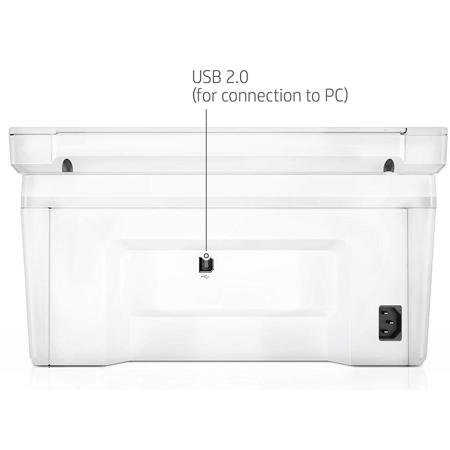
Wish I would have returned this printer and got my money back. Does not perform as advertised. Can't scan and keep losing the wi-fi connection forcing me to use the USB cable. The print and scan doctor ap is useless because I have a chromebook. I should have done more research before buying.
scarlettdance
Originally posted at
2021-05-14T20:00:00
Rated 5 out of 5
very happy with product!
It does exactly what I expected, also easy to set up.
cmpospishil
Originally posted at
2021-05-11T20:00:00
Rated 5 out of 5
Great price
I purchased this a month ago and had trouble connecting to two computers. HP support was very helpful in getting it to work smoothly. Better instructions from the company would be helpful. Satisfied with the unit.
Greg130
Originally posted at
2021-05-10T20:00:00
Rated 4 out of 5
Great Printer
I love my new HP Printer...it has scanner and copier functions as well. I have not used the scanner as yet but copier and print jobs are wonderful.
The only negative I have regarding my purchase is that I wish a REAL Instruction Manual came with the actual printer!! You have to look on line and it can be confusing
LauLat
Originally posted at
2021-05-08T20:00:00
Rated 5 out of 5
Great price to feature ratio
The ability to print, scan and copy for a reasonable price added to the ability to handle a wide range of paper sizes make this printer an excellent choice.
Duke1234565
Originally posted at
2021-05-06T20:00:00
Rated 5 out of 5
Love my new copier
I used my new copier to make copies of a family cookbook for several of my grandchildren and in all made over 500 copies. This printer is very easy to use and the ink lasted for almost all of the copies, although I had made a few copies before doing the cookbook. I am very pleased and would highly recommend. FYI - I am 91 years old and am not tech savvy, at all.
ptodd
Originally posted at
2021-05-04T20:00:00
Rated 5 out of 5
Good Little Printer
This is a good quality, fast printer for home use or even small business. It's smaller than most which is a benefit when considering desk top space. The only negative; it will not connect wirelessly to my Chromebook which was an important factor in my purchase decision.
TomsHP33
Originally posted at
2021-05-02T20:00:00
Rated 5 out of 5
Very easy to install
I had to return because I was unable to download driver for windows 10 P
marie H.
Originally posted at