
This item is no longer available.
Review Summary
2020-03-24T20:00:00
We used this printer in our production office for film productions on location for five years. It functioned flawlessly, enabling us to print documents wirelessly on a tight schedule. But this week, while in the process of changing an ink cartrisge, it emitted a horrible screeching sound. It did not stop, and upon examination I discovered that the drive belt for the carridge transport had shredded in one spot. So we sadly have to sideline it, but I am hoping this can be repaired. I hate the idea of discarding a perfectly good product for want of a single small part. I will investigate with Service.
UnauthorizedRob

2016-07-03T20:00:00
On my second one of these printers. Returned the first one as a result of paper skewing when feeding. Bluetooth connection is unreliable. Paper feed is always skewed, sometimes resulting in printer jam. Ink cartridges dry up and become unusable if the printer is not continually used. Would chalk this up to a defective unit, but this is my second exhibiting the same issues.
DissatisfiedUser99
2016-06-04T20:00:00
Purchased this product after a local sales agent assured me that I could print via Bluetooth directly from my iPad. How disappointing. Nice little printer otherwise. Needs an app that would allow you to do this similar to your competition has developed for their product.
Disappointed50
2016-05-02T20:00:00
Over the past years this printer has always worked well with my windows laptops through bluetooth connection but now we have moved to Mac and my MacBook Pro doesn't see the printer in the bluetooth window, printer on, bluetooth blue light lit up but no connection. Wondering if others are having this issue.
Ericdhvac
2016-02-09T19:00:00
Love this printer! Had mine for over 3 years and hardly any problems. It's been all over the country with me and been a life saver for my small business.
missamyfaye
2015-12-04T19:00:00
I purchased an HP411Bt printer at least three (3) years ago(around 2011/2012) & the unit has performed exquisitely at all times. As an automation consultant, I used it at my clients’ offices; they (clients) were quite impressed by the crisp sheets it produced. While I do not know the (printer’s) BlueTooth’s version, nor the BlueTooth’s power class, the range (printer/laptop separation) and the printing speed are more than adequate for all my uses. Now that I am retired, my wife uses this unit as her sole printer – got rid of her tethered unit. We use the HP ink cartridges only (NOT refill’s); & 24 lb (minimum) paper. Suggestion,Admonition: If you purchase this unit (as with all HP products) download all software (drivers/ updates . . . ) from the HP site. Do not use the CD’s furnished with the device.
MMot
2015-10-19T20:00:00
Printer is compact and great to work in the car for emergency printing. But it prints super slow. Not sure if it's my computer, but it takes 2-3 minutes to print a page. Don't have time to wait!!!
brem24
2015-10-07T20:00:00
I bought this for work when Im on the road. the quality is a nightmare. I'm so depressed :(
Frippy
2015-04-28T20:00:00
this is perfect for me with all the traveling I do and the reports I have to make this is the perfect printer.
Val7
2015-04-27T20:00:00
We needed a printer to take on the go. This one works for us. We did have a few paper feeding issues, but other than that - it is great. Now we can print certificates for clients real-time!
CPR3237
2014-09-07T20:00:00
I use this printer in my truck. It prints very well and the battery lasts a couple of weeks between charges. After a couple of months with tech support we FINALLY got the bluetooth to talk to my HP computer. It kind-of worked until I upgraded my home printer. The bluetooth has never worked since and I gave up. I bought a new one recently because I tried to clean the heads on the old one and it jammed up and I had to destroy the cartrages to get them out. After that, everytime the heads needed cleaning I had to throw the cartrages out and install new ones. Anyway, except for the Bluetooth the new one works great, and now I use the old one as a battery charger for the second battery.
MrLocksmith
2014-03-13T20:00:00
I run a small business and have always owned HP printers and, for the most part, have loved them all. With that said, this printer is garbage. HP missed the mark on this one. The concept is great but the paper feed just doesn't cut it. I can't get anything to feed through. By reading the reviews, I'm not the only one.
MikeS194
2013-12-04T19:00:00
I would have expected a mobile printer to be wifi compatible, however the only thing that makes it mobile is it has a battery. It would not even hook up to BlueTooth on my ipad, although "Blue Tooth" was the major sellnig point. Very dispointed with this printer
TreDellinger
2013-08-04T20:00:00
This printer is exactly what I have been looking for. It fits in my computer back pack perfect.
flalaskan
2013-06-25T20:00:00
Every time it would get low on paper and I would add more, or run out of paper, the lights start to blink and the printer goes unresponsive. The only way I could reset it was to disconnect the power cord and remove the battery. Then re-submit the print job all over again. What a PAIN!!!! Talked with tech support and they couldn't figure it out!! All they could tell me was to reset it by powering it down..... ugh!!!!!
mobileguy
2013-05-19T20:00:00
First trip using the printer, it fell off the carrier going through airport security. Put it back together, the covers flew off, plugged it in at my next stop and it worked fine.
Steve0415
2013-05-13T20:00:00
I returned one Officejet 100 Mobile printer because it failed to feed the paper. The replacement Officejet 100 performed no better. Thanks to HP, I decided to try the Officejet 150 and it performs great. Hasn't missed a feed and produces great prints.
elbird
2012-12-28T19:00:00
I have been extremely happy with this printer. Overall this is a very well built and compact product. I needed a mobile printer that I could take on the road and print from my vehicle. I would have given this printer 5 stars if it was "air print" or wi fi enabled with an "e-print" function. I print from my iPad and was forced to purchase a separate print server (xPrint Server) from Lantronix ($100) to make it compatible with my iPad. Although this printer is equipped with bluetooth, the bluetooth function will not recognize my iPad. HP should realize that they are losing a HUGE market share by not making a small mobile printer that is "out-of-the-box" compatible with an iPad. Thanks to the xPrint server, I know can print from my vehicle and I am very happy with the HP 100 L411.
BThor
2012-09-08T20:00:00
It was a little problematic to initialize with the blue tooth at first, however once O got the newer set of drivers it was relatively simple, the printer is fast and quite for a porrtable, seems like it will work out well for what I need, which is on the go printing. I looked at a couple of others from different manufactures but this one seemed to feet my needs the best, speed, bluetooth, portability, paper feed capacity etc. (a little pricey overall but not too bad when you compare features)
BajaGene
2012-08-22T20:00:00
Our company has been using HP printers for 8 years now and have been extremely satisfied until the HP 100. The HP 100 will randomly print on it's own and will print misc. symbols etc. sometimes up to several pages. This is very inconvenient as our field associate will be in the middle of printing their work and will freeze up the handheld they use. We use approx. 300 HP printers in the field so accuracy and performance is very important to us. Otherwise the printer works fine. I can see it being better for home use.
Ledbetter50
2012-08-14T20:00:00
I was pleasantly surprised to find this printer exactly what I need for my mobile office. The battery has enough power for several pages. The only downside is that it is slightly heavy but this means it's sturdily made. I had a little trouble setting up the bluetooth but believe that is because of my pc, not the printer. Now it works great.
Vickerina
2012-07-05T20:00:00
I just recently receive my officejet 100 printer and works great. Great for mobility & Great Performance.. Printer is fast and reliable. There are comments that Bluetooth does not work. Well it does WORK!;. Here are some pointers: 1- Laptop must have bluetooth technology integrated. 2- Installed driver using option- wireless/bluetooth connectivity.3- Enable bluetooth to discovery mode.4- Pair and follow connectivity. It took me a while but all has to do with setting your bluetooth on and discover mode. Enjoy
Nicaman
2012-05-02T20:00:00
Set up was easy and printing is good, however blue tooth does not work. Read the instructions and it fails to give adequate guidance. Tried to connect via blue tooth with several laptops, phones and ipad and nothing recognizes the printer. Turn the printer on and off, turn on blue tooth and off, and nothing works. Not sure either that this was a brand new printer when I took it out of the box. Why companies do not test their products before they ship their product is beyond me. Wish I had a good portable printer!!!!
abused
2012-04-11T20:00:00
I wanted a printer that needed no wires. I have a HP360 that has blue tooth card that works great but it was getting old so I bought this HP100 Bluetooth.That was a mistake! I have an SSHD and it is way too fast for the software on this printer and locks up and after I reboot my computer it prints before I log on. It will not print from internet as it reads some codes and prints that. I have to down load and then print if I use Bluetooth or plug in. I plug it in like OLD printers then it seems to work 3/4 of the time.I have been on road for 3 months now and when I get home in June I will be trying to sell this thing and look for something a little more reliable on the road.This printer is only 6 months old.I have downloaded all the available software for this and it still is poor at least in operation.
rjones6461
2012-04-03T20:00:00
The H470 was a much better printer. I travel 50% of my time and this printer was a workhorse until a clip broke on the ink supply. I had the H470 and have a good battery and was hoping to use the same battery as a back-up to this printer and was unable to. I get false alarms on the printer and the printer locks up when I print from an internet page. I cannot print to my I Pad. I have been a strong follower of HP up until now. Unless HP upgrades and improves this mobile printer I will be looking to purchase from another printer company. This printer was a big step back for the mobile printers for HP!!!!!
RichL1107
2012-03-20T20:00:00
I have gone though two printer in as may weeks, the first one all the lights started to blink and I got a error message on my laptop. Second one a message can on my laptop stating that the ink tub is empty, I replaced the ink and the printer would not notices the change. I went so far as to reload the software and all and it's still the same. The worse of it all is I can't return this one because or the wind blow the receipt off the box and its gone. The place I purchased it they will not take it back.
PWA1
2012-03-04T19:00:00
When I wanted a mobile printer 7 years ago, I bought an HP 450. It was great. But eventually it started leaving ink globs on the paper. When I tried to troubleshoot it, I found that it wasn't supported in Windows 7 or by HP any longer. After reluctantly accepting that I had to buy a new printer, I discovered that HP's latest model was less good than my old printer in virtually all respects: 1 lb heavier, bigger and slower. Why is that, HP? Unfortunately, nobody seems to make anything even as good as my old HP 450. I'm not a happy camper, both because my old printer (not used all that much--just for travel) isn't supported and because the replacement is 3 steps backward.
Disgruntled111
2012-02-28T19:00:00
Easy to setup and use. great printer on the go
joedug
2012-02-27T19:00:00
Received printer today. Tried with my Asus tablet PC. USB works fine. Bluetooth will not accept documents.Will accept printer services only (cleaning, alignment, etc.). Spent about 4 hours troubleshooting this device to no avail. Need Bluetooth, soo... returned printer for a refund.
tesla
2012-02-11T19:00:00
fantastic idea ! to bad the batteries last about a day. I have replaced battery twice in six months and have never been able to use it as a stand along printer... must always be plugged in battery failure. other than that it is a very expensive plug in and use printer.
formerhpguy
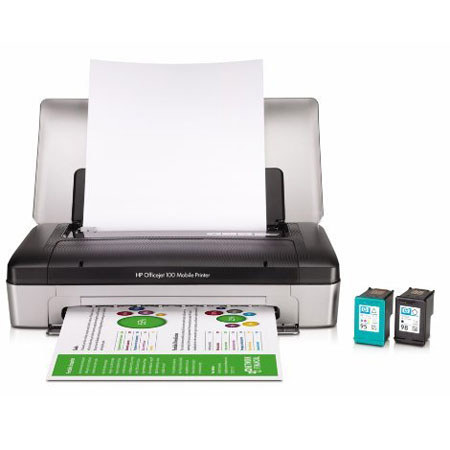
The Hewlett-Packard Officejet 100 Mobile Printer is a convenient and compact solution for making prints when you're out of the office. Whether it's in your vehicle, on-site, or anywhere in between, the Officejet 100 is ready to print at up to 22 pages-per-minute (18ppm for color). Using Bluetooth technology the printer connects with your smartphone or laptop for quick, seamless printing in any environment.
The Officejet 100 features a 500 page monthly duty-cycle, while a 50 sheet paper tray allows you to make numerous prints at once, without having to stop to refill the tray. And in addition to printing via Bluetooth, the printer also has PictBridge connectivity for printing directly from PictBridge compatible devices. Other highlights of the mobile printer include a long-life rechargeable lithium-ion battery and HP's high-capacity ink cartridges which help keep the cost of consumables low.