
This item is no longer available.
Review Summary
2023-01-06T19:00:00
I've had many problems with this printer over the years. Now it will not connect to the smart hp app. I cannot find hp4630 to set it up. I'm not sure why HP would just take it out of the list of printers to troubleshoot/setup.
NEED h.

2022-03-05T19:00:00
This is the printer (and HP) is for you. Had this printer for 2 years at our house and dealt with endless problems with this printer. Today was the day I gave up on this printer. Here is the list of all the problems: Losing network connectivity multiple times, 15 minutes between each printing batch, crazy high HP ink prices, ink barely lasts, scanner would not work to PC along with a couple other items I forgot. This is the last time I buy HP because we had issues with everyone. Bought a Epson Ecotank for our office 1.5 years ago and never had an issue. Plus ink is a much more affordable.
You b.
2019-10-26T20:00:00
We have had this printer since 2014 but every time we try to use it we have to turn it off and restart in order to get it to print. It is quite annoying that it has to be restarted all the time. Additionally, it goes through ink super quickly and then is not compatible when we have it refilled by any company other than HP. I called HP customer service and was told that they only allow their cartridges to be filled by HP. Definitely never getting another HP again.
Jacob131
2019-04-11T20:00:00
1. The ink it uses will eat your lunch! 2. The wireless printing usually gives me a problem. 3. I've had it for a little over a year and the rollers are making noises. 4. Starting to have problems with the printing even being plugged in directly. will work one day an not the next.
Welp
2018-09-13T20:00:00
I don't know what these people are talking about. I have been using this printer since 2015 and it print perfectly good photos and documents.Choosing the paper size is not the printer job. That's a software job.
jagrl

2017-07-11T20:00:00
I have had this printer for 2+ yrs and like it very much. I was having some problem scanning but received quick help from HP. Keep up the good work.
Joe81
2017-05-27T20:00:00
awesome love it!!!!!
hippie561
2017-05-17T20:00:00
This printer is very easy to use and is very reliable. The print quality is excellent. I highly recommend this product. Super
JoeMatt57
2017-05-16T20:00:00
The easiest, most self explanatory printer ever!!! The WiFi is amazing! I keep my printer upstairs and I can print out documents from downstairs! The black ink prints out a tiny bit too dark but that's ok. I just lighten it if necessary. The HP Ink Program is my absolute favorite! I've told at least 50 people already!!! Even strangers in the store! I'll be keeping my printer til it dies and then I'll get a new HP. By the way I use my phone for everything so just that capability in itself will keep me as a customer forever!!!
Mslia
2016-05-24T20:00:00
The two-sided print feature works well. Paper tray 2 small, constantly needs reloading. It's slow. It has minimum adjustment abilities for quality control. One can't reduce contrast, paper type doesn't allow for selection of a type of HP Photo paper-matte- soft gloss, glossy. It's difficult to find ink reduction-lighter ink-normal-darker ink. The normal ink output is very heavy, too heavy for photos. I find myself wanting to use a sledge hammer on it. I miss my old clunky HP. It was perfect---
meyati
2016-04-08T20:00:00
Worst printer I've owned in 25 years! New, but throwing it out and replacing it! Bad set up screen, ink guzzler, Slow, won't hold paper so always always up fixing... I give up!
Rox22
2016-03-15T20:00:00
Instructions included with printer are not very good. Very difficult for a new user.
bruno21
2016-01-05T19:00:00
Don't expect this printer to take less than an hour. The quality is great, but after 4 calls to tech support and reinstalling the software 4 times, I still can't get the printer to work via USB, and have to reboot printer, router, and computer each time I want to use the wireless function. This is the worst printer purchase I've ever made.
PoorPrinter
2015-12-06T19:00:00
The printer works good overall, but the spooler keeps turning off and I have to use the troubleshoot method in the control panel to turn it back on every time I try to print. Very annoying!!
TJGeorgia
2015-11-14T19:00:00
installer would not work with windows 10. The updaters would not work either.
astro12
2015-10-29T20:00:00
I don't print much, I tried to print something and my printer tells me my cartridges are not compatible with my printer. I changed the ink cartridges with new ones and it still says the same thing. I have talk to support and they have come up with the contacts are not making contact,they sent me another black cartridge but that did the same thing, now they will not answer my calls. The printer is only 16 months old. I guess when I buy a new one I will definitely buy a different brand.
KEC614
2015-10-28T20:00:00
I like the printer it work fine --- I read some of the other reviews and do not fine the problems they are talking about my printer works well in all modes ---- I would by it again
give
2015-09-06T20:00:00
Recurring problems with new, HP-made, ink cartridges that I bought at reliable stores (BestBuy, Staples) being rejected as counterfeit or non-original. After 3 cartridges were rejected in a row (I ran through the full helpdesk spread of cleaning contacts, reinserting, etc.) I figured it was the printer so I bought another one. Right out of the box the same thing happened with the cartridges that were sent in the box with the printer. I'm taking it back and switching to another brand.
Matty96
2015-08-31T20:00:00
It's too difficult to cancel a print job. When I push the cancel button on the printer, it stops for about 3 seconds then continues to print. I try to go into the queue to cancel the print job but it won't cancel the job in there either even though I clicked the button to cancel all print jobs. So I turn off the printer then turn it back on and it continues to print the job I wanted it to cancel. I go through way too much ink and paper because of this. It happens OFTEN.
Jfed
2015-07-22T20:00:00
But it will not work for me... I have att U verse and it will not correct to it..
mj65
2015-05-29T20:00:00
my only problem was it didnt work for the reason i purchased it.works perfect with regular printing paper but not anything thicker.
dgirl8
2015-05-23T20:00:00
jams often, freezes print jobs
lhcstreet
2015-05-11T20:00:00
Worked a few times, but after clearing a jam it jammed EVERY time it tried to pull a sheet in. Poorly made. Wasn't worth the low price that I paid.
mtc99
2015-05-10T20:00:00
TAKES AWHILE TO START PRINTING. OTHERWISE, NO PROBLEM.
DODGERBOY
2015-05-08T20:00:00
I had an HP 4500 that I loved. Unfortunately, we had a power surge that took care of that. With that I could not find another one anywhere. I purchased the 4630 from Office Depot. Since I have had it, I have had more paper jams in two weeks than I did on the 4500 in over two years. Then you have to prompt it on the screen as opposed to the computer in rather or not you want color or B&W. So, now I have to clutter up my desk so I can prompt it on each print job. I will probably take it back.
HuskerRick97
2015-05-04T20:00:00
nice product as always by hp
rlp1
2015-04-30T20:00:00
I can be in any other room in the house and still be able to print my papers.
regina1962
2015-04-28T20:00:00
I love this printer. It is a first class printer. I find that it does not eat up ink like some other do. Prints are bright and clear. When printing for copy it works very fast.
Nancy48
2015-04-28T20:00:00
Nice printer, love the all in one copy, fax, scan and print, wireless! Good printer for the money! Excellent tech support too!
kaw65
2015-04-28T20:00:00
I love my new printer, fax, etc. machine! Surprised me how easy the set-up was. I just like it a lot.
doss66
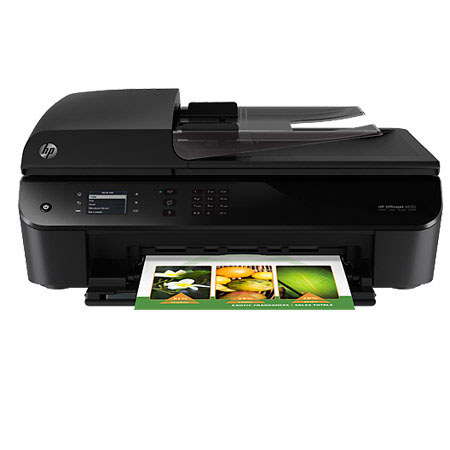
Command productivity for all your home office tasks with this powerful HP Officejet 4630 e-All-in-One Printer. Efficiently fax, scan and copy multiple pages hands free. Create lab-quality photos and laser-sharp documents with ease. Print wirelessly from mobile devices. It is ideal for tackling any home-office project efficiently, producing high-quality photos and documents, plus printing wirelessly from your mobile devices.