


This item is no longer available.
Review Summary
2017-06-22T20:00:00
I had this for a few years and then purchased one for a friend who doesn't use it via wifi. my wifi never worked even w/tech service no one seems to know why if you buy for Win 10, normal drive never worked. i had a printer friend who gave me the specific driver
printer4860

2010-04-23T20:00:00
Have had good results with HP so bought an all-in-one when upgrading. Much trouble getting software installed. Three calls to Tech support. More than 3 hours total on phone trying to make Tech understand my problems each time. Finally gave up and took printer back to Sam's and upgraded to Pro4500 model. No problems since.
dobeman
2010-04-22T20:00:00
Pro - easy setup, small printer doesn't use a lot spaces, low price. Con - WIFI doesn't support WAP2 encryption, tray doesn't hold a lot printer, little loud noisy while printing, the ink cartage come with used up real quick, on screen menu is little hard to use. In summary, it a low price office jet does all you need.
user37
2010-04-22T20:00:00
The printed user guide material is greatly inadequate. The quality of the printed output is only fair. The price of ink is high. It is noisy. On the other hand, the price of the machine when on sale is quite low. It also takes up little space for something that does so many things. It is a reasonable choice for a backup printer.
Revizor
2010-04-22T20:00:00
I do not feel the scanning function is as user friendly as it should be, otherwise this is a great product
MaggieMae03
2010-04-22T20:00:00
I'm really happy with the scan, copy and print options. I had a few problmes with having mutiple computers connected wirelessly but the tech support was awesome in fixing that. I haven't tried the fax yet, so I can't rate that function
CHS261Philly
2010-04-22T20:00:00
Nice printer at a good price. Print quality excellent. Sending a fax can be confusing until you get used to how to do it efficiently. Scan feature does a good job. Expensive ink.
mikboc
2010-04-22T20:00:00
i have been using hp printers for over 10 years and this unit has not let me down!
speze
2010-04-22T20:00:00
This printer is fast, but a bit noisy. We expecially like the option to print drafts. It is a great ink saver for use when high print quality is not necessary.
Alleycat44
2010-04-22T20:00:00
It goes through black ink very fast. It took a couple of tries to get it to go wireless. It was probably my computer; because I followed the steps both times. It does what I purchased it for.
Ken42
2010-04-22T20:00:00
This is a super All-IN-One Printer. Clarity is excellent. Speedy. And easy to use. Best HP printer I've owned, and I've owned quite a few, in business and at home.
Golfwally
2010-04-22T20:00:00
Excellent product. I had four machines connected wireless and working fine. Easy set up.
victorj
2010-04-22T20:00:00
Have had my printer for close to two years and it gets a heavy work out every week. It has been very dependable and almost totally problem free. Easily prints 500+ sheets a week without missing a beat, have had no problems with print heads, streaking, etc. It notifies me when it is running low on ink and generally is very low mainatenance. Would highly recommend it to anyone that needs an all-in-one machine that is capable of standing up to hard use over the long haul. The fax, copy and scan features are simple to use and produce an excellent quality product.
teamster
2010-04-22T20:00:00
Software increases temp files with no automatic removal. HP Support after many emails and telephone calls now state growing temp file is "normal" with HP printer software. Would not purchase unless you know how to manually remove Windows temp files not removed by Windows Disk Cleanup. After 60 days of ownership, have over 100 temp files.
DocDoc
2010-04-12T20:00:00
Shipping was fast and efficient. Easy installation. Has less than detailed printed instructions and manual read out on machine difficult to read, Excellent value for the price paid.
IHG942
2010-04-05T20:00:00
Bought this all-in-one machine when my old one died, and have been very pleased with its performance. Very easy to learn to use, great software with it that has allowed me to learn to use features I've been unable to figure out with previous all-in-one machines. Small footprint, fast printing, pretty good ink life--I think you'll like this printer (currently used in small one-person home office).
Doc945
2010-04-01T20:00:00
tryed to conect and could not geek squad told me I was the 5th person do not get if you want to be wireless
back
2010-03-29T20:00:00
I originally purchased this printer to print military evaluations from home and so my wife can print out pictures for scrap-booking...when and if this does print without errors it does a great job, however most of the time there are blemishes in the pages that are printed and this thing has also blasted through 2 ink cartridges in a little over a month and less than 200 pages. I hope there is just something wrong with this printer and I'm am trying to get this one fixed but seeing how this works I wouldn't recommend it to anyone.
YN2Mac
2010-03-25T20:00:00
this has been a long process to get this printer to operate on both my wife's and my portions of our computer a dell desk top). I still haven"t gotten it to print from my apple laptop.. It is a good printer with clear printing and wireless capabilities. I would recommend it to anyone who is technically sav vy,, as it is quite difficult to get it to work with a network or different operating systems.
scottofold
2010-03-25T20:00:00
The display that is used for set up is dim and the glass face is cloudy in spots making it very difficult to use. There is no instruction regard the keyboard. How does one shift from alpha to numbers and vice versa? There is no clue in the information that accompanies the device. There is no operating information for the use of the keyboard. The wireless connection will not accept a WPA code tor security settings. It only accepts WEP code. My router only allows WPA. The printer is very slow. Overall I am very disapponted in this device.
Rafael3
2010-03-21T20:00:00
This all in one seems to be a fair printer. My problem is in the software, it will not install on my desktop running XP. I was able to set the printer up wireless but the software would not complete the install. When i tried to configure the fax settings i get a message that no HP products were detected. I even downloaded the complete install and drivers (273 MB) but that did'nt work either. If i try to install with the USB the software will not find the printer. I have had this printer for a total of five days now and i cant get it set up on XP so i am in the process of packing it up to return it.
Colez
2010-03-21T20:00:00
I love my all in one printer. It was a great price for all that it does. AT&T Uverse tried to tell me that I would need to get a land line for the faxing. This was not true. You only have to get a spliter for the telephone cord and fax cord. Also, you can't be on the telephone at the time you are using the fax machine. It's a little loud but, overall it was well worth the money!
Ladyluck
2010-03-21T20:00:00
I use and have owned exclusively HP products for 10 years. This printer is the first of all the HP electronics owned to ever give me a problem. 1. The printer uses Massive amounts of Black Ink. In a few months I have used 4 XL Black ink Cartridges to 1 color. I have maybe printed at most 100 pages out of this printer since I've owned it. So although the printer is only $130. Be prepared to spend over $300.00 a year on BLACK ink. 2. Paper does not feed correctly. You can have 50 sheets or 10 in the tray and it will not grab the paper.
Aine
2010-03-13T19:00:00
The printer arrived in short order and fine shape. The installation/setup directions were clear and worked perfectly. The unit came with a cable...an item I thought the unit description said was not included. The supporting documentaion was clear and helpful. The unit has perfomed efficiently, quitely, and without problem. In being quick, the printed pages sometimes drift off the tray and onto the floor. It was a great value for me.
TACinKy
2010-03-12T19:00:00
This machine is no good. I have had nothing but trouble since getting it. The wireless feature has been an on again, off again situation. Constantly have to reload software to keep the wireless function working. Now I have an error message that the feeder does not work. I am supposed to reclose the door firmly in the middle and that does nothing. I am going to check customer service, but I assume it has an abysmal warranty. Would not recommend this to anyone!
Dellnd
2010-03-11T19:00:00
Printer performance including the All-In-One features is as expected for an HP product. BUT, the wifi is difficult even for an informed user if the user's network varies even slightly from that expected by the setup. Overall a great printer but perhaps not for setups that use a wifi router as an access point. My wife's new printer is now tethered to her laptop with a USB cable waiting for me to have a stroke of genius to make it work wirelessly.
MyComputerTrials
2010-03-09T19:00:00
This is a great printer but the driver won't stay on Windows 7. I've dropped the driver 3 times in 3 weeks
gtsp
2010-03-08T19:00:00
The printer itself is a good printer. The problem we have had with both our 4680's is HP's printer software and the wireless conection. The solution center appears to have problems with WIN 7. Hopefully an update will be forthcoming to solve this problem. After that time this will be a very good system to work and print with.
BWD3
2010-03-08T19:00:00
I got this printer a few months ago and it works fine. Had a little trouble setting up the printer, but that was my computer's fault-- not a HP problem. My only real complaint about this product is that it is pretty loud when it prints on the standard settings.
wshutt
2010-03-08T19:00:00
A lot of times the printer does not print all of the document from Microsoft Word. It leaves part of the information off.
DRIC
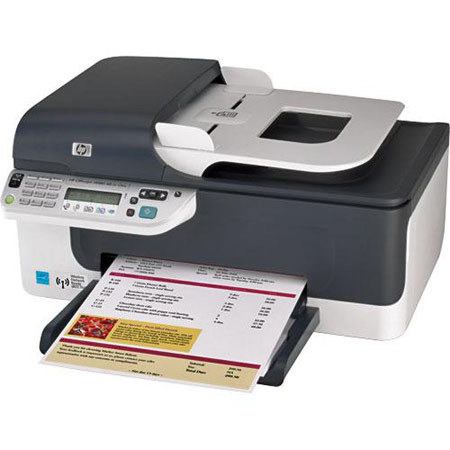
Enjoy the convenience of wireless connectivity with HP Officejet J4680 All-in-One. You'll be able to print, copy, scan and fax all from one device, plus print at speeds as fast as 28 pages per minute in black and 22 in color. And with the HP Officejet inks, you'll get high-quality printing at a lower cost per page than with a laser printer.
Join VIP PRO
Earn 2X Points + Exclusive Perks!
Request a Callback
Chat one-on-one with an expert
Sell or Trade your Gear
Get started in 3 easy steps