Overview
Compare
Accessories
Specs
Protection

Reviews about this item

Review Summary

2017-05-16T20:00:00

Rated 4 out of 5

Fast and trouble free.

No ColorLok card stock is available. That?s disappointing. Especially when it is hard to get a good image without ColorLok paper. It is good on self maintenance. But it is obviously engineered for ColorLok paper and the choices are abysmal. The ColorLok website invites you to communicate, BUT NEVER EVER ANSWERS! That sucks.

Smedley

2015-05-11T20:00:00

Rated 2 out of 5

Many defects

Overall a very disappointing product. We purchased this printer to print nice full color marketing pieces, only they are more often than not unusable due to color streaks. This is despite paying up for HP's branded glossy inkjet paper. Additionally, the printer refuses to recognize the main paper tray, so instead of the ream of paper we thought would be used, we have to load small amounts into the front loader each time we want to print. Perhaps MOST FRUSTRATING however, is the printer's inability to detect that it has been loaded with paper. LITERALLY every single time we print, despite paper already being loaded in both the main feeder and the front loading area, the printer doesn't begin printing until you walk over to the printer and physically hit "OK" on the screen (in response to the prompt that the printer is out of paper). As soon as you hit OK, it prints, without any other action. Very annoying, especially for a wireless printer where people from across our office have to walk over to hit OK before their print job.

ChiClear

2013-11-16T19:00:00

Rated 3 out of 5

Interesting

I bought this printer for my in-home business. If it is possible, I would recommend you look at it and try it in a store before making a decision to purchase online. I didn't have that opportunity, so this review is to help others who are trying to sort out the online information. I was unsure where tray #1 was because it isn't shown in the photos. It is a lift down tray on the left side that holds approximately 50 sheets (about 1/4" of paper) and increases the width of the printer by about 9" with legal size paper loaded into it. Tray #2 is a disappointment because it won't hold anything larger than letter size. Neither tray will handle paper wider than 81/2". After setting it up, I recalled the information mentioned a 3rd tray option, but I couldn't find it on the website. After talking to several people at HP, someone in one of the parts departments was able to determine this can only be purchased through resellers and gave me the part number. An internet search revealed the average cost is around $200.00. It weights over 11 pounds and will add a little over 6" to the height. I haven't bought it yet, so I don't know how easy it is to program and use. The printer's software is similar to the software that at one time was standard in HP printers. You can pre-set print jobs with a short-cut icon, however, the default short-cut won't always communicate with all programs and websites like it did in the old days. This means you still need to check the preferences before printing every job which can be time consuming if you do a lot of single page printing from multiple sources. As advertised, it does print fast. It has a smooth sound, but, it's not quiet. It also cycles a lot and some of these are quiet while others are noisy. Since the print-out tray is on the right, it's more difficult to find a comfortable place to put it on a desk-top, especially with tray #1 extended. In addition to being able to reach the print-out tray, there needs to be plenty of room to access the left side tray, see the screen on the left and pull out the front drawer. There is plenty of space under the print-out tray and behind the screen to store paper, envelopes, etc. I don't know about ink consumption yet, but there is no "draft" printing feature anymore. The lowest setting is now called "General Office". I had one paper jam in tray #1 which I was able to undo because the paper didn't tear, but it wasn't easy. The screen showed me where to go to clear the jam, but there isn't much room to work and visibility is poor. This is also something to consider when deciding where to place the printer. Set-up with a USB cable was easy, but the instructions didn't mention when to plug in the cable. I only print from a computer, so I can't comment about using other devices. However, I do print a mix of text and photos onto regular paper and the quality is sufficient for my work. All in all, it's an interesting printer, but it is bulky, heavy, and in my opinion, a bit too pricey, especially if you need to purchase the 3rd tray in order to have a quantity of different paper readily available or to decrease the width of the printer. It's best feature is it's speed and, hopefully, low ink costs.

Karoline

Select a plan in the Add Protection section above and purchase with this product by clicking “Add to Cart”.

image-protection

TRUSTED PROTECTION PLANS, EXCEPTIONAL SERVICE.

Invest In Your Gear and Peace Of Mind!

Accidents happen where life happens. Protect your favorite Adorama products and purchase a protection plan to stay covered from accidental damage, mechanical or electrical failure, and more.

Repair or Replacement

Repair or Replacement

If we can’t fix it, we’ll replace it at no additional cost.

Accidental Damage

Accidental Damage

Protect your product from drops, spills, and more.

Peace of Mind

Peace of Mind

Enjoy your gear without fear. We have you covered!

Malfunction Protection

Malfunction Protection

When regular use of your product over time results in mechanical or electrical failure.

Zero Deductible

Zero Deductible

We will never charge you a deductible after the purchase of a plan.

Customer-Focused Support

Customer-Focused Support

Our claims process is simple & easy and our customer service team is happy to help.

Adorama Protect powered by Extend is available for purchase to customers in the United States. Not available for purchase Internationally or in U.S. Territories.

HP X551dw Specifications

  • Print speed black

    ISO Laser comparable: Up to 42 ppm
    Draft: Up to 70 ppm

  • Print speed color

    ISO Laser comparable: Up to 42 ppm
    Draft: Up to 70 ppm

  • Print quality black

    Up to 1200 x 1200 optimized dpi from 600 x 600 input dpi

  • Duty cycle (monthly, A4)

    Up to 75000 pages

  • Print technology

    HP Pagewide Technology with pigmented inks

  • Print quality color (best)

    Up to 2400 x 1200 optimized dpi from 600 x 600 input dpi

  • Display

    10.9 cm CGD (Color Graphic Display), touchscreen

  • Processor speed

    792 MHz

  • Number of print cartridges

    4 (1 each black, cyan, magenta, yellow)

  • Print languages

    HP PCL 5c, HP PCL 6, native PDF, HP Postscript Level 3 emulation

  • HP ePrint capability

    Yes

  • Mobile printing capability

    HP ePrint, Mobile Apps, Google Cloud Print, HP ePrint Wireless Direct, Apple AirPrint

  • Wireless capability

    Yes

  • Connectivity, standard

    2 Hi-Speed USB 2.0 Host
    1 Hi-Speed USB 2.0 Device
    1 Ethernet 10/100 Base-TX network
    802.11 b/g/n Station
    802.11 b/g Access Point

  • Connectivity, optional

    Support the following external Jetdirect servers
    Print only: HP Jetdirect en1700 External Print Server (J7988G), HP Jetdirect en3700 Fast-Ethernet External Print Server for Network Capable Hi-Speed USB 2.0 Peripherals (J7942G), HP Jetdirect ew2400 802.11b/g wireless and Fast Ethernet external print server (USB 2.0, 10/100Base-TX, 802.11b/g) (J7951G), HP Jetdirect ew2500 802.11b/g Wireless Print Server (J8021A)

  • Minimum system requirements-1

    Windows 8, Windows 7: 1 GHz 32-bit (x86) or 64-bit (x64) processor, 2 GB hard disk space, CD-ROM/DVD drive or Internet connection, USB port, Internet Explorer; Windows Vista: 800 MHz 32-bit (x86) or 64-bit (x64) processor, 2 GB hard disk space, CD-ROM/DVD drive or Internet connection, USB port, Internet Explorer

  • Minimum system requirements-2

    Windows XP (SP3) or higher (32-bit only): any Intel Pentium II, Celeron or compatible processor, 233 MHz or higher, 750 MB hard disk space, CD-ROM/DVD drive or Internet connection, USB port, Internet Explorer 6 or higher; Linux: For more information, see hplip.net; SAP: For more information see hp.com/go/sap/drivers;
    Mac OS X v10.6, OS X Lion, OS X Mountain Lion; Intel Core Processor; 1 GB available hard disk space; CD-ROM/DVD drive or Internet connection; USB port

  • Compatible operating systems

    Windows 8, Windows 7, Windows Vista, Windows XP (SP3, 32-bit), Mac OS X v10.6, Mac OS X Lion, Mac OS X Mountain Lion

  • Memory card compatibility

    No

  • Memory, standard

    512MB

  • Memory, maximum

    512MB

  • Paper handling input, standard

    500-sheet input tray
    50-sheet multi-purpose tray

  • Paper handling output, standard

    300-sheet face-down output bin

  • Duplex printing

    Automatic (standard)

  • Envelope input capacity

    Up to 37 envelopes

  • Borderless printing

    No

  • Media sizes supported

    Tray 1: A4; A5; A6; B5 (JIS); B6 (JIS); 10 x 15 cm; envelopes (B5; C5; C6; DL); Tray 2: A4; A5; B5 (JIS); envelopes (B5; C5; DL); Tray 3: A4; A5; B5 (JIS)

  • Media types

    Plain paper (light, intermediate, mid-weight, heavy, extra heavy, prepunched, recycled, bond, other inkjet plain paper); HP Advanced Photo papers (glossy, gloss, soft gloss, satin, matte, other inkjet photo); envelopes; labels; cards; HP Brochure Matte; and other HP inkjet specialty paper (glossy brochure, matte brochure, tri-fold brochure, Hagaki, greeting cards, other inkjet specialty paper)

  • Power

    Input voltage: 100 to 240 VAC (+/- 10%), 50/60 Hz (+/- 3 Hz)

  • Power consumption

    100 watts (maximum), 70 watts average (printing), 9.5 watts (ready), 4.5 watts (sleep), 0.95 watts (auto-off), 0.2 watts (manual-off)

  • Energy efficiency

    ENERGY STAR qualified

  • Dimensions (WxDxH)

    517x399x414 mm / 20.35x15.70x16.29"

  • Weight

    17.1 kg /37.69 lbs

  • UPC Code

    887111508034

8 Accessories for HP Officejet Pro X551dw Color Inkjet Printer, 42ppm Black Print Speed, 1200x1200 dpi Resolution, 75000 Pages Duty Cycle, 500-Sheet Input Tray

  • All Accessories (8)
  • Ink & Toner (2)
  • Cables & Adapters (4)
  • Care & Cleaning (1)
  • Legacy Paper (1)

About HP X551dw

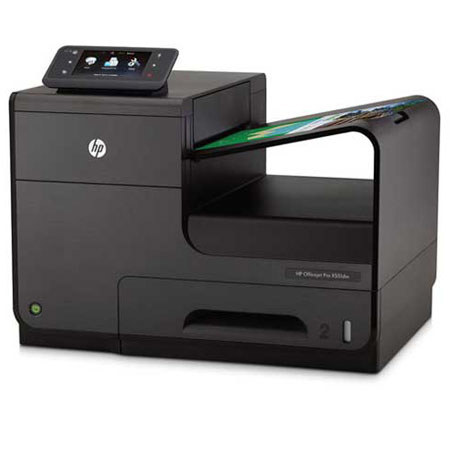
The HP Officejet Pro X551dw Printer features boost workgroup efficiency with this high productivity, next generation wireless printer. Print professional-quality color at up to twice the speed and half the cost per page of color lasers using HP PageWide Technology.

It is ideal for small to medium-size business work teams that need professional-quality, low cost per page printing at breakthrough speed, with the flexibility of wireless/mobile connectivity, touchscreen access and web-based printer management.

HP X551dw Features

  • Print at up to twice the speed of lasers with the same HP PageWide Technology used in top-end digital presses
  • Certified by Guinness World Records as the world's fastest desktop printer
  • Get more done with productivity-enhancing features including new General Office mode (70 ppm) and duplex printing
  • Access print tools and tasks quickly and easily via the inituitive control panel and large color touchscreen
  • Control settings and monitor status remotely with industry-leading management tools like HP Web Jetadmin
  • Stay productive - print up to 9,200 pages per cartridge and load up to 1,050 sheets at once with the optional paper tray
  • Choose HP for reliable workgroup printing - designed for volumes of up to 4,200 pages a month
  • Add this high performance printer to your wired or wireless corporate network for enhanced workgroup efficiency
  • Share the performance across workgroup members using notebooks, tablets and mobile devices - even with no network or router
  • Enjoy the flexibility of being able to print from smartphones or tablets from virtually anywhere with HP ePrint
  • Walk up and print files directly from your thumb drive using the easy-access USB port
  • Control your costs - ENERGY STAR qualified device uses up to 50% less energy than color lasers
  • Save up to 50% on paper with automatic two-sided printing and maintain efficiency at breakthrough speeds
  • Conserve resources, using Original HP pigment inks that require less packaging than toner cartridges
  • Reduce your impact - easily recycle your Original HP ink cartridges for free through HP Planet Partners

Key Features

  • Certified by Guinness World Records as the world's fastest desktop printer

What's in the box:

  • HP Officejet Pro X551dw Printer
  • HP 970 Setup Black Officejet Ink Cartridge (Yield: 2400 Pages)
  • HP 971 Setup Officejet Ink Cartridges (Cyan & Magenta & Yellow) (Yield: 2500 Pages)
  • Power Cable
  • 500-Sheet input tray
  • 50-Sheet Multi-Purpose Tray
  • HP 1 Year Warranty