



This item is no longer available.
Review Summary
2013-01-16T19:00:00
THE HP6000 IS A GREAT PRINT BUT THE REFIRB I GOT DOES NOT WORK....I HAD TO BUY ANOTHER PRINT HEAD AND STILL DIDN'T.....BUY NEW ONLY....THIS COMPANY NEEDS TO TEST THEIR REFIRBS BEFORE SELLING THEM....
MAD H.
2012-06-19T20:00:00
Good but a little noisy.
zippo99

2012-06-15T20:00:00
An excellent printer for the price. Had one previously and it finally failed after a couple of years. Since the price from HP was so low just bought another one rather that try to fix.. Worked right out of the box.
DoveBoyz
2012-06-01T20:00:00
Because my wireless access point uses MAC filtering, it took me literally hours to successfully get the printer installed on my network. The setup instructions mentioned MAC filtering VERY briefly, but didn't include any information on how to obtain the printer's MAC address. Using documention from HP's website, eventually I was able to work it out, but it took multiple attempts at installing the software and many rebootings of the PC, printer, and wireless router. By comparison, my wireles Brother laser printer was much easier to install. After installation I was able to remove the HP bloat-ware because Windows 7 certainly didn't need all of that junk. The good news is that once installed, the printer functions very well and we're quite satisified with the print quality. Except for the wireless installation issues, I'd rate the printer as a good value.
PDXRob
2012-05-31T20:00:00
I bought this for my mom because she had an old 722C HP printer, and we just updated her computer to a new one. The old one only had 512 memory and was to slow. I needed to get just a simple printer, but one she could see. She has glaucoma and tunnel vision and no peripherial vision. So the buttons were easy for her to see. So far she is very impressed with it. The price was great, and I found some online discount coupons as well. I like the fact the printer shell wasn't all black and it was easy to set up. So ar, no complaints.
sjhirvine
2012-05-29T20:00:00
we use this printer as a network printer and it works fine until it goes into standby and then it disconnects from the network. We have a couple of computers on our network not located next to the printer but in another part of the house, but if you want to print you have to go to the printer to make sure the wifi is on and it is not in standby mode. Called HP and they say there is no way to either extend the time before it go into delay (seems like it's only about 5 - 10 minutes) or turn off the delay feature. I looked in all of the docmentation and never saw anything about standby mode other then it goes into it. If I had know that we couldn't control that feature we would not have purchased this printer but bought one that we could turn off the standby mode or at least extend it.
12rcals12
2012-05-18T20:00:00
This wireless printer does not work with the new iPad we recently purchased. That was the reason for this purchase.
Artur
2012-05-02T20:00:00
I purchased this printer at the HP website. I appreciated the great value in price. The printer was delivered very fast!! I had both my wife's laptop and my laptop linked with the wireless network in under 20 minutes. No problems at all. The printer is extremely quiet and the result is great. Highly recommended product.
donmar
2012-05-01T20:00:00
I have owned more than a couple of printers since the advent of the home computer and I always come back to HP. I have owned other brands and have always had probems down the road. Not with the HP brand! This printer is easy to set up and delivers as advertised right out of the box. My wireless operation has been solid. The large paper tray is a bonus. The color is excellent; the black is crisp and clear. I have yet to try the double sided printing. No need! I have three other HP printers all still functioning. There must be three or four 'other brands' of printers gathering dust in my garage, waiting to be recycled. HP does printers!
Ebach
2012-04-30T20:00:00
I Run an insurance agency in Ypsilanti MI, and I Print between 100-200 documents alone each day. So I would exspect to have a printer which prints very fast and at high quality. When printing normally, its fine but when it is at its fastest setting, it makes a little ill when looking at the paper. The lines are not straight and they are a little wavy.
iceman99h
2012-04-19T20:00:00
"Ad-hoc" wireless communication between printer and Pavilion dv7 laptop was inoperative...on-line chat representative (after an hour of trouble shooting) recommended purhase of $75 router. I used USB cable included with printer to solve printer/laptop communication problem.
noadhocman
2012-04-19T20:00:00
Every easy to set up and the price was excellent.
Donan
2012-04-16T20:00:00
This is the worst printer I have ever owned. First, when trying to print something, the components of the printer move around for about five minutes before it actually begins printing something. Then, it does this for about five minutes after. It's extremely noisy and there's no reason it should be doing anything once it has completed the print job. Second, it does not print well in color. After constantly being out of ink, I finally decided to change all 4 of the ink cartridges hoping that I would finally be able to print in color. However, this is still not the case. When it prints in color it is just streaks of different colors. And, it does this for black and white now. So it is impossible to print any images from this printer because it has red streaks going through it. Finally, this printer does not have any extra features that would make this worth buying. It is extremely large, yet it does not have a printer or a scanner. To sum it up, there is absolutely no reason anyone should purchase this printer, as it will only cause headache and waste your money.
HPPrinter
2012-04-07T20:00:00
I wanted a first-class HP printer to use for printing only. This is absolutely perfect----fast, perfect color, works instantly. I recommend it and rate it as a quality product that never fails to work for me.
OHIOAN
2012-03-21T20:00:00
Nice compact printer. Prints clean and loads print job fairly quickly. Does not print as fast as my ProK5400, but its still not bad. I like having the wireless and plug in as my office computer is plugged in, but my lap top can be anywhere in range and still print. Photos also come out clean and nice. A good machine for the money.
MarkL
2012-03-21T20:00:00
The printer is everything I expected it to be. I knew that it was quality since it is Hewlett Packard. Easy directions -had it working in minutes. Ordered direct from HP and it came before scheduled delivery. (my laptop also came early) I found the best prices on their website and would certainly encourage anyone to order from them. Thank You HP.
Frankpross
2012-03-11T20:00:00
i had a old laptop, a acer, this wireless printer worked good. now i upgraded laptop with a h/p win7 and i had to do nothing the computer noticed the printer and printed with no problems, now one month later it wont work, i tried to delete the old printer, and install with the cd, wont do it.. now the printer passes everything on the printer, but nothing on the lap top, i have to hook it up with the cord, WTH the wireless wont work
dennis42129
2012-03-04T19:00:00
Good overall general purpose duplex printer!
Backwoodscracker
2012-02-28T19:00:00
Previously bought HP Officejet 6000a (not wireless) and have been completely satisfied. After setting up home wireless network, decided to purchase a wireless printer and because of experience with the HP 6000a went with the HP Officejet 6000n (wireless printer). This decision also helps with keeping ink available since they both use the same product.
Sandman616
2012-02-01T19:00:00
This printer randomly quits printing and has to be re-installed on my computer often. It has a lot of unexplained quirks.
beekay
2012-01-28T19:00:00
So far, my printer works great. I haven't used its wireless feature so I hope I'll be pleasantly surprised. It makes great copies. Now, as others have noted, it's very noisy and shakes. It's also a bit larger than expected even though I measured and it is true to its dimensions. It just seems clunky. Overall, for my personal use, it's a good, reliable printer!
klw1
2012-01-24T19:00:00
Date of Post, January 25th: Purchased this printer on January 22nd at Office Depot. Unpacked, followed wireless connection instructions (to my ATT UVERSE Wireless Network), FAILED. Followed all troubleshooting instruction over and over again and could not get the printer to find what is an operating (lap tops connect) wireless network. Very frustrating and spent hours tryiing to figure this out. Now trying to return to place of purchase but unfortuantely receipt is misplaced. We shall see what store comes up with but right now I would not recommend this low cost wireless printer. Not easy to install at all.
GARPAR
2012-01-22T19:00:00
This is a basic deskjet printer for under $100, so you can't expect too much from it. It's not the fastest to start printing, and it took some extra effort to get it installed on my new Windows 7 HP desktop (something wrong with the driver on the CD, so I had to download some HP uber-driver program, which BTW was awesome). I can't help thinking that these printers are so cheap because you end up paying for them with their very pricey ink cartidges (kind of like buying a $400 iPhone for $50 as long as you sign a 2-year contract). But HP has occasional discount ink offers, and anyway, their printers are *so much* better than Dell's!
Acier
2012-01-20T19:00:00
I recently purchased 2 HP wireless printers. The 6000 and the 6500 and both are JUNK! I have had nothing but problems since the day I hooked these up (at 2 locations) on to my wife's HP Laptop (which is also junk by the way). Spend the extra money and find a good wireless printer!! The 6000 had a print head failure after a few months of operation and is no longer repairable. Both printers sounds like a blender is running when it is "Attempting" to print! Absolute JUNK!!!! Waste of Money!
BobHatesHP
2012-01-19T19:00:00
The Officejet 6000 provides an inexpensive means of printing quickly and clearly. If there is one downside, the time the printer takes to dry a page prior to printing on the reverse side appears excessive.
RobertR
2012-01-12T19:00:00
This printer is on a par with the HP printer I purchased in Europe in 2004. It is very good and fast. It replaced an HP printer (DeskJet 4360) which was absolutely the worst printer (hardware and software) that I had ever had. It is a relief that HP is still making quality products. I almost purchased from another manufacturer.
ABCDdfj
2012-01-08T19:00:00
Very easy to set up.
surveyorbill
2011-12-19T19:00:00
I bought this Officejet 6000 about a year ago, wireless and LAN ready. Hooked it up hard wire to my network and it works great. I see a lot of negative reviews on the site, but I have experienced none of these issues. Never had a single paper jam with this printer. Works well with papers and envelopes. The only incident I have had is that it doesn't seem to print the old fashioned smaller envelopes, not #10 business envelopes, but, I believe, the 5 inch size. So, if that is important to you, this printer won't work. The 'print on both sides of paper' feature has worked flawlessly for me and I do it a lot. I have printed color 5X7 index cards as well. This was my first home network printer and I love it. rwj 2011.
Stickler
2011-12-14T19:00:00
I bought this printer to replace my 6122 because the 6122 was not compatible with Windows 7. The 6000 wireless prints great when it feels like it. The cons are: It tells me it's out of ink when it's not. It feeds multiple sheets at the same time. Paper jams constantly. And the latest, I put in a new cartridge and now the printer carriage just sits and clicks. I've tried all the troubleshooting suggestions and it still won't work. I get a message that there is a general printer problem. Can't fix it so I'll have to buy another printer. Why can't we get a good printer at a reasonable price? I really don't like buying a new printer every two years, less in this case. It's only 16 months old. I think I got a lemon.
dollymayb
2011-12-13T19:00:00
Printer makes more noise than my previous 6122 but seems to do a decent job. I purchased this unit for its duplexing capabilities, however, it does take some strange set up choices for it to print in this format. In the layout section one has to turn off the two-sided setting but in another place have it on. If both settings are set for two-sided, larger top and bottom margins are used and the type is squished to fit between these reduced margins. Once the tricks of setting up the printer correctly are learned it works just fine. Quality of print is excellent and speed is good. It serves me primarily as a back up printer. The option of wireless printing is fantastic and worth the purchase. What amazes me that replacement ink costs almost as much as the printer's total, delivered cost. HP inks have always been great and, therefore, I stay away from cheaper generic brands. Ordered the unit from HP one day and had it delivered the next day!
revrwc
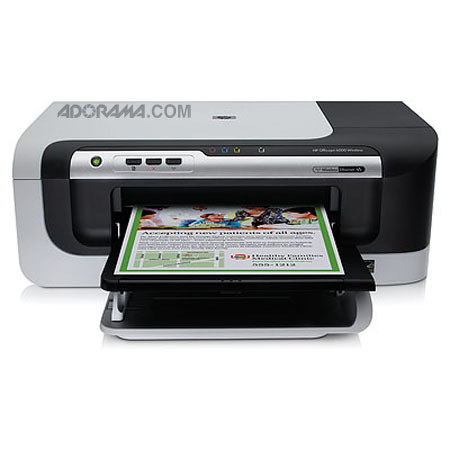
Improve the speed and efficiency of your office work with the HP C9295A Officejet Pro 6000 Color Inkjet Printer. You'll get professional-looking documents for a cost of up to 40% less per color page than with laser printers and you'll use 40% less energy. The HP C9295A Officejet Pro 6000 Color Inkjet Printer delivers maximum print speeds of 32 ppm black and 31 ppm color. Lose those printer cables and share resources with wireless 802.11g networking. Make your office printing more efficient with the wireless HP C9295A Officejet Pro 6000 Color Inkjet Printer.
Join VIP PRO
Earn 2X Points + Exclusive Perks!
Request a Callback
Chat one-on-one with an expert
Sell or Trade your Gear
Get started in 3 easy steps