2023-01-26T19:00:00
Rated 1 out of 5
Terrible!
Does not work after 3 months!!! No drivers supported on Windows, won't print from iPhone - says no printer found or OFFLINE while blue Wi-Fi fully lit in printer! Utter trash!! So disappointed & waste of so much time troubleshooting with no resolution!!!
Tad123
Originally posted at

2022-05-10T20:00:00
Rated 1 out of 5
Poor Longevity
I cannot recommend this printer. I have had the unit for 5 years and used it for small business purposes. The color ink quit working on Year 2 even though replacements were always made with HP ink. The print head began having issues in Year 4, and now on Year 5 it takes half an hour of fighting with it each morning between paperjams (from properly loaded quality paper) and printing blank pages from a well-maintained printhead with HP black ink. Not a good long-term investment.
Jessica12
Originally posted at
2021-08-10T20:00:00
Rated 3 out of 5
Short Life
Great printer while it worked. but only lasted 2 years. Blue won't print. Tried all maintenance options and 3 new cartridges. Nothing helped. No one will work on them and if they did would cost more than the printer cost. Going to have to buy another new one. Should last longer than 2 years in home use. Disgusted.
Already n.
Originally posted at
2021-05-20T20:00:00
Rated 1 out of 5
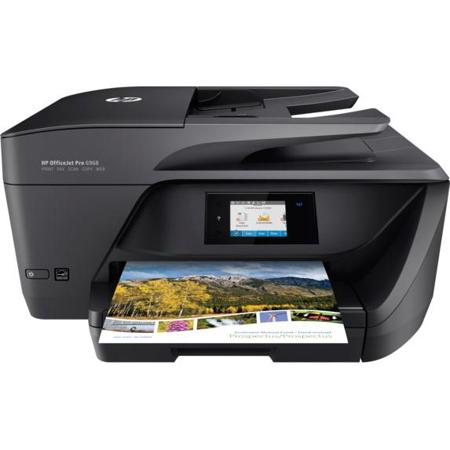
HP OfficeJet Pro 6968
Purchased a while back and ran out of ink. Bought LxTek replacement cartridges, but latest HP firmware upgrade wouldn't allow me to use non-HP cartridges. Shame on HP. I will never buy another HP printer again. Thank you.
Steamboat22
Originally posted at
2021-04-08T20:00:00
Rated 1 out of 5
Worst Experience with a Printer
This printer has been so bad. I've had it for not even three years and I'm having to replace it because it won't print color at all anymore. I've had techs work on the issues with me, but that has ended with them saying it needs to be replaced. Before the color printing issue, the touch pad never worked properly, and copying using the glass scanner stopped working after about a year. The HP printer I had prior to this one lasted probably just under 10 years, and I think it was my fault that it stopped working in the end, so my experience with that one is the only reason that I'm going to try HP again for this next printer purchase. I?m hoping that the quality I?ve experienced is the norm and that this was just a bad model.
kgram
Originally posted at
2021-03-06T19:00:00
Rated 1 out of 5
Going to landfill
Less than 200 pages printed and hours and hours of online trying to fix and this garbage is going to a landfill
Mad 1.
Originally posted at
2021-02-15T19:00:00
Rated 1 out of 5
Fatal error shortly after a year.
When I first unboxed it, the printer worked fine and was easy to set up. Now, a bit over a year after getting it, it got an error code and stopped working -- in short, the parts inside aren't moving correctly, it says it was improperly shut down each time it's turned on, and it insists there is a paper jam when there is none. I rarely used the printer before it got this error. I checked HP support forums and many others experienced the same issue with no working fix by the company. My warranty expired a year after purchasing, so now this is essentially a brick that cost me over a hundred bucks. In these times (early 2021) I do not have money to waste on buying a replacement. HP ripped me off and I am not buying from this company again.
Eric2468
Originally posted at
2021-02-11T19:00:00
Rated 5 out of 5
Works great
Bought this to replace older HP printer and really am pleased with this printer
JD350
Originally posted at
2021-01-25T19:00:00
Rated 1 out of 5
Worst Printer In the World
The ink will run out after like 20 sheets. The printer is always begging for attention with notifications and pop ups and loudly preforming maintance. It's not a subtle easy streamlined piece of machinery. I find myself feeling lucky when it works. That's not an ideal thing for a printer. The user interface touchscreen is atrocious. It's honestly just a piece of rubbish's.
annoyedcustomer1
Originally posted at
2020-12-02T19:00:00
Rated 2 out of 5
Black Ink Problems
Just wanted to provide some feedback in frustration:
Pre-pandemic:
o I primarily printed at work and my HP OfficeJet Pro 6960 was VERY rarely used/
o The HP OfficeJet Pro 6960 had 50-100 pages printed at most over a 2 year period) and was in mint condition (kept in an office with little traffic, virtually no dust, far from any direct sunlight, etc).
During the pandemic:
o the header for black ink stopped working (C,Y,M colors work just fine).
o Thinking either a problem with the black ink supply or headers, I
-subscribed to Instant Ink,
-changed out the black ink cartridge two times,
- Tried clearing the header using "Clean Printhead" and "Test Printer" print functions 10 times.
o Tried contacting support, but the product was barely out of warranty despite being in mint condition.
o Tried changing out the black ink cartridge one more time,
o Flushed the header out a total of 5 times (until it was crystal clear a couple of times).
o I printed well over 100 pages. 80% of the time using "Clean Printhead" and "Test Printer" print outs (which all are decremented against my Instant Ink page count quota).
o Meanwhile, the header for black ink stopped working (C,Y,M colors have always worked just fine).
o I am now in search for a new printer...
Note: On this model, the header cannot be easily removed for cleaning as in older models, making you rely on HP Printer support if you want to manually repair it. The features are nice, but reliability is terrible!
gasman009
Originally posted at
2020-11-16T19:00:00
Rated 1 out of 5
Stopped printing with black ink after update
This printer stopped printing with black ink after firmware update. I do not recommend this product.
Backinblack_nope
Originally posted at
2020-11-09T19:00:00
Rated 1 out of 5
Stay away
I have a 8600 at home "GREAT." At work they use several 6968 and they are all Garbage. You can print from the one at your desk, ten seconds later try and scan and it jumps to the printer down the hall. The only thing worse are the HP cartridges that it accepts 1/2 the time. I have better luck with off brands. I never write reviews but felt that I had to warn everyone.
CEO61
Originally posted at
2020-09-02T20:00:00
Rated 2 out of 5
Second One, Stops working within 2.5 years!
Purchased first HP printer in 2016, worked great until a year and a half later when it simply died with no warning (stopped printing multiple ink colors... started with the black one). Purchased second HP printer (6968) in 2018. Here we are mid-2020 and viola... same issue (suddenly black ink will not print at all). Have done all the suggested troubleshooting (reset, cleaning, etc) to no avail. Rep then suggested 'other support options' which will result in me paying 'repair' prices higher than just purchasing a new printer (again) or 'utilizing the great one year warranty' (yea, right) if deciding to purchase a new HP product. Quick internet search shows me I'm not alone with this issue (seems to be common with this printer). Do better HP!
MzMimi
Originally posted at
2020-03-20T20:00:00
Rated 1 out of 5
Worst Printer/multi use machine I ever had.
This multipurpose machine would be a decent machine; however almost everytime I turn it on, it runs a maintenance check, which takes about 5 minutes or longer(so you better not be in a rush). During this time it also runs through a sheet of paper and spits it out each time, and half of the time, when it runs through a sheet, it gets jammed, and must be removed. I have never had a machine do this all the time!! I would never buy this again, and the only reason I have kept it is because we have a lot of ink to go through before taking the sledgehammer to it.
Voice O.
Originally posted at
2019-12-07T19:00:00
Rated 1 out of 5
HP 6968 Just Bad
Bought this with a new Mac and have had problems with it from the start. The scanner never wants to scan properly and HP’s solution is pull the power cord out and then replace it. It fails to fine the computer on WiFi constantly and drinks ink like water. The warranty will run out and you will be stuck with a machine that just prints, just like one you could buy for half the price. if you want an all in one that o ly functions, most of the time, as a printer, buy this. But if you want what you are buying an all in one device to print, scan, copy and fax, do not buy this, you’ll just be wasting your time and money. Buy a simple print only machine instead of this, they do exactly the same thing.
Jurispuris
Originally posted at
2019-11-11T19:00:00
Rated 3 out of 5
Had better HP printers
Printer keeps having network issues as well as printing blue; it's usually pink or purple. Always had HP printers without issues, usually love them, but this model was definitely a lemon.
Programmer519
Originally posted at
2019-10-01T20:00:00
Rated 1 out of 5
Poor Advertising
Sold as being able to do two-sided printing with a duplex unit and ADF. As it turns out it can print, but not copy or scan two sided documents. They should be a bit more upfront with this, now I have a machine that does not fit my needs.
JN_Consumer
Originally posted at
2019-09-20T20:00:00
Rated 4 out of 5
Best printer I've ever owned!
Printer was very easy to install and met my expectations for functionality and ease of use. Definitely worth the cost!
sedwa
Originally posted at
2019-09-02T20:00:00
Rated 1 out of 5
Waste of time
I purchased this printer after Harvey becuase of the features listed in the box.
I only print one or two pages once or twice a week, bit every time I need to print something, the printer takes longer doing maintenance than printing my paperwork. Waste of time waiting on your printouts.
Maintenance
Originally posted at
2019-08-25T20:00:00
Rated 1 out of 5
DO NOT BUY!!!
...and if someone gives it to you, ask them why they hate you! It's no wonder they discontinued this garbage! Where to begin.. First, I was in a hotel and couldn't connect it to the hotel wifi because it had a web based login, so I tried to connect it to my HP Probook hotspot, and failed. Contacting HP support about this was futile. I was unable to connect my HP printer to my HP computer's hotspot. Yet, I was able to connect both through my Android phone's hotspot. Don't ask, because I don't know, it's as stupid as it seems. Next, if you think you're just going to print up something real quick on your way out the door, think again while you wait ten minutes for it to run through it's annoyingly frequent maintenance process. Finally, when the paper jammed and I couldn't get it out without taking it apart by removing screws, I just went Office Space on it and put myself out of its misery. All the bells and whistles are hardly worth the hassle of printing with this worthless junk, I threw it away, and I'll never buy another HP printer.
TL F.
Originally posted at
2019-08-13T20:00:00
Rated 1 out of 5
could NOT get it to work with my devices
I bought this because i need it for school and i could not get it to connect correctly with anything (my iphone, imac). and then when i finally kind of got it connected to my imac, every time i tried printing something it would end up “printing” like 20 pages and only 3 of them had writing (which was all some type of coding). i am definitely returning
lesly23
Originally posted at
2019-08-06T20:00:00
Rated 5 out of 5
Excellent compact HP OfficeJet Pro
HP OfficeJet Pro 6968 along with the instant ink program is great so far. The machine provides me with both paper tray options; 2 sided printing; print, scan and fax capabilities and is very quiet!
Recommend Purchase 5*. Good value. Looking forward to see how well the ink replenishment program works.
Rita
Originally posted at

2019-07-25T20:00:00
Rated 5 out of 5
Excellent for price. Fairly loud
Fairly loud. Nice quality really enjoying. Easy set up
Deefer
Originally posted at
2019-07-19T20:00:00
Rated 5 out of 5
Easy startup!
Well priced, quick ship, easy to set up and use. Wireless set up was painless compared to my last printer.
RLW28
Originally posted at
2019-07-15T20:00:00
Rated 5 out of 5
It is simply great and works beautifully right out
It is just great. Works right out of the box! I am very impressed with t. Thanks HP for a great printer/fax!
Sydney
Originally posted at
2019-07-07T20:00:00
I bought this product by online because my prior printer was Office Jet pro 6978. However the quality of copy of Office jet pro 6968 is not good as Office jet pro 6978 and need to improve a picture's resolution. I recommend you to buy Office Jet 6978.
Mild528
Originally posted at
2019-07-02T20:00:00
Rated 2 out of 5
dissapointed
this printer is noisy, slow, and difficult to make cards.
bertrand
Originally posted at
2019-07-02T20:00:00
Rated 1 out of 5
Piece of Junk
One of two things happen when I try to use this "printer" : One, I press print and walk down and find that nothing has printed. I walk up, press print, walk down, and find that nothing has printed. I walk back up, press print, but before walking down the stairs, I consider jumping off to put an end to this madness. Finally, after ten minutes spent watching this "printer" do "maintenance," it prints, but not without a decorative line through the middle or a fun-sized version of my page that cuts off the right side. Two, I press print, walk downstairs, and find that a message has popped up saying the printer is jammed. This will be easy, I think to myself, at least I know what the problem is, right? Wrong. I follow the cute cartoon showing me how to make sure the paper isn't jammed and think once I remove the paper, all will be well. Wrong. The "printer" begins to make concerning noises for at least five minutes, meanwhile my legs are about to give out from all the walking and standing. When I think this horrific process could not get any worse, the same exact message pops up. Once again, I dismantle this piece of junk and see that a new piece of paper has appeared in the spot where I had just removed the last one. On the verge of tears, I take the paper out and try again. Another five minutes of "maintenance." Then, I have the great idea to press the off button to reset it. But of course this results in me standing in front of the "printer," waiting for it to turn off. It shows me a loading screen for five minutes, so I pull the plug out and put it back in. The process begins again. I don't know why I put up with this for months, but I would not wish this experience upon my worst enemy.
6968h8r
Originally posted at
2019-07-01T20:00:00
Rated 4 out of 5
All in one under $100
I bought this little all-in-one as it was under $100 and I needed to get a 2nd printer for the home. It is working well. It ran out of black ink faster than I expected but all in all - I like it's features - the fact I can scan and send a copy of my document to my email, scan to my computer, etc. w/o much issue. I also have done a lot of 2-sided printing which is saving on paper and it seems to be working well. I'm pretty happy with this printer for what I paid. Nice value.
KKB1
Originally posted at
2019-06-25T20:00:00
Rated 4 out of 5
Like automatic turning of two page printing.
Only have had the printer 1 month. So far excellent performance.
Ted 7.
Originally posted at