



This item is no longer available.
Review Summary
2022-04-03T20:00:00
We have all sorts of trouble with this printer. Avoid at all costs !!
Kimbo 0.

2021-08-31T20:00:00
So far I am very happy with this printer. It's much easier to use than the Canon Pixma that I replaced it with. It does everything required and is always ready, unlike the previous printer. The real proof with satisfaction will be with how long the ink lasts with the same amount of usage as with previous products. Quick delivery and easy online order from HP Canada.
Mississauga C.

2021-08-29T20:00:00
paper jams constantly and goes through ink like mad!
Pepe1114
2021-08-11T20:00:00
May I have inkstand (ink for hp free for 8 month) is it possible
John69
2021-07-22T20:00:00
The printer itself is ok the quality of print is set below best so u have to change. The low rating is for the ink plan. I had valid coupon but made the mistake of signing up my credit card BEFORE they were used and i was charged immediately for a month even though first month was free and I have 3 month coupon as well. I have been unable to change to coupon or remove my credit card without losing my the month i have paid. I have been unable to find a phone number to call HP
George2233564478
2021-07-07T20:00:00
Excellent Printer! I suggest using instant ink as well, great service and pricing. Brent
Brent R.
2021-06-20T20:00:00
Returned unopened due to misinformation by HP store sales rep. The return process was difficult especially for the ink that was purchased with the printer. Finally got a return shipping label for ink after 5 phone calls. Hopeful that the refund is processed quickly.
Val R.
2021-05-23T20:00:00
Not sure yet, just received last month and didn't have a chance to use it yet.
Carl S.
2021-05-16T20:00:00
I found the set up and printing very easy. I still am having some trouble with scanning from the computer to printer. I will have to buy a printer cable to make this function work properly. Note: Printer cable doesn't come with the unit.
Working 5.
2021-04-24T20:00:00
Happy with the printer. Not happy with the HP instant ink service and supply !!
Tom B.
2021-04-18T20:00:00
OfficeJet Pro 8035 is an excellent printer. I highly recommend it.
Carmen S.
2021-04-09T20:00:00
We have had this printer for about a year. absolutely NOT happy with it. Probably the worst printer we have ever owned. Save your money and don't bother.
dakip113
2021-03-17T20:00:00
The best printer around!!! Honestly does everything you'll ever need.
Jasmine M.
2021-03-04T19:00:00
Returned 10 days ago and still no refund. Brand new out of the box and the colors werent coming out uniformed at all.
Tiki
2021-01-25T19:00:00
We had an old HP in the past and after several years of using it, it broke. My husband decided to buy another printer (not an HP) which was really slow to print, did not have a good quality when printing in colour and did not print 2 sided and also it was hard to know when I needed to get ink. Less than a year when we bought the other printer, my son suggested we should really look into buying another HP printer. So glad we did that as the HP Office Jet PRO 8035 printed did everything that the other brand printer could not do. It printed so much faster, great colour, easy set-up and I love that when you register to get inks that they automatically send it. Needless to say, we are happy with the HP printer!
Domartin
2020-10-19T20:00:00
Bought this to modernize my equipment. Like the printer but many advertised extras are not working in Canada.
Frankie
2020-10-18T20:00:00
I bought this last month and it's fantastic. Super nice to be able to send things from my phone to print when I think of it. My son needs so many things printed for school and visuals and I find this printer super convenient
Momma94
2020-10-18T20:00:00
I bought this HP OfficeJet Pro 8030 Series about two weeks ago, and it is working well. I like the fact that it is not too big and not too small. Just the right size for me. I am very satisfied with its architecture.
manu
2020-10-12T20:00:00
I replaced a smaller HP printer with this one and love it. Very clear printing and I especially love the scanning tray on top for multipage documents. A time saver that prints every time and with instant ink I spend zero time with my printer on my to-do list. Recommend!
cbrookins
2020-10-12T20:00:00
Just received the printer, had help from James setting it up (shout out to James great job thanks for the support you deserve a big raise) --- as of now printer: so far so good.
Mr B.
2020-10-09T20:00:00
I bought this new printer just because HP Instaink was discontinuing the support of the printer I had. There was nothing wrong with the old printer - it worked perfectly. But - If I wanted to stay in the Instaink program - I had to replace it.
Anne46
2020-10-08T20:00:00
I operate a home business and this printer handles all my printing and scanning needs very well.
Lennythegirl
2020-10-04T20:00:00
Like my new HP Office Jet Pro printer it works great & I love all the new things it can do.
JOANYKINS1946
2020-10-04T20:00:00
I bought this printer about a month ago. I am not happy with it at all. The construction is flimsy; the paper drawer is difficult to open and jams; when printing from the computer, it won't quit printing at the desired number; when I select "Cancel" it just keeps blinking until I turn it off and on; the colors are dark, not bright.
Buddyboy4me
2020-10-01T20:00:00
This unit was up and working minutes out of the box. My previous printer finally gave up. 13yrs. old and with the new unit i hope it will last as long.. I can even use my phone to get things printed. Wonderful. ConS: the touch screen is a little small.
Glassman
2020-09-28T20:00:00
We purchased the 8035 from HP direct. It took some time to get here probably due to the virus. The biggest drawback was getting everything thing to work like it should. We think that HP could put out more complete install instructions, especially the scan feature. Otherwise it performs like an HP should
Susan1255
2020-09-27T20:00:00
I just received my printer, but it hooked up great and prints nice. I hope it stays this way
gubdeb
2020-09-26T20:00:00
I purchased this unit thru Walmart, but it was actually shipped from the HP shipping center. It actually arrived 4 days sooner than I had been told, which was great. I purchased the 8035 as a replacement for my Epson 3-in-one printer, that has never connected via Wi-fi. Also, the scanning feature was so slow. I have had to feed my documents a page at a time. Paper feeder would always jam. The HP 8035 unit connected right up to my Wi-fi without any problems. I have 2 Samsung smartphones, a Samsung tablet and 2 Windows 10 laptops that are all connected and can print wirelessly from each device. It took me about one (1) hour to install ink, set up Wi-fi connections and become familiar with the unit its self. I was able to find the PDF version of the user's manual. It is 205 pages in length and is detailed enough that I was able to understand unit's operation and find answers to my questions without much problem. For those wanting to know how many seconds it takes to scan a document, i'm finding that each page was scanned in about 15 seconds. That was while using the document feeder or just placing a single page on the glass. That speed works just fine for my use here at my home. I also like that where I can keep the unit always on. After an adjusted time duration, I can set the go-to-sleep time (5 minutes for me) and it does. Using any of my 5 devices to print a document, the 8035 wakes right up and starts printing from anywhere in my home. I received a $40 ink coupon with a redemption number. I am probably going to wait another week to see what type of monthly use I am going to experience before I sign up for the monthly ink replenishment program that HP is offering. The only complaint that I have is, like a few others, is accessing the paper tray. It is a bit tight, but eventually goes in and out. Don't force it or you'll break something. Other than that quirky issue with the paper tray, I feel the unit as a whole is a pretty good and solid build. Thanks -
Gatorguy
2020-09-23T20:00:00
I am happy with the product. Being able to print from anywhere is amazing.
Claudine30
2020-09-22T20:00:00
I'd give it zero if I could. When it works - wow it's great. But that's not been the case for me. Hundreds of pages that are wrong. Jammed all the time. Tech support was a waste of time. Customer service was a waste of time. Just so upset with this purchase. And the lack of help received was disgusting.
Steph R.

Accidents happen where life happens. Protect your favorite Adorama products and purchase a protection plan to stay covered from accidental damage, mechanical or electrical failure, and more.

If we can’t fix it, we’ll replace it at no additional cost.

Protect your product from drops, spills, and more.

Enjoy your gear without fear. We have you covered!

When regular use of your product over time results in mechanical or electrical failure.

We will never charge you a deductible after the purchase of a plan.

Our claims process is simple & easy and our customer service team is happy to help.
Adorama Protect powered by Extend is available for purchase to customers in the United States. Not available for purchase Internationally or in U.S. Territories.
Browse our FAQ
1 Ethernet; 1 Wireless 802.11b/g/n; 1 RJ-11 Fax
Yes, built-in WiFi 802.11b/g/n
Number of Copies; Resize; Quality; Lighter/Darker; Paper size; Paper Type; Two-sided; ID Copy, Collate; Margin shift; Enhancement; Crop; Copy preview
Yes
Up to 99 copies
25 to 400%
Black (draft, A4): Up to 29 cpm
Black (draft, Letter): Up to 29 cpm
Up to 600 dpi
6.8 B(A) (printing at 16 ppm) (active, printing)
62 dB(A) (Draft printing at 17 ppm)
20 to 75% RH
59 to 86 Degree F (15 to 30 Degree C)
-40 to 140 Degree F (-40 to 60 Degree C)
Yes, color
Color fax; auto reduction; auto redial; speed dial; group speed dial; junk barrier; forwarding (black only); distinctive ring; delayed send (black only); scan and fax; PC fax send and Fax to PC
Up to 300 x 300 dpi
Up to 100 pages
No
No
Synaptics Troy modem; Data rate up to 33.6kbps
Up to 99 numbers
4 sec per page
Based on standard ITU-T test image #1 at standard resolution. More complicated pages or higher resolution will take longer and use more memory.
256 MB
256 MB DDR3 SDRAM
HP Smart; Apple AirPrint; Wi-Fi Direct Printing; Mopria Certified
9100; LPR; SNMP; SLP; Internet Printing Protocol (IPP); WS-Print; Wireless
Up to 225 sheets (22.5mm/0.9inch Stacked)
Up to 10 sheets
Up to 60 sheets
A4; A5; A6; B5(JIS); 6 x 8"; Executive; Index card 3.5 x 5"; Index card 4 x 6"; Index card 5 x 8"; Index card A4; Index card Letter; 3.5 x 5"; 4 x 6"; 5 x 7"; 13 x 18cm; 8 x 10"; 10 x 15cm; L; Photo 2L; 8.5 x 13"; Letter; Statement; Envelope #10; Envelope C5; Envelope C6; Envelope DL; Envelope Monarch; Card Envelope 4.4 x 6"
Tray 1 (W x H): 3 x 8.5" to 5 x 14" (76.2 x 127 to 215.9 x 355.6mm)
Plain Paper, HP Photo Papers, HP Matte Brochure or Professional Paper, HP Matte Presentation Paper, HP Glossy Brochure or Professional Paper, Other Photo Inkjet Papers, Other Matte Inkjet Papers, Other Glossy Inkjet Papers, Thick Plain Paper, Light/Recycled Plain Paper, HP Tri-fold Brochure Paper, Glossy
Plain paper: 16 to 28 lb, Bond
Yes - up to 8.5 x 11" (216 x 279 mm)
Standard, 35 sheets
Letter; executive
Schedule On and Schedule Off
Internal
Input voltage: 100 to 240 VAC (+/- 10%), 50/60 Hz (+/- 3 Hz)
Up to 21 watts (printing), 5.80 watts (ready), 1.00 watts (sleep), 0.08 watts (manual-off)
4 (1 each black, cyan, magenta, yellow)
HP 910 Black Original Ink Cartridge (-300 pages) 3YL61AN; HP 910 Cyan Original Ink Cartridge 3YL58AN; HP 910 Magenta Original Ink Cartridge 3YL59AN; HP 910 Yellow Original Ink Cartridge 3YL60AN (CMY composite -315 pages); HP 910XL Black Original Ink Cartridge (-825 pages) 3YL65AN;
HP 910XL Cyan Original Ink Cartridge 3YL62A; HP 910XL Magenta Original Ink Cartridge 3YL63A; HP 910XL Yellow Original Ink Cartridge 3YL64AN (CMY composite pages -825); HP 916XL Black Original Ink Cartridge 3YL66AN (-1,500 pages). Actual yield varies considerably based on content of printed pages and other factors.
HP Thermal Inkjet
Automatic (standard)
Black, draft, Letter: Up to 29 ppm
Color, draft, Letter: Up to 25 ppm
Black: Up to 20 ppm
Color: Up to 10 ppm
Up to 4800 x 1200 optimized dpi on HP Advance Photo Paper 1200 x 1200 dpi input
Up to 20,000 pages
HP PCL3 GUI
Orientation: Portrait/Landscape; Print on Both Sides: None/Flip on Long Edge/Flip on Short Edge; Page Order: Front to Back/Back to Front; Pages per Sheet: 1, 2, 4, 6, 9, 16; Quality Settings: Draft/Normal/Best; Printing Shortcuts; Print in Grayscale: Off/High Quality Grayscale/Black Ink Only
Pages per Sheet Layout: Right then Down/Down then Right/Left then Down/Down then Left; Print in Max DPI: No/Yes; HP Real Life Technologies: Off/On; Booklet: None/Booklet-Left Binding/Booklet-Right Binding; Pages to Print: Print All Pages/Print Odd Pages Only/Print Even Pages Only; Borderless Printing: Off/On; Page Borders: Off/On
SNPRC-1806-01
ENERGY STAR qualified
IEC 60950-1:2005 +A1:2009 +A2:2013, EN 60950-1:2006 + A11:2009 + A1:2010+ A12:2011 +A2:2013, EN 62479:2010, EN 62311:2008
CISPR 32:2012 / EN 55032:2012 Class B, CISPR 24:2010 / EN 55024:2010, EN 61000-3-2:2014, EN 61000-3-3:2013, FCC CFR 47 Part 15, ICES-003, Issue 6, EN 301 489-1 V2.1.1:2017, EN 301 489-17 V3.1.1:2017
FCC Rules and Regulations 47 CFR Part 68 / TIA-968-B, ES 203 021-2 / ES 203 021-3, EN 300 328 V2.1.1:2016
OCR (Optical Character Recognition); Smart Taks shortcuts: 1-click customizable scan to cloud destinations, email, and print, create editable, searchable documents by scanning from phone or printer; Smart Tasks destinations: Dropbox, Google Drive, One drive, email recipients, print
Contact Image Sensor (CIS)
Up to 8 ppm (200 ppi, b&w), Up to 3.5 ppm (200 ppi, color)
Up to 1200 x 1200 dpi
256
24-bit
8.5 x 11.7" (216 x 297mm)
Minimum: 5 x 5" (127 x 127mm)
Maximum: 8.5 x 14" (216 x 356mm) (one-sided); A4, Letter (one-sided)
Version 2.1
For Windows:
Windows 10, 8, 7: 1 GHz 32-bit (x86) or 64-bit (x64) processor, 2 GB available hard disk space, CD-ROM/DVD drive or Internet connection, USB port, Internet Explorer
for Macintosh:
OS X v10.11 El Capitan; macOS Sierra v10.12 (previously OS X); macOS High Sierra v10.13; 1.5 GB available space; Internet access
For Windows:
Windows 10, 8, 7: 1 GHz 32-bit (x86) or 64-bit (x64) processor, 2 GB available hard disk space, CD-ROM/DVD drive or Internet connection, USB port, Internet Explorer
For Macintosh:
OS X v10.11 El Capitan; macOS Sierra v10.12 (previously OS X); macOS High Sierra v10.13; 1.5 GB available space; Internet access
Windows 10, 8, 7: 32-bit or 64-bit, 2 GB available hard disk space, CD-ROM/DVD drive or Internet connection, USB port, Internet Explorer, USB port, Internet Explorer 8; any Intel Pentium II, Celeron or 233 MHz compatible processor, 850 MB available hard disk space, CD-ROM/DVD drive or Internet connection, USB port, Internet Explorer 8; Linux
Windows XP and Windows Vista not supported
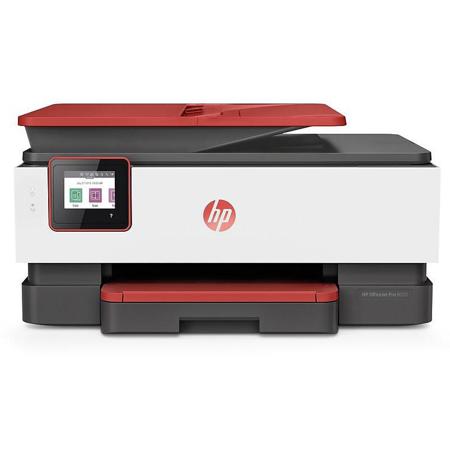
Coral
18.11 x 20.13 x 9.17" (460 x 511.25 x 233mm)
18.04 Ib (8.2kg)
HP Instant Ink is an ink cartridge replacement service. To participate, enroll your HP Instant Ink eligible printer in an Instant Ink plan. The plan charges a fee based on the number of pages you print each month. The printer sends ink level information to HP, and when the printer runs low on ink, replacement ink cartridges are shipped to you. You do not need to purchase replacement ink cartridges from retail stores when you are enrolled in HP Instant Ink.
The productive smart printer that doesn't just print, it produces. Includes 8 months of ink delivered with HP Instant Ink. Help save time with Smart Tasks. Get automatic two-sided printing, easy mobile printing, and self-healing Wi-Fi.
Business owners who want a printer to be simple and easy-to-use, and who want to work smarter so they can do more of what they love.
Dynamic security enabled printer. Only intended to be used with cartridges using an HP original chip. Cartridges using a non-HP chip may not work, and those that work today may not work in the future.
Designed to save you time
• Organize documents 50% faster with Smart Tasks - first mobile print app that automates scanning tasks
• Work fast and hands-free with the 35-page auto-feeder. Get automatic two-sided printing
• Take control of print, scan, and copy jobs with tap-and-swipe ease, using the color touchscreen
• This printer is made from recycled plastics and other electronics-more than 15% by weight of plastic
Freedom to work anywhere
• Connect to cloud-based printing with Wi-Fi or your cellular network to print from anywhere
• Quickly access and print documents and images on your smartphone, from Dropbox and Google Drive
• Get high-quality scanning to share to Dropbox, Google Drive, email, or the cloud - from virtually anywhere
• Get notifications when printing, scanning, or copying from your smartphone
Best-in-class security, reliable connections
• Reduce interruptions with self-healing Wi-Fi that keeps you connected
• Get best-in-class security to help protect devices, data, and documents
• Count on chatbot support and helpful notifications with the HP Smart app
• Easily share resources - access and print with wireless and Ethernet networking
Includes 8 months of ink delivered to your door
• Save on ink and get it automatically delivered to your door
• Create vibrant, professional-quality color graphics, ideal for office use and presentations
• Get rich black text for all your business documents