
This item is no longer available.
Review Summary
2018-07-31T20:00:00
Does not have same scan format as my last HP which is frustrating. At CERTAIN TIMES for no reason the computer and printer do NOT CONMECT even if Wi-Fi is working. I can't seem to atop a print job in the middle of it and I end up unplugging the unit.
emily

2017-04-13T20:00:00
We have had this printer for several years. It is a very good, stable product with ample features. I enjoy the HP Printer Assistant software. It is extremely helpful and unusually easy to use when faxing or scanning. Printer quality whether color or black and white is exceptional. Ink is expensive - the only draw back.
KennE

2014-09-05T20:00:00
I've had this printer for about 9 months now and as I've normally been very pleased with HP printers, this one has been a dud. Problem 1 - upon receipt, the printer wouldn't work at all. would boot up but error'ed during self initialization. after a trying couple of hours on phone support, I was sent a new printer head. several days later, new head arrives, same problem, more hours on phone, whole new printer sent. several days later new printer arrives and everything works. All in all, I'm out a few weeks of a printer. HP support, not impressed. Problem 2 - the touch screen is awful. I find I have to attempt pushing 'buttons' several times almost every time I need to touch the thing. Thankfully I do not have to often, but I dread every time I need to scan a document because it's just irritating. Problem 3 happened today, 9 months in. Now the touch screen is barely visible. It's super contrasted where you can almost make out images, but no way can read text. I was able to navigate to the contrast setting and changed it, but it doesn't fix the problem. So now I steel myself for the painful HP support call I need to make. One positive I will relay, is that I have yet to change the ink (one of the reasons I purchased this model). Thumbs up on miserly ink usage. Bottom Line: When it's working its a good printer/scanner, but the product seems to be flawed and I would not purchase this again, I just don't trust it. I believe I am going to end up with a boat anchor after the 1 year warranty is over....
6tramps
2014-07-06T20:00:00
I think the printer is great, but the interface with my sony laptop has something to be desired. The CD that came with the printer doesn't have the owner manual and some of the features you'd expect to run the printer from a laptop really fall short. Disappointed in HP when they are supposed to be the top of the line.
phoenixbird
2014-07-06T20:00:00
This is my 2nd HP 8600 Office Jet and I like them both very much. With the XL series cartridges the ink lasts quite a while. The quality of text and photos is very good. The e-print feature is quite handy as well. Had some problems with the first one losing the wireless connection at times but was solved by putting a fixed IP address in. Overall, am very satisfied with the performance. Have owned the first one for over two years now.
Scotty39
2014-06-30T20:00:00
We are SO happy with this printer, now that we have it all set up. We bought this to replace an HP printer that was not printing photos correctly for us, for our home business. The initial set up was easy, BUT the printer would not feed ANY photo paper that we had. (We buy it at Costco.). My husband took the printer back to Staples, and even the manager of the Tech dept found the same thing - It would not feed ANY photo paper except HP's own photo paper. Husband brought it home, and got a great tech person at HP support. He led my husband through re-setting the printer back to "original factory" settings - and suddenly it started feeding anything, including card stock. Since then it has been working GREAT, prints EXCELLENT photos, and everything else we've tried. It's fast! We LOVE it. (NOW!)
PortLudlow789
2014-06-28T20:00:00
So far, terrible decision to buy an HP Printer - NO SUPPORT AT ALL !!!!
BillH173
2014-06-26T20:00:00
had a OfficeJet 8500 all in one, no longer available so I chose the 8600 e-all in one...much more complicated than the 8500 and MUCH slower...takes 1 minute plus to fax 1 page where 8500 done it in seconds
Robert53
2014-06-26T20:00:00
This product has all the features I needed for a small price. Wireless, printing, copying, and scanning. Good clarity and easy to use. What more could you want.
DeniseColorado
2014-06-20T20:00:00
After 17 years I finally let my HP 7210 RIP. Reason for death Repeated carriage jam failure. Probably could have had it fixed but decided to give a new HP 8600 911a a chance. Set up was a breeze if I had small fingers. Fixed that with a pen with a small rubber tip attached for touch screens. 8600 came with Duplex printing got it working by turning on duplexing via computer through HP Printer assist program. The small user guide that came with my 7210 was so useful that the first thing I did was print out the 8600 user guide from HP.com (over 200 pages) I spit out the pages flawlessly and very fast compared to the older models I had. If you are using for office use I highly recommend u read ratings searching for performance for your specific needs before buying. Mine will be home use with access to many features when ever I need them including printing. To me it is like getting a $499. printer(the original price of the 7210) for only $108. I am very excited about my 8600 print and photo quality is great and plan to use this HP product with all of its features a long time. I am also expecting to save a lot on ink this year. Performance so far is above and beyond for personal use.
Charle50072108600
2014-06-18T20:00:00
While I have only had the printer for 3 weeks, so far I am very pleased and look forward to writing in several months. I previously had a OfficeJet Pro 7590 and replaced it with this 8600 since HP did not provide updated software for Window 7 basically forcing me to purchase this (at a very heavily discounted price). In comparing the two printers, so far I am finding the 8600 to be lighter (which makes me nervous that the workmanship quality is less???), but otherwise is is operation fine.
Icenine
2014-06-16T20:00:00
So far this printer is working just fine! I had no problems installing the software on my laptops and wireless setup was simple. Print quality is great and I like that it will print both sides to save paper. The shipping was quick as well. I will definitely buy from HP again!
Ross1956
2014-06-16T20:00:00
When our Photosmart's ink system failed, I started compairing the new printers and found that this was a no-brainer, from the features to the price. The setup wizard is great and within a couple of minutes, with a side call to XFINITY, we were up and printing. Suprized to see that the ink supplied is the 'XL' and not the standard. Very well done here HP. So far so good, now lets see if this one last as long as the last one. A happy camper so far HP.
Redstar
2014-06-13T20:00:00
when I click on print a properties of the printer doesn't show up
jakes
2014-06-10T20:00:00
This unit is just another in long well over 20 year string of HP printers I have bought for work, home, and for freinds and family. Even after all of this time, as well as they work, and the great improvements in software and firmware, the printhead is THE weak link. When these printers work, they are GREAT! and of course, when not, it really is bad. There is usually no inbetween. If you lose the printhead, they cost so much that you may as well just buy a new unit on sale someplace, for there is no sure thing that the new printhead will work well, nor fix the total problems with the machine. Just the facts of life. I just jiunked my HP 7580 all-in-one for only the printhead. I have had greif with those in the past 3 machines I had problems with. My hope is that this new machine may have some inprovment in that direction, or that the $80 price tag for new heads will be reduced in the near future. Even so, after having tried some other brands, I still come back to my HP all-in-one units. this one is a bit smaller than the 7500 series, and the ink system is changed too.... I sure hope it works. Right now? I love it. I hope that you will love yours too. Enjoy.
gliverson
2014-06-08T20:00:00
The best printer I have owned.
rickb196
2014-06-07T20:00:00
Large but effective., does everything but run hot and cold water!.... or is that next
cust1
2014-06-06T20:00:00
No matter when nor who downloads the driver its gone soon may be one day may be a month. Must uninstall and then download the driver again and again. No one can keep it connected.
rockyontherock
2014-06-05T20:00:00
This product works adequately for the price.
rhfbiz
2014-06-04T20:00:00
Same printer bought little over a year ago... print head went bad... replace print head $120. Buy whole new printer $108.. last HP printer I bought lasted 10+ years..2 owners--no repairs needed EVER... This replacement better last longer than 1 year !!! Otherwise I love the printer, the quality of printing, and the number of things it can do.
sansgluten
2014-06-04T20:00:00
This is the second HP Officejet Pro I have purchased. The first one was purchased almost 10 years ago. I have had several other HP printers over the years as well. The features that this printer has for the price is unbelievable. It out performs my previous Officejet Pro and at about 1/3 the cost. This printer is about the same price as those throw away models from some of the other vendors. It supports both regular and high capacity ink cartridges. The high capacity cartridges may cost more, but if you do a lot of printing they are much less expensive per sheet. I love the automatic duplexer. I also like the fact that it has four separate cartridges for the ink. When one runs out, you can replace it without wasting the ink in the other cartridges. I have used this printer for over three months and have never had a single problem with it.
showtime
2014-06-04T20:00:00
I got this printer because of reviews and discount, and it came packaged so securely. Wireless connected great. I got the hp paper as well and Ive never been able to scan so easily before, first time I figured out how. It's a heavy duty printer. Im really happy with this purchase.
BeachBabe
2014-06-03T20:00:00
We have three of these machines at work and do a large volume of printing there. I have one for personal use also. These machines are rugged and durable and the improved ink usage is another plus. I can absolutely recommend the machines based on the heavy work usage. We have used their printers over the last 15 years and are pleased with the products and service. Have only had one defective printer and it was replaced as a new defect by HP through Staples service.
eddiespaghetti9
2014-06-01T20:00:00
The installation process is simple and straight forward. Once you have the printer unboxed and tapes off. Just plug it in, the wifi detects the available networks and prompts you to select the wireless network. After entering the correct password for the wireless network, just follow the instructions and you are done. The whole process completes just from the printer mini touch screen.
Ckngo
2014-06-01T20:00:00
The 8600 is very nice to use and to set up. It is so much better than the similar product we purchased from _____ four months before. Can't say enough about how well it's performing -- great printing and copies, and fax is simple and works!!! If I need other products HP sells, I'll certainly start my search there. Thanks. Ben K
lawyer01
2014-05-29T20:00:00
This printer has most of the things that you'll need for a small office.
abelbmartinez
2014-05-29T20:00:00
I purchased this printer about 8 months ago for home office use. I've been exhausting the "cartridge" from my old LaserJet 3050 in the meantime, which works flawlessly (and is ~10 years old if not more). The only problem with the 3050 printer is that it's out of support and I'm unable to use wireless with it from most devices (have it hooked into a router to support some basic wireless printing). With this new printer, it jams about 1 out of 3 times (not just with duplex btw), which is extremely frustrating. It's relatively easy to unjam, but given it jams so often, it's been a terrible experience. For a home office, I'd spend additional dollars on something that is more reliable than this one. With respect to the printing itself, it does a nice job with excellent print quality. It also manages ink relatively well, as I haven't had to buy ink nearly as much as I thought with the inkjet. Aside from the jamming, a good printer....having said that, a printer that constantly jams isn't really one that's usable.
omahasandman
2014-05-23T20:00:00
this is without question the best printer less than 5 min's to set up wireless works perfectly and it will tell you when something needs fixed Ink etc. great product!
ogdad
2014-05-02T20:00:00
I L-O-V-E this machine! I purchased it and took it home but I put off opening it and setting it up because I imagined it would be very difficult to do. Boy was I wrong. I followed the prompts on the generous-sized screen and, in no time at all, I had it up and running, including setting up a home network so the whole family can use the printer. By the way, I never opened the instruction booklet once. I even have it paired to my cell phone and can print from there if I choose to. The printer is almost silent while it's running and the print speed is more than satisfactory. I am impressed with all the features this printer has. I would definitely recommend this printer to anyone who is looking for a good, sturdy, all-in-one, wireless printer. I have been buying HP printers for many years now and, based on the performance of the Officejet Pro 8600 Plus, I will continue to purchase HP products in the years to come. I purchased an 3 year warranty on the product, as I have done in the past. I never have had to use the warranty in the past and don't anticipate having to use it with this purchase.
Jacqui6847
2014-05-02T20:00:00
I have had the machine for almost a year now, and it prints like a charm. No jams, mobile app is great, scan works well. However, the scan to email is a bit sketchy, can't get it to work yet - but may be operator error, so I will set aside some time and keep trying. NEVERTHELESS, don't believe HP's product description when it says "Automatically print two-sided documents." THERE IS NO AUTOMATIC DUPLEXING! A Google search reveals that only the N911g and N911n have an ADF or Automatic Document Feeder with a duplexing scanner unit. With the N911a, HP offers the following tip in the user's guide: "You can perform manual duplexing by first printing only the odd pages, flipping the pages over, and then printing only the even pages." Very disappointing since that was a feature I was looking for when I purchased the printer.
RocksPile
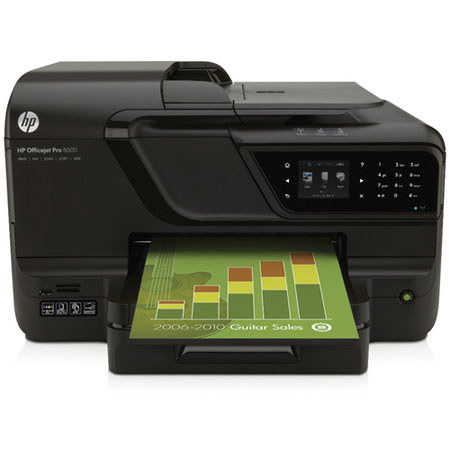
The HP Officejet Pro 8600 e-All-in-One is a complete All-in-One solution for your home or office with print speeds of 20 ppm in black and 16 ppm in color. The printer features automatic duplex printing, allowing you to cut your paper consumption by up to 50%. The 35-page ADF lets you scan and copy multi-page documents automatically. The machine doubles as a stand-alone fax machine, allowing you to send multipage faxes by using the ADF.
In addition to a standard USB connection, the printer has several options that make it easy to share and access the printer. The built-in Ethernet lets you share the printer with your network.
The wireless connectivity allows you to share the printer without cumbersome USB or network cables. The printer works with AirPrint for wireless printing from any iPad, iPhone, or iPod touch. Additionally, the printer is compatible with HP's ePrint, allowing you to print by simply emailing a file to the printer's dedicated email address.