
This item is no longer available.
Review Summary
2017-06-13T20:00:00
Does all it's supposed to do very well. Efficient and intuitive.
Raven24

2016-06-05T20:00:00
easy to use. love the picture tutorials for trouble shooting. not too bulky,
pgoodrich
2014-08-05T20:00:00
I have had the HP Officejet Pro 8600 Premium for a few weeks now. It includes, extra "Color" ink, scanning software and has larger paper capacity. I own a "Pro 8600" and now a Pro 8600 Premium, replacing an older Officejet 7400. The scanning software has nice 2 way scanning communication - can start / control scan from laptop or at the printer and good scanning features. Did have one hang up in printing, had a software lock up when the printer ran out of paper, fix was to reinstall the printer software. Have not tried the remote printing from Smartphone. Chose the HP Officejet Pro 8600 Premium, which is no longer available in local stores over the newer models as this appears to have more features and a slightly reduced price. Ink is pricey. I have not had the issues mentioned in some on-line reviews.
Paul36
2014-08-01T20:00:00
Purchased to replace a network laserjet printer. The setup & configuration process and instructions were very easy to follow. It connected to two PC's and a MacBook without any issues and I can even print wirelessly from both my iPad and iPhone. The print quality is very good and scanner function works well.
CarlMast
2014-07-22T20:00:00
I expected "plug&play"....like all my other HP experiences, however my 8600-N911n would not initially bootup. After 4-6hrs, 35-40 painstaking procedural 'by the book' turn-on's, & 3techs laboriously trying to resolve the problem (3d tech was actually starting the process to ship me a replacement) the 8600 mysteriously booted and has since been operating flawlessly. Except for the initial unresolved startup mystery, I find the features, performance and value of this printer perfectly matched for my small business and its companion HP Pavilion20 TouchSmart PC.
asdfgh3
2014-07-15T20:00:00
This machine was unbelievably easy to set up. I made one call to HP and found out I had downloaded the software only partially customer service rep talked me through the uninstall and reinstall process because I don't allow remote access on my computer. After that everything was a breeze. I have yet to have a problem that has not been answered in the user guide. My only complaint is that Ihis machine does not qualify for the HP instant ink program, but I was given the number for "sure supply" that I can save money on ink with according to a support rep from HP.
thebecca
2014-07-15T20:00:00
This was the 3rd printer I had in my possession that could not perform the duplex scanning function. Very very disappointing.
psychetri
2014-07-08T20:00:00
I had heard good things from an HP worker whose wife was using a pre-production prototype of this printer. My OfficeJet 8500 had become unreliable (it was never a very good printer), and I had high hopes I would like this printer. But unfortunately I cannot recommend it to anyone for the following reasons: - wireless printing is at best unreliable (despite adequate "bars", the printer frequently loses communication) - wireless printing and ePrint were not straightforward to set up (it should have been, but the instructions were not accurate for this printer) - paper handing (a bane of the 8500) is still iffy with this printer (especially with card stock) - printing is streaky even in normal mode (I should not have to always use best mode to get a decent print) - the case is even more flimsy than the Office 8500 (this is not a performance issue, but I do like panels to line up) I can address all of these, but it's a pain to have to help my wife print half of the time because of the network issues with this printer. And while I might expect draft mode to be sometimes streaky, I should NEVER see this in normal printing mode. To add to all of this a continuing issue with paper handling makes me question my decision to buy another HP printer after my problems with my OfficeJet 8500.
IdahoPrinter
2014-07-06T20:00:00
Product was great and did just what we needed. The delivery was prompt, printer was cheap and it fit our needs. I could not ask for easier setup. Now, to get the rest of the family using the new printer!
TraciinMIchigan
2014-06-26T20:00:00
After being disappointed by another brand's new printer, I called HP and told them what I needed a printer to do, and they recommended the Officejet Pro 8600 Premium N911N. It's nice having the two trays, and the copies look really good, both text and color. We printed some photos, and they were spot on. Kudos to HP for providing excellent documentaion with this printer, something a lot of competitors lack. The only problem I had was hooking up the fax to my Voip phone system. Again, there is excellent documentation to show you how to do it. This is a big printer, so you will need to have a little more room to place it.
HAMRAD
2014-06-25T20:00:00
Low first cost, versatile, easy set-up, exceptionally well-designed, very reliable, excellent print quality, fast output, low cost per copy. The N911n should be the benchmark for any small business looking for a full-featured all-in-one.
jmhtexas
2014-06-23T20:00:00
Well, I had ordered a new printer and it had worked flawlessly. After 3 months, it started randomly jamming in the duplexer. I contacted support and after about 30 minutes of troubleshooting, they sent me a replacement printer. The printer I received (which was next day by the way) was a "factory reconditioned" one and required that I remove certain accessories from my printer and put them into the new one - one being the print head. Well, needless to say, the replacement printer was DOA - carriage would not move and it said it had a paper jam before I could even put paper in it! I was not happy. Contacted support again and told them it was junk, and that I wanted another replacement - a BRAND NEW printer, not refurbished. They complied and shipped me a brand new 8600, no questions asked. The support mgr was in constant contact with me letting me know status of my new printer. All of this cost me nothing, as it should. That last effort by "Mike" to offer to give me a brand new printer saved me as a customer. On other notes, the printer has great features and print speed is super fast. It is also pretty good on ink usage. I can print wirelessly from anything in my house, including my iphone and ipad without any setup! wonderful!
Blackbimmer
2014-06-13T20:00:00
This printer replaced my 6100 series all in one printer. I had used it for the last 7 years without a flaw. The only thing I hate about all the printers is that you don't have a slot for envelopes. I haven't investigated this printer enough to see if I couldn't load envelopes in the extra tray that comes with it. So far, the printer works great. The fax is faster than my old one. This is my 6th HP printer I have owned in the last 20 years. I wish they would make one where the ink was not so expensive.
BenBrigman
2014-06-10T20:00:00
This is an excellent printer at a great price. Shipping was fast and it arrived in great condition. Printer set up was easy. I love the touch screen. This print speed is fast with great print quality. A good addition to my HP computer.
Rick129
2014-06-08T20:00:00
Easy to setup. Good quality. Could be a bit faster... on the whole a solid printer with some nice customized options to email remotely or print to certain folders.
reviewer22
2014-06-07T20:00:00
This has great features and print quality is good. But it prints gibberish intermittently and sometimes skips printing pages in a multi-page document. Happens with both text and picture documents. Some comments suggest this is an adobe problem, I use acrobat pro other computers use adobe reader. Can't run a home business with this problem, will probably need to scrap this printer. And when running a home business you shouldn't need to play computer/printer technician, don't have the time for that. Now I see comments have been made about this in 2011 and it obviously has not been fixed. Very disappointed. Even if it is an adobe problem (but my older HP printer didn't/doesn't have this problem!) HP should have made this printer immune to it.
em108
2014-06-05T20:00:00
Product was easy to set up out of the box. Setup documentation was easy to follow. Installation of printer to my network took approximately 30-40 minutes including a coffee break for the installer. Printer has been on my home network for 4 weeks with no problems. I have had no problems with any of the many applications and functions that are available on this printer. Works great with all mobil devices. Price is fair, printer size is a little on the large size. I have not used long enough to give a higher rating. Printer is quite and print jobs are fast. Love the option of multiple feed trays and document scanner.
Poppy2008
2014-05-11T20:00:00
This unit was easy to set up and worked wonderfully for 1 year and 8 days, at which point the scanner flatbed became dysfunctional. Nothing but colored lines. Went through the whole trouble shoot with customer support, who were delightful. 8 days out of warranty. Disappointing because I really loved the unit. I winder if the fact that it is a legal sized flatbed, it is predisposed to problems?
jrhandball
2014-05-08T20:00:00
So far, we haven't had any troubles. Everything is working. It was easy to setup. We really like the e-print feature. It has been a great all in one so far.
OldFisherman
2014-04-12T20:00:00
First purchased a LaserJet thinking it was more of an 'office' printer. HP gladly took it back and suggested this printer. I'm a real user in need of something that must print nearly non-stop...and not break the bank in doing so. This is what I call a printer that can fly through any job: color, back-to-back, draft, Best, in-between, etc., and I haven't looked back. My praise goes to HP's support. Simply tops. Second praise goes to the engineers who produced an efficient, quiet, inexpensive (to buy and operate) workhorse. Would I recommend? Yep. An 11 on a scale of 10.
AtlanticPacific
2014-03-27T20:00:00
So far, so awesome!!! Been using this product for about two weeks and I love it. I will update @ the 6 month mark.
Omni337
2014-03-24T21:00:00
We use this as our business, work, and personal printer. Setup went well (I have 30 years experience with computers). It is part of our wireless network. Be sure to install the cd at each computer versus using "add a printer" at each computer. The double sided copy and print work great. And it is so cool to have a scanner that feeds itself and scans both sides to a usb flash drive. And now we can print from our phones as well. I read a few reviews that described the touch panel as FAIL. We find it a joy to use. Two thumbs up. I don't know how this printer can be sold for $200. Just a lot of good stuff here.
Joiner F.
2014-03-24T20:00:00
Printer arrived a few days after I ordered it, and used my HP EPP discount to get it at a sweet price. Easy to open packaging was plainly marked and easy to remove. Setup was easy, and linking it to my computer and home wireless was effortless. I have not scanned anything yet, but will test that out soon. Printer linked to my iPhone after I downloaded the app as well. Overall, great product for average home use or light office work.
caju12831
2014-03-16T20:00:00
EWS (Embedded Web Server) is not fully compatible with Internet Explorer 11, we now have to use Google Chrome for some of the EWS functions such as changing date and time, setting up speed dial list, etc. If you depend on speed dial fax numbers a lot, the HP OfficeJet 8600 printer series is not for you. Accessing speed dial numbers is far from user friendly. With all previous Officejet printers we could press the speed dial then key in the 2 digit speed dial number and we were there. We now have to page down on the touch screen (3 speed dial entries at a time), for instance, to get to 45th speed dial number we now have to press the arrow down key 15 times to get to it. Not good at all.
Ernie52
2014-03-03T19:00:00
Purchesed printer from Staples 2/27/2014 Liked the idea of scan to WORD/EXCEL Software is READ IRIS 2012 not READ IRIS 2014 and after registering I'm prompted to pay to upgrade.
Bill25
2014-02-19T19:00:00
The printer has great print speed, the scan/copy features have good speed, color and resolution. The only down side I have encountered is the skewing of documents when using the automatic document feeder
Miker1000
2014-02-05T19:00:00
I purchased the printer from Sam's Club. Immediately when the print head test started it came back with an error and asked to contact customer support. I unlocked the print head mechanism and locked it back and it fixed the problem. Went through the rest of the tests and was fine. As soon as I printed the test paper, the paper jammed in the duplex unit and got chewed. Removed the duplex unit and cleared the paper and made sure to attach it back firmly. It didn't work and it kept jamming. Gave up and returned the unit back. I will not settle for a refurbished unit instead of my brand new printer. That's just unacceptable. HP needs to recall these printers and replace them with better quality ones.
Mo123
2014-01-29T19:00:00
This is a definite upgrade in technology from my last HP which still works and is being passed on to my son for an extra printer. A little more technical than I've had time to study but the picture quality is excellent.
Chedonthecoast
2014-01-23T19:00:00
I had the HP 8600 with touch screen ... worked beautifully until right after the warranty expired. Then the touch screen went out. It was so faded that nothing could be read leaving utilizing this printer useless. I could only print when I used the wireless feature from my computer but to use actually stand at the printer and use any of the touch screen features I couldn't. I have done all the fixes that tech support offered which didn't work. They did offer me a small discount to buy another printer. HA What a waste. I would not buy a printer with a touch screen. Before you buy go to HP's message boards and look at all the touch screen issues they have. I'm sorry I spent the money on this. HP's response was sorry we can't fix it.
LizB
2014-01-15T19:00:00
I purchased this printer in Feb 2012 for our small office. We currently have printed 11,522 pages total. It has recently started printing poorly on color print jobs, so based on the maintenance recommendations I cleaned the print head down to the deepest level offered. This however did not improve the quality. To my disappointment, I must concede that the print head is damaged and I will need to replace the printer. I was extremely satisfied with the printer up to this point and I have personally been a long time HP user for printers and computers. I must add at this point that I have also noted a decrease in quality on our most recent purchases of 2 HP computers for my home offices. Hopefully this is not a trend.
TerriF
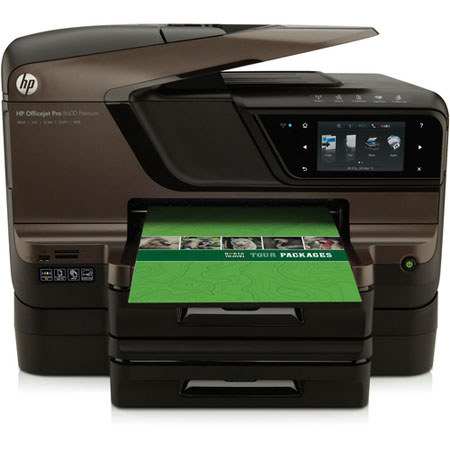
The HP Officejet Pro 8600 Premium e-All-in-One is a complete All-in-One solution for your home or office with print speeds of 20 ppm in black and 16 ppm in color. The printer features full duplexing capabilities, allowing you to print, scan, copy and fax both sides of a page with only one pass-through. The ADF has a 50-page capacity so you can scan, copy and fax multi-page documents with ease.
The 8600 Premium e-All-in-One is an upgraded version of the 8600 Plus e-All-in-One with the addition of a 2nd 250-sheet input tray, OCR software, 50-sheet HP Brochure Glossy Media Pack and an additional full set of ink. The full-size legal scan glass provides greater flexibility for quick one-page scans of legal documents, there's no need to feed it through the ADF. The scanner features Direct Digital Filing, allowing you to easily minimize your paper clutter by scanning two-sided documents directly to an email address, fax recipient, or network folder.