
This item is no longer available.
Review Summary
2019-04-19T20:00:00
We use it everyday since last two months and we just change the first cartridge this week. The speed is great, the quality of impressions very good and I can print even on the road by mail to home.
Mimi222

2018-07-09T20:00:00
I bought the printer a few months ago to replace an OfficeJet 8500. I have had many OfficeJet printers and have been pretty happy with them. I manage three companies and my personal finances with QuickBooks & Quicken. I print checks using both programs but was surprised with the 8730 because I could no longer print a single check (checks are three to a sheet) in the portrait position. This change was a step back to how printing checks was many years back which is very inconvenient. I contacted HP prior to purchasing the printer and they were great and helpful but I wish they would have mentioned the check printing change during the call. I would have given the printer a 5 star rating if there wasn't the check printing issue.
TRam

2018-06-20T20:00:00
Example: I bought this a month ago and am so happy that I did...
kool12
2018-06-12T20:00:00
I purchased the HP OfficeJet Pro 8730 All-in-One Printer about a month ago. It is very easy to use with very fast printing. I installed the printer as wireless. I was concerned that it would be difficult and would need to be re-installed many times from dropping out contact with the router. Wireless printers are much better these days. The HP printer was very easy to install and has not dropped out at all. The display panel is extremely easy to use. It is much easier to print to a USB storage device. Color and black and white print is execellent. Very pleased with this HP printer. I am a very pleased HP user.
Life u.
2018-06-11T20:00:00
It is a great printer, however, it does have continuous print spooling problems. So, it you don't mind clearing out the print spool, rebooting your computer, maybe reinstalling drivers every few prints then you may be okay. Personally, I have found this to be very frustrating, and there does not seem to be a fix.
Frustrated P.
2018-06-02T20:00:00
I read too many (in my estimation) negative reviews, so I bought the printer direct for HP. Thinking it would be easier to return, in case I had problems. Mechanically the HP 8730 is well designed machine. I chose the printer for the feature of two sided scanning since I believe that it will be quicker and less chance of jamming. I do more scanning that printing. My experience with HP products has always been very positive. However for the first six months I have had problems with the drivers. I have a duo-boot desktop PC…Win 10 and Win 7. Also, I have 3 Win 10 laptops. The drivers loaded fine in my laptops and Windows 7 boot on my desktop. However, loading the drivers on the Windows 10 desktop boot was another issue. I could not get Windows 10 desktop apps to print. After nearly 2 hours on the phone with HP Support I could get it to print and scan. However, they could not get Printer Assistant (PA) to work. I was told that to correct this issue, the registry would need to modify. I declined. I was concerned that this would take a long time, or I could end up with more problems. I could print and scan Windows 10. PA in Windows 7 (or my laptop) could take care of issues like checking ink level. Later I found out that you need a fully functional PA. One tool “Updates IP address” in PA. What can happen is the router/internet provider may change the IP address of the printer. This tool will change the IP the computer looks for. The alternative is to change the IP address at the router and fix it so it does not change. I had an IT professional do this. So for the most part it was fully functional i.e. I could print and scan, again. Then Microsoft did a major update and that was a setback for the printer software. To get things going again, I uninstalled the drivers. After uninstalling a installing the drivers I found that I had two icons on my desktop. One lead to a fully functional PA, and the other that did not function, but only restarted the install. I discovered that I had 8630 drivers as well as 8730 drivers installed. I removed the 8630 drivers and everything worked perfectly. OK, how did I get the 8630 drivers installed? I don’t know I may have done something wrong, or HP’s web site had a quirk in it. One thought is: the problem may have been the wrong drivers from the beginning. The 8630 driver may work on an 8730…partially. The drivers/software appear to be updated since my purchase. You may not have any problems. I have not tried printing photos. I get my photos printed at COSTCO, Walgreens, etc. Pros: Near Laser quality text printing Color Graphics is impressive, but I cannot compare to other late model printers. Fast printing and scanning. Two sided scanning in one pass No trouble (so far) in scanning previously folded letters. Great all around scanner. Cost of ink/per sheet appears to be reasonable. After a year, I am still on the original ink cartridges. Feature rich (can be a con) Technical Support speaks understandable English, they appear knowledgeable, polite, and helpful. Cons: Print driver installation can be problematic. Wrong driver (HP 8630) could be installed. Unit is big and heavy – this does not bother me, but is should be noted. Long start up time. Be prepared to spend about a $100 for a set of ink cartridges. Feature rich…almost too much. There are features that I will never use. Tips: Create a “restore point” before installing drivers/software. This precaution should be done before any software installation. I forgot to do this. Decline “instant Ink”, even if makes economic sense for you, until your printer is fully functional, in case you need to return the printer. I came close. After installation of drivers/software go to “file explorer >> C: (C drive) >> program files >> HP. Open HP folder: there should be a folder “HP Officejet Pro 8730”. If it is something else, uninstall it. Check out Printer Assistant to be sure it is fully functional. There should be a printer icon on your desktop. If by clicking on it, PA does not open, but restarts the installation. You have a bad installation. Welcome to my world. To uninstall drivers: in control panel >> hardware and sound >> Devices and Printers >> Devices and Printers. Right click on all the unwanted HP devices and delete. Then go to Program Uninstaller in Control Panel and remove the unwanted HP print drivers/software. Then do a system restore, if you created a restore point. This last step may be overkill, but a good precaution. If you know how to set your router so the IP address cannot be changed, I would recommend doing it. Otherwise you may have to use PA from time to time to get your IP address correct. Recommendations: Buy. Once I got the software fixed, I find it a superb product; everything you would expect from HP. I believe with the latest drivers everything will work well. I am knocking it down one star for all the grief, and I am tempted to knock it down two stars. The drivers should have been fixed well before I bought my unit. If you follow my tips, I believe you will not have my problems, at least, avoid some of my grief. Example: I bought this a month ago and am so happy that I did...
faro1
2018-02-25T19:00:00
I have thoroughly enjoyed this printer...and I've owned a large number of them over many years. It's reliable - the easiest to set up of any printers I've owned thus far. The print is clear whether black and white or color, the double sided printing saves paper, the scanning screen is easily accessed. I love that it's not so wide and doesn't have any pull out bars for the paper to rest on after printing (that then gets broken when I close the door to the cabinet if I forget to push the pull out bar back inside. I appreciate having the legal page print and scan capability. It also wasn't too heavy for me to pick up and move and although that shouldn't matter normally, it meant I wasn't dependent on another to help me put it into place.
Hilde71
2018-02-20T19:00:00
I purchased this printer after I was unhappy with the previous 2 printers I bought. The quality has been as good as the laser printer I used in my office at work. It was easy to set up. It remains completely stable while printing and, so far, as worked well with a variety of paper quality. I am very happy with this printer.
Pennycatall
2018-02-06T19:00:00
THIS PRINTER HAS WORKED GREAT AND HAS ALL FEATURES WE NEED IN A BUSY SMALL BUSINESS. IT IS KINDA NOISY THOUGH.
SROB
2018-01-20T19:00:00
Great fit for my accounting home office. All of my clients are paperless now, so the scanning feature is a must. Fast, efficient and intuitive. And the HP Instant Ink program option is a cost-effective no-brainer. This HP was an upgrade from my HP OfficeJet 8620, and definitely worth it: quieter, better paper feed (especially for two-sided documents), and new design means no more printed pages falling to the floor.
Lore123
2018-01-18T19:00:00
GREAT PRODUCT. MEETS MY EXPECTATIONS THUS FAR. WILL WAIT TO SEE ON THE INK USAGE.
LARRY65
2017-12-29T19:00:00
Always had HP Printers. My last printer was a HP OfficeJet Pro 8600 which is now my backup printer. This new model is absolutely beautiful. HP Printers are very reliable and are definite work horses for a home office business.
Jay2018
2017-12-19T19:00:00
I recommend the 8730 to anyone looking for a good all purpose printer.
HENRY36
2017-12-08T19:00:00
This product has a bulky design. It is absolutely NOT an option for printing photos. All the photos I tried printing had lines the whole way across the photo. I tried different papers and got the same result.
Ebg42
2017-11-30T19:00:00
All around great printer for home use. My college children love all the great features provided for their school work. We only purchase HP printers and I have to say, with very little maintenance, they run always perform seamless for my family.
VinnyS
2017-11-25T19:00:00
My previous HP printer, a J6480 all-in-one, did not stay logged on to the wireless network and had to be hard-wired. This one works fine, and I can locate it anywhere. I love the 2-sided copying.
Rick23454
2017-11-08T19:00:00
I have to work the kinks out because it goes to sleep and does not wake up when I want it to print.
SanDiego18
2017-10-06T20:00:00
If only there were a special paper tray for envelopes I would give it five stars. It is annoying to have to deal with this manually.
ARL247
2017-09-11T20:00:00
This printer was easy to set up and has great features. I was up-and-running in no time! I am pleased with the amount of work it can handle at a time. I like the white, but probably would have preferred black if it had been available. I am also pleased with the speed in which the copies are produced. All together a great product!
Val32
2017-08-28T20:00:00
Have had many multi-function printers. The 8730 is GREAT. I print 50 + pages per week and this printer is fast. Whether printing, scanning or faxing, it meets and exceeds my expectations. Wish I had found it long ago. I would definitely recommend it.
allinoneguy
2017-08-21T20:00:00
every generation of these machines is better than the last.i would rather buy a new machine [$269.00] than replace the print head [$155.00].easy choice,and new is new.you can't beat smoother,quieter ,faster
blt4737
2017-07-27T20:00:00
Wifi doesn't work. Other funcations so far work well. The printer design is too big. Print quality is not good as I thought compare to the HP Laser Printer I have in the office. I think next time I will buy the Laser Printer instead .
Edith1
2017-07-26T20:00:00
This printer was very easy to unpack and install. The print quality is far better than my previous printers. This printer has several features ( two sided print, copy, fax) which all work flawlessly.
Jacksonville
2017-07-13T20:00:00
The HP OfficeJet Pro printer are great the first 12-18 months. But don't make the mistake of not adding onto the price the $145 printhead cost you are likely to incur after that. I have been through two HP Officejet Pro printers that had printhead failures. HP's instructions for fixing them don't work and you may have to shell out $145 for a new printhead that probably has a 90-day warranty and is not guaranteed to last any longer than that. I like these printers but I wish HP would solve their printhead problems. Fix them so they work longer or bring the price of the replacement part down to about $50...since we end up needing more than one.
MyPrintheadsFailed
2017-07-12T20:00:00
Great printer cane on time and it was very easy to set up. The print outs look great.
Steveshomeprinter
2017-06-30T20:00:00
It took 1 hour and 54 minutes for HP support to set it up to duplex scan legal size document which was the main reason for buying this machine. Other than that is has performed as well as the HP6700 it replaced.
Ron57
2017-06-23T20:00:00
This printer is replacing my 9 yr old HP Photosmart C7280 AIO that broke. I knew I wanted another HP printer and after checking out the AIO printers on HP's website. The OfficeJet Pro 8730 was my pick, it had the features I wanted and it was the right size to fit on my desk. After using it for the past 2 weeks I am very pleased with the printer. The setup was cake and has worked flawless without any issues. I would recommend this printer for anyone looking for an all-in-one printer.
Tom454
2017-06-18T20:00:00
Good product, POOR overseas customer service. 2nd attempt as HP would not publish my first report. Too bad HP has to use non-American Customer Service.
BudBBTX
2017-06-16T20:00:00
I HATE this printer ! For over 15 years, I owned HP all-in-ones & I LOVED them. The quality was excellent & there were tons of features. In fact, with the last one I had, I was able to beautifully restore & edit 100 year old family pictures as well as all my current photos. Anything I printed came out clear and sharp & I was able to adjust color, brightness, contrast, sharpness, etc. I self-published travel guides, real estate info, genealogy charts & files & more. Everything was great. If it had not died, I would have it still. HOWEVER, THIS printer is a PIECE OF JUNK !!!!!! I absolutely cannot stand using it !!! There are NO features to speak of, I canNOT make ANY adjustments on color, brightness, sharpness, contrast, etc. and ALL pictures, whether from a file, copy from a website, or my own digital photos, come out DARK and BLURRY. The color can be smeared or dappled and NOTHING is sharp and bright. And, as I said, there is NO way to make adjustments. Because the print quality is so poor, I now print a LOT less than with my old machine, BUT this printer is using up ink like a dying man in the desert drinking water. I just bought ink a few weeks ago, have not printed all that much & I'm already out of yellow & will soon be out of blue & red ! Believe me, I have not printed much AT ALL !!! And besides all that, this machine clanks loudly & vibrates so hard that it shakes the entire table. To be fair, text prints OK, and that is the only reason I gave it a Fair rating on Performance. If there were a separate category for pictures, I would give it a Zero - Extremely Poor. Like I said, I HATE IT !!! I will NEVER buy another HP ANYthing again !!!!
Dab84
2017-06-15T20:00:00
Compared to out previous printer, this was so easy to set up... in fact, you just plug it in, and it does everything by itself, such as finding the network, loading its own driver, etc, etc. Highly recommended!
AGT62
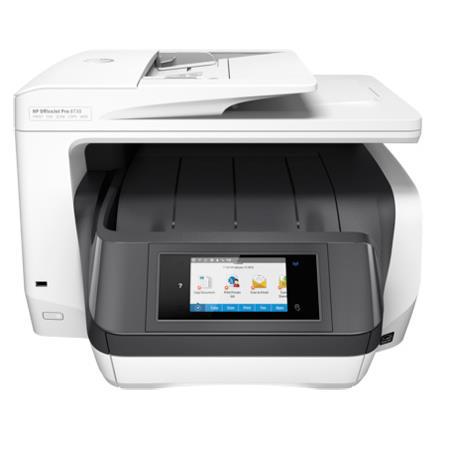
Maximize your print environment with space-saving HP Print Forward Design and professional-quality, low-cost color. Help reduce costs with fleet management solutions. Stay productive with an all-in-one designed for high-volume enterprises. Ideal for small workgroups who need affordable, professional-quality color with fleet management capabilities, all in a space-saving design.
• Print, Copy, Scan, Fax
• Print speed ISO: Up to 24 ppm black, up to 20 color
• Auto duplexing, Legal flatbed, NFC, USB Document Print, distributed enterprise solutions
• High yield ink available
Affordable, Professional Color
Print up to 3x as many pages with optional Original HP high-yield ink cartridges. Manage your budget with professional-quality color at up to 50% less cost per page than lasers. Save up to 50% on ink and never run out. Print color or black-and-white for the same low price. Professional-quality prints for up to 50% less per page. Save even more with HP Instant Ink.
Innovative Design For Superb Office Productivity
Increase paper capacity to 500 sheets with the included second 250-sheet paper tray. Speed through print jobs, using superfast two-sided printing. Breeze through multipage documents with one-pass two-sided scanning and a 50-page automatic document feeder. Revolutionary design delivers laser-like paper handling and superfast print speeds.
Mobile Printing That Keeps Your Business Covered
Help protect information and access to confidential print jobs with HP Jet Advantage Private Print. Print with just a touch of your NFC-enabled mobile device to the printer-no company network needed. Print directly from your mobile device without accessing the company network, from anywhere in the office. Easily print from a variety of smartphones and tablets.
Ultimate Fleet Control, Seamless Management
Easily take command of your printing environment from one central location, with HP Web Jetadmin. Get increased printing options with HP PCL 6, HP PCL 5c, HP PS and scalable TrueType fonts. Easily print Microsoft Word and PowerPoint files, plus Adobe PDF files, directly from your USB drive. Experience a new style of business printing and imaging, with HP Jet Advantage On Demand solutions.