
This item is no longer available.
Review Summary
2021-03-30T20:00:00
I bought this printer as I hoped it would be more reliable than my Officejet 7500 - but I'm spending hours and hours on solving different errors - always! Think I'm completely done with HP after a minimum of three very bad products. All I by is Officejet pro and I would therefore expect a little quality
SofK

2020-05-01T20:00:00
This model was discontinued for performance reasons; it clearly failed as a reliable product and burned through ink like crazy. Now it needs new printhead replacements that cost 2x the actual purchase price. How???? My product was registered. In the very least, HP should have contacted to either buy back or offer discount or coupon towards new purchase after discontinuing this model. Or I could just invest in new product by different manufacturer.
syw610
2019-10-27T20:00:00
This printer began having black ink head issues after a year. Cleaning the black ink head kept it going for a few more months, but now won't print black at all. Internet searches reveal this is an issue with this series. Replacing the ink head will cost more than the printer. Now looking for a printer that'll last more than a year.
Kloiga
2019-09-12T20:00:00
I've had mine for several years and it's worked OK once I got one that worked at all. HP replaced the original twice under warrantee for various reasons. The final replacement has worked for a couple of years until it started printing pink streaks in dark blue areas. Repeated print head cleaning has failed to resolve the problem and since the print head is non-removable and sending to HP for repair would cost more than a new color laser from Staples it looks like this old printer is going away to be replaced by a new color laser.
paul516
2019-08-14T20:00:00
I bought this printer 3 years ago. I literally had to have it replaced by HP within the first month. They sent me the same printer back I am convinced. I've used it like... twice MAYBE. You're better off getting a cheap printer. I
VMC27
2019-05-03T20:00:00
I bought HP 6830 about 3 1/2 years ago (spent ~$125+). The black color is not printing at all, even after rebooting and going thru 3 levels of cleaning cartridge/printhead. I replaced the cartridges with brand new, genuine cartridges few weeks ago (spend $80!). The support agent now tells me I have to get a new printer and that of course means my cartridges are useless. Of course, I would also have to buy new cartridges for my new printer ! It is totally unacceptable that a company like HP should manufacture a product that only lasts 3 1/2 years. Imagine the resources used to put a product like that together. I would hesitate to recommend a HP printer to anyone. It was stunning how non chalant HP is about telling you...I know it is not the unfortunate agent's fault, but they are in the frontlines. Case # 5030966753
Calac
2019-05-01T20:00:00
I have always love all HP products but will buy no more. I thought if I just stopped payments to them I could buy my own ink cartridge. NOPE. My printer stopped working until I reinstated their monthly withdrawal from my bank account. THEN I get a “there is a problem with the print cartridge”! I tried running the “clean print cartridge” three times only to have it freeze up completely! That was the last straw. I went out and bought a Cannon that I’m happy with! And now won’t let me post my review!!!!!
Nonserenity
2019-02-18T19:00:00
not bad out-of-the-box. But all down hill from there. New ink cartridges cost more than buying another printer and chances are pretty high you will not be able to print with them anyways. Ink head never worked once I replaced the ink cartridges. Wireless is unusable because it's always dropping and fax only worked once, the second time I needed it, it just won't do anything. Unfortunately I do not use the printer too often so it's out of warranty but seems like the only thing that still works is the scanner. I should have spent the 90$ of the ink on a new printer, that's NOT HP.
jfelixs
2018-10-31T20:00:00
I can not believe the cost of this thing and the printer head issue. I have barely used it. This is crazy! WHAT A WASTE OF MONEY!
rosilynne
2018-09-27T20:00:00
This is the third HP all-in-one I've purchased over the years. This was the first one I will not be able to give to charity as a workable, quality printer when I buy the next one. One day, a little over a year of light use (100 - 200 pages per month - mostly black & white - light color printing), it just stopped printing colors properly and began to streak. After multiple cleanings and streak removal maintenance and changing printer cartridges, I've given up. I'm extremely disappointed in this printer. I've been loyal to HP for all this time and this is leaving a very sour taste. Won't even print green anymore.
BigDRichT
2018-05-15T20:00:00
Black printer head stopped working. tried to fix using the internet recommended process and that worked for a while. Then black printer head stopped again. 6830 is total junk.
CPAMARYLAND
2018-04-27T20:00:00
I'm really disgusted that my print head went bad with only a year or two of use.. I did not purchase a warranty because it was expensive, but now wish I would have..
lornadoone60
2018-02-11T19:00:00
I loved that printer when i first got it, it worked perfectly fine then after a 5 months out of the blue "printer head error" so i called HP support center and the printer was still under warranty so they replaced it with no charge, THANK YOU HP. After 4 months of regular home use same issue " printer head error".
AliAlQayyim
2017-07-11T20:00:00
I love this printer except when my computer loses connection and I have to restart my computer to connect to printer. Happens a lot.
Forty2
2017-04-13T20:00:00
This is a very good printer but I would like a message feature warning about low ink levels.
Gene219
2017-04-12T20:00:00
Keeps dropping wireless devices
Micker908
2016-12-21T19:00:00
The printer just died on me after 1 year. Can't even power off. I have to turn off the main switch!!
WTFwtf
2016-08-03T20:00:00
Well I will echo all the other reviews, printhead dead in about a year. Disappointed to hear that I will be getting a refurbished one . Obviously a manufacturing issue as they have discontinued the model. It would have been nice to get a different model as the replacement will go in about a year as well.....
JennT
2016-07-21T20:00:00
As you can see from the many reviews this printer has a issue that causes it to have a printhead error which seems to be unfixable. Our printer got the error in less than a year and never worked again. On the other hand we are VERY impressed with the support from HP on this issue. After a quick phone call HP did the right thing and replaced the printer.
MLFamily
2016-07-13T20:00:00
We purchased the printer July 12, 2015. The printer is now stating there is a Printhead Error. It was good while it lasted.
Karen51
2016-06-24T20:00:00
Good printer when it worked. After very little use got a "PRINT HEAD ERROR" one day and never worked again.
Myname43
2016-06-21T20:00:00
I loved this printer until the first one came up with "problem with printhead" and since it was still on warranty, they sent me a refurbished one. Well, less than a year later, this one too has "problem with printhead". Not good if your job is mostly printing checks and finance reports.
bankinglady
2016-06-09T20:00:00
I purchased the HP Officejet 6812 back in April of 2015. received error for printhead, called HP support and getting a refurbished 6830 since mine is still under warranty, should have by Monday or Tuesday and I am praying that this one will not give me issues, if so I will consider another brand! I do a lot of printing for personal and business so can't really do without for a long period of time! I really like HP products , however I need something that will not leave me stuck!! I would have gladly given 5 stars across the board, however this printhead issues seems to be an issue that happens quite often from the reviews I have read!
Pam68
2016-06-05T20:00:00
The printer has good features built around a faulty printer head at 100 pages per month using the printer ink plan. Out of warranty and out of luck. Need to get a replacement unit asap.
Johntb
2016-05-31T20:00:00
after 6 mos. I too had PRINTHEAD error. Returned for a new one that would not work. Thank god for my computer tech nephew !!! found an I.P. setting that no one else could figure out.. Never HP again !!
MkyG
2016-05-30T20:00:00
I am a student and a side business from home. I was so excited when i got this printer. It was suppose to have printing , scanning , fax, and copying capabilities. The most I have been able to do with it is print and make copies at times. I am soo disappointed. Eerytime I am in a really need a print or anything it doesnt work. I am so outdone, and out of the money spent for it. :-( I really need to use the printer really bad, but i have just run out of patience , trying to figure it out at this point.
amiles369
2016-05-30T20:00:00
Purchased a Officejet 6835 16 months ago. Used carefully sparingly and always with original cartridges. Out of the blue today, in the middle of kids exams, the printer stops working with a "problem with printhead" error message. Searched the web and seems like this problem is very common for the 6830 and 6835 family of printers. And the printhead cannot be replaced so printer will need replacing. So I now have a almost new printer which is useless!
AmitD
2016-05-26T20:00:00
I need all functions to perform wireless through my iPhone and iPad. After installing the HP Officejet Pro 6830 e-All-In-One printer I find out in order to fax you have to hook it up to a phone line. No where in the description does it indicate that. It says copy,scan ,print,fax, web. It does not indicate anywhere that faxing needs a phone line. What does "wireless" mean?
Barb59
2016-05-24T20:00:00
I bought this printer to replace another HP Printer that would not connect to an HP laptop. Finally got it to work and the lights started flashing and nothing would work. Printer discontinued. I took the 6830 out of the box and made a few faxes and then put it back to move. It has been sitting in the box until recently. Went to use it and it now reads "Problem with Printhead." Of course, warranty is 2 months expired and I was notified HP doesn't service this one anymore. My question... why is HP still selling an item they won't service? I have had terrible luck with the HP products of late. I had an earlier Photosmart printer that I had for 5 years and gave it away when I moved... sure miss that one.
Cali65
2016-05-22T20:00:00
All I see on reviews is how bad this printer is.......WELL IM HEAR TO TELL YOU IT SUCKS...PRINT HEAD IS NOT WORKING FOR NO REASON AFTER 6 MONTHS....READ REVIEWS PEOPLE. THEY ARE TELLING THE TRUTH!
AJ1981
Very happy Overall
By SecreTerri10
I needed the most compact inkjet all in one with individual ink cartridges and this is it! Easy to set up. Better features than my old HP (which I also loved for 5 years). And you can scan directly to an email address. It has auto-answer-off feature so junk doesn't come through and you can see the incoming number then add it to blocked #s if you need to. Thank you HP!
THIS IS THE MACHINE TO HAVE
By 23SKIDO
THE ONLY THING I HAVE NOT TRIED IS THE PHOTO PRINTING BUT WE HAVE TWO GREAT NEWPHES BIRTHDAY SOON SO I WILL TRY IT THEN. THANK YOU MRLSR
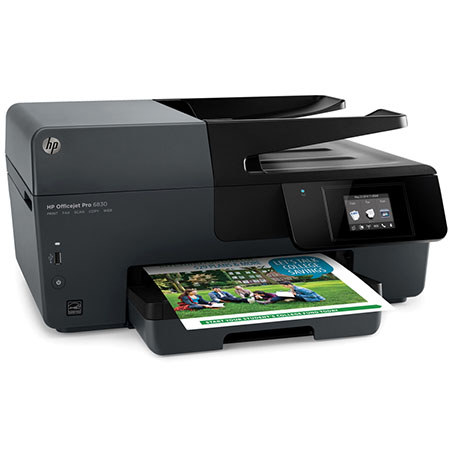
Rapidly create color documents, scans, copies and faxes with the HP Officejet Pro 6830 Wireless Color e-All-In-One Inkjet Printer. The printer features a maximum resolution of 600 x 1200 dpi and can produce up to 18 black ppm or 10 color ppm thanks to speedy ISO print speeds. Other useful features include the ability to print borderless documents at up to 8.5 x 11" and automatic duplex printing.
Scans are highly detailed with an optical resolution of 1200 dpi and with both a 35-sheet ADF and flatbed you can scan documents in a variety of configurations up to 8.5 x 14". There is also a 225-sheet input tray for general media handling and it can work with sheets up to 8.5 x 14" as well. For checking and changing settings, the front panel has a 2.65" color touch screen display and the printer has USB 2.0, Ethernet, RJ-11 and Wi-Fi connectivity.