2026-05-10T20:00:00
I have not been happy with this new printer at all. I have always bought HP products. My computers, my printers and this printer has been the worst one ever.. It cuts the edge of an 8 1/2 by 11 paper off, its complicated just to scan anything anymore. It used to be simple and nowit is all complicated. I even put brand new HP ink cartridges in it and it said they were not HP . The inks were brand new and I had to run the print head cleaner 4 times to get it to print the black ink. It is just not a very good machine at all and I don't think I will ever buy another printer from HP again.
BCat 1.
Originally posted at

2026-05-08T20:00:00
Rated 1 out of 5
Hewlett Packard customer service
Dealing with Hewlett-Packard's customer service was a total nightmare. 3 hours on the phone one day, and 2 additional hours on following day. No resolution. If I was given a machine for free, I would not accept it. Run from HP.
Mr L.
Originally posted at
2026-05-03T20:00:00
Rated 4 out of 5
Almost good
I have not been able to get the tray out of the printer to set up to print on envelopes
RealMT
Originally posted at
2026-04-29T20:00:00
Rated 4 out of 5
Be careful of necessary firmware updates which cause the printer to be incapacitated.
The printer is great and fulfills why I I purchased it. HP on the other hand was difficult to navigate. Once the printer was up and running, it required a firmware update that was next to impossible to get installed for DAYS. Tech support was of no help. Endless time on the phone trying to troubleshoot an issue that there was no solving. It simply took DAYS on it's own to restart, attempt to update, fail and start all over again.
Ruth T.
Originally posted at
2026-04-15T20:00:00
Rated 2 out of 5
Poor set up instructions; absolute hastle!
I had top spend two days trying to get this printer set up as the instructions were not thorough. I pay 17 dollars a month with HP Smart Help; after 4 people, someone finally was able to help to get the printer connected to my desk top computer. Terrible time and much wasted time on my part. Will not continue with HP after this and we have purchased many items this year from you. Bought lst one on line which I had to send back because of connection issues along with ink issue after several attempts. Ended up buying same series from Sam's Club.
Ann S.
Originally posted at
2026-04-12T20:00:00
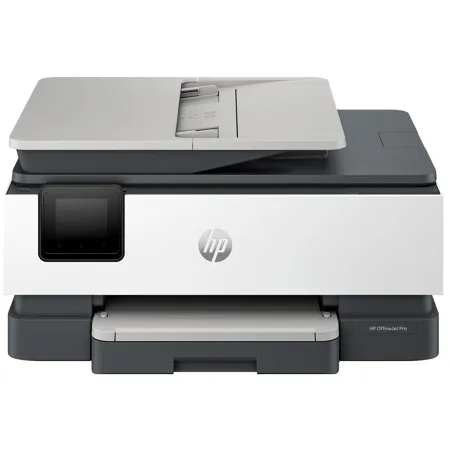
Nice looking, compact printer. HP salesperson said it was comparable to my old, reliable 8620 that I have used for used for years. Only wanted a new printer because scans from 8620 scan feeder have a line down pages. 8125e is slow and noisy. Cartridges are bear to load. Cartridges seem small and suspect to often (expensive) replace. Only good thing about 8125e is was cheap (on sale).
Harry C.
Originally posted at
2026-03-31T20:00:00
Rated 1 out of 5
COULD BE MORE EADY TO OPERATE
NOT AN EASY PRINTER TO GET USED TO
BILL S.
Originally posted at
2026-03-06T19:00:00
Rated 1 out of 5
Trouble with this product
I have had a lot of trouble with this product. I have had trouble setting it up and sometimes it just shuts down as if it has no electrical power. I would call HP Support but can't find a phone number to use.
Insurance a.
Originally posted at
2026-02-21T19:00:00
Rated 3 out of 5
Inadequate setup instructions and no scanning for Linux.
The printing software from HP did not have scanning for Linux whereas for the Windows and Apple operating system scanning was part of the package. The instructions did not explain how to connect the printer to WiFi when the password is not known. In contrast, a Canon printer explained the procedure. I tried the WPS button on the HP printer and that worked. It was a shot in the dark. WPS was not explained in the instructions.
Alano
Originally posted at
2026-02-18T19:00:00
First printer I've ever bought and I love it. Pretty easy to set up for an old man. I enjoy being able to print or copy anything I want from my easy chair. It is my latest toy!!
Greg H.
Originally posted at
2026-02-08T19:00:00
Rated 4 out of 5
Driver needed!
The purchasing was easy, shipping was timely, the set up was dicey. Immediately after setup the printer had printing issues. Turns out the wrong type of driver was installed. Called back a third time because I was getting an error-type message along the lines of ScanToPCApplication that kept popping up then disappearing on the screen. The rep tried a few things then gave up and said it wouldn't cause operational problems. I looked it up online and fixed it myself.
Faircatch C.
Originally posted at
2026-01-29T19:00:00
Rated 3 out of 5
Easy to set up and easy to use
I like this printer as it is easy to find any jam and remove such. What I don't like is the very low capacity for paper, half of what I had in my former printer. Also the tray that houses the paper feels very flimsey, and is very touchey. I have to pull put the stack of paper and re-arrange it many times after printing. As much as I like this printer I just don't think the quality is there. It is a much cheaper machine, and I am afraid it won't hold up like my prior printer. It is also slower than my prior printer.
Mary-Lynne
Originally posted at
2026-01-20T19:00:00
Rated 5 out of 5
Excellent
This is a real nice printer, I really love iy
My p.
Originally posted at
2026-01-17T19:00:00
Rated 3 out of 5
HP OfficeJet Pro 8125e Issues
Seems to be a good printer but the set-up is very difficult. My previous HP printers were pretty much plug-and-play but not this one. Also it seems that HP designs a new print cartridge for each new printer, why can't existing cartridges be used?
GeorgeT451
Originally posted at
2026-01-13T19:00:00
Rated 5 out of 5
Great printer
I have an 8025e printer and have loved it. My son needed a printer so when I saw this on sale through HP website, I bought this one for him for christmas. He loves his printer and has been putting it to good use.
kswl
Originally posted at
2026-01-08T19:00:00
Excellent product
Jaime O.
Originally posted at
2026-01-01T19:00:00
Rated 4 out of 5
New 8120e scanner/printer
Fast multi function printer. Print function was easy to set up, scanning less so. I'm using HP Smart to access scanning. Each time I set up direct scanning communication the printer looses it after reboot of computer.
Eric L.
Originally posted at
2025-12-28T19:00:00
Rated 3 out of 5
Printer setup is not flawless and printer is very slow compared to previous HP printers
Price was decent and the printer works. Setup was not flawless, it had some hiccups but we got it up and running. We previously were using an HP 8610 and this printer is MUCH slower in printing that the previous HP we had. Not overly happy with our purchase but it'll work for what we need it for.
KHalstead
Originally posted at
2025-11-30T19:00:00
Rated 1 out of 5
Endless paper jams
Endless paper jams. My old HP printer worked well. The new product is disappointing.
Louise388
Originally posted at
2025-11-14T19:00:00
Rated 4 out of 5
No complaints
I haven't had any major issues with the printer. The only minor issue is that sometimes when I print it will pull two sheets through printing process instead of one.
HP S.
Originally posted at
2025-11-13T19:00:00
Rated 5 out of 5
Best ever
Great printer! Best printer of all I've ever owned
Lrobertson
Originally posted at
2025-11-10T19:00:00
Rated 4 out of 5
Office Jet
I really like this printer and all that it does. It was very easy to install and setup. Only problem I can't print envelopes yet as it keeps telling me I have the wrong size in the printer, when I do not. I still cannot figure out what the problem is.
nbybev
Originally posted at
2025-10-03T20:00:00
Rated 3 out of 5
Not Efficient
Wifi printing does not work. Printing on both sides requires you to re enter paper into printer
F W.
Originally posted at
2025-09-20T20:00:00
Rated 3 out of 5
It Works but slowly
This is a slow printer. The duplex scanning is manually done which is aggravating. The auto feed of documents is really picky. Sometimes it works well, sometimes it doesn't.
Wendy S.
Originally posted at
2025-09-07T20:00:00
love the printer
Mike D.
Originally posted at
2025-08-29T20:00:00
Rated 5 out of 5
Great printer
Great printer. Easy to setup and operate. Lightweight as well
DoloresS
Originally posted at
2025-08-19T20:00:00
Rated 5 out of 5
bad 4 day installation
WHY should i ? Ive sent 2 bad reviews and didnt get any help completing installation or even apology after employees admission that the printers mistake Cost You and me 4 days
dwaine
Originally posted at
2025-08-17T20:00:00
Rated 2 out of 5
Like our last HP printer, but worse
This printer still has all the same deficiencies our last HP printer did. This includes sometimes taking 2 minutes to print a single page while the printer makes all kind of noise. The most useful feature is the scan to computer. But something major has changed with that and it is just terrible now. I'll scan a single page and it will take 2-3 minutes for the save dialog to show on the computer. I don't even want the save dialog ... I just want it to save like it used to. It's just frustrating to use now. So this is definitely a regression from the last printer we had.
Derrick C.
Originally posted at
2025-08-13T20:00:00
Rated 5 out of 5
Perfect for home printing
We are really liking our new printer. It was easy to set up and is easy to use.
Deb5
Originally posted at
2025-08-11T20:00:00
Rated 3 out of 5
Good printer
Nice compact printer seems to work well have only used twice
Cycling
Originally posted at