
This item is no longer available.
Review Summary
2011-09-06T21:00:00
This is a very good all round product. You can't go wrong for the price.
jim
2011-04-15T21:00:00
Liquid cartridges beats the old powder laser machines any day. I have all 3 printers online on a wired-LAN. The first printer has been running one year with no issues to date. The other 2 installed with no issues. Be sure to use HP's "Add Printer" for additional printers, in place of the Install CD!
Trumpeter
2011-03-16T20:00:00
We have had several HP printers over many years, and have always been happy with them. Then came the 8500. The first one never made it through the "checking printer" screen in setup, and HP sent a replacement. Since then I have spent 30+ hours on the phone with HP support trying to get the printer to install. Using the cd provided and software on HP's website not one of the 3 computers on our network has ever been able to detect the printer. Tech support guys are very nice, but they keep trying to uninstall and reload the software over and over again, as well as adding allowed ports to my firewall. Three analyses by "engineering", then follow up calls from tech support with the recommended engineering solutions, and after 6 weeks the only working printer I have is still my compact Epson. I think it's time I try something other than an HP.
Verymuchdisappointed

2011-03-12T19:00:00
I bought this machine due to it's all in one features and it's economics regarding ink usage. I have one at work and liked it so much, I bought one for home as well.
Pappy
2011-03-10T19:00:00
Now I remember why I ditched my last inkjet over 12 years ago and never looked back. Although this printer is lightweight, has tons of functions, a color touchscreen and decent but not awesome printing, it just can't beat a laser printer. If you don't do a lot of printing this would be a decent choice. But I have been spoiled by laser printers for years and this Officejet Pro 8500 is good but not great. It is painfully slow compared to my laserjet 3015dn but then again I will not be using this as frequently as the laserjet. The print heads and print cartridges are a pain in the neck to install. I can't figure out how to power down the color touchscreen as it stays on continuously so I have to turn off the machine. What happens to faxes? I guess they don't get received. I wish I got the color laser all-in-one instead WITHOUT the touchscreen.
socalgal
2011-03-03T19:00:00
Can't beat this device for features and price.
DaveNY
2011-02-25T19:00:00
I thought that having a newer model printer would make my print experiences even better. The printer had duplex paper trays and was supposed to print 34 ppm. I owned 2 other HP Officejet L7680 printers and found this newer model of officejet printer to be far below my expectations. The HP website recommended this model as a replacement for my former obsoleted model. The printer speed is not nearly as fast as the models I used in the past or even close to what the specifications stated. The machine is noisy when printing. The printed colors are similar to what I would expect from a laser printer (which I do not think are as good as an inkjet printer). The colors do not print as vibrantly or brightly as they should for an inkjet printer. They turn out way too dark compared to what is on the computer screen. The only bright spot is that it does print very nice photos. I had a very difficult time getting this machine set up. The paper kept jamming every time I tried to run a test page and then a piece of black rubber material came out of the rollers just before I was able to start printing normally. The machine would not acknowledge that the print heads were installed until I took them out and reinserted them 2 more times. I thought I was going to have to return it for a replacement. I am pretty disappointed overall by this machine and would rather have the old style back.
Traciw
2011-02-19T19:00:00
Bought this unit because I need legal size scanning and it is one of very few machines that offer this. After a few days it seems to work fine as a fax, printer, scanner. Print quality better for text than for graphics, but on the coated HP-supplied brochure paper, photos approach competent offset print quality. Photo quality falls a bit this is short of photofinisher's prints, however, so not your choice if printing photos is an important need. Another downside: its second paper tray just sits under the unit with only gravity holding the machine in place over it, which does not inspire confidence. Construction is almost entirely injection moulded plastic, which is not unusual today, but it feels less sturdy even than plastic body HP office printers of several years ago. I would recommend this unit, with some reservation, for someone who specifically needs legal-size in an all-in-one, but otherwise would suggest a cheaper machine as this unit does not seem to offer any other special reason to warrant its significantly higher pricepoint than other machines in its class.
AnotherConsumer
2011-02-09T19:00:00
I am extermely satisfied with this printer! There are so many options this has to offer, seems that I am always learning something new! More than a bargin with this purchase!
dsj1959
2011-01-20T19:00:00
This is the first time I have ever written a review. I have owned numerous HP printers over the years, but never one like this. Absolutely love it. It's prints so fast, the double siding printing and copying feature is great. Scanned a copy with no difficulty, and my faxes go out great. Highly recommend this printer. With the wireless feature, you can print from anywhere in the house. For the money you can't go wrong. Very easy to use. Installation has many steps, but if you follow the directions exactly as written, you won't have a problem. LOVE IT!!!!
conniep
2011-01-20T19:00:00
We purchased this for our small church because it had high ratings. We have had nothing but problems from day one. It would read that the machine was out of paper when it was full. After 11 months of use it would paper jam and give a paper jam error message even when there was no jam. HP replaced ours with a replacement. It work for about 6 months then started giving us missing or damaged inl cart. messages. They had us replace all of the ink cart. with new ones. It worked ok for a couple of weeks then the message came up again. HP told us it was a printerhead problem and sent 2 printerheads to us. It still had the same problem. Now they are going to replace the unit again. They worked with us but it has been a hassle dealing with these issues and downtime. We have a cheap HP printer as a back up and it works better thab our "Good" one I would not recommend this product!
PastorR
2011-01-12T19:00:00
The set up could be easy, but it appears that Microsoft Security Essentials has a conflict with the HP driver. (That's what tech support decided was going on.) We had to uninstall MSE to get the driver to install successfully. Getting everything installed took several calls to tech support. The Wireless set up wasn't too hard, but don't make any mistakes! If you do make a mistake, you'll possibly have to clean up the installation (not just uninstall, but also remove all entries from the registry, delete all files, etc.) and start all over again. The wireless is very good once it's set up.Then the Twain driver kept failing and throwing error messages. Sometimes that would happen after one scan to PhotoShop. Sometimes it would happen without having done any scans. And sometimes I could scan multiple images to PhotoShop without problem. I don't know what finally solved that problem (knock on wood) but it just went away on its own -- right after tech support claimed they couldn't fix it! Bizarre.It's great to have the scanner working well now.The print has irregularities in which some parts of a letter will appear to be in bold and other parts won't, and the Word document doesn't have any bold in it. Really odd. Text is crisp. Photos printed on regular paper look pretty good, too.All in all, I'm pleased and it's on clearance now, so the price is excellent. The only significant difference I see between the older 8500 and the new 8500A is the ability to print remotely from a phone or the internet. No big deal.I'm glad I got it, but I would only recommend it to someone who is tech savvy or someone who does NOT have Vista and Microsoft Security Essentials. The software problems are irritating, but once surmounted, you've got a great printer.[...]
ARTHUR W.
2011-01-09T19:00:00
I bought this AIO to replace an inkjet and a LaserJet that did not have Windows 7 drivers available. This is a great printer when I can get the wireless to connect; sometimes it does, sometimes (when I very most need it) it doesn't, and I have had to unplug the AIO to get the wireless to "reconnect" too many times. It's frustrating, but it really is a nice printer & scanner for the price.
Intrudercj
2011-01-07T19:00:00
After 6 weeks, I've experienced several of the issues reported by others, but I don't consider any of them a "Deal-Breaker." The combination of print quality, speed, convenience, and features far outweigh the nuisance of fixing occasional problems: Pros: Outstanding print and copy quality. Great print speed from the 2nd copy on. Easy-to-use faxing and scanning. User-friendly touch-screen and Solution Center features. Uses far less ink then my previous Cannon MP830 all-in-one. Having 2 trays a major benefit (keep 20# paper in top for everyday use and 24# in bottom for special occasions). Holds much more paper than the 2 trays of my Canon MP830. I have never had a paper jam (I'm knocking on wood as I type). Perhaps those who reported frequent jams were using copier paper? Good "everyday" quality in "Draft" mode. Cons: Disconnects from our home network (became much less of an issue when started letting it run 24/7 (instead of shutting it down every night. It has a good "sleep" mode). Frequent self-checks and printhead cleanings are annoying. One time in 6 weeks reported "out of paper" when there was plenty left. Fairly noisy, but so was the Canon.
Kibitzer
2011-01-07T19:00:00
It is an easy to use advanced all-in-one that even my technically challenged wife found a joy to use! Had only one problem with an ink cartridge that was quickly taken care of through customer service (on line not phone!) Everyone in the family loves the ease of use and all of the features it has!
ZEROCOOL
2011-01-06T19:00:00
I highly recommend this printer, one of the best HP items that I've ever bought I will never own anything else again.
InsaneKnight
2011-01-06T19:00:00
I have used this printer for months and have the same problems over and over. This printer is networked in my home and when it goes to "standby mode" it becomes "offline" to all my wireless pc users causing documents not to print - usually until we reboot the pc and the printer. It works well for the hardwired pc's but is generally offline for the wireless pc's. The most annoying thing is the constant updates my pc's get from HP. It seems they are endless and my family doesn't know if to install them or not. It seems as if every other week there is an upgrade notice on our PCs. While this printer is very functional and cost effective it is a pain in the rear due to the offline hassle and all the updates. I'm thinking of junking it just because of all the time I spend troubleshooting the wireless PCs to print and the endless Software updates and notices from HP. THINK TWICE BEFORE YOU BUY THIS HEADACHE!
Marcl427
2011-01-06T19:00:00
I have been using HP printers exclusively ever since printers were invented and this is by far the worse one that HP has ever designed. My biggest problem is that on feeding paper it constantly shows that it is out of paper at least 50% of the time. I complained about the first one and HP sent me a new one as a replacement, and it is not much better. HP tells me I have to use HP paper, and I still have the same problem with the more expensive paper. My second complaint is with their envelop feature. With previous HP printers, printing envelopes was a no-brainer. With this model I can hand write the enevelop quicker than I can set it up to print an envelop. I would not recommend this printer to anyone. It stinks. I have an HP 6500 at my second home and that works fine, and it is a much cheaper printer.
rmnuckols
2010-12-23T19:00:00
I have owned more than 10 Hp Printers over the past 15 years and the Officejet Pro 8500 Primeire is one of the best.to date. We had no issues in setting it up for use on our netwoked PC and Mac desktop units
NorCalGuy
2010-12-02T19:00:00
Performs as advertised. First Black cartridge didnt last very well compared to old 932 printer. Cannot use fax feature at all due to I have a digital phone system (Vonage) so that part is useless copies well and performs well without 1 paper jam to date Envelope printing is somewhat of a hassle as you have to remove all the paper to print an envelope the 932 had a special slot you just fed the envelope into super idea
teetotler
2010-12-02T19:00:00
This is my second printer, the first was replaced after the factory warranty ran out and thankfully I had extended coverage through the office store I made the purchase with. The first had issues jamming and print errors, print head errors and the carriage finally stopped working. The second machine has worked well except for paper jams, and an issue with some file in Publisher not printing, and the printer says restart and flashes errors. It seems the machine has the right idea but needs some refinement so that its more reliable. The all in one is used daily in our business and personal life so its getting its work out and usually performs as it should. Also seems that the start up time and cleaning print heads could be shortened to enhance performance. I have purchased HP products for nearly 20 years now, most with no issues.
isellnaplesflorida
2010-11-28T19:00:00
I have only one problem but its a large one. The printer will randomly drop out of network and will not get back in network. It has happened about 6 times since purchase in May 2009. Im not knowledgeable enough to figure out how to get it back on . It took a tech over 2 hours on Thanksgiving. How about an exchange?
joby
2010-11-21T19:00:00
IMO probably the best looking business inkjet on the market. The Premier comes with a bonus of extra ink cartridges which you have to buy later, anyway, because this printer will use a lot of ink if printing brochures, photos or business documents with lots of graphics or color. It also includes a bonus software for business brochure and flyers, etc. There is ink capacity of 900 pages or something that must of been just a single page letter to grandma or something. I get nowhere near that capacity. I have tested most features in real world use. In another words with no warning I had to use most of the features on demand which I had not done or practiced beforehand. I must say in the middle of mortgage negotiations documents had to be faxed, copied, scanned, etc. and happy to report everything pertinent worked beyond expectations. In fact with just 5-10 minute warning I had to copy about a dozen paper documents immediately when all of sudden the machine stopped operating. Panicked and perplexed I could not figure out what went wrong and tried to get the solidily stuck paper out of the feeder. I was almost going to tear out this official one of a kind document when something told me I better not, and good thing because looking at the screen I found something curious. It told me I was OUT of ink! Grabbing another cartdrige the ink replacement procedure could not have been easier and the printer continued without missing a beat! On the hardware side the document feeder and scan feature worked excellent with no trouble. Scans are very very good and business documents all come out excellent and see nothing wrong about them. However, I still cannot get this printer to use the No. 2 tray printing directly from the printer using the on-board screen no matter what I do either with the screen setup or the software setup. It simply just will not grab from the No.2 tray. However, working inside Windows 7 OS side it will grab from the No.2 tray, . Some other notes; tapping the small screen with YOUR FINGERNAIL and nearly all the time the screen buttons worked excellently. I have tried the new screens on the updated all-new all-black 8500 E-Printer and do not find them effective or very responsive and I see it as counterproductive. I have not setup this up for digital e-mail so I don't know if it works or not and I have not faxed through the software side yet. To set this printer up correctly you MUST USE the CD that came with it. One note; tech support for this printer is fair and they just follow a script, obviously. If they have people that actually use this printer I think the outcome for one of my problems would of saved HP $$$ and me from some real wasted time.
KnuckleHead
2010-11-19T19:00:00
If I had reviewed this machine nine months ago I would have been singing its praises for the easy start up, the fantastic wireless function, and beautiful photos, with only the smallest of complaints about the long start up times, unexpected shutdowns and tempermental touch screen. Then one day when I needed to make a copy, I got only a "power button" symbol and some numbers on the screen. I tried all the usual restarting techniques that had worked to get it going before, then looked everywhere to see if the numbers matched up with any error code. I found nothing. I had two other HP7410 printers and a G85 so I wasn't desperate to have it in use and didn't get in a big rush to call for help. Finally gave up and took it to the authorized service center. By then I had owned it one year and twenty-two days. After two days, the technician called to tell me my beautiful 8500 Premier was dead, with no warranty remaining and with no hope of resurrection. It cannot be repaired. There are no parts available to repair it with. "HP offers us no options on this except to tell you they will give you some kind of special price on a replacement--with only a 90 day warranty." He said I would be better off to pay a little more and just buy a new one that would have a full year's warranty. I could not believe this to be the truth. I have four HP All-in-One Inkjet printers in my possession and have owned at least three others before these. I also have an HP Pavilion computer and 22" monitor and have always told friends and associates to buy HP Inkjets because nothing else would be as good. I still say the wireless functions, scanning, color photos etc. were extraordinary while they worked but what am I to do now? I don't want to spend another $400 for a machine that HP does not support. I have several unopened ink cartridges but I am going to lose my money on those also unless I get another 8000 or 8500 series machine. I am not having much luck getting through to anyone at HP. All the options appear to require a payment up front since the machine is out of warranty. I have tried calline HP regional but there is no answer. I will keep trying to get someone to hear my case and redeem HP's reputation with me. But meanwhile, I won't be recommending this machine to anyone I care about . This has really shaken my faith in HP. I amy very upset to think someone else might be having this problem after buying a machine like this based on my recommendation.
Lostfaith
2010-11-15T19:00:00
This machine has been nothing but trouble. The malfunctioning started 1 week after it was purchased and installed. The Pro 8500 Premier will "freeze" - it won't print, the LCD screen won't wake up when touched, and the power button will not turn it off. The only way to get it to work is to unplug it, let it sit for a minute or so, then plug it back in. After several minutes, sometimes as long as 10 minutes, it will be ready to print. Then, more likely than not, I get a message that tells me to only use the power button to turn it off. If this only happened once in a while, I could deal with it. Unfortunately, this usually happens multiple times in 1 day. I tried to get help from HP customer service, who sent a link in an email with what turned out to be several pages of instructions when printed. I did everything in the email, in the order instructed, and it did not help. I advised the HP service agent, and they had nothing else for me to try. So I'm stuck with a $500 piece of machinery that has the poorest performance of any HP item I've ever used. I've used many, many HP products over the years at home, and in the office, where I am the person who chooses and purchases computers and printers for everyone at the company I work for.
TLinTulsa
2010-11-13T19:00:00
When I first bought the 8500 Premier back in 10/09 it did not work at all, but HP's help was sufficient. They got it working well, but in a few days it crashed once again. To make a long story short I am on my 3rd printer and it is working very good now, but it is not a printer to be bought by someone who is not "very" familiar with networking as this printer can and will do lots of stuff. My household now is using it for every computer now wirelessly. My wife is not a favorite at using the printer reprinting school pictures, though as it doesn't really capture the true colors of the originals, but it seems that everything else is working fine now. I did however purchase a 4yr warranty after all of the issues that I had with it at first. Well worth the money spent, though.
packardfan
2010-11-04T20:00:00
I previously owned an HP Officejet 7100 All-In-One for several years and outside of the loud printing noise was quite happy with its features. After 3 years the automatic feed mechanism failed and I replaced it with the Officejet 8500 Premier model. I was informed that the Officejet 8500 Premier All-In-One is an upgrade from the 7100. I have had my machine about 6 weeks now. Can't get it to network with my desktop and therefore I can't use my extensive Microsoft Outlook 2010 to quickly scan and email--which was my favorite feature of my Officejet 7100. I now have to type in each email address I want to send to. As I work in sales, I have hundreds of email addresses in my Outlook data base and this is most inconvenient. It is a feature that worked perfectly in my Officejet 7100. I have had computer tech people try to resolve this issue and they can not. Another feature that seems to have disappeared is the ability to reprint the last fax from memory. On occasion I need to do that and this feature was well worth it when needed. (Ever have a fax not print out properly due to a paper jam, etc.?) Now I have to call the sender and ask them to re-send. My biggest disappointment is the inability to network with my Outlook 2010 address book. If I could network with my Outlook 2010 address book, I would give the 8500 4 stars. 4.5 stars if I could reprint a fax from memory. As it is, 3 stars is all it is worth to me.
Kendall1
2010-11-04T20:00:00
No problems in set up . Started prin ing with no problems , no tech support, Everything easily done with good setup instructions.
royceg
2010-11-04T20:00:00
I bought this printer nearly a year ago and I really like it. Quality of printed sheets is excellent! In "Printer Preferences" you could easy find best options for particular printing needs. Printer has a touch screen where you could easy find the commands for cleaning printing heads, alignment,... XL cartridges last longer and you could save money on the ink.
HPLongTimeUser
2010-11-04T20:00:00
I have owned my HP Officejet Pro 8500 Premier printer for six weeks now. It is a superb product. There are lots of (deserved) five-star reviews already, so let me focus on a few aspects that really impressed me favorably. 1. The wireless networking set up so smoothly from the included software disc that it took my breath away. I have three computers, and each one immediately set up properly and was able to seamlessly print via the wireless connection. This far exceeded my expectations. 2. The copy function works beautifully (both black and color options), and I especially like the option to go to "best quality" from the LCD screen whenever I need to (there is a "button" for selecting "quality"...the default is "normal", but often I like to choose "best". "Normal" is just fine, but "best" can make a dramatic difference). 3. Fax setup was extremely easy, and I have used this function happily. Standard printing from each of my computers is seamless. Again, the option to choose "best quality" when needed is terrific. Of course, the print time for "best quality" is a bit longer, but it can really be worth it. 4. "best quality" results are quite analogous to a high quality laser printer copy. I recommend this product highly, without reservation.
GazesAtStars
Best Color Inkjet Printer on the Market
By Rockfish
I am an engineer with 27 years experience in digital color printer research, development, & manufacturing. My areas of experience include both inkjet printing & electrophotographic printing. Over the years I have owned many digital color printers manufactured by Xerox, Kodak, & Hewlett Packard. Recently, my Kodak ESP 7 printer died after only 1 year 4 months of ownership. The Kodak ESP 7 printer was a total disappointment and consumed ink at an alarming rate: 1 black cartridge & 1 tri-color c...
View full Review
At last - a printer worthy of 5 stars
By compasst
After being burned by spending over ten hours (and giving up)to install/configure an HP color laser (1312), I was ready for another battle to get this unit installed on a small Windows 2003 x64 network. Enter this printer - it was a pleasure to install, configure, and walk out with a complete job without any hitches. Wireless config took less than a minute - automatically. Workstation configuration took maybe 10 minutes for the software to install and automatically find and configure the pri...
View full Review
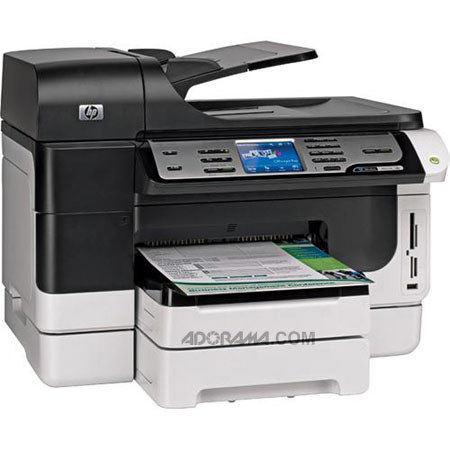
The Hewlett Packard - HP Officejet Pro 8500 Premier Wireless All in One Inkjet Printer is a wireless capable all in one with an additional 250 sheet paper input tray. The P Officejet Pro 8500 Premier inkjet printer is ideal for work teams with both Ethernet and wireless network capabilities. With this all in one you can print, copy, scan and fax all from one easy to use machine. A 3.4" LCD touchscreen makes creating your desired settings extremely simple and you'll be impressed by the high quality output the HP Officejet Pro 8500 delivers daily. A second set of color ink cartridges and creative software are also included.
Join VIP PRO
Earn 2X Points + Exclusive Perks!
Request a Callback
Chat one-on-one with an expert
Sell or Trade your Gear
Get started in 3 easy steps