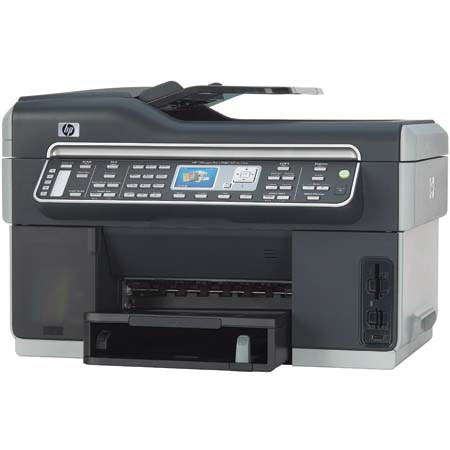
HP OfficeJet Pro L7680 Color All-in-One Inkjet Printer, 8.5x11", 1200-dpi, USB Interface, for Windows & Mac
SKU: IHPOJPL7680
This item is no longer available.
Share:
Overview
Compare
Learn
Specs
Protection
Reviews about this item
Review Summary
2018-09-21T20:00:00
Rated 1 out of 5
Great at taking a dump when you need it to print!
This printer was made to make HP money! If you don't value your time or the concept of quality, purchase one of these. They are a constant delight to sit and watch them waste ink as they "clean the print heads" or "align the print-heads' for twenty minutes only for them to print something that does not resemble whats on your print preview screen. love how many things consistently go wrong with it. It never makes me behind schedule because I know it will reliable show me an error code (ink related) that takes at least an hour to get right; I always have to plan ahead! I'm thinking of putting fireworks in it as it tries to print (which it won't) and video tape this thing in it's most magnificent hour!
HPuckBoi
Originally posted at
2009-08-23T20:00:00
Rated 4 out of 5
Great Printer - No Compatability with Vista 64-bit
Awesome features, couldn't ask for more. Spent dozens of hours trying to get printer to work with MS Vista 64-bit editions but printer cannot be used with advanced features, only basic printing.
PwrUser
Originally posted at
2009-08-05T20:00:00
Rated 2 out of 5
Fax problems on HP L7680
We had an all in one that broke before the 1 year warranty. HP gave us the L7680 as replacement - a used one. We did not mind that it was used but the fax is a big problem. The tray to send several sheets as a fax (or to copy more than one page)has plastic parts and keeps falling apart. We have put it back together but each time we use the fax it comes apart again. So we can only send a fax one page at a time from the glass. Not good when it is a big document and the receiver is not happy. As soon as we can we will replace it and even though we are really HP people we will look at another brand. Printing, scanning and copying (if one page) is great.
gaokie
Originally posted at
2009-08-03T20:00:00
Rated 4 out of 5
Great product But.....
I love this printer and have one in my office and one at my shop. But for some strange reason both seem to use the KY print head up quickly and both have now needed to be replaced. I am very disappointed that this has happened not once but twice now and if it happens again, with so little actual usage then I am certain my rating will be reduced. Other than this, however this is one of the fastest and best printers I have ever owned and I have owned quite a few (more than ten for personal use).
1immortal
Originally posted at
2009-07-05T20:00:00
Rated 1 out of 5
Unrepairable Machine
I have owned this machine for a year and have replaced it four times under warrenty. It is hard to believe that there would be four defective L7680s one after the other unless there was a major design flaw in the machine. The folks at HP have always been very pleasant to deal with but the printer is a flawed machine. When it works it produced good copies at a fast speed, but there was a constant problem with the printhead alignment. Like I said, four replacements in a year and each for the same reason - "failure printhead alignment." The last replacement machine also broke just 30 days out of the warranty . Again, the same reason, "failure printhead alignment." I would not recommend this model printer to anyone. Find one of the other HP printers that works.
ProfessorOne
Originally posted at
2009-06-14T20:00:00
Rated 5 out of 5
Great printer
I have owned several printers over the years and find this one the best I have owned thus far. Many of the all in one printers I have owned did not work well and cost me alot for the inks. The ink in this one lasts a good long time and the printer alerts you when you are running low. I especially like ordering the inks through HP (with free shipping) as they are as reasonable as the office supply stores in our town.
jgg14
Originally posted at
2009-06-06T20:00:00
Rated 1 out of 5
Poor warranty service
I had this machine in ext. warranty and it failed to copy. I sent it in and received rebuilt machine. Much had to be taken off the old one to make the new one complete. My old one reached HP. I had neglected to remove the 2 print heads. Two agents declared HP would sent the heads, but it would take tech sup. to authorize. Long argument this agent. His supvr. then promised to fed ex the heads. Nothing heard. Went through same routine, still no print heads and worthless machine on floor.Please send print heads! You have wasted precious staff time!
gray
Originally posted at
2009-06-02T20:00:00
Rated 5 out of 5
Software Install
If you have conflicts installing the USB, & are using disk version 7, throw it out! Download the Full ver.8 from HP approx. 311mb. HP also has a 'Scrubber' for ver 7 only. I did not use this, I used the uninstalls from the orig. software disk ver.7. Using Win XP: Be sure you unplug the USB, FROM YOUR (THE) COMPUTER. -To uninstall all the software proper, insert the software ver.7 install disk. -When it opens, close it. -Open My Computer/ right click [OJP_7X00 (D:)] & choose 'explore'. -Open the 'util' folder, then open the 'ccc' folder. -There towards the bottom, you will see the uninstall programs... uninstall, uninstall_l1, uninstall_l2, uninstall_l3, uninstall_l4. Running these in order opens a dos program, some are zip-zap quick, some take about 2 minutes be patient and follow instructions. -Start with uninstall, then uninstall_l1.....run all of these in order. This may not be totally ness. but it does make sure all the mal-functioning software is completely deleted and cleaned out. ***Save some time and check the little box to 'restart later' when your all done with each, then restart after uninstall_l4. -Restart your computer. -Run the Version 8 program and choose the complete install (you may have downloaded the driver only ver. and this review does not cover that version) on a fresh install, follow the instructions when to plug in the USB. There you have it. Pros: This printer, once working properly, is a scream. Prints fast, super fast, super-duper fast in draft mode yet still prints out good pages. In Normal mode it is almost laser quality, and still fast. In Best mode it is excellent & laser crisp (I'd use the word awesome, but thats already been reserved for GOD!) All the features work very well. Copy quality is very good, scan features work and the fax was easy to set up. Print heads are a snap to install, and the cartridges are easy and clean. Print production is good with quite a number of pages printed already and the ink is still 3/4 full. Have had this printer several months now and of the dozen printers that I have owned, only my still producing Photosmart 1218 comes close. I also found the Two-Sided printing option to function well. On draft mode, this baby will print out 50 pages, both sides, in about 5 minutes. Sweet! Cons: Other than the pain in the backside of my neck with version 7 software not working proper, NONE! Oh wait...on draft mode, this machine is like an unbalanced washing machine on spin cycle, so give it some room to move about. Put it on a sturdy table, mine is on a wood file cabinet and works fine. Happy printing. ALOHA!!
AlohaJon
Originally posted at
2009-05-31T20:00:00
Rated 3 out of 5
HP officjet lj680
I Have trouble changing the ink. when you lift the lid above the paper to add new paper the the bottom try, the plastic cover is so tight that clicks and you fear the it will break, i had a 6 years older version of this product that was used every day constantly, I loved that printer . This one has a much tinier feel. every time i load paper and get that tight click sound i get annoyed. Iwas told by the salesman i could use lrger ink cartrages in it and i don''t khow how to replace the smaller for the larger.
teann
Originally posted at
2009-05-28T20:00:00
Rated 1 out of 5
Bad softwear
The fax softwear doesn't have a coversheat option, so If you want to to fax an image, you have to print it, make a coversheat & re-scan and fax it. I have other brand multifunction printers and I can fax witha cover sheet right from the computer. Also, the Scan function always requires you to stretch the scanned item out to the full page. This is a lot of work when scanning multiple pages. Also, the automatic feader jams easily, I bought 3 HP multiunction printers and they all three jam easily, or grab the paper crooked. I would not recomend H.P. All in one printers.
Paul123456789
Originally posted at
2009-04-20T20:00:00
Rated 4 out of 5
Great Printing - Lousy Faxing
I have had this printer for 1 yr. The print quality is great but have had nothing but trouble faxing with the way the rollers feed papers in the automatic feeder. It has only one central roller and unless the papers are perfectly straight and not ripped they jam all the time. I do a lot of faxing of documents that have had staples and/or paperclips removed and they don't feed. Needs to have more rollers that can be spaced out. Probably won't purchase another HP for faxing purposes. It seems they all have this same feature. Also, no confirmation page is printed. Unless you watch the screen, you don't know if all the pages went through. Time consuming to sit & watch it for that. I like the idea of no phone handset, though.
snowbunny
Originally posted at
2009-04-19T20:00:00
Rated 1 out of 5
L7680
This printer has so many problems with document feeding for both the scanner and the printer that it should never have been marketed. I constantly experience paper jams on the scanner and the printer regularly informs me that I need to add paper even though the feed tray has at least half an inch of HP paper. Nothing but problems
RobertD28
Originally posted at
2009-04-12T20:00:00
Rated 3 out of 5
jambs up
this is the 3rd one they have sent and they all do the same thing JAMB UP and send updates 1 or 2 times a week and clutter the computor
dandydans
Originally posted at
2009-03-24T20:00:00
Rated 5 out of 5
Best printer I've had
My first printer was a different brand all in one but, switched to the HP Office Jet (This is my 3rd printer) but when this one came on the market I just dreamed of owning one but didn't think I could afford it. I went to buy a new one, low and behold it was as affordable as my other office jet, yet this one had all the features I wanted in a printer, including being able to hard wire my computers through my router without using wire less (because of the area I live in) I am so pleased with its performance. It was easy to set up, the print quality is great and I get 4 or 5 times the amount of printing with the ink then I did with my other printers. That is so far and the ink goes on. This is with just the ink that came with it. I have printed pictures, Science project and multi other reports in the time I have had it and haven't changed in yet. I have used everything from HP Photo paper, card stock and paper from 20 -28 lb paper. This is a must have for the home Office.
welroundedeileen
Originally posted at
2009-03-24T20:00:00
Rated 5 out of 5
Great printer
I've had my printer for one year and I love it just as much as the day I got it. Definitely would purchase again.
kjmc
Originally posted at
2009-03-21T20:00:00
Rated 1 out of 5
Very Unreliable
Terrible software on both Mac and Windows. My Windows XP software on multiple machines will run away and use 100% of the CPU. I have to disable the service in order to avoid this. The Mac software fails to connect almost 50% of the time. I have tried updating to the latest version and contacting HP but nothing really gets fixed. I haven't had any trouble in Linux but maybe HP doesn't fix this software. The machine jams a lot, the scanner is unreliable and jams with the feeder, the feeder scans routinely are crooked, it is slow, frustrating, and occasionally must reboot before using. An all around horrible purchase. I find that I frequently give up and just use an old flat bed scanner as this is more reliable.
yoma
Originally posted at
2009-03-16T20:00:00
Rated 5 out of 5
Can't believe it!
I produce a newsletter on a quarterly basis and opted for this printer after reading previous reviews. Normally, printing the newsletter involved a lot of re-printing and loss of paper/ink because pages would multiple-feed (especially when doing the second side), thus jamming the printer and having to be discarded. With this printer, it took just under 1/2 hour to print 10 copies -- 4 pages, both sides printed and all collated. Printing 10 at a time, it took a couple of evenings to print the 120 copies needed -- and no re-printing was necessary! Every copy came out beautifully! I plan to print more copies at a time with the next issue. The savings in wasted paper and ink (not to mention the time!) will pay for this printer in no time flat. One more bonus -- with other printers, we could not do anything else on the computer or it would dramatically slow down the printing. With this printer, we could do other work on the computer with no slowing down of the print process. Just want to say, "Whoopeeeeeee!!!!" Thanks for a GREAT product, HP!
KeystoneKeynotes
Originally posted at
2009-03-03T19:00:00
Rated 4 out of 5
Follow instructions!
I decided to get this unit because of a store promotion. I am glad that I read the reviews after I purchased my unit. Many of the problems that many people encountered were due to incorrect installation. The major problem with this unit is that it is very noisy. During the day, it is not too bad. But in the stillness of the night, it can be disturbing.
winkiebird
Originally posted at
2009-02-17T19:00:00
Rated 4 out of 5
It won't work with Quicken
It seems like a good printer for the few programs we have at our church but it absolutely will not work with Quicken 7 nor 9. Plus we are not online so we seem stuck in the spool. I'm about ready to box it up for something that will work.
jersher
Originally posted at
2009-02-16T19:00:00
Rated 4 out of 5
L7680 is great for a Macintosh
I had my last HP printer (LaserJet 5MP) for 12 years so I wanted to make sure my next printer would be as good. This printer is great. It has Bonjour (I don't think the specs talk about that) so hooking up is great, just plug in the ethernet cable. I haven't even installed any software that came with the printer. I use MacOS 10.5 and it already has the print driver. Scanning to a Macintosh shared SMB works great. Just a great printer. I highly recommend it.
DougNH
Originally posted at
2009-02-04T19:00:00
Rated 1 out of 5
HP 9120 vs L7780
This product was a big disappointment. I was thrilled with its predecessor teh HP 9100 series which was discontinued. This unit was the stated replacement. Fewer features, does work with Windows Server 2003 shares, does support outbound email pdfing of files and has a really poorly designed paper tray. I would pass on this one. -Kam
KJinnah
Originally posted at
2009-01-25T19:00:00
Rated 3 out of 5
Document feeder problems
The document feeder malfunctions constantly. I cannot scan documents. I will be donationg this one to a charity aned will shop for a different one that works.
rupert
Originally posted at
2009-01-14T19:00:00
Rated 2 out of 5
Upset HP Owner
I purchased a HP 7680 All in One in July and have had nothing but problems with it. It continually jams and I have had issues with the printerheads. I would not suggest this printer!!! It has cost a lot of money for repairs and is not reliable.
UpsetHPOwner
Originally posted at
2009-01-10T19:00:00
Rated 3 out of 5
2 Replacements Warranties
I am waiting on yet another warranty replacement printer within just 4 months of the first warrantly replacement. Paper "pick" problems, paper jams, paper jams and more paper jams. You definitely have to put the paper in a very specific manner or you'll spend more time at the back of the machine than you will printing. Maybe HP should have a Paper Installation University! And if you have to print large quanities of brochures and things of that nature with graphics...be prepared for very slow spooling! Other than that, it's a great machine.
gmar923
Originally posted at
2008-12-29T19:00:00
Rated 2 out of 5
not happy
bought this printer all in one and not 2 months of use, had to order a printer roller head..installed that ..then another 2 months it started skipping and not printing..called tech again ordered another printer head..and again started skipping letters...wouldn't print..would check the ink..check everything..even the printer would check..and go into a loop and would have to shut down and restart...so as of december 30 2008 it's going to the garbage. for a 300.00 printer I would have expected lots more..don't buy this or I just got a lemon..I have another printer all in one...cost of 50.00 that works better than the 300.00 one..it's hooked up now
Gima
Originally posted at
2008-12-20T19:00:00
Rated 3 out of 5
Poor Paper Feeding
I purchased the L7680 because I work with a lot on contracts and do a lot of faxing. Unfortunately, you have to watch every page as it goes through because it constantly crimps the page as it's feeding through and either causes a paper jam or sends everything through at an angle. It also has a tendency to skip pages and you're forced to start all over. My old K80 worked much more efficiently and I didn't encounter those types of problems. I expected more from HP.
MaryJo
Originally posted at
2008-12-07T19:00:00
Rated 5 out of 5
SLEEPER
This printer is GREAT, Looks like it is asleep. Punch print and it comes alive..
lwpscorpion
Originally posted at
2008-11-18T19:00:00
Rated 3 out of 5
Nice All In One Printer
The printer is very fast, has great print quality and scanning. However, when I received the printer, the scanner unit was not working. Since I am a PC Technician and have been for 20 years, I repaired the scanner unit. Apparently, a piece that sits on the bottom of the scanner assembly that helps guide the assembly back and forth simply fell out of place during shipping. No big issue there, but the Software is problematic at best, at least if you are going to install it on a network. I purchased this printer for home use and have a 2 PC network and the only simularity between the 2 PC's is that they have the same NIC card in them and both are running XP. On 1 PC, after installing the software, the PC would hang when you try to shut it down, which is caused by an exe file that is part of the software suite. On the second PC, it took several hours to get the software to work correctly because it could not find the printer, even when I manually entered the IP address. I finally got it working, but when the update service ran and installed 2 updates 2 days later, the Digital Monitor would not initialize, so I had to re-install the software again and not use the HP update service. After getting through these issues though, the printer works great. But because of the scanner issue and the software issue, I gave it 3 stars for overall rating. This replaces a Photosmart 2610 that was also connected through the network and the software worked great, which is why I purchased this printer and was surprised that I had these issues. I also had installed the latest driver and software suite from here and updated the firmware.
DanDaMan
Originally posted at
2008-11-13T19:00:00
Rated 5 out of 5
carefully stack the paper
carefully stack the paper to have the stack to be vertically straight, otherwise paper jam occurs. It took me some time to find the importance of it. After that, this is one of the best printers.
shiro
Originally posted at
2008-11-10T19:00:00
Rated 1 out of 5
Unreliable Machine
I've had nothing but trouble with this machine. I purchased a warranty good thing I did the network card went out in it. I had to exchange the machine for a new Thank goodness for the warranty, now the new one does not connect at all to the network. Now I am having color issues when printing. I DO NOT RECOMMEND THIS MACHINE TO ANYONE!
Sauve
Originally posted at
Specification about this item
Related Articles & Videos
About HP OfficeJet Pro L7680 Color All-in-One Inkjet Printer, 8.5x11", 1200-dpi, USB Interface, for Windows & Mac
Enhanced, high-quality performance is headed your way with the HP Officejet Pro L7680 Color All-in-One. Featuring printing, faxing, and copying plus convenient built-in networking, it's ready to take on-and plow through-the workload. And the Direct Digital Filing feature lets you scan photos and documents (up to legal size) directly into folders, no PC required.
Get efficient high-volume printing with the optional 350-sheet tray. With HP's Vivera inks and Advanced Paper, documents dry fast and photos are water-resistant. Print borderless photos in various sizes up to 8.5" x 24" panorama from memory cards and proof sheets. Enjoy professional-quality printing at a cost per page up to 25 percent lower than comparable laser All-in-Ones with the HP Officejet Pro L7680.
Join VIP PRO
Earn 2X Points + Exclusive Perks!
Request a Callback
Chat one-on-one with an expert
Sell or Trade your Gear
Get started in 3 easy steps
What's in the box:
- HP OfficeJet Pro L7680
- Power Cord
- HP 88 Black Ink Cartridge
- HP 88 Cyan
- Magenta
- and Yellow Ink Cartridges
- 2 Printheads
- Getting Started Guide
- Setup Poster
- Driver CD with User's Guide
- Automatic Two-sided Printing Accessory
- Large Color Graphics Display
- Legal-sized Scanner Glass
- Direct Digital Filing
- HP 1 Year Warranty