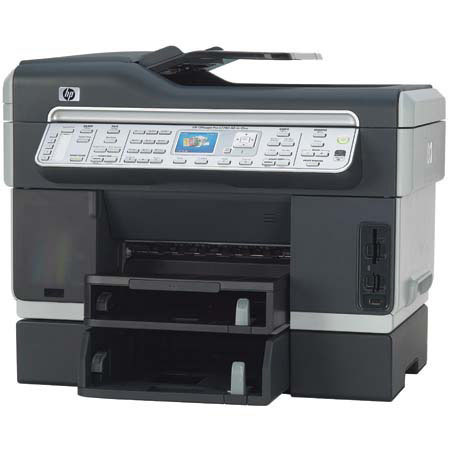
HP OfficeJet Pro L7780 Color All-in-One Inkjet Printer, Scanner & Copier, 8.5x11", with USB Interface
SKU: IHPOJPL7780
This item is no longer available.
Share:
Overview
Compare
Learn
Specs
Protection
Reviews about this item
Review Summary
2009-07-06T20:00:00
Rated 2 out of 5
Not the upgrade I was expecting.
This is my first color MFP after a few LaserJets. I will never again waste my money this way. Overall print quality was decent at best, but if printing two sided, be ready for streaky, wet products. The only decent feature of the whole thing was that I had no problems with the wireless functionality on either XP or Vista. Performance has been horrible. ADF skips pages, second tray jams after 3 or 4 pages. Print heads continue to fail. And machine is constantly "checking" itself. Scanning is slow, but bearable. I would not recommend this product to my worst enemy.
jwamz
Originally posted at
2009-07-01T20:00:00
Rated 4 out of 5
Nice but LOUD
This printer replaced a very old inkjet printer. So the speed was absolutely amazing! Many, many good features, actually more than I needed but for the price I couldn't go wrong. I am not sure if the printer came with full ink cartridges, but they did seem to last a very long time! Only downfalls I see are the printer is VERY loud and shakes the small table I have it on, but since it's wireless we are moving it to a different room. Also we try to recycle paper at our house. I notice when I use recycled paper the machine tends to jam up frequently. We have tried putting the recycled paper in both trays and have the same problem. Our recycled paper is "normal" paper that we have used through the printer and no longer need and are trying to use the back side. Overall we are extremely pleased with the quality and the wireless connection. When setting up the wireless connection MAKE SURE TO TURN OFF YOUR ANTI-VIRUS SOFTWARE. This is not very clear in the directions. We spent HOURS trying to figure out why it would not print:(
Busyteacher
Originally posted at
2009-06-27T20:00:00
Rated 1 out of 5
Woops! Watch out for this one...
I have tried my best to get this printer to work. It's beautiful and the features are exactly what I wanted, but alas - they don't work. I've double-checked my installation. I've followed every software trail and update I can find, but it won't print properly 100% of the time. The problems are: Missing text or graphics(random) in any kind of document from any program that prints, the 2nd paper tray will NOT EVER work when the first tray runs out of paper. Every self-test on the printer says all is well. All drivers and software are the latest available on the HP web site product page. I'm not a novice user and understand how to turn printer features on from within Windows. I do not recommend this printer.
TimT
Originally posted at
2009-06-27T20:00:00
Rated 2 out of 5
Generally Disappointed
This is my 4th HP printer. The 1st was an R40xi that was very nice, but it just got old and very used. I then got a cheap psc 1315xi to supplement it and was very happy with it. When the R40xi finally quit altogether I added a D5160 (also cheap) for added capacity and for the photo printing capability (infrequent use). When I started needing significant printing volume capability for my home-based business, I went for the L7780 for its advertized volume capability, scanning and double-sided printing features. I am generally disappointed with the paper jams, the noise and the need to replace expensive print heads frequently, but what really ticks me off about the machine is the fact that if any one cartridge is "empty" you can't print at all. I suspect that the machine electronically lowers the level indicators for the cartridges as printing is performed, because I print almost exclusively in black but the indicated level in the other cartridges decreases along with the black cartridge. Two months ago after "running out" of cyan ink when I had only been printing in back, I changed the printing prefernces to use black ink only. Not long afterwards I had to replace the magenta cartridge, and now the yellow cartridge shows as empty. I now use my cheap old HP printers for printing, and the L7780 is just a huge scanner. The print quality is just as good on the old printers as it was with the L7780.
Doug1
Originally posted at
2009-05-29T20:00:00
Rated 5 out of 5
I have had my L7780 for just under a year
My L7780 was one of my more intelligent purchaeses. Although the ink cartridges are a little more expensive than my other HP inkjet printers -- the print quality is100% better. I have 8 HP Printers from a 4215 all -in-one to my heavy duty 4700DN laser jet I use for my large tasks. If you are looking for a printer that will serve 99% of your printing needs for your small business YOU CAN'T GO WRONG WITH AN L7780
docbennett
Originally posted at
2009-05-18T20:00:00
Rated 5 out of 5
CAN'T SAY ENOUGH ABOUT IT!
I have owned several printers in my time, starting with the ever amazing dot matrix printers. This machine has blown away all machines I have seen so far, and in my opinion will continue to blow them away for years to come. The four ink tank system is a great feature, having a tri color cartridge run out of one color (yellow, cyan or magenta) renders the ink tank useless in most machines. You are able to replace only the color needed and this helps you get all of your invested money out of the tanks. I have noticed some jamming while duplex printing, however, upon changing paper (from 20lb standard copy paper to HP 24lb inkjet paper) solved the issue. The amount of pages produced by the 88XL ink tanks is well worth all the money. ~2450 pages yield in black and ~1700 pages yield out of the color (average) is great. This printer may cost more than the average inkjet printer when purchased, however, the amount of money saved on ink over the course of one year, is astronomical. When comparing most Laser printers to this inkjet you will find most toners produce a ~2500 page yield in black and cost somewhere around double the price of the 88XL Black ink tank. And the color toners, around $80 produce the ~2500 page yield where the 88XL color ink tanks cost around $27 and produce ~1700. When you do the math it all really is the most cost efficient printer on the market. Happy Printing!
CrEaMy
Originally posted at
2009-05-07T20:00:00
Rated 1 out of 5
do not buy
this printer lasted just a little over a year, right outside the warranty before it had a hardware fail in which copies and print jobs had smears and missing sections.
juma
Originally posted at
2009-04-16T20:00:00
Rated 1 out of 5
Worst printer EVER!
This thing constantly gets paper jams!! Every single day I am forcing paper out of this thing. The document reader also gets jammed frequently...extremely annoying. I would not recommend this to a small business at all, maybe it wouldn't be so bad for a household. Today I got a new error called "general scan error" so all day today I could not scan any documents. My office frequently references "going office space" on this machine one day.
KMurph
Originally posted at
2009-04-14T20:00:00
Rated 2 out of 5
Automatic Document Feeder
This is a totally frustrating machine to use because the automatic document feeder (ADF) works sometime. When you have a stack of papers that need to faxed, copied, or scanned the ADF won't feed the papers into the machine. This is a replacement printer for our first one that had the same problem. I will never buy another HP all in one again.
OSCSRET
Originally posted at
2009-03-25T20:00:00
Rated 5 out of 5
Best HP printer I have owned to date.
This is an awesome printer. I get comments everyday from my friends and our customers, who would like to have one. The installation was smooth and easy. It prints everything fast and at a quality that I feel is far superior to any printer that I have had to date. I especially enjoy the two sided printing, large paper capacity and its ability to copy to file or send to email. The fact that each cartridge is separate, has definitely saved me a lot of money over this this last three months. I feel this was a super purchase for us and would do it again in a heart beat. In fact, I am thinking about upgrading the printer that I am using at home, based on my experiences with my L7780, and the printer I will be purchasing is this one - for sure.
beckycs
Originally posted at
2009-03-14T20:00:00
Rated 4 out of 5
GREAT ALL-IN-ONE
THIS IS MY SECOND ALL-IN-ONE PRINTER - I HAD A HP7410 IT WORKED GREAT - THIS PRINTER IS EVEN BETTER - FASTER & HAS MORE FEATURES - THE ONLY THING I DON'T LIKE ABOUT IT IS ALL THE DIFFERENT INK CARTAGES IT HAS (4) ONE BLACK & 3 COLOR - BUT, I MUST SAY IT USES VERY LITTLE INK - ESPECIALLY, WHEN PRINTER IS PLACED IN THE INK SAVING MODE (DRAFT COPIES)....NICE LOOKING TOO BOOT!
TEXAN
Originally posted at
2009-03-11T20:00:00
Rated 5 out of 5
I love this printer
I finally retired my old HP and upgraded. I originally found one locally and then found this online for half the price. There is also a $30 coupon online. It was a super price. The only complaint is that I haven't figured out how to make it wireless yet. I'll figure it out one day..haha..The picture is super sharp copies are extra fast. More than I ever dreamed I'd have for this price. You can't go wrong with this machine for a business or busy home.
lushtaa
Originally posted at
2009-03-08T20:00:00
Rated 5 out of 5
HP Delievers Value and Quality yet again!
The HP 7780 amazed me at the simplicity of setup and hooking it up to my wireless. I thought that I would spend 1/2 day in getting it working -- and 15 minutes later I was priniting away! I have always had an HP all-in-one since they were released in the '90's. I have never had a moment of trouble and only bought new ones because of the features they had -- never because the printer broke. Thank you HP -- you have amazed me again.....
Annabelle
Originally posted at
2009-03-08T20:00:00
Rated 4 out of 5
Good Printer
I'm a small business owner and have had this printer for 2 years. Works great - only issue that i have is with the duplex. Jams consistently after 5 or so copies. Haven't been able to resolve this yet...
reviewer09
Originally posted at
2009-03-04T19:00:00
Rated 5 out of 5
Great Buy So Far!
I am a business owner and I am VERY pleased with the print speed and quality of the printing. As a "non-techie" it was a breeze to install, however the USB/Wireless instructions could have been a little more clearer but I figured it out and after having it for only 1 day, I'm very pleased. I'll do another review after 30days of use. Outstanding price, $299 vs. $499. This is a STEAL! I highly recommend. -A Happy Buyer
FirstReview
Originally posted at
2009-02-19T19:00:00
Rated 2 out of 5
Dissapointing
I have had the pleasure of trying 2 of these all-in-ones. It is a reliable printer, and ink consumption is average to good, we probably switch a cartridge a month with average amount of print. On one of the printers, the screen would just freeze, it would be non-responsive. The other one, which we still use, has to have the auto paper tray turned before copies, scan or a fax involving 2 or more pages. The scanner is good, but there is no dramatic improvement over a cheaper unit. The user interface is OK, with some bugs and some annoying behaviors such as scanning the whole drive for new pictures when a new one is scanned. Overall, it is a OK all-in-one, probably ideal for a home or very slow/small office with light printing.
dre78
Originally posted at
2009-02-05T19:00:00
Rated 4 out of 5
Excellent except slow scanning
This is my second HP all in one. For my usage (small law office) it does everything quite well with the exception of scanning speed. Usually I want to scan to PDF with OCR using Acrobat professional; it takes over a minute to scan the first page, and less than a minute for subsequent pages. Which is too slow for most documents, so I am looking for a dedicated scanner. I am using a Mac, so I suppose it is possible that PC users get better scanning speed.
WJMLaw
Originally posted at
2009-01-27T19:00:00
Rated 4 out of 5
HP Officejet Pro L7780
I love this new printer, I have already saved money using this new one over our previous printer, the ink seems to last a lot longer. I am very happy with the results when I print pictures, also. I admit, there still are some features that are unfamiliar to me but in time and with practice, I'm sure I will learn all there is to know about this printer. One of the best features is the two trays. I was constantly changing the paper with the previous printer, but having two trays has made it a lot easier. So I also save paper by using the second tray as I use less costly paper for that tray, etc. All in all, it is wonderful and I am so please with the results of this purchase. I highly recommend it! Also, HP has always treated us well when it comes to repairs or other issues we've had with our previous HP printer so I did not hesitate in purchasing another HP product. Keep up the good work!
SKay
Originally posted at
2009-01-20T19:00:00
Rated 5 out of 5
L7780 Printer
Great printer, glad I bought this model. Very fast, excellent printing. Have had it over a year, only problem has been a couple of paper jams, probably my fault when I added paper to tray. Great for faxing, makes great color copies.
RogerDodger
Originally posted at
2009-01-11T19:00:00
Rated 1 out of 5
VERY POOR PRINTING
This is the third replacement we have had in less then one year. The print skips, quality poor. We would not recomend this to anyone. I was always an HP supporter, now not so sure, this printer is terrible,
bonbask
Originally posted at
2009-01-07T19:00:00
Rated 5 out of 5
Best yet
Read all the reviews and had some reservations but have always had HP inkjets. This one is easy to setup, easy to modify the default settings to my needs. I don't have to worry about startup because I never shut my printers down. It is a little noisy but not any worse than the one it replaced and it's twice as fast as the old one and the photo output is great. I use it as proofs to a film house for newletter reproduction. Haven't had to use the support line but I thought all of them went overseas today. Guess we just have to deal with that.
Chuck9
Originally posted at
2009-01-03T19:00:00
Rated 5 out of 5
HP L7780
I purchased the Officejet Pro L7780 to replace an older HP Officejet 145d. It's setup was straight forward and I was impressed with how quick it can print along with good quality. I like the two sided, duplex printing and wireless and network connections features included. I use this in conjunction with my other HP K8600dn printer. As both have high 6K+ duty cycle and use the same high capacity 88 XL ink cartridages which helps keep printing cost and ink inventory needs down. I use it for my small home office and does very well on small to medium size printing jobs. These complement my newer HP Pavilion d5000t computer perfectly.
joeyk
Originally posted at
2008-12-29T19:00:00
Rated 5 out of 5
Dependable
I teach a woman's bible study group that requires a large amount of printed material, my printer has not fail to deliver. The quality of print is outstanding. I am pleasantly impressed.
wjbm1
Originally posted at
2008-12-23T19:00:00
Rated 4 out of 5
Ultra
Have always had an HP OfficeJet in my home office. Purchased the L7780 because of its duplex capabilities and extra paper tray. Although this is a niffy piece of engineering, I still have not been able to use the duplex feature without having the paper jam. Other than that 1 problem, this is a super printer. Recommend it to any and everybody that I know who is looking to purchase a printer. Even in the stores, when I see someone looking at printers, I tell them about the L7780 features.
WildChief
Originally posted at
2008-11-20T19:00:00
Rated 5 out of 5
One Great Printer
Am very happy with the HP 7780 and enjoy all of its features. Another great printer from HP.
OhPonds
Originally posted at
2008-11-10T19:00:00
Rated 1 out of 5
bad news
I've had this printer for 6 months, replaced 2 or 3 times. driver won't work with vista. ink cartridge door breaks off latch tab 2x,
beltingguy
Originally posted at
2008-10-28T20:00:00
Rated 5 out of 5
Admin
I knew this OfficeJet Pro was going to be excellent prior to purchasing it. However after installing it, it very quickly became obvious this was a superb "everything" printer! I would rate this machine as superior/outstanding. Impressive may be a bit of an understatement here.
Sgt77th
Originally posted at
2008-10-26T20:00:00
Rated 4 out of 5
WiFi and LinkSys
Just unpacked my machine and still in the process of evaluating it. That said, the wireless radio is NOT compatible with LinkSys 54G routers! You must configure the IP address manually. Otherwise it will lockup and or hang until unplugged. Other then that, so far it seems to work great. One small note, the duplexer is very slow but working great. I am going to withhold and Overall 5 star until I use this for a while.
MichaelR
Originally posted at
2008-10-15T20:00:00
Rated 3 out of 5
Not as good as advertised
We run a a small business. The issues we have: 1) Does not work well with CIS (Continous Inking System). Even when I put the original cartridges back in it thinks that they are not there. Censor issue. 2) Auto document feeder misses pages from time to time. 3) You are lead to believe that your paper capacity is great, but reality is when both trays are full it will only 250 pages in the No. 1 tray but when it runs empty the 2nd tray does not automatically kick in. 4) It spend a lot of time "Readjusting" its self. This can take up to 5 minutes on occasion. I wish I would have known more about the machine prior to buying it. I would not but it again.
Scottankaren
Originally posted at
2008-10-03T20:00:00
Rated 2 out of 5
HP officejet pro L7780 All-in-one
This printer looked to be a good buy at first. Then we found out that it was of very poor quality. Features are good, but the feeder on the top to send faxes and make copies works 1/4 of the time. Printheads also go out about once a month and the only place you can find them is on this website. Stay away from this printer for small businesses. Might be alright for home users that print 100 pages a week.
Chickenboy
Originally posted at
HP OfficeJet L7780 Clr All-in-One Inkjt Printer,8.5x11" Specifications
Related Articles & Videos
About HP OfficeJet L7780 Clr All-in-One Inkjt Printer,8.5x11"
Want a multifunction color printer that offers the convenience of wireless networking? The Officejet Pro L7780 is right for all your small-office printing, faxing, copying, and scanning needs. Plus you can scan photos and documents (up to legal size) directly to folders-without a PC-using the Direct Digital Filing feature.
Get laser-quality color prints faster than with most color laser All-in-Ones, up to 12 pages per minute black. Also, get outstanding scans with up to 2400 x 4800 optimized dpi color. You can share innovative features and enhance productivity with the wireless networking. Enjoy professional-quality printing at a cost per page up to 25 percent lower than comparable laser All-in-Ones with the Officejet Pro L7780.
Join VIP PRO
Earn 2X Points + Exclusive Perks!
Request a Callback
Chat one-on-one with an expert
Sell or Trade your Gear
Get started in 3 easy steps
What's in the box:
- HP OfficeJet Pro L7780 Color All-in-One Inkjet Printer
- Power Cord
- HP 88 Black Ink Cartridge
- HP 88 Cyan
- Magenta
- and Yellow Ink Cartridges
- 2 Printheads
- Getting Started Guide
- Setup Poster
- Driver CD (includes User's Guide)
- 350-Sheet Tray
- Built-in Wireless 802.11b/g Networking
- ReadIris Pro OCR Software
- HP 1 Year Warranty