


This item is no longer available.
Review Summary
2016-03-18T20:00:00
This printer has great features, but is terribly unreliable. I don't do alot of printing, but every single time I rely on this printer I end up frustrated, angry, and more disappointed in HP. Terrible printing, terrible drivers, and ink that seems to run out quickly and constantly. Today, it has let me down for the last time. I will be shopping for a new printer, and HP will not be in the running.
AngryCustomerGuy

2016-01-04T19:00:00
The drivers for my Windows 7 OS have been flaky. I have had to reinstall them multiple times on both of my laptops. The HP Solution Center will stop working and tell me the printer isn't completely installed. Recently there have been frequent paper jams. I have had multiple HP printers in the past with no problems but I am very disappointed with this one.
AW67
2009-05-22T20:00:00
I like the C7280 All-in-one because it works. I have owned this model for almost a year and have not had one paper jam, missed fax, scan, or copy. What else can you ask from this machine?
Bman
2009-05-13T20:00:00
For the first couple of months i loved my new printer, after that it jams everytime i print so out of 20 prints maybe get 2 decent copies. I will not recomend this unit to anyone its a huge hassle.
Tiny
2009-05-11T20:00:00
I recommend that anyone that needs a new printer consider this printer. I have found that the quality of the output of this printer is very high class and is one of the best printers I have ever used.
dlrocha
2009-05-10T20:00:00
this is aclunky piece of equipment. TAkes a lot of ink and constantly needs to be rebooted. Under no circumstances should you waste any hard earn money on this lemon
UpJohn
2009-04-24T20:00:00
I looked around quite a bit before I decided to go with this printer. I liked the idea of the 802.11g (although it slowed down my network), so we could print off our laptops without having a dedicated print server. I had read the reviews on several sites so I knew that it had some issues. I wasn't thrilled that I had a bad software install right off the bat.(It was a clean install on a new machine and I had a hunch that it was my driver disk) I expected some issues because of my inexperience with Vista but I have 20 years of PC experience and I can get almost anything to work. However when I installed on my XP laptop and had the same problems, I d/led the software off of the web, and had no issues. It's noisy starting up (understatement) but I love the print quality for photo's. I don't print much in draft mode but I was fine with the results on what I did. If you are a serious Home-office user I would tell you not to get it but for light home-office use it's a very good printer.
JustBri
2009-04-23T20:00:00
Has everything you need with the quality you want. I'll be keeping this one!!
fribbit44
2009-04-21T20:00:00
This all in one machine works very good. The photos are of excellent quality and it is simple to use. Only real negative is the machine is very noisy at start up and after printing.
Richie29407
2009-04-19T20:00:00
This is the noisiest HP printer I have ever had. Combining that with more than average paper jams does not make for a high rating.
syrettj
2009-04-19T20:00:00
It does everything. Right from the box it recognized my wireless network and is very easy on ink as long as you don't want to print in color every time....all printers are like that. Photos in hi res rival anything you'd ever get from the store. Fast draft mode is so fast its hard to keep up with. I'd buy another in a heartbeat.
momule
2009-04-18T20:00:00
i bought this machine a week ago and i love it. it does so much and prints photos very nice.i would recommend this machine.
tuscany
2009-04-16T20:00:00
After reading all of the reviews on this product, I became suspicious of the problems some were having.I loaded the software disc and immediately could not get past the initial update page.It turns out I deleted the hp update software on my computer and it could not check for new updates, so I corrected that issue and the software installed just fine. after printing some of my pictures taken from a 2 megapixel cam and a 6 megapixel cam,I can see a big difference in the copies. Beautiful prints from the 6mp camera. All of the other features worked fine on their own. So if you start with good quality pictures, this printer will give you excellent quality copies and very fast, so go for it. It is easy to setup, easy to use and does what it claims to with great results.
jcdanvers
2009-04-15T20:00:00
I have to admit that I was somewhat skeptical about this printer because of some of the other postings about setting it up on a wireless network. However, I trusted my instincts and went ahead and bought one. Shipping was fast, only took 3 days from the time I ordered until I received it (at 6:40 in the morning via FedEx). I literally followed the instructions to the letter and had it up and running on my network in 20 minutes. Instructions were clear and concise. What took the longest was entering my WEP info on the keyboard. It took me a little over an hour to set up the printer on my network and install the software on my two computers (one is a wireless notebook and the other a desktop PC). Printing on this is a little slow to start but is very clear. Having 6 color cartridges the photo printing is absolutely great. The only downfall that I found is that you have to have the printer turned on when you submit a print job, it will not automatically turn on like my HP 7260 does when you submit a print job to it. The total functionality of this printer is great and I would tell anyone to buy this all in one printer.
501Retired
2009-04-07T20:00:00
Love the features of this unit, but have had a lot of problems. Sheet feeder feeds multiple sheets. Replaced the unit in warranty. Wouldn't connect wirelessly but Tech Help solved the problem. Put in new ink cartridge and the unit failed, having it replaced. Get the Service Contract. I also like the upgrade feature. If the unit fails you can upgrade to a newer unit or replace the same at a better price. It keeps you coming back.
thePatriot
2009-03-31T20:00:00
I have installed and uninstalled at least five times and still will not load correctly. I have checked every article and tried everything online. It all checks out, but stalls and then freezes my internet acess. I hate the fact that the duplex option requires a manual fix every time I want to use it.
stillnothappy
2009-03-25T20:00:00
wanted something really nice for my new laptop last year & bought the C7280 all in one... everything is great & i have it hooked up to my laptop & when i take my laptop out & about i just reconnect the usb cord and no problems...love the printer, copier, scanner, & fax function...LOVE the photosmart creating pictures...wonderful...cool thing is you can even use it as an internal fax if you don't have a phone line and it goes into an "inbox" type mailbox like email...BEST THING IS YOU CAN BUY FROM HP A "COMBO 02 INK & PHOTO PAPER" as you save $ and always have ink & authentic HP photopaper when you need it...also I use HP multipurpose paper for copy/print... HAVE not used the wireless feature but i know it's there when i have to set up all things wireless... GREAT PRODUCT... easy set up, nice tech help who made sure my fax worked and also a "trial number" to make sure your outgoing fax feature works, too... VERY FINE PRODUCT...THANK YOU... hope nothing happens now that i wrote this sterling review...fingers crossed...i am not "mechanical"...
MIAMIHEAT
2009-03-24T20:00:00
I love this printer. Scanner function works great, especially with the page feeder. The only thing that is missing is a dual-sided page feeding scanner... and none of them have that. Good printer. Get it!
Benistpope
2009-03-19T20:00:00
So, it's noisy but it's perfect for me right now at this instant in time. Whoa, Nelly.
zoroaster
2009-02-24T19:00:00
I bought my printer back in September of 2008. I shopped around a bit because this is my third printer and I wasn't overly pleased with my previous two printers. Since I don't have a data line in my house, the only feature that I haven't had a chance to use yet is the fax. All of the other features: printer, copier, scanner and photo printer are, simply put, TOP NOTCH!!! This printer is fast and the print/copy/scan quality is EXCELLENT. I REALLY like that it prints multiple page documents in descending page order, so I never have to reorder the pages when I take them off of the printer. The duplex attachment is a true MONEY SAVER!!! I use the HP Advanced Photo Paper and my prints are always crisp and clear...lab quality. I like being able to set up custom printing profiles that I can select depending on the project I'm working on instead of having to always change the printer settings. The software that comes with the printer is a nice addition. I've done all sorts of projects; scrapbook pages, photo books, calendars, invitations, etc...all with professional quality. The wireless setup was a breeze. I followed the onscreen instructions and it literally took less than 2 minutes. I can't say enough good things about this printer. It is DEFINITELY a great value. If you're shopping for a printer, you'd be crazy if you didn't check out this printer. You won't be disappointed. GREAT JOB HP !!!
QTeePy
2009-02-19T19:00:00
Our biggest problem with this printer is the crummy ink. We thought it was going to be great to only have to replace the empty one. And it is, BUT the ink smears and if it gets a little bit wet it runs. My wife's brochures stink because if they get "runs" on them then they look unprofessional. Thought it was going to be "print quality"....
dnewman
2009-02-18T19:00:00
Wireless is less then expected. I would not recommend this prnter to anyone.
Fitz
2009-02-15T19:00:00
I initially purchased a C7280 in March, 2008. 11 months later, I'm on my fourth (yep, you heard right) unit. The first three all failed with paper jams when printing. Supposedly, this model tries to be smart and determine whether you are printing to plain or photo paper. If plain, it uses rollers to transport the paper. If photo, it engages little sprockets to help the thicker photo paper along. Well, when the sensor gets dirty, plain paper gets confused for photo paper. Up pops the sprockets and causes feed jams. There is no way to clean the sensor -- oops! To top it off, I received my 4th refurb unit 2 days ago and it cannot make copies or send faxes without inserting a nice, 2-inch black bar on the margain of the paper. I've had it and have requested a chat with a manager and a refund. I cannot tell you how many hours I have spent in chats or on the phone dealing with this piece of trash. Do not get one! It is totally unreliable.
rjk51
2009-02-14T19:00:00
Excellent product! This is my third printer in less than a month . . .I couldn't find anything that I REALLY liked until I tested this printer in the store. My previous printer (the one I was trying to replace) had the the PC Fax feature & I loved it (helped to save a tree), so I wanted to make sure I had that particular feature, again. This printer's wireless setup was way too easy! The color printing is rich . . . prints pretty fast, too. Finally, I have a printer where the paper lies flat & doesn't stand on its end (creates paper jams); you only have to change the "one" ink cartridge that runs out. I do wish it had the disk labeling feature, though. Oh! And it's pretty, too!
3rdTime
2009-02-09T19:00:00
This product is awsome. It is very user friendly and the wireless connection was easy to set up. I printed all my wedding invitations, ceremony programs and thank you cards using this machine and it was great. Everyone thought it was done professionally.
Robin25
2009-02-09T19:00:00
I'm very happy with this printer............it does get a little noisey will priniting but its not that bad..........print quality is execellent and so is the photo printing.......the fax, scanning and copier are perfect features..........the only thing i wish it had is laser disc labeling then the total package would be complete............but overall its an excellent product.
deelaa
2009-02-08T19:00:00
I recently purchased this all in one photosmart printer and so far have been very happy with it. I almost didn't because of the review regarding installation, however, I'm glad I did. I had absolutely no problems with the installation. I have 2 laptops that are connecting wirelessly to the printer and they both work fine. The picture printing quality is great. I would highly recommend this printer for a home wireless network setup.
Chicagoan
2009-02-05T19:00:00
It's been a few years since I bought a new printer. My old Photosmart printer was, well, old, so I retired it even though it still works. I figured technology must have changed since 2003. I was right. This printer works great and the print is stunning. This unit is as plug-and-play as anything I've ever bought. The software takes a good 15 minutes to load and requires user input from time to time so you can't hit install and walk away, but once it's loaded you're good to go. The only thing out of the ordinary I found is when you ask it to duplex it tells me the duplexer is not installed, but it is. Just ignore the warning and it goes right into duplex mode and does flip and print the second side without a hitch. Beautiful finish and fit. You don't have to hide this in a closet. I have it on the desk next to my computer and it looks great. My eyes tell me the Photosmart printout is sharper than the old unit I had. There must have been some tweaks done to something, because the old printer I had was a Photosmart and this one does a better job. You won't be sorry with this printer.
Chip123789654
2009-02-03T19:00:00
There are way too many software malfunctions with this printer. Do not buy it or you will be in for one long headache.
morthia
2009-01-29T19:00:00
We have had the 7280 for about six months now. Our IT guy has been here at least 5 times to get it back on line where it will print. He spends hours and hours each time, it works for a short time then, caput! It stops printing. Cannot figure out the problem ourselves and now the IT guy can't either. I wouldn't give you a penny for the thing. It's certainly very expensive to try to maintain for use when you have to pay the guy $40/hr to fix it every few days. Wish I'd gotten someething else for sure.
Griffin
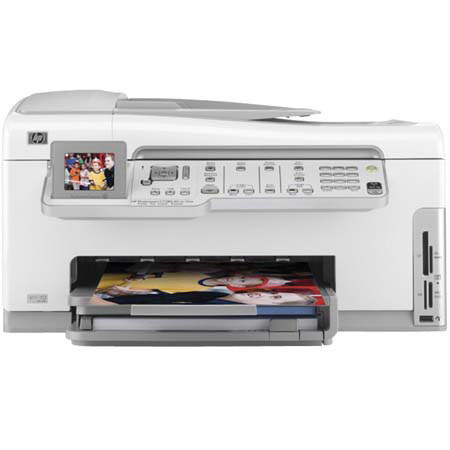
The HP Photosmart C7280 All-in-One is ready to print, scan, copy and fax as directed. It's ready to turn out lab-quality photos and reprints, laser-quality documents and beautiful scans. It will print on both sides of the page, print uncut Web pages and automatically feed paper so you don't have to stand around. And you can even add it to your home network, as it has built-in wireless and Ethernet connectivity.
Join VIP PRO
Earn 2X Points + Exclusive Perks!
Request a Callback
Chat one-on-one with an expert
Sell or Trade your Gear
Get started in 3 easy steps