


This item is no longer available.
Review Summary
2012-01-27T19:00:00
I'm quite amazed at the ease of set up and how quickly it prints. Actually my son in law set it up for me but he was also quite impressed.
Bubbette

2012-01-27T19:00:00
The prints from this machine are 5 star, but opening the back for a paper jam is a terrible task. After only nine months, a piece of the back flew out and there is no diagram availble to see where it belongs -- my very first bad experience with an HP printer. In addition I need a wrench to open the cartridges. No more easy paper to pull off each cartridge.
Sonya
2012-01-26T19:00:00
It will go back to sender, this printer refuses to scan!!!
Dinaki
2012-01-25T19:00:00
works and looks great
Cbarry
2012-01-24T19:00:00
I installed the printer on Monday. The installation does take a while, but the entire installation went very smoothly. I chose to use the USB cord, since we will not be printing from various places and I was being cautious. I may change it, however. It is for home use. Installation stage 1 uses a wizard and then stage 2 uses the enclosed CD. We have used the photo print, scanner, and copier functions. And we have used the printer function. All are super and the speed was more than acceptable. After all, it is not a dedicated copier. We copied a letter, handwritten on onion skin paper from 1939, back and front, and the quality was amazing. We were astonished really, It is Wednesday morning and I am extremely pleased with this All-in-one. Kudos to HP.
AMAVA
2012-01-24T19:00:00
Easy to set up and use I am pleased with the performance.
Firstsarge
2012-01-23T19:00:00
Set up was seamless for me and this printer EFFICIENTLY does EVERYTHING I need. Faxing is almost a lost art so I do not have the need for that. I simply scan documents into emails or Word documents according to the end user's requirements. I love sitting in my lounge handling my small at home business invoices. When I need to scan several documents (or photos) I just sit at my desk working in batches. My iPhone, my MacBook Pro, and my iPad2 said, "there you are and promptly I printed from all these devices."
adnawat
2012-01-23T19:00:00
Printer has done everything as promised. Excellent picture quality and very easy to setup. thanks!
jdoug21
2012-01-21T19:00:00
I have a big problem with printing photos, it will not pick up the 4x6 photo paper and it is all HP products. I can only put 1 or 2 sheets in at a time and then it still takes numerous tries before it works. Does anyone have an answer for this problem. P
Larry8ball
2012-01-21T19:00:00
I have been so disappointed with this printer. Bought 11/26/2010 as Christmas present for family. Left town day after Christmas so I didn't install until Jan. Upon setting up printer the print head was bad. Called HP and they replaced it. Now 1 year and 1 week later printhead is bad again. Guess what, no replacement part available any longer, yet they still sell this printer on HP website. WHAT???? I regularly had to turn off and unplug printer if printer had sat for a week and not been used. The job would go to printer's memory but would not print until unplugged and restarted. This printer, as other reviews indicated, uses and enormous amount of ink. No where near what HP says. Overall, a BIG disappointment from a company like HP.
go4noles
2012-01-20T19:00:00
The C310a is a five star printer and I would recommend it to anyone, but I liked the Photosmart C8180 printer that the C310a replaced.
JimandJudy
2012-01-20T19:00:00
My Photosmart Premium printer was easy to set up wireless and has given me great results in text and color picture printing. Would recommend!
Jeno
2012-01-20T19:00:00
The quality of this printer was better than I had expected. The photo printing was superb. I love the duplexing capability and the memory card input. Setup went without a hitch, wireless working great with all laptops in our home. Scanning output is excellent as well.
AmyT
2012-01-19T19:00:00
This printer gets a lot of duty at my house. At least 100 pages every Saturday plus all the jobs during the week. I like that fact that I can adjust the ink usage without changing dpi quality. I also like the fact that I can create shortcuts on my PC that show up on the LCD so scan jobs can be tailored to your preferences. I've used it in all four attachments configurations - Wireless 802.1, Bluetooth, USB to PC and wired ethernet. The wired ethernet is the smoothest. It shares perfectly and you don't get hiccups from radio traffic. I paid $200 for the model three years ago. I don't plan on replacing it soon, and I don't feel bad about that!
k3V1n
2012-01-19T19:00:00
The one thing I don't like is that it prints,color advertising automatically! I hope the ink lasts long time, I wish ther was an easy way to turn this off!
RickiHawaii
2012-01-18T19:00:00
i love the touch screen, the ability to copy about anything i can e-mail, the paper trays are very good, and the cabinet is very nice and professional looking. pictures printed off this machine are excellent. great buy
jimmylee
2012-01-17T19:00:00
I purchased this H & P printer as a gift which will be used in a mobile construction business. These functions are awesome and have simplified the paperwork needed for my son's estimates and contracts. The jury is still out on the ink use and I will report back on that subject down the road.
dobbie
2012-01-17T19:00:00
I was extremely pleased with the ease of setup, and how I didn't need a connecting cord for either of my computers. I have not had a chance to fully use all of the features, but so far with limited use, I have been completely satisfied with the speed and quality of the prints, copies, etc. It is extremely easy to use. I would recommend this product to others.
gjs148
2012-01-17T19:00:00
I have had HP printers for over 20 years. None of them lasted forever but worked well until death. This one is junk. First one died in about one month. HP replaced with a recon. Spends more time adjusting itself than it does printing. Noisy. Consumes ink like it is some kind of addict. A lot of jams and I use HP paper. Fax feed never worked well. And it died just out of warranty. That said, when it worked it worked well.
jcdwrd
2012-01-16T19:00:00
I love this printer, so easy to print photo's from my Iphone & ipads.
Foxynannie54
2012-01-16T19:00:00
I was very surprised at how well packed this printer arrived and how nicely protected all parts were with easily removeable blue tape and plastic covers. The printer is a sleek beautiful black, compact, and well-designed ! The wi-fi setup with the download CD and setup wizard was simple and connected instantly, recognizing my router. Paper load tray is smooth, ink cartridges loaded easily, and the command display screen on the front is very colorful and simple to read. Photos print clearly as do my windows office documents and the scan function is flawless. Very compatible with my new HP Laptop. I am impressed with HP products and have previously used only Dell (Inspiron) with a Lexmark printer. I'll NEVER buy another Lexmark after using this HP setup. VERY PLEASED & SATIFIED !
Kerrpatch52
2012-01-15T19:00:00
If you doesn`t save paper - it is good, Self upgraded via Wi-Fi. But You cannot choose two sided printing with only black ink. It is not available (probably in next drivers it will be corrected)
Legat
2012-01-12T19:00:00
I am extremely disappointed with the printer. I received the printer as a Christmas gift exactly a year and 20 days ago. The printer was purchased approximately a month before that, give or take a few days. I began using the printer within the first week that I had received it. I used it on a semi-regular basis. I printed no more than 75 various prints. The cartridges are supposed to be able to print far more prints than 75, 500 I believe. After about 10 months, about 60 prints, all of my ink levels were very low. After running my black ink until my prints were barely legible, I decided to replace the cartridge. I replaced only the main black cartridge because I did not print in color often. I replaced the cartridge exactly as I had initially installed the first ones I had used. I printed about 2 - 5 prints when the error message "incompatible printerhead" appeared. I believed 'printerhead' was the ink cartridge, so I purchased another ink cartridge paying special attention to whether or not I had purchased the correct cartridge, I had. I installed the second cartridge and then the error message "incompatible printerhead" appeared again. My warranty was supposedly up 120 days prior to the day I had called, the printer was purchased in November 2010, then it was registered and used for the first time in December 2010, which would of made it completely impossible for the 1 year warranty to be expired by 120 days, as it is currently January 2012. Regardless, it was expired. After many attempts to repair the printer as directed, I was offered a refurbished version for very slightly less then what I could buy a new one for, I declined. The "printerhead", as you may not know, refers to the basic black strip in the shape of a square that encases the printer cartridges, on it are the symbols that show you which ink cartridge to install in which spot. I would have no clue how to remove such a thing unless directed to do so, even then it was difficult to understand how to remove it and reinstall it. I am very disappointed with the quality of the printer, as it is quite ridiculous that a printer would miraculously fail after just 1 year and 75 prints. The people who gifted the printer to me were also very disappointed because the printer was expensive when they had purchased it. I would think that people pay extra for higher-quality products, however it seems that we payed extra for the hassle and trouble. The positive end to my unfortunate experience with hp is that it was quite enjoyable to drop my printer off my second story balcony onto concrete, and to watch it shatter. Thank you hp, for showing me exactly where your products go, In the trash.
CrystalAnn
2012-01-10T19:00:00
Previous printer was an HP Photosmart C5180 working fine on all computers over wired internet. I really wanted a duplex printing printer and this one does it. I have a clone computer running Windows 7 Professional. The printer is 6 inches from this computer. I could use a USB cable but prefer everything connected with the internet. I installed the software and the printer prints just fine over our WIFI. I then tried to install it on my HP Pavilion Slimline running Windows 7 Professional. By clicking add printer and selecting network, it finds the printer and then attempts to load the drivers. It runs a bit and then says installation failed. I then run the HP uninstall and insert the supplied disc in the computer. It runs awhile and once again says installation failed. As I purchased it on Black Friday and installed it today when my older printer finally ran out of ink, I cannot return it. Just a boat anchor now as only one computer out of 3 can print to it. Should have never gone with a WIFI printer.
TexasPopo
2012-01-09T19:00:00
This printer is an ink hog. The longer we have it the less we use it. We were replacing the 500 page XL Cartridges way before thier yield. On the last set, I called HP to complain try to find out why I'm going through less than 100 pages and am always out of ink. That tech showed me how to pull up printer status logs and gave me a little bit of a break on new ink. I installed that new ink and now that it is time to print tax documents, guess what. Empty again, all 5 cartridges. My printer status report shows I've printed 73 pages this time. I called HP and was offered a "deal" on a new printer since there is a problem with mine. The deal was the same price as thier website. I passed, just like I'm passing on new ink again. My next printer will be a Dell. I bought this for the wireless and all-in-one features to replace a basic Dell. I"m going back, the only advantage to an HP is you can buy ink at a big box store in an emergency, but since the best prices are online anyway....
noss1
2012-01-09T19:00:00
I personnally own over 6 HP Printers. the last 2 I have purchased are very, very disappointing. I have had to throw away 3 HP Printers lately because you expect good quality and the printers to work. So, you unpack and throw away the boxes. You can't take them back if you don't have the box. Or, you just can't print. You can Scan and you can copy and that Test page. Only i/2 a line of ink shows. It takes 10 minutes for the printer to begin, and then you get a spit of ink on the page and then you get the same piece of INK SPIT every 10 minutes because ....the print job is STUCK in the print queue. You not only have to delete the print job on the front of the printer, but you have to attempt to cancel the job in the Print Queue. But you wind up having to completely reboot your computer just to get rid of the print job. HP...what are you doing?
HPwhatrudoing
2012-01-08T19:00:00
This printer was very easy to set up. Wireless works great. I am very pleased with the performance and quality .
barb123
2012-01-08T19:00:00
Printer is easy to set up, and easy to use. It prints great photos. I like the touch screen, but having games on it seems odd. But then, I don't play games on my phone either. I have only used the print function on it so far, but that is mainly what it is going to be used for. Very happy with this purchase.
footprints
2012-01-04T19:00:00
The HP Photosmart Premium with wireless is very fast. I find the quality of the print to be clear. I just purchased this printer and started to use it, but I find it to be quiet. I only wish that it had a paper stop. The printed copy is pushed out and there is nothing to stop it from falling on the floor or whatever the printer is resting on. In my set-up it is at the end of the desk and could easily land on the floor. I do like the cute little bell like sounds for start up and shut off, and I like that the power button is always lit up, even during the power down period.
EZlivin
2012-01-04T19:00:00
It is fast, the prints look wonderful, and the kids can work it too!!!
funandfabulous10
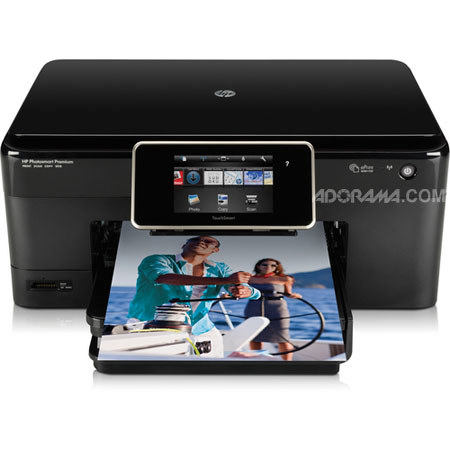
Use the HP TouchSmart screen and customizable apps to print Web favorites, everyday documents, lab-quality photos and creative projects without a PC. HP ePrint and integrated wireless keep you in touch with your online world.
Join VIP PRO
Earn 2X Points + Exclusive Perks!
Request a Callback
Chat one-on-one with an expert
Sell or Trade your Gear
Get started in 3 easy steps