


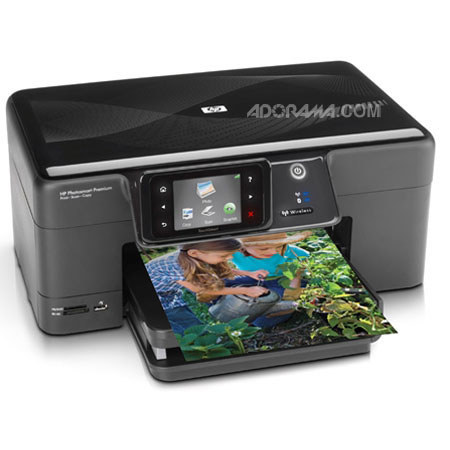
This item is no longer available.
Review Summary
2012-01-23T19:00:00
I used a 7 year old Photosmart 8450 until it recently lost its alignment and to fix it would have been too costly. I got this one as a replacement and to put it mildly, this printer absolutely smokes the 8450. The first photo I printed knocked my socks off; it was nothing short of brilliant!! The printer is a little noisier than I was expecting and after printing a job, it seems to run what appears to be diagnositcs just for the hell of it. But overall, this printer is a real keeper and I would recommend it to anyone who reads this.
pagan
2011-01-28T19:00:00
I've paid for so much ink for this printer. It says 300 pages on the box. More like 50 or less. I'm going to try the XL and see if that helps. For one cartridge it's pretty cheap (9-11$) but the printer takes 5 cartridges and the black photo ink is more (20-25$). Last thing----the wireless took me forever to figure out. The instructions in the book were horrible.
Vegasmilman
2011-01-13T19:00:00
We printed lots of photos just after we set it up and had no problems and they were great pictures. However, it sucks up ink like an alcoholic drinks booze. My old HP inkjet produced equally great photos with a fraction of ink use compared with this new model. What gives? I must assume it's HP's effort to make more money. I'm going to give refills a try to cut down the expense of ink cost. I just finished printing about 50 double-sided pages. Not once did it jam! Have not yet tried the other functions, but except for excessive ink use, I really like this printer.
Ruth
2010-12-05T19:00:00
I purchased this Printer because of the touch screen and price. I never purchased item like this in my life. I had series of issues with this printer. I spoke to customer representative in HP and they kind of agreed this series has major issue and soon they are going to stop it. Please do not buy this C309g, it is going to spoil your life. I spent almost 3 days with HP people to fix this issue and they are not able to resolve an issue. At the end they agreed they do know that this series has known issue. I will not buy any of the HP printer in future based on this expreince. Let me explain my story here, First I purchased this printer and worked personally more than a day to set up, then I took help from Custermor Rep support, they worked on many days and they said we will replace with new one because the printer which you have is not good. Something wrong with wireless. Then I went back to Office-Depot and exhanged it. Again same issue with new one, then I took support from HP people. They said, again this printer has also same problem after working on this few hours. So one final word, DO NOT BUY THIS SERRIES C309g.
Basavaraj

2010-11-25T19:00:00
I love the printer itself...great quality and has alot of bells and whistles. The only issue I have with it is that I feel it goes through ink too fast. I like to print out pictures but I don't think I print out enough to warrant me having to go and buy the ink as quickly as I have to. I would recommend it for the quality of the photos but I would just forewarn you that you go through ink faster than you would like.
Kaycee
2010-11-25T19:00:00
Overall I rate this product excellent in comparison to other home color inkjet printers I've owned. The colors on printed pictures either taken from my own camera or ones that I am copying really pop and are impressive. I like the double sided printing feature without having to purchase anything extra to make it happen. Another aspect I like about this machine is that it does its cleaning operation before you print, so you don't have to get the message that you must go to your utility screen and select clean heads, it does it all for you before you print. I like the wireless feature, however this model doesn't go online which make it easier to select pictures to print from a e-storage site and you can not fax on this machine. My only complaint, which applies to all HP inkjet printers is the cost of the ink cartridges, although there are places which will refill your cartridges for less cost than a new one. I would recommend this printer and it can be found for less $$ now.
Stanskeys
2010-11-24T19:00:00
When compared to my last HP photo printer this one uses ink very fast. The printing is good but the cost of ink is high.
mrpineapple
2010-11-22T19:00:00
Had this printer for a short time but it's meeting all my needs for scanning, printing photos and documents.
Lois
2010-10-20T20:00:00
This is great printer for Color prints. However if you want true Black and White prints don't expect it from this printer. The color is just is not right. It has a color tint to it. HP support was very good trying to figure this out, even giving a substitute printer, but it's not right. My old HP 3210 does a great job doing B&W but will now only do one print at a time.
kriegsie
2010-10-19T20:00:00
This is a good printer that uses an enormous amount of very expensive ink. The printer itself does a pretty good job. But you have to put up with a lot of noise and lengthy setup gyrations before it's ready to print. The real downside is the ink. The number of pages they claim each cartridge is capable of printing is overstated to say the least. Then there is the cost of each cartridge. Buying the large cartridges will cost you more than you paid for the printer itself.
blank
2010-10-17T20:00:00
I've experienced the same issues with the ink cartridges. In the 6 months I've owned this printer I've printed out a test photo, 5 personal photos (3"x5"), and four 8 1/2 x 11 color pages. The printer is saying "ink is low." You're kidding me right? What I have read from another reviewer, based on an HP techs response to that customer, is that by design the ink will dissipate over time. I did not read that anywhere in the owners guide. This is not good. My other HP printer did not do this. I wish I still had it. In addition, in the printers solution center window, I have never seen it display the ink levels. It always reads, "Ink levels not currently available." The printer itself displays, "ink is low," and to "See display on computer." Secondly is the annoying noise it makes as others have indicated on here about what seems to be the c309g always going through a recalibration process? Each time I turn it on, or printing, it begins this annoying ratcheting noise as the printer head runs back and forth which lasts between 20-30 seconds. The printer almost oscillates on top of the table. I have not been able to adjust the audible tones the printer makes when turning on or off. They are very loud. For these issues, tech support was ineffective. After providing detailed background on the steps I performed for troubleshooting, using both the online TS guide as well as the supplied troubleshooter software, they have you run through the same exact procedures only to yield unsuccessful results. Recap : - very noisy - uses too much ink too quickly - does not display ink levels - audible tones for on/off are loud, not adjustable - extensive troubleshooting has not yielded a solution to issues presented
TechAnalyst
2010-10-15T20:00:00
Purchased this All-in-one for my mother to allow her to scan documents and print pictures without turning on her computer. Now my daughter and wife both want one. Pictures print flawlessly with built in paper holder--less waste and fast output. Pros: 1. Easy to install provided software and setup with wireless network. 2. Did I say fast printing of pictures. 3. Great quality output--both pictures and documents. 4. Reasonable ink costs. 5. Bluetooth works great--print pictures directly from your cell phone. 6. Much less shaking/vibration than earlier model during printing. 7. Faster scanning and better software integration and tools. 8. Duplex printing. 9. Huge improvement in functionality and performance over earlier models. 10. Great job HP! Cons: 1. Longer initial setup and initiation (about 5 minutes the first time only). 2. Paper tray extends a couple of inches out the back of the printer limiting placement--probably needed for the duplex printing. 3. Black plastic is a finger print magnet. 4. That's it.
Wildfire2010
2010-10-09T20:00:00
Best Printer I ever owned. I have been through all the rest, bottom feeder tray is the best. No More Paper Jams!
PrintGuy
2010-10-09T20:00:00
I purchased one approx 6 mos ago ago the setup was fast and painless. Great photos, etc. I like it so much, I just got another for my man cave to replace a very old HP. How could I resist. The other plus will be the identical ink supplies.
nomobux
2010-10-06T20:00:00
my last printer was an hp officejet 5610 all in 1 and it lasted for 6 years of printing about 50 pages a day. so when it started to act uo ,it was time for a new one. after much resurch . kodack, brother , cannon, hp. I decided to get a new hp. plenty of choices ,spent over two hours with sales man ad decided to go with c309g.it is with no doubt the best printer you can buy for the money
jdf1
2010-10-05T20:00:00
I have had this printer for about 6 months and have suffered constant issues with the paper trays thinking there isn't any paper in them. I have read other reports and followed all of the recommendations/troubleshooting tips I could find. Still have to fight with the paper tray almost everytime I print. I can print about 12 pictures before at least one ink cartridge starts giving low ink messages. Between the unacceptable cost of ink and this printers thirst for ink, I can't afford to use it. I hooked an older epson back up to print photos. I have had other HP printers and liked them - this one is very disappointing.
bqmjim
2010-10-03T20:00:00
I've been very pleased with this printer. It installed nicely and prints quickly. Before this I had the Photosmart 1215 and a scanner. This reduces clutter and connects to both Windows 7 and Vista.
LadyWiz100
2010-10-02T20:00:00
Does a good job on photo and letter, but it is terrible on envelopes. I might get one out of ten attempts to produce a good envelope. The printer puts a black smudge on the top left corner where it prints the return address, and it wrinkles the edge of the flap as it pulls the envelope through the machine. I'll easily run through 100 envelopes to get 20 good ones.
BSBLMB
2010-09-30T20:00:00
I purchased this printer and it turned out to be the worst printer that I have ever owned. I worked for three days trying to get it to work. I called HP service twice and even though we re-loaded it 5-times it still would not work. The printer will not connect to the wireless network. I would not recommend this printer or HP customer service . The printer is still under warantee.
annioe
2010-09-28T20:00:00
Very noisy & slower than my 3 previous Photosmart printers--just sounds more cheaply made. Ink cartridges don't last & all have to be nearly full to even print in black & white.
ponyprincess
2010-09-27T20:00:00
This printer is nice but USES TOOOOOO MUCH INK TO FAST !!!! I always like an HP printer but this one just uses too much ink !! getting another one that will use less ink !!!
BigEasy1962
2010-09-27T20:00:00
Bought from Best buy last week, returned this morning! Setup - long install process, worked smoothly on my PC but MAC OSX kept losing connection to wireless router (Linksys E1000 wireless N) and when I could get a wireless job to submit from the MAC it took 15-20 minutes to print each page! I'm guessing it was routing the data all over the world before sending it to the printer! If I plugged in the USB cable it would print ok but I specifically wanted a wireless print capability. Other problems, each print job was followed by 30-40 seconds of irritating clicking/whirring sounds like an old grandfather clock as the print heads went through some mysterious noise-making routine. More ominously my PC (a top-of-the-line work issued Lenovo T61P) started having blue-screen crashes after I installed the software that came with the printer. I recommend steering clear of this model!
DrElectric
2010-09-24T20:00:00
Color fidelity is terrible. The ink also costs more than my old deskjet (you have to buy 5 different cartridges!). Set on "Best" quality, the color fidelity, particularly for blues and oranges is way off register and hue. Also a Terrible waste of money if you're doing color copies. Stay with the old 722 or Deskjet 970. I have gone back to using my Deskjet 970cxi.
RichardV
2010-09-23T20:00:00
After many years of excellent printers from HP I bought a C309g. After 2 weeks of working fine it now has a paper jam 100% of the time I attempt to print. As luck would have it I returned it to Staples 2 days past their 2 week "return date" and they refused to take it back or exchange it. What a pain!
FredCII
2010-09-21T20:00:00
We have had this printer about a month and so far have been very satisfied with it. Installation was a breeze, but I would recommend that you go to the support and drivers section before you start the set up as the instructions that come with the printer are not as detailed as those that are available on line. The only problem that I have had is in printing envelopes; there is sometimes a smear at the start of the print. Other than that, no complaints. The quality of the printed and copied material is great and the photos that I have printed are of a much better quality than I have gotten from the Photosmart 7550 that I had previously.
donbeach
2010-09-21T20:00:00
Had printer for 5 months and it has work great,no problems at all and got it at a great price.
jrjr19422001
2010-09-17T20:00:00
You wish to use this printer to print out any business-related document such as address labels or business cards. This printer DOES NOT print any sort of label or business card correctly.....everything is about 1/4 of an inch off. I spent well over an hour with a tech and even he could not figure it out. Picture-wise, it is great. But I do not use this option frequently.
revbillt
2010-09-14T20:00:00
This is the THIRTD time i needed to clean the printhead up to a level two in the software and it still clogs and leaks ink in the back
irulethe70s
2010-09-14T20:00:00
Don't waste your money on this one. I have had a tech 3 times for this product and the last time which was yesterday, after 2 hours couldn't get it to work.
dancer25
2010-09-14T20:00:00
I purchased the C309g when my other printer went out. I needed a wireless printer that would support XP and Windows 7. I had a print server so I could print wirelessly and this new printer works even better with its built in wi-fi printing capability. ITs wonderful.. The print is great quality and I am very pleased. I would certainly recommend it to others. I trusted the reviews I read and I wanted to take the guesswork out for you. Get the free delivery..:)
MDT1
Join VIP PRO
Earn 2X Points + Exclusive Perks!
Request a Callback
Chat one-on-one with an expert
Sell or Trade your Gear
Get started in 3 easy steps