2024-02-06T19:00:00
Faster than Nspire II CAS and has nicer keys
kyle1
Originally posted at

2023-12-04T19:00:00
Rated 1 out of 5
A lonnng-time HP user...
The unit arrived inoperable, which I understand happens occasionally. I am frustrated with the effort required to get all this sorted out. A cynic might think HP set out to design a system guaranteeing customer frustration - absolutely abysmal. I made contact with customer service but have no confidence this be resolved smoothly. I hope you prove me wrong.
Papa56
Originally posted at
2023-11-13T19:00:00
Rated 5 out of 5
Does It All
The device satisfies all my needs both in the classroom and in my personal life. It's a bit of transition from TI. The HP is fast, the touchscreen negates dozens of keystrokes, especially when navigating models.
Geriatricus
Originally posted at
2023-08-16T20:00:00
Rated 5 out of 5
This has become my main calculator
I would like to learn this calculator inside and out like my many previous HP calculators. I'm so happy HP is still producing their excellent calculators. This has something for everybody, RPN, calculus, and Diff-Eq are my main apps, but also like unit conversion and processing with units. Looking forward to trying the new Python interface and seeing what it can do. Also, having this same calculator available in apps on my PC and android phone are really great, as I only have to learn one calculology. Thanks!
MathMike
Originally posted at
2023-07-06T20:00:00
Rated 5 out of 5
The very best engineering calculator available.
The HP Prime G2 is the very best engineering calculator on the market. I own a TI Nspire, a TI 84, a TI 89, a Casio fx-CG50, and others (I am an electrical engineering professor). The CG50 is my second favorite. The Nspire is also a great engineering calculator, but it takes far more keystrokes to do anything on the Nspire in comparison to the prime. The prime does partial fractions, Laplace transforms, supports complex matrices, supports RPN, has a touch screen, and is far faster than any of the competitors.
My only concern is the HP doesn't care about this market anymore. HP used to be an engineering company. Not anymore.
EE_randy
Originally posted at
2023-04-25T20:00:00
Rated 1 out of 5
False description of Item
Why did you not display my very accurate assessment of the product? You are showing an item that does correspond with your description (300 ? math/science) as a Prime G2. I know what an HP Prime is and several other HP calcs are over a few decades of use and ownership. Blatantly false on your part.
Mark...mech engr
markhp48
Originally posted at
2014-05-19T20:00:00
Rated 5 out of 5
exclent calc
best hp since hp41 longtime hp user started with a hp45, hp67, hp41, hp49g+
ArtT
Originally posted at
2014-03-12T20:00:00
Rated 5 out of 5
Definately worth every penny
Coming from a TI calculator, it definitely took some some getting used to it, but the application and function layouts are very efficient once I got familiar with them. Having such a high resolution display (well, high for calculators, that is) makes graphs and charts appear very detailed, and depending on font size and complexity of entry, it's nice to be able to see the last 10 or so entries at once. The ability to switch from app to app in only a few keypresses (or taps) is extremely useful. The separation of the Home and CAS menus as well as the separate apps is convenient, and both talk nicely to their counterparts (get from Home/CAS, importing data to inference, et cetera). Finally, the programming language is fast, function library is extensive, and the design is ultra sleek.
BenLe
Originally posted at
2014-03-11T20:00:00
Rated 5 out of 5
Confusing Research/Poor Results
First of all, the Prime appears to be a high quality calculator, but for the following reasons it does not meet my expectations. I researched this product, the Prime, several times to make sure I could write programs, similar to my HP 42S; which I referenced in my written dialog with your agents. While they were friendly, I could not get a yes or no answer, but was assured that it would out perform the 42S. So far, I can't find a way to introduce programs to the Prime. I beginning to think it is worthless for my purpose. I would like to return it, but I don't have the original package material. I have two HP calculators (simulation models) on my old PC, but now that I have upgraded to a new PC with Windows 8.1, they are not compatible. I have gotten myself into a bad deal and I have no use for the Prime. Do you have any suggestions? I have one HP 42S in my possession and when that is gone I am out of luck.
1JoeP1
Originally posted at
2014-03-10T20:00:00
Rated 4 out of 5
Impressive, but could use some polish
First, some background: I am an engineer by profession, a lifelong calculator buff, and an HP user since the late 1980s. I've had a 28S and a 48SX. Most of my heavy-duty analysis is done on the computer (primarily in FORTRAN), but I occasionally want/need to perform some smaller-scale calculations without going to a keyboard. The Prime wasn't a necessity for me, but I had some gift cards to spend, so I was able to pick it up for very little out of pocket.
What follows are my opinions on the device thus far, after having it for about a month.
Pros:
Physically, the calculator is fantastic. It looks great; it is light yet feels sturdy; the screen is great, and touch works well; and the keys feel a lot like the keys on my 28S.
The calculator is very responsive, and has lots of built-in functionality. Many operations that had to be programmed into my 48SX are native on the Prime, along with many more.
PC connectivity is a big advantage. I really like being able to write code on the PC (rather than keying it into the calculator directly), testing it on the emulator, and sending it to the device when I'm done. The high-level language structure also means I can copy/paste bits of FORTRAN code and reformat them only slightly to work on the Prime.
Cons:
Usage is definitely non-intuitive after working with RPN/RPL on the 28S and 48SX for many years. I'm not a big fan of the pre-defined variables (and pre-associated variable types) implemented on the Prime, and switching between textbook/algebraic/RPN/CAS is a little strange. As some other Prime users have pointed out, some things require a lot more keystrokes than they used to.
Connectivity with the PC feels a bit half-baked. Sometimes (but not always) my Prime will not charge when connected via USB; sometimes (but not always) I cannot send programs directly from the emulator to the device. It took many attempts on three different PCs, and assistance from HP support, to update the firmware on the calculator.
RPN on the Prime also seems like an unfinished work. The 28S and 48SX were both "RPN native", and algebraic mode sat on top of RPN. With the Prime, RPN, textbook/algebraic, and CAS are quite separate, and some things do not work as well in RPN as in the other modes. For example, if I wish to store 78 in the variable A7, I have to create the variable A7 first, then do 78 'A7' Sto>. Otherwise I get a syntax error.
It is unfortunate that the equation library, periodic table, and 3D graphing are not built-in. I am sure the color touchscreen would make the latter two capabilities, in particular, fairly spectacular.
Also unfortunate is that no print manual (not just a Quick Start guide) is included with the calculator. The User Guide is fairly informative, but not as comprehensive as it could be. When I got my 28S and 48SX, each had extensive print documentation that, in my opinion, also served well as a tutorial. After spending a couple of days with those manuals, I felt like I knew enough to do most of what I needed to do.
Other notes:
The Internet has already been a useful resource for learning how to use the calculator better, and for downloading some impressive programs written by others, including a 3D graphing capability. These resources are in fact more useful than the User Guide.
Quite a few people on various Internet forums have reported serious stability issues, such as several reboots a day. So far, I have experienced no such reboots during regular use; I did freeze the calculator several times while attempting to update the firmware.
I assume (hope?) that future firmware updates will add features to the calculator and improve its robustness.
Nits:
The sliding case is OK, but a little hard to get on/off. I would definitely buy an HP leather case if one were available for the Prime. (Does the HP 50g case fit it?)
I like the option for a dark screen (white text on black background), but it would also be nice to change the font color. Bright blue on black, or green on black, would be great.
Summary:
While I think there are some kinks to work out, I am quite pleased with the calculator in its present state. (More so after the firmware update.) I've effectively transitioned away from my 48SX in favor of the Prime. The combination of build quality, color touchscreen, functionality, and (admittedly immature) RPN make the calculator a great value for the money.
I really do hope that HP plans to offer additional updates in the future, both to correct issues and to add new features.
nancerp
Originally posted at
2014-01-26T19:00:00
Rated 4 out of 5
This product perfroms!
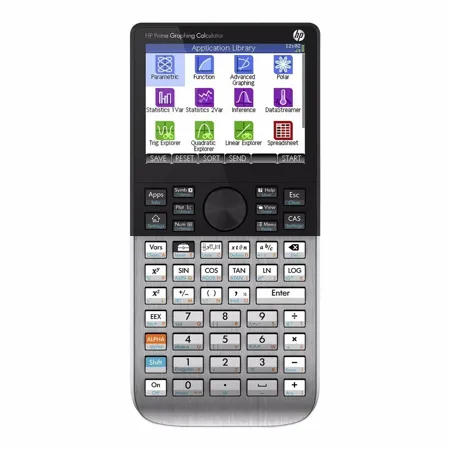
While the performance meets my needs, I need a magnifying glass to read the tiny blue shifted functions. This could have been better human engineered. I am disappointed with this. HP should provide a keyboard overlay to make the shifted functions more user friendly.
greystoke
Originally posted at
2014-01-18T19:00:00
Rated 5 out of 5
This calculator is fabulous.
The implementation of functions, use of apps and overall computing power is impressive. The speed of getting graphs is phenomenal. I simply love this product and highly recommend it.
The instruction manual comes on a disk and is thorough. I have been reading and trying the examples and everything works well. It seems to me that this is definitely the best calculator yet.
There is one complaint I have, and that is the keyboard. The colors are not very definitive, and reading the sub-functions is very difficult. I have an HP-48 GX and there is no comparison as far as the keyboard is concerned, but...as I have read an article from an HP engineer, the cost to produce a calculator like the HP 48 GX would be prohibitive, and not competitive. So, I have no problem to adapt, same goes for the RPN functionality, it's best to go with the flow and accept the default. One can still use the RPN functions, but it is limited and not allowed in the CAS. One other issue is the manuals now-a-days, they are on a CD, I would gladly pay the price for a printed manual if it were offered as an option. Overall, I am extremely pleased with this product, and it is just a joy to use it.
Juergen
Originally posted at
2014-01-16T19:00:00
Rated 4 out of 5
Good update to the platform
I like the Prime, it's layout is logical and intuitive. It took very little time to learn it. The speed at which it displays is awesome. The touch functions on the touch screen don't seem to be fully implemented yet but I'm sure they'll show up eventually. The Home/CAS playgrounds are easy to switch back and forth from and the setup parameter keys are logically placed so you can set up the parameters for whatever function you're working with. I like it!
HPP90
Originally posted at
2014-01-13T19:00:00
Rated 3 out of 5
Great features with fatal flaw.
I started my career with an HP-45, Graduated up to the HP48G and was excited about having one more of the latest HP's to retire with. This is one great calculator but for the color scheme and symbol sizes they chose for the keyboard. Even with glasses I normally use to assemble circuit boards, it is hard to make out the characters and symbols that share the number pad. It is functionally a fine calculator if if you are willing to squint and slowly try to pick out those symbols on the keyboard. Some are OK but about half, you will have to memorize if you want to be fast and furious hitting keys. HP, have one of your older engineers with his glasses on, just look at it and tell us if he does not agree. Fix the keyboard and I will buy another. I had to return mine as unusable. What were you thinking when you shipped this to all of us in the field?
DavidG47
Originally posted at
2014-01-11T19:00:00
Rated 1 out of 5
Bad User Interface Design!!!!!
It is nearly IMPOSSIBLE to read the VERY SMALL, complicated, ight blue alernate function hieroglyphs on the bright white keys. There is no definition to ease identification! Most typical engineering functions are at least 3 keystrokes from the keys. It is NOT a candidate for general or typical engineering calculations. Where did the good HP products go??? I found a used 11C and bought that instead.
mandrake
Originally posted at
2013-11-22T19:00:00
Rated 1 out of 5
Waste of time for professionals
The biggest issue with this calculator is the lack of documentation; there appears to be nowhere in the pdf user manual or the internal catalog where all of the functions at listed for proper syntax or explained for operation. This in itself makes using this calculator for advanced purposes much more difficult then it needs to be. Combine this with the ability to lock yourself out of functions by inadvertently entering exam mode and fingerprints on the screen really make this a toy for school children. Very disappointing.
nmartin
Originally posted at