2022-11-30T19:00:00
Rated 1 out of 5
Worst large format printer ever, have owned HP large format printers for 20 years...
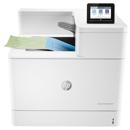
I think this is the worst printer HP has ever made. Print quality is just fine, but paper handling and software matter. Let's start with HP Smart the printer app, try to log in and tab between username and password, basic. Have Multi Sheet Tray installed, HP Smart recognizes it, HP click calls it Tray B. Roll does not ever automatically unload, always needs a manual roll back. Cancel a print, you have to unplug it. Thought I could have a roll and multi sheet tray loaded at the same time for unattended printing, HP Smart has green checkmarks for both, but you can't. Not well documented. Frequently several times while a roll was loaded, it thought it was a sheet and ejected an entire roll of paper. I keep a knife on the machine now so I can quickly cut the paper before that happens. Printing 11x17 from the multisheet tray, the paper is ejected far enough back in the printer that it hangs from the printer, causing the next sheet to bind. Try to reboot the printer, it never powers down. Print a photo with HP click and set it to best, the driver won't let you, you have to change the printer preferences at the driver level. Firmware Ver SPRKLFPR2N001.2123A.00 HP SMART when printing from the roll says no paper frequently. List goes on...
cp1800
Originally posted at

2022-05-23T20:00:00
Rated 5 out of 5
Love being able to make 24" x 24" prints
I love how easy it is to use, I just wish it was easier to buy the type of paper I need. I ordered some transparent film thinking I could use it as a giant sticker for decal but found out that I just spent around $100 for plastic that I have no use for. Also wished that it could print larger than 36" in length.
LisaZ5637
Originally posted at
2022-02-15T19:00:00
Rated 1 out of 5
I am very disappointed
I am shocked by how bad the quality of the printing is, I read the product Technical specifications like ten times just to make sure I'm making the right decision, and I was so happy I'm buying a printer that prints on different kinds of paper like matte and glossy paper and with a different paper thickness (Max 280), The posters I printed were filled with strips it wasn't a smooth color at all, and I didn't even use glossy paper, and the ink is all wet and messy. I am a designer and I wanted a printer to print my designs and sell them in my store, I paid a lot of money for this and it was the worst thing that I've ever purchased, my small printer prints with better quality than this. If you're a designer and you want to print posters with a lot of colors and shapes trust me you'll be disappointed, I have no idea what I'm gonna do with it now, it's taking a lot of space and it's useless.
Shroog
Originally posted at
2022-02-09T19:00:00
Rated 1 out of 5
Nice output when you can get it to print
Had this for maybe a month. The output looks great - when you can get it to print. After 2 pages or so, it simply stops. You need to reboot it. And it randomly doesn't cut sheets, so you need to print one sheet at a time. And even then, you need to form feed it sometimes. And don't dare cancel a job. You are then completely hung up and need to unplug it. Use it for check plots, when you are not in a hurry. Don't use for production. Presets don't keep. Need to be set each print.
Chris B.
Originally posted at
2022-02-04T19:00:00
print couples of poster and quality is outstanding and very supprising, colors looks so glossy on photo paper , awesome.
polo008
Originally posted at

2022-01-29T19:00:00
Rated 3 out of 5
Not terrible
There are a lot of nice features on this printer for the cost. For my purposes (outputting film for screen printing) it's been less than optimal. I have print quality set to highest possible setting but can still see through the black. That results in pinpoints where my screen emulsion is cross linking and hard to wash out, and UV resistant inks don't seem to be available from HP for this printer. General purpose prints on paper have all been very nice quality.
RobHon
Originally posted at
2021-09-12T20:00:00
As described, quick delivery, smaller footprint than previous 24" printer, easy WiFi set-up once preferred connection method established
Quiet A.
Originally posted at
2021-05-11T20:00:00
Rated 5 out of 5
Fantastic printer!
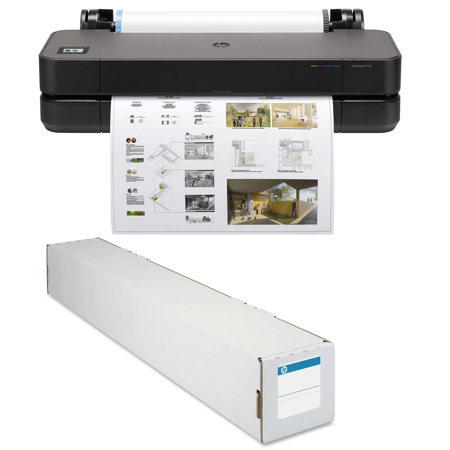
This printer was truly plug and play - our first prints were made moments after we plugged it in and loaded the pater roll
OCRG
Originally posted at
2021-05-04T20:00:00
Rated 5 out of 5
Nice Plotter
It?s a beast! Much heavierand robustly built than I expected. Nice output.
High G.
Originally posted at
2021-04-05T20:00:00
Rated 5 out of 5
Extremely happy
This machine meet all my expectations and more amazing print quality and pages per cartridge is exceptional
Trevor
Originally posted at
2021-03-22T15:47:14
Rated 5 out of 5
Great Printer
The printer works great! very fast and acurate, the ink lasts more than an entire roll of paper. I use it to print artwork and Photographs the quality is great! I was able to set it up to print up to 24x70. I would absolutely recommend this printer to anyone looking for a quality, low cost, easy to use large format printer.
JOSE E.
2021-01-13T15:14:11
Rated 5 out of 5
I'm impressed!!!
OK, folks. This is an honest, 'non-paid, non-biased, pure-defacto" review. I ordered this HP T230 from Adorama yesterday (Jan 12, 2021). I paid the $49 extra for 'club membership' (I forget what it's called) which also gives you free 2 day delivery. The UPS gal was ringing my doorbell about 28 hours after I ended my call with Larry (Larry: I hope your cough is better soon). So A+++ on fast delivery.
I immediately unboxed this monster (It's big-but it is currently sitting on an antique fold-out leaf table, so, perhaps 'monster' is an overstatement). The manuals that came with the printer are superfluous. They provided 2 important details. 1) remove the plastic pin that locks the printing head during shipment (but there was a length of orange tape on the outside that was taped to the pin on the inside-so any idiot would have found it), and 2) all set-up is done online......with my iphone.
I followed the on-screen instructions on the printer. I did what it told me to do with my iPhone. The ink and alignment checks went fine. The test-print was fine. Now for the BIG test, could I print a layout from my 4 year old Apple MacBook Pro? I installed the printer via the Preferences menu. I Searched for the drivers, but couldn't get them to install. Probably the usual Windows/iOS issues. I couldn't find anything on HP's website that would work. The App on my iPhone worked flawlessly, but I wasn't going to print a CAD layout from my phone. I decided to try to print anyway. My hopes weren't high since I didn't think I had current drivers, or any drivers since none of the driver updates worked. The test print was PERFECT!!!! Who would have known? It might be the printer standard 'Rasta??" lanuage, I don't know. But It Worked! No Error codes, No missing file messages. Just a simple, easy, one-and-done, perfect print job.......wirelessly.
So, Adorama gets an A+, a Get-Out-of-Jail-Free Card, and they get to pass Go and collect $200.
HP aslo gets and A+. This is a fine printer.
Footnote: During my research, I read that non-HP paper rolls were too large a diameter and peeps had problems with them. I got an HP paper roll from Adorama. I also got the Adorama package that also contained inks (though, inks do come with the printer). During my research, I discovered several sites that had 2 out of 4 inks or 3 out of 4, but all sites were backordered on at least one of the inks. Adorama had all of them-hence the bonus awards.
Thank you, Larry (Adorama customer service). It took 2 calls for me to make up my mind and take the leap, but you were awesome. You get a DP (in military speek, that's Definitely Promote).
PS. Anyone want to buy an Epson Stylus 3880? It's in practically mint condition?
TIM W.