
Review Summary
Accidents happen where life happens. Protect your favorite Adorama products and purchase a protection plan to stay covered from accidental damage, mechanical or electrical failure, and more.
If we can’t fix it, we’ll replace it at no additional cost.
Protect your product from drops, spills, and more.
Enjoy your gear without fear. We have you covered!
When regular use of your product over time results in mechanical or electrical failure.
We will never charge you a deductible after the purchase of a plan.
Our claims process is simple & easy and our customer service team is happy to help.
Adorama Protect powered by Extend is available for purchase to customers in the United States. Not available for purchase Internationally or in U.S. Territories.
Browse our FAQ
Up to 20000 pages per day
Up to 90 ppm/180 ipm at 200 dpi and 300 dpi (landscape, letter/A4 size, black and white/ grayscale/color)
Dual CCD; Grayscale output bit depth is 256 levels (8-bit); color capture bit depth is 48 bits (16 x 3); color output bit depth is 24 bits (8 x 3)
Dual LED
Graphical LCD display with four operator control buttons
600 dpi
100 / 150 / 200 / 240 / 250 / 300 / 400 / 500 / 600 / 1200 dpi
Auto-feed: 12" / 304.80mm / 2.5" / 63.50mm
Hand-feed: 12" / 304.80mm / 2" / 50.80mm
Auto-feed: 863.6 mm (34") / 63.5 mm (2.5")
Hand-feed: 863.6 mm (34") / 50 mm (2") (rear exit only)
Long document mode: 160" / 4064.01mm maximum length (The scanners support continuous scanning mode)
34-413 g/m 2 (9-110 lb.) paper
Up to 250 sheets of 80 g/m 2 (20 lb.) paper
Documents can exit into the front output tray or at the rear of the scanner if the straight-through paper path option is manually selected
Ultrasonic multi-feed detection; Intelligent Document Protection
USB 2.0; USB 3.0 compatible
Fully supported by Kodak Capture Pro Software and Kodak Asset Management Software
Windows bundled software: TWAIN, ISIS and WIA drivers; Kodak Capture Pro Software Limited Edition; Smart Touch; Kofax certified
Mac bundled software: NewSoft Presto! PageManager; TWAIN driver
Perfect Page Scanning; iThresholding; adaptive threshold processing; deskew; autocrop; relative cropping; aggressive cropping; electronic color dropout; dual stream scanning; interactive color, brightness and contrast adjustment; automatic orientation; automatic color detection; intelligent background color smoothing
Intelligent image edge fill; image merge; content-based blank page detection; streak filtering; image hole fill; sharpness filter; auto brightness, special document mode; continuous scanning mode; toggle patch; auto photo cropping; segmented bitonal images
Single and multi-page TIFF, JPEG, RTF, BMP, PDF, searchable PDF
100-240 V (International); 50-60 Hz
Off mode: <0.5 watts; Running: <75 watts; Sleep mode: <4.5 watts
Energy Star qualified scanners
Operating temperature: 15 to 35 deg. C / 59 to 95 deg. F
Operating humidity: 15% to 80% RH
Off or Ready mode: <30 dB(A)
Operating mode: <60 dB(A) (operator position sound pressure level)
Intel Core i7, 3.4 GHz or higher, 4GB RAM or more ( Windows and Linux )
Intel Core i7 processor, 2.0GHz quad-core, 4GB of RAM, USB 2.0 ( Mac )
Windows XP SP3 (32-bit and 64-bit), Windows Vista SP2 (32-bit and 64-bit), Windows 7 SP1 (32-bit and 64-bit), Windows 8 (32-bit and 64-bit), Windows 8.1 (32-bit and 64-bit), Ubuntu 12.04 (LTS), Mac OS v.10.7, 10.8, 10.9
AS/NZS CISPR 22:2009 + A1:2010 Class B (C-Tick Mark), CAN/CSA-C22.2 No. 60950-1-07 (C-UL Mark), Canada ICES-003 Issue 5 (Class B), GB4943.1:2011, GB9254:2008 (Class B), GB 17625.1:2003 Harmonics (CCC "S&E" Mark), EN 55022:2010 ITE Emissions (Class B), EN 61000-3-3 Flicker
EN 55024:2010 ITE Immunity (CE Mark), EN 60950-1:2006 + A11, A12, A1 (TUV GS Mark), IEC 60950-1, CISPR 22:2008 (Class B), VCCI V3/2012.04 (Class B), CNS 13438:2006 (Class B), CNS 14336-1 (BSMI Mark), UL 60950-1:07 (UL Mark), CFR 47 Part 15 Subpart B (FCC Class B), Argentina S-Mark
9.4 x 17 x 4.6" / 23.88 x 43.18 x 11.68cm (with input tray closed)
35lbs / 15.88kg
041771034788
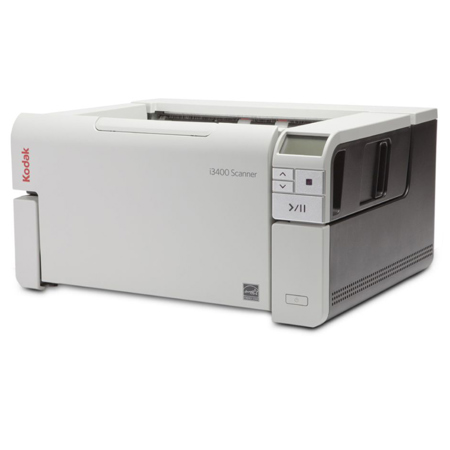
The Kodak i3000 Series Scanners are purpose-built to deliver consistent throughput and minimize downtime for your o ce. They're loaded with impressive imaging functionality for onboarding of information and Intelligent Document Protection to defend against damaged documents and lost data. Two models feature an ingenious book-edge fl at bed scanner - built right in. These A3 rotary scanners can take on virtually any challenge while taking up less space on your desk - making them the perfect fi t for any business that doesn't have a second to waste.
Missions accomplished
The Kodak i3000 Series delivers consistently high throughput. Whether you're scanning in color or black and white, at 200 or 300 dpi, images, text or mixed-size documents - it doesn't matter, it just gets done.
Give productivity a major lift
Stack up the work. With a 250-sheet feeder/elevator you can neatly and efficiently scan document batches with ease. Their design ensures continuous throughput with rapid-fi re scanning and less risk of jamming.
It's even smart enough to know when something's not right
Intelligent Document Protection provides an added level of document and data safeguarding. "Intelligent" because it listens for the very first indication of potential document damage from staples, paper clips or other obstructions. At the initial sound of any issue, sensors stop the scanning process to allow you to take appropriate action and correct the irregularity.
Flatbed at your fi ngertips
Kodak's integrated book-edge A4 fl at bed is designed to handle all kinds of exception documents. So book pages, passports, folders, fragile documents and more are simply no match for the Kodak i3250 and i3450 Scanners.
Flexible input for inflexible documents
Some contracts are not just unbreakable, they're unbendable, too. For those instances, simply choose the straight-through paper path option. This bypasses rotary scanning, enabling you to feed thick or exceptionally long documents right through.
Better than ever
Perfect Page technology optimizes image quality and intelligently manages a host of image processing tasks. It all happens automatically, with every scan.
Intelligent by design
Scanning is really only half the story. Configuring image profiles, Defining job names and fi le destinations and distributing information is truly crucial. That's where Smart Touch functionality takes over. It streamlines repetitive tasks like fi ling to your server, Simplifies distribution of content and makes access to your data easy, whether you're in the offi ce or out on the road.
Works incredibly well with others
Easily integrates with all TWAIN, ISIS and Linux -based scanning applications so managing your data is just as easy as scanning your documents.
Built to meet the demands of today and the rigors of tomorrow
Make no mistake, these scanners are made to last . Designed to impress your most experienced employees and make life easier for workers who are just getting started. When it comes to getting work done day after day, depend on scanners that truly deliver.
Protect your investment
Ensure the optimal operation of your equipment and software with Kodak Essential Productivity Services and Kodak Advanced Proficiency Services. Their array of service offerings helps maximize efficiency and value in your business.
Impact made compact
Proof that a smaller design doesn't have to compromise features. They have managed to engineer heavy-duty features into a device that takes up less space on your desk and less time in your day.
The Smart Touch graphical user display
Pre-Configured scanning setups make common, yet complicated scanning tasks easy.






