


This item is no longer available.
Review Summary
2019-01-08T15:57:17
The printer is reasonably easy to unpack, load, and hook up. The driver offered was out of date, and I found the updated driver hidden with the firmware updater required to support the new "high grade" paper. Unfortunately, the firmware updater is DOS-only (no Mac version), and it refused to install the firmware. The driver defaults to 8.5x11" paper (which the printer does not support), leading to a media error. However, once the media size is set correctly, it makes gorgeous prints in a hurry.
JOHN R.
2018-10-16T18:04:56
The printer has a lot of good features especially the ability to print different sizes without changing the ribbon. However, it does not do a great job printing correct colors. I really wanted to like the printer and tried everything to color correct it but it takes too long to do this when time onsite is critical. Everything printed with a reddish hue, had trouble printing contrast colors like white or silver. I returned it for the Hiti P525 and the print quality and ease to use is like "night and day". I have read other reviews that state the printing color is great but it never was great for me.
GERALD T.
2018-10-09T08:25:19
This printer works very well, it does have a few minor hiccups with Apple MacBook pro. Occasionally fails to awake from sleep mode. Mtisubishi support says the are working on update. It prints good quality photos for events.
ANDREW A.
2018-06-15T05:09:32
This is a seriously fantastic printer that’s of great quality, and fast. We purchased it for our photo booth. It just seems that there aren’t great drivers for it. We can use the PS Events software and that sends great images to the printer, but so far, other software we’ve tried can’t speak to the printer... we feel sort of locked in... still, the printer is fantastic. Also, the documentation on how to get an auth code for the software is wrong. The software only allows a 5 day trial period... be careful. We had to call/email tech support to get an activation code... which seems pretty unreasonable since you just purchased the printer. All in all, the software almost sours an otherwise great experience, I’m really sorry to say.
RORY Y.
2018-01-15T11:45:50
This product is great for my photo booth setup.
KATHLEEN N.
2017-07-30T12:11:22
For the price, features, and portability, it is more than I expected from this printer. I would highly recommend buying one, especially from Adorama, to use in a photo booth.
Raymond M.
2017-03-14T08:36:02
It's a great printer with a great bundle deal I love it and I'm enjoying it.
JERRY G.
Accidents happen where life happens. Protect your favorite Adorama products and purchase a protection plan to stay covered from accidental damage, mechanical or electrical failure, and more.
If we can’t fix it, we’ll replace it at no additional cost.
Protect your product from drops, spills, and more.
Enjoy your gear without fear. We have you covered!
When regular use of your product over time results in mechanical or electrical failure.
We will never charge you a deductible after the purchase of a plan.
Our claims process is simple & easy and our customer service team is happy to help.
Adorama Protect powered by Extend is available for purchase to customers in the United States. Not available for purchase Internationally or in U.S. Territories.
Browse our FAQ
Dye sublimation thermal transfer line 3-colour face progressive printing (yellow, magenta and cyan) and surface lamination
300 x 300 dpi
Yellow, magenta, cyan
256 (8 bits per color, approximately 16.7 million colors)
2 x 6" (x2): 11.4 sec
3.5 x 5": 10.5 sec
4 x 6": 11.4 sec
5 x 7": 19.9 sec
6 x 6": 18.5 sec
6 x 8": 21.9 sec
2 x 6" (x2): 20.5 sec
3.5 x 5": 18.8 sec
4 x 6": 20.5 sec
5 x 7": 36.0 sec
6 x 6": 32.2 sec
6 x 8": 39.9 sec
2 x 6" (x2): 15.1 sec
3.5 x 5": 13.3 sec
4 x 6": 15.1 sec
5 x 7": 26.0 sec
6 x 6": 23.7 sec
6 x 8": 30.0 sec
2 x 6" (x2): 23.5 sec
3.5 x 5": 21.5 sec
4 x 6": 23.5 sec
5 x 7": 41.3 sec
6 x 6": 32.3 sec
6 x 8": 45.8 sec
32MB (Four 4x6" images)
8" (20.3cm)
6x8" (15.2 x 20.3cm)
5" (12.7cm) and 6" (15.2cm) rolls
2 x 6": 640 prints
3.5 x 5": 360 prints
4 x 6": 320 prints
5 x 7": 180 prints
6 x 6": 160 prints
6 x 8: 160 prints
2 x 6" (5.1 x 15.2 cm)
3.5 x 5.0" (8.9 x 12.7 cm)
4 x 6" (10.2 x 15.2 cm)
5 x 7" (12.7 x 17.8 cm)
6 x 6" (15.2 x 15.2 cm)
6 x 8" (15.2 x 20.3 cm)
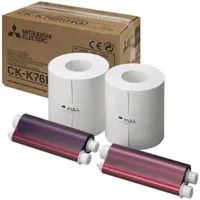
CK-K75R 5" Paper & Ink Set
CK-K76R 6" Paper & Ink Set
Matte or glossy
USB 2.0
Windows 8 (32/64-bit)
Windows 7 (32/64-bit)
Windows Vista (32/64-bit)
Windows XP (32/64-bit)
Mac OS 10.5-10.8
120-240 VAC, 50/60 Hz
120V: 4.6A
220V: 2.4A
10.8 x 17.6 x 6.7" (27.4 x 44.7 x 17.0cm)
26.5 lb (12kg)
082400032799


This printer works very well
By ANDREW A.
This printer works very well, it does have a few minor hiccups with Apple MacBook pro. Occasionally fails to awake from sleep mode. Mtisubishi support says the are working on update. It prints good quality photos for events.
Great prints
By KATHLEEN N.
This product is great for my photo booth setup.
The Mitsubishi CP-K60DW-S Dye Sublimation Color Photo Printer is a compact and lightweight dye sublimation printer that requires minimal installation space and incorporates the latest developments for the generation of high resolution prints.
Recommended Uses
Pharmacies
Photo retailers
Social/event photography
This intelligent dye-sublimation printer can automatically switch between 4x6" and 6x8" prints without any need to exchange the paper roll or ink ribbon! The result is a printer that's easier to use and service, saves time and is simpler to store. The CP-K60DW-S takes full advantage of the two-in-one principle, including for the photo paper, which can be output as glossy or matte without the need to switch paper or ink ribbon.
One media, several sizes: 4x6 up to 6x8"
PC/MAC & Photo System Printer
Rewind function
Compact design
300 dpi
Easy to use
High speed printing
Up to 6x8" instant prints
Energy efficient - consumes 0.05W of power in standby mode
The economic compact printer also features a special 'rewind' function for optimal use of the ink ribbon. When in the power-saving standby mode, it consumes less than one watt of electricity. The practical front loading design means that the already economical consumables can be reloaded quickly. The CP-K60DW-S naturally works with all components from the Mitsubishi Electric photo system family.