


+1
more
more

See Options
Need help? Ask our experts.
4k Resolution - Crystal clear video, every time
Look your best in every video meeting, family call or live stream, thanks to Ultra HD 4K resolution.
1/2" Sensor - Every detail, any environment.
From dark and gloomy to bright, sunny rooms, the 1/2" sensor and advanced HDR technology always deliver a balanced, lifelike image.
For the first time, get DSLR quality in a webcam - Get a professional look.
Get DSLR-like bokeh straight from Link Controller. Powerful AI identifies people and automatically adjusts the depth of field in real time, making them stand out against a professional-looking background.
Best-In-Class Audio - Loud and clear
Communicate with confidence. Advanced AI audio algorithms provide best-in-class audio straight from your webcam.
AI-Powered Noise Reduction - Distraction-free
Intelligent AI noise-canceling technology filters out unwanted background noise for pro-level clarity, even in busy environments.
Tune into your surroundings
Tailor your audio with three customizable audio modes.
Voice Focus
Perfect for when you're alone. Highlights your voice and eliminates ambient noise.
Voice Suppression
Ideal for busy environments. Filters out nearby voices and background noise.
Music Balance
Balances your voice with external background music, ideal for content creation and live streams.
AI Tracking & Auto Framing - Move freely, stay in frame
Automatically zooms and adjusts to keep everyone in sight, whether it's one person or a group.
True Focus - Stay sharp, stay focused
Keep your audience engaged with faster, more accurate Phase Detection Auto Focus (PDAF). No more blurry shots, just fast focusing and crisp video.
Stay sleek wherever you are
Powerful options, designed for you to look your best no matter the context.
• Background Blur: Effortless privacy your viewers will barely notice
• Background Replacer: Whatever the mood, use your own custom images or our selection
Desk view Mode - Get hands-on in a snap
Manually adjust the mount, then change the angle in Link Controller.
Simply clearer presentations
Whiteboard Mode
Our advanced AI detects the recognition markers, keeping your whiteboard in focus and squaring it off for maximum visibility. No need to use any app and you can activate it with gesture control.
Smart Whiteboard Mode
We take it a step further, too. Use Link Controller and the AI automatically detects the whiteboard, no recognition markers needed. Ensure your online classes, brainstorms and presentations are crystal clear.
Gesture Control - Effortless control from a distance
Stay in position and keep presenting. Use simple hand gestures to control the webcam.
• Activate Al Tracking/Auto Framing
• Zoom In/Out
• Enable Whiteboard Mode
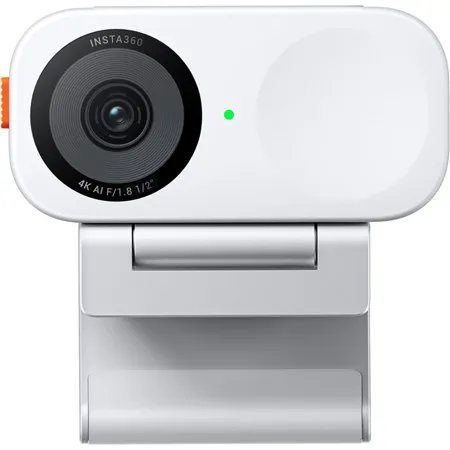
Insta360 Link 2C
Has an easy-access privacy switch to block the camera.
Smartphone Control - Right at your fingertips
Control the webcam from your phone! Adjust settings, change modes, and fine-tune your look, all in the palm of your hand.
Creative Filters & Presets - Express yourself
A whole range of new customizable filters and presets await. Adjust your look in just a few clicks, from subtle tweaks to dramatic effects.
One-Click Makeup - Shine no matter the situation
Get effortless makeup that looks natural, perfect if you're behind schedule.
Portrait Mode - Vertical perfection
No crop needed! Use with a tripod to capture stunningly clear 4K vertical content. Rotate the camera, and you're shooting in 9:16. Social media ready! (Tripod Sold Separately).
Universally Compatible - Connect with ease
Works with all major platforms, including Zoom, Microsoft Teams, Twitch, and more.
Easy mounting
Easily attach to laptops or monitors with the included Magnetic Mount. The 1/4-inch mounting point also lets you connect a tripod for added versatility.
https://www.insta360.com/support/care_warranty
800-692-0360







