
Orders placed during Passover Holiday (Wed 4/1 after 4PM ET – Thurs 4/9) will ship Fri 4/10. View our holiday shipping schedule.
This item is no longer available.
Review Summary
2018-11-12T22:29:51
TLDR. In my opinion there is a serious problem with the compressor in this camera that makes it unusable for professional work. View this online here http://phimedia.com/insta360pro/ I have been using the Insta360 Pro since its release. I have used it to commercially shoot more than 400 locations in and around the South West of Australia. I am in no way a novice. I am a visual effects artist with over 25 years experience in post production . IMDB I own and use daily a number of 360 cameras. Since its introduction I have used the Insta360 Pro and the 360RIZE Pro7E about 50/50. 360RIZE Pro7E ( 7 Gopro Hero4 Black ) Insta360 Pro GoPro Fusion Mija sphere. 360Rize Abysss. I even recently purchased a Insta360 One X. I recently made time to do a side by side comparison of a number of cameras to highlight the problem. Insta360 Pro GoPro Hero4 Black Gopro Fusion Sony A7RII with 8mm Sigma ( just for comparison) You can download the original Insta360 Pro footage here https://drive.google.com/drive/folders/1fkCAsof2fbX_UhguFAJLm928DJXMv_ad The video below shows progressive zooms of raw video taken from each of the cameras. No sharpening or colour correction. The GoPros are using a protune flat profile ( because that is how I shoot) The A7RII is using a Cine 3 profile. But this is not about colour profiles or sharpness. I have cropped the images from the different cameras to the same area so resolutions of the crop vary. It concerns the way the footage is compressed. Compare the footage. Apart from the the overly aggressive sharpening, notice how the Insta360pro footage pops every 32 frames. Jump to 1:30 for image comparisons https://youtu.be/qoPHTwpzyZY Looking at the output of any single camera from MediaInfo ( https://mediaarea.net/MediaInfo )you can see the GOP value is 32 frames which corresponds to the “pop” I am no technical expert but it seems when the mp4 codec progresses between I frames there is a very large jump as if the P frames are not encoding correctly. Compare this with the Sony, Gopro Hero and Fusion.. There is absolutely no popping but a smooth transition. Here are 360 exports for the cameras Insta360 Pro https://vimeo.com/300151373 Straight out of Insta360 stitcher Fusion https://vimeo.com/300153559 Straight out of fusion studio Hero4 black https://vimeo.com/300157812 From Kolor Autopano video I frankly cannot understand why no one has noticed this before. I do work in broadcast/film where artifacts like this would be picked up and rejected immediately so my standards are quite high. I suppose it is possible I have a faulty unit but since I have had no response from support I can only assume not. I produce content both for viewing on VR headsets and for viewing on large 65" touch screens where the user navigates the scene by swiping. At this size ( but also in a headset ) the effect is very noticeable. I shoot mostly outdoor nature footage where there is a lot of high frequency ( trees, leaves etc) noise. This is where it is most apparent. I sent information about this problem to Insta360 support in August 2017 and received the standard response. That seems all to common for Insta360 support, thank for letting us know, support is looking at it then you never get a solution . I even contacted them prior to posting this to let them respond but as yet they have not. I waited patiently hoping a firmware fix would come. All the time I continued to shoot with my 360RIZE Pro7E alongside the Insta360 pro. Workflow is (slightly) longer of the Gopro Hero 4 Black rig but the results are so much better for cameras with similar data rates. Better dynamic range and better grade-ability with protune. And no 32 frame pop in the codec either. To summarize. I cannot recommend this camera to anyone wanting to get professional results from it. I also fall into the camp of those who feel like I have paid $ to be a beta tester for their product. I really want to like this product and am even thinking about upgrading to the Insta360 Pro 2 as the data rates are so much higher. But I have to break my silence and warn any serious professional about its serious flaws that make is useless for any serious work.
Mike D.
Accidents happen where life happens. Protect your favorite Adorama products and purchase a protection plan to stay covered from accidental damage, mechanical or electrical failure, and more.
If we can’t fix it, we’ll replace it at no additional cost.
Protect your product from drops, spills, and more.
Enjoy your gear without fear. We have you covered!
When regular use of your product over time results in mechanical or electrical failure.
We will never charge you a deductible after the purchase of a plan.
Our claims process is simple & easy and our customer service team is happy to help.
Adorama Protect powered by Extend is available for purchase to customers in the United States. Not available for purchase Internationally or in U.S. Territories.
Browse our FAQ
Maximum at 7680x3840 (8K) (real-time stitching OR post-processing s titching)
Maximum at 3840x1920@30fps (4K) (real-time stitching/live-streaming )
Maximum at 7680x3840@30fps (8K) (post-processing stitching)
Maximum at 7680x7680 (8K) (real-time stitching OR post-processing s titching)
Maximum at 3840x3840@24fps (4K) (real-time stitching/live-streaming)
Maximum at 6400x6400@30fps (6K) (post-processing stitching)
6 x F2.4 fisheye lenses
MP4, JPG, RAW
Aluminum alloy, polycarbonate
Built-in mic x 4
AUX
143mm
1228g
SD card
USB3.0 High-Speed driver
HDMI 2.0 Type-D (for the monitoring and output of footage)
RJ45 Ethernet interface (for stable cable communication)
USB Type-C (for high speed file transfer)
WiFi
5000mAh removable battery (with 75 min of endurance) 12V 5A DC adapter
Up to 3840x3840 (4K) at 24fps H264 video coding and 3840x1920 (4K) at 30fps
H265/H264 video coding
On any 360-supporting platform, including Facebook, YouTube and Insta360 server via sharing link
Anodized precipitation-hardened aluminum
Intel
NVIDIA GeForce
120GB M.2 SSD
802.11b/g/n/ac with external antenna
Bluetooth 4.0
4x USB 3.0
2x USB 2.0
2x Gigabit Ethernet
1x 3.5 mm mic
1x Headset
110 / 220 V connected on power outlet
Camera: 3.1 x 2.8 x 2.6" / 7.87 x 7.11 x 6.60cm
Stitching Box: 10.8 x 5.1 x 10.4" / 27.43 x 12.95 x 26.42cm
Camera: 16.9oz / 479.11g
Stitching Box: 6lbs / 2.72kg
192223075207
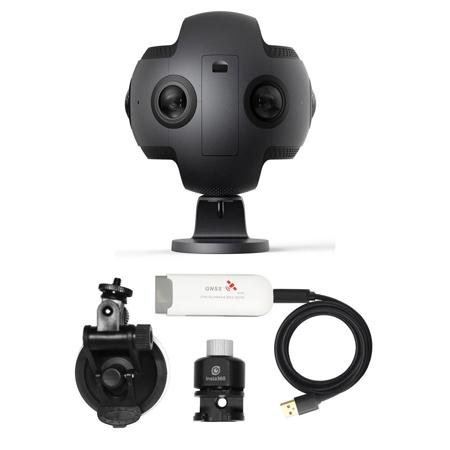
Insta360 Pro 8K 360-Degree Virtual Reality Camera
a 8K-resolution Insta360 Pro camera designed for shooting 360 Videos that can be displayed with virtual reality headsets.
The camera can capture 3D images and videos and is also suitable for livestreaming. Designed for professional photo and video creators, as well as non-professionals who demand excellence from the camera they use to pursue their creative visions.
Insta360 Pro uses six independent high-definition lenses. It captures 60-megapixel 360-degree 3D stills and supports both HDR and RAW formats to bring out levels of detail and low-light performance unprecedented in a 360-degree camera of this size.
When recording 4K video, the camera supports up to 100 frames per second. In addition, the VR time-lapse mode adds a new dimension to videos, and the live preview function allows users to get the best angle before shooting
. Insta360 uses real-time image stitching technology and offers both H.264 and H.265 video compression, which substantially improves video quality at the same bit rate
HD image files can be easily auto-stitched with Insta360 Studio. The company is enhancing the imaging potential of the camera by offering professional 3D 360-degree video that applies the 3D video-capturing capabilities of Hollywood films.
The camera can capture 3D videos in up to 6K (4K in real-time stitching mode). As a standalone camera, it can be used with the dedicated Insta360 Pro iOS and Android apps. It connects via Wi-Fi, Ethernet, or 4G, and it is ready to livestream and share any event instantly on Facebook, YouTube, and Twitter.