Overview
Compare
Specs
Protection
Q&A

Questions & Answers

Shopper : can this scan 110 film?JOAN S : No. It is for 35mm filmstrips.
Shopper : How fast for 24mp speed ?
Shopper : Why Did You Choose This?DAVID H : digitalcameraworld review. need to digitize many years of b&w 35mm negatives and this appears to be the best solution to that problem.EDWIN F : batch film scanningJOHN M : Functionality, Reviews

Reviews about this item

Review Summary

2021-08-20T13:52:44

Rated 5 out of 5

Just what I wanted.

Works well, detail and color are excellent. I can let it work while I do other things (I have a _lot_ of old negatives to scan).

WILLIAM H.

2020-08-27T14:16:06

Rated 5 out of 5

Great Scanner, Especially for Large Numbers of Negatives

This scanner is highly recommended. It works well, and is easy to use. Scans turn out well for archiving. A must if you have many rolls to scan as it will be MUCH faster than doing it manually. Although you can probably find a scanner that makes better scans, for the price and the ability to do so so many negatives at once, nothing is better. Although scanner can take 10 strips, I found it works best if you load with fewer than 10 strips. If the negatives are curled, do 3-4 at a time. To make the scanning easier, a light table and bulb air blower for dust are musts. Emulsion cleaner, lint free wipes, and lint free gloves are also helpful. The cleaner the negatives are to begin with, the better the scans will be, and the fewer you will need to re do. The software that comes with the scanner also works well. It does sometimes freeze, but it hasn't been too often, and only when the scanner has been running for a long time. Adorama customer service is great. They quickly responded to my concerns about the box being damaged during shipping (not their fault), and the price drop that happened after purchase and before the scanner arrived.

PETER L.

2020-07-30T10:23:11

Rated 4 out of 5

Sometimes finicky but great results

If you have a little patience and a lot of tenacity, I highly recommend this scanner. Almost all of my negatives scanned beautifully. There were a handful, out of a couple thousand, that I just couldn’t seem to scan satisfactorily. Some reviewers had problems with banding on the scanned images. I started seeing this problem after about 1000 images scanned. The software provides a link to a video that shows how to solve the problem by cleaning the scanning area with rubbing alcohol and a cotton swab. It was an easy fix. I experienced occasional software crashes that were quite frustrating, but, in balance, found the scanner extremely easy to use and couldn’t be happier with the results.

CHERYL P.

2020-02-20T07:17:31

Rated 3 out of 5

It’s decent with some bugs

When it works it’s great. Film has gotten stuck on more thn one then one occasion. Sometimes the firm is also gun stock we’re more than one Strip has tried to come out at a time. Overall it’s nice not sure it worth the price when you have to constantly watch it. Deff not a set 10 strips and forget it.

terrelle p.

2019-12-30T11:01:11

Rated 3 out of 5

preliminary review: subject to change once I really get going on my scan every thing since 1965 project

first look: shipped with a defective USB cable, customer service insisted i try a new cable but never let on they knew it was defective, Once i got it working it worked well.

ALLEN A.

2019-02-09T11:16:13

Rated 4 out of 5

Great Scans but...

Recently purchased this scanner and have held off on review until I had completed set up. It is not "plug and play" easy. It sometimes disconnects for no reason, Interface sometimes crashes. That said - the scans are beautiful. This scanner needs a USB 2.0 direct port on your computer. So those with MBPs need to buy special hubs with USB-C to TRUE USB 2.0 (not USB 3.0 that convert). Lention makes one. The biggest problem with this scanner is the User Interface. Not much flexibility especially for those of us whom like VueScan. I wrote to VueScan and they won't add support for this scanner despite all the other drivers they do support from PIE. I have not had a problem with filmstrips getting stuck. Once you get this scanner up and running it works great. You can drop in a few 35mm filmstrips and walk away. Recommend using TIF image for output 16bit and their extra clean up and multiscan options. Absolutely stunning images. In some cases better than our local photo shop originally printed out.

JOAN S.

Select a plan in the Add Protection section above and purchase with this product by clicking “Add to Cart”.

image-protection

TRUSTED PROTECTION PLANS, EXCEPTIONAL SERVICE.

Invest In Your Gear and Peace Of Mind!

Accidents happen where life happens. Protect your favorite Adorama products and purchase a protection plan to stay covered from accidental damage, mechanical or electrical failure, and more.

Repair or Replacement

Repair or Replacement

If we can’t fix it, we’ll replace it at no additional cost.

Accidental Damage

Accidental Damage

Protect your product from drops, spills, and more.

Peace of Mind

Peace of Mind

Enjoy your gear without fear. We have you covered!

Malfunction Protection

Malfunction Protection

When regular use of your product over time results in mechanical or electrical failure.

Zero Deductible

Zero Deductible

We will never charge you a deductible after the purchase of a plan.

Customer-Focused Support

Customer-Focused Support

Our claims process is simple & easy and our customer service team is happy to help.

Adorama Protect powered by Extend is available for purchase to customers in the United States. Not available for purchase Internationally or in U.S. Territories.

Pacific Image PowerFilm Specifications

  • Scan Speed

    Up to 24 sec/frame at 6MP

  • Data Capture

    35mm negative, positive, B/W film strip (2 to 6 frames per strip)

  • Scan Capacity

    Up to 10 film strips per batch

  • Light Source

    White & IR LEDs

  • Sensor

    Linear RGB CCD

  • Advanced Functions

    MagicTouch and Multipass Xposure

  • Interface

    USB 2.0

  • Minimum System Requirements

    PC:
    Intel i5 2.53 GHz or higher
    Windows 7/8/10 32&64 bit
    4GB RAM (4GB or more highly recommended)
    30GB of available hard disk space (additional space required for software installation and more required for image storage)
    High-speed USB 2.0 port

  • Minimum System Requirements (Cont.)

    Mac:
    Mac OS X 10.7 and higher, PowerPC NOT supported
    4GB RAM (4GB or more highly recommended)
    30GB of available hard disk space (additional space required for software installation and more required for image storage)
    High-speed USB 2.0 port

  • Electrical Requirements

    Output: 12V DC / 1.5A
    Input: AC 100-240V; 50/60 Hz

  • Dimensions (LxWxH)

    232 x 157 x 128mm (9.13 x 6.18 x 5.04")

  • Weight

    1.9kg (4.19 lbs)

  • UPC Code

    649899001912

About Pacific Image PowerFilm

FEATURED REVIEWS

Just what I wanted.

By WILLIAM H.

Works well, detail and color are excellent. I can let it work while I do other things (I have a _lot_ of old negatives to scan).

Great Scanner, Especially for Large Numbers of Negatives

By PETER L.

This scanner is highly recommended. It works well, and is easy to use. Scans turn out well for archiving. A must if you have many rolls to scan as it will be MUCH faster than doing it manually. Although you can probably find a scanner that makes better scans, for the price and the ability to do so so many negatives at once, nothing is better. Although scanner can take 10 strips, I found it works best if you load with fewer than 10 strips. If the negatives are curled, do 3-4 at a time. To m...

View full Review

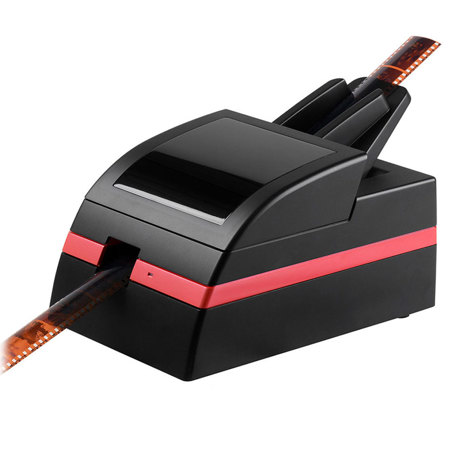
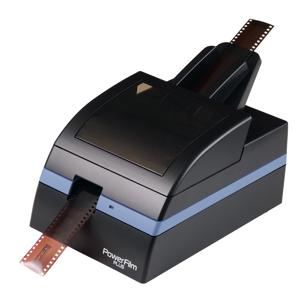
Automatic batch filmstrip scanning
You can walk away while it works. The maximum number of frames per batch scan is 60 frames (10 film strips per batch each strip has a maximum of 6 frames).

Makes scanning easy & relaxing
The most convenient and easy to use 35mm batch film scanner, simply load the films, set up the software with your particulars and select scan, now you are free to do other things instead of being tied to the computer.

24 MP image quality
Comparable to high-end DSLR camera, with 24M resolution you can output a print size of 20.0 x 13.3 inches (50.8 x 33.9 cm) at 300 dpi.

Compact Size
Small desktop footprint, takes up half the space of a conversional flatbed scanner.

Automatic dust and scratch removal with MagicTouch technology
Our own proprietary infrared cleaning technology, a great time saver in the post editing process.

Better image quality than scanning photo prints
Photo prints are very low resolution, scanning them even with a high end photo scanner will still not provide you with a high quality digital image like scanning the original film will. Photo prints offer only about 260 dpi, whereas scanning a film you can capture the full 2000+dpi per inch using this film scanner.

Fast and efficient, Saves time
High speed scanning: 24 sec./frame at 6MP, fast scan speeds will make quick work of all those boxes and boxes of old negatives and once digitized you can share many times over with friends and family or make print reproductions of old images that may have become lost or faded, using the fast 6M setting your digital output is high enough quality to make 300 dpi prints at 10.0 x 6.7 inches (25.4 x 16.9 cm) in size.

Advanced Features
CyberView PF 135 Scanning software is the interface used by the scanner to achieve scans, this software has many built in features to facilitate good quality scans from your device. CyberView PF 135 scanning software is your intuitive link to your device for all your scanning needs, it offers you Advanced features to enhance your images with fully customizable options or you can simply enable the automatic functions and let the software do the rest, scanning your images directly to your selected location be it on your hard drive, an external storage device (i.e. External Hard drive, Flash drive) has never been easier.
What's in the box:

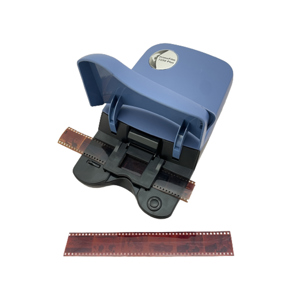
  • Pacific Image PowerFilm CCD Automated 35mm Film Scanner
  • Film Feeder
  • Universal AC Adapter with Interchangeable Plug (US/EU/UK)
  • USB 2.0 Cable
  • Quick Installation Guide
  • Pacific Image 1 Year Warranty