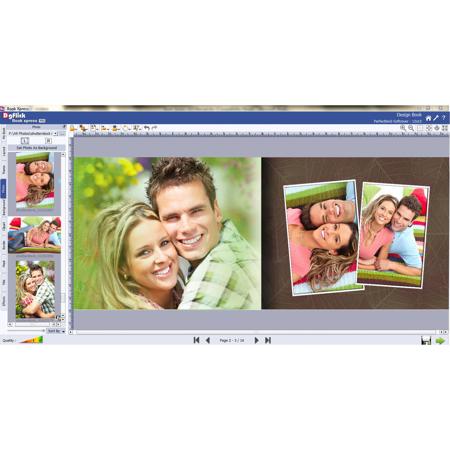
DgFlick Book Xpress Software
SKU: ISWDGFBX
This item is no longer available.
Share:
Overview
Compare
Specs
Protection
About DgFlick Book Xpress Software
The DgFlick Book Xpress Software is the fastest Auto Photobook Creation Software and the inbuilt occasion wise resizable themes make easy selection. Standard & Designed Page Layouts can make book look really creative. Possibility of applying layouts, themes on individual pages or complete book adds flexibility to book making. decors like cliparts, titles, frames will help making book attractive.
DgFlick Book Xpress Software Features
- Predefined standard Book sizes: Considering photographic and digital offset printing as well as different binding styles available, Created most of the standard types and sizes of books. Your book is designed along with safe area and proper printing technology
- Auto book creation: Software makes book creation easy and save time. Just select the book type, template and photos. Arrange the selected photos in sequence and the book is designed in few minutes. Photos can be sequenced on the basis of time, size and name or even manually dragged and dropped
- Export to JPEG and PDF: Designed book can be exported to JPEG (photo lab friendly format) or PDF (digital offset friendly format) while exporting profile can embed in book. This helps your designed book to print at any print lab
- Edit Cover and Page design: You can edit and design the book pages by filling in pages and setting their location on the page, selecting backgrounds, setting frames, masks or effects on the photos, adding clip-arts, adding texts
- Flip Page: The designed page composition can be flipped horizontally or vertically without flipping the photo and this gives you new composition
- Change theme, photo and layout of the book easily, Modify Design for - Left Page/Right Page/Both Page/Entire Book
- Auto adjust portrait photo
- Quality indicator: This is very useful indicator, it helps to indicate whether the photo quality is printable or not. The indication comes over the photo in form of red or yellow alert but does not come in printing
- Rotate and Flip - Mask and Border on object: Photos can be made more creative by rotating and flipping masks and borders with just one click. Select the photo, click on it to rotate and flip. With this you can have new formations and designs for a book
- Swap photo: Arrangements of photos can be changed according to the requirement to give a better look to a book. Select the photos to be swapped and click on swap button. Photos are changed in seconds
- Copy, Paste & Clear Effects: To apply the similar effects on other photos, copy the effects & paste to the new one. It can also be removed by just clicking on clear effect. It helps in designing your book fast and easy way
- Online cropping: Photos that you want to adjust on a page can be cropped in an easy way. Select the photo and adjust it with mouse. You can bring back photo by just one click
- On-Board rotation: Photos can be rotated in 360 degree on board while in page composition just by selecting the photo and moving in various directions with the mouse
- 40+ Book Themes, You can create and save own theme
- Huge collection of Background, Borders, Mask and ClipArts: Choose over hundreds of borders, masking effects, gorgeous backgrounds, clip arts and many more. Change your backgrounds with 18 ready tones. Make your book more creative by rotating clip arts and masks with the mouse
- Ready to use presets: Ready presets are available for designing your book in easy and fast way
- Multiple ready tones for Background: Various backgrounds are inbuilt within software to make the book more creative. Use them for designing the book in new way
- Effects- Outline, Shadow, Colorize Feather, Blur, Opacity, Rotaton, Glow: Use the various effects for making photos more attractive with many options like outline, shadow, colorize, feather, blur, opacity, rotation, glow, etc
- RGB color correction and Brightness Contrast Gamma Settings: To apply the appropriate curves to an image take an underexposed RGB image and make it look great using Levels and Curves. At this juncture shown above, the photo starts to become richer and more saturated with color
- Batch color correction: Color Balance is given to adjust the Colors of the Picture in a Batch Mode. You can set the colors and Brightness & Contrast of the Entire Picture Folder with the Match of a Particular Picture. There are Automate Options that can be used in batch mode
- Define Font, Font size, Alignment and color: Font, font size, alignment & color can be changed according to your designs. It gives a new look to your book
- Fill Title with Color: It helps in changing the color of the title by selecting the color, adding it on text using color picker. Make your texts look colorful
- Ready to use presets: Ready presets are available for designing your book in easy and fast way. These presets help in making your book more creative
- Insert multiline Rich text: Book can be made more creative by simply adding multiline text. Add the text to comment on your relation and the moment
- Life time free upgrades: Along with the software, Dgflick offers lifetime free upgrade for the software, background and clip arts. It gives you great benefits for life time