DgFlick Collage Xpress Software for Windows & Mac (Download)
SKU: ISWDGFCOX
This item is no longer available.
Share:
Overview
Compare
Specs
Protection
About DgFlick collage xpress software
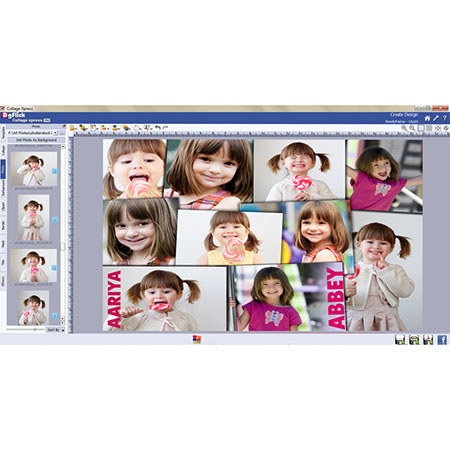
Collage creation is not a tough job anymore. The DgFlick Collage Xpress helps you achieve it speedily and easily. Collage Xpress creates different type of collage designs of various sizes in just few clicks. It has an inbuilt industry standard size and ready to use templates by which you can generate instant design for Canvas, Lamination Board, Sun board and Ready Frames. Collage creation got automatic, easy and fast. Genius! Save your time and efforts using it.
Predefined Standard Collage Sizes
Fast and Right selection of standard Collage sizes is all you get here. Sizes are readymade and available on single click. It has an inbuilt industry standard size by which you can generate instant collage designs for Canvas, Lamination Board, Sun board and Ready Frames. The Standard sizes help you get started easily.
Click to Choose Your Collage Combination
Collage Xpress provides the facility of choosing type of Collage Combination you want. Variety in the type of Collage Combinations is available in a single button. Select the photos and the collage will be ready just by single click. On every Single click you can generate new combination with existing photos.
Attract More with Templates and decor
Make your Collage look more attractive using ready to use templates. Collage Xpress provides more than 200templates which can be used for collage designing in single click. Make your Collage designs look more attractive using ready to use decor, huge collection of backgrounds, borders, clipart available and can be used in multiple ready tones. Import option allows you to bring in your choice of backgrounds, borders, clipart etc. No limitations to Creativity!
Fetch Photos from Facebook and Bluetooth
If you wish to use photos which already exist on your Facebook account, Collage Xpress provides you with the special provision by which you can fetch it easily. It has a feature of photo import, by which you can login to your FB account and download the photos for collage designing. Also if your system is Bluetooth enabled, the photos can be transferred to the Collage Xpress software as it also has feature to get photos from Bluetooth.
Make your collage speak a bit more by adding the text to it.
Inserting text is made simple. You can add multiline Rich Text of the font and font size you want in your collage. Photos and Text together is easy with Collage Xpress.
3 Ways to Automate Collage making
3 Ways auto options available make the collage creation a very simple task. Get it Expand, Fit or Crop in a click. With Expand auto creation the photos are placed without any crop and some of them even overlap each other. Fit auto creation fits in actual orientation of photo i.e. landscape or portrait without any overlapping. Last but not the least Crop auto creation cut the photos in equal sizes for both landscape and portrait and fits the photos on selected collage size. This option provided by the software saves lot of time and gives accurate results.
Print or Share your creative skill
Let others also see how creative you are!! Once the Collage is completed, you can take the output in Jpeg or Pdf format and can print it anywhere or you can show your creativity to your friends by sharing it on Facebook by just one click.
Auto Collage Creation
Collage Xpress provides you auto collage creation facility. It is easy to use and time saver as well. You just need to select the Collage type, size and photos and your Collage is designed in few seconds. Photos can be sequenced on the basis of time, size and name or even can be dragged and dropped manually.
Set Outline for photos
Highlight the photos by giving it an outline. Add an outline to the photos in the Collage in a single click. Every time you generate a collage, you can generate it with outlines to the photos.
Predefined Standard Collage Types and Sizes
Various standard book types like Center Pinning, Perfectbind soft cover, Perfectbind- Hard cover, Perfectbind -Readycover, Photopaper Ready cover & Wirobind - Offset. Book types & sizes are according to printing & binding industry standards.
Grids, Guidelines and Ruler
It helps you to position images or elements precisely according to the width and height of the page. Guide lines appears over the entire page and do not get printed. You can move or remove the guide line to avoid accidental move.
On Board Photo Cropping and Transforming
The online photo crop feature allows you to trim out any part of the source photo that you don't need. You can crop your photo to give it the desired height and width before incorporating it in your Collage.
Online Zooming and Panning
Feature that allow you ultimate zooming in which you zoom the image to maximum extent to make the photo detail noticeable and to avoid unwanted part. Collage Xpress has an in-built 'quality indicator', which warns you whenever the photo quality goes below the required standards. Photos can be panned by moving the mouse. To see the 'Zooming effect' please scroll over the image and after zooming in drag the image for 'Panning effect' and also see the quality indicator on the photo.
Object based alignment
This option allows you to align photos with respect to other photos or elements on the Collage. This Auto-Align Layers command can automatically align layers based on similar content in different layers, such as corners and edges. You assign one layer as a reference layer or let Photo automatically choose the reference layer. There are multiple options for this sort of alignment.
Page based alignment
This option allows you to align photos and other elements on the page with respect to the page.
Used Photo / decor Indicator
While creating Collage, selection of photos is major task; Collage Xpress helps you by indicating Used Photos along with their number of recurrence. You may also sort Photos as used /unused. While re-editing previous Collage design; you can find source Photograph, Border, Mask; just by right clicking on Photograph in the Collage.
Photo Quality indicator
The quality of photos used in a Collage must be good to ensure clarity in the final output. Collage Xpress has an in-built 'quality indicator', which warns you whenever the photo quality goes below the required standards. Once a photo has been placed into the frame, the indicator warns you if the resolution is inappropriate for the desired output size.
Swap photo
It comes handy when in Auto Creation any Landscape Photo fits in portrait position; you just need to select both photos to swap them instantly.
On Board rotation
You can add a different look to your Collage by rotating it in three different perspectives. Collage Xpress provides you the feature to rotate the objects x, Y and Z axis.
Create your own workspace
Flexible for Advance Users. All Panels are Dock able, Expandable and Movable, allowing you to design your own better interface, just comfortable for you.
Copy, Paste and Clear Effects
Apply the similar effects of one photo on the other photos as many times as you want, just copy the effects from one and paste them to the other one. It can also be removed by just clicking on clear effect. It is as simple as that.
RGB color correction
To apply the appropriate curves to an image take an underexposed RGB image and make it look great using Levels and Curves. At this juncture shown above, the photo starts to become richer and more saturated with color. After finally adjusting the blue channel below, you can see the photo is at a very rich stage. Details that weren't previously visible shine out now.
BCG (Brightness, Contrast, Gamma) Settings
You can adjust the brightness, contrast and gamma of the photos to achieve the clarity of the image.
Curve & Level
Curve tool is a flexible control that can brighten or darken parts of a layer based on the layer's luminosity. It can be used to edit photos, masks, graphics and hues. Level tool is used to adjust brightness, contrast and tonal range by specifying the location of complete black, complete white and mid tones in histogram.
Basic Effects on Photos
Add an extra edge to your photos with the effects such as Blur, Colorize, Feather, Opacity, Crop, Rotate, Glow, Shadow and Outline.
200+ Templates
200+ ready to use templates are provided in the software which will help you to design speedily.
Advance Search option for Template Selection
You may alter existing theme or layout & save as new or you may create completely new page design using DgFlick's or your own decor & save your created theme or layout to reuse.
Huge collection of Backgrounds, Borders, Mask and Clip-Arts
Choose over hundreds of borders, masking effects, elegant backgrounds, clip arts and many more. Replace the backgrounds, clip-arts and borders with 18 ready tones generated. Make your Collage more creative by rotating clip-arts and masks.
Multiple Ready tones in single click
18 ready tones get auto-generated for backgrounds, clip-arts, borders, etc. not only for decors provided by Dgflick but also for the decors brought by you.
Title
Change Font, font size, alignment and color of the title according to your design. Collage can be made more creative by simply adding multiline text. Add the multiline text to comment on event, on your relation and the moment.