Orders placed during Passover Holiday (Wed 4/1 after 4PM ET – Thurs 4/9) will ship Fri 4/10. View our holiday shipping schedule.
This item is no longer available.
The MCS5 stands out due to its relegendable LCD button labels that change on-the-fly according to different editing operations. This feature, along with customizable function keys and compatibility with a wide range of applications, makes it a versatile and user-friendly choice for professionals.
Yes, the MCS5 allows you to customize the function keys and create banks of hot keys according to your specific needs. You can program these keys with various messages, including standard key command combinations, MIDI messages, mouse clicks, and more.
The MCS5 is compatible with popular applications such as Final Cut Pro X, iMovie, Premiere Pro, Pro Tools, Nuendo, and others. You can also create your own keyset for any program, making the MCS5 a versatile tool for any Mac software.
The raised display on the MCS5 ensures easy viewing, enhancing the user experience by providing a clear, easy-to-read display of button functions and programmed commands.
Yes, the MCS5 is designed to provide a tactile assurance that enhances speed, ease-of-use, and overall productivity, making it a suitable replacement for the traditional mouse and keyboard setup.
Review Summary
Accidents happen where life happens. Protect your favorite Adorama products and purchase a protection plan to stay covered from accidental damage, mechanical or electrical failure, and more.
If we can’t fix it, we’ll replace it at no additional cost.
Protect your product from drops, spills, and more.
Enjoy your gear without fear. We have you covered!
When regular use of your product over time results in mechanical or electrical failure.
We will never charge you a deductible after the purchase of a plan.
Our claims process is simple & easy and our customer service team is happy to help.
Adorama Protect powered by Extend is available for purchase to customers in the United States. Not available for purchase Internationally or in U.S. Territories.
Browse our FAQ
Any Mac Software
5.75 x 8.0 x 3.0" (146.05 x 203.20 x 76.20mm)
2lbs (0.91kg)
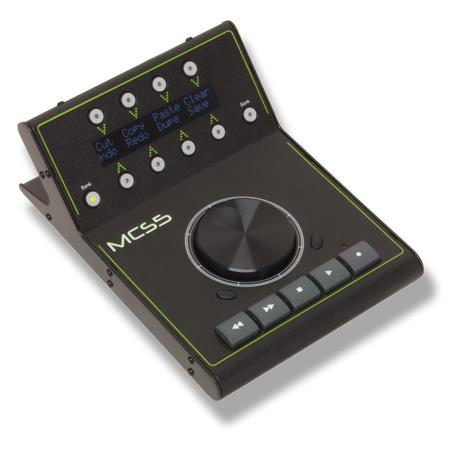
Enhance your digital workflow with the innovative MCS5 USB Media Control Station, JLCooper's latest addition to their line of advanced desktop controllers. Designed with the modern professional in mind, this high-quality device offers a user-friendly interface, complete with professional-grade transport buttons and a precision optically encoded jog wheel for superior control.
One of the standout features of the MCS5 is its relegendable LCD button labels. These dynamic labels change on-the-fly, adapting to different editing operations and providing a clear, easy-to-read display. This unique feature allows for a custom arrangement of controls, ensuring you always know the function of each button, increasing efficiency and reducing the risk of errors.
The MCS5 also boasts assignable function keys, allowing you to create and customize banks of hot keys tailored to your specific needs. These keys can be programmed with a variety of messages, including standard key command combinations, MIDI messages, mouse clicks, and more. This versatility extends to compatibility with popular applications such as Final Cut Pro X, iMovie, Premiere Pro, Pro Tools, Nuendo, and others. You can also create your own keyset for any program, making the MCS5 a truly versatile tool for any Mac software.
Group your frequently used commands into logical banks for different tasks, such as ingest, tracking, or editing. The raised display ensures easy viewing, further enhancing the user experience. With the MCS5, you can replace the traditional mouse and keyboard setup, providing a tactile assurance that enhances speed, ease-of-use, and overall productivity.
Built to last, the durable MCS5 USB Media Control Station is a reliable choice for professionals seeking advanced control of their software applications. Experience the difference of JLCooper controllers and elevate your digital production process today.