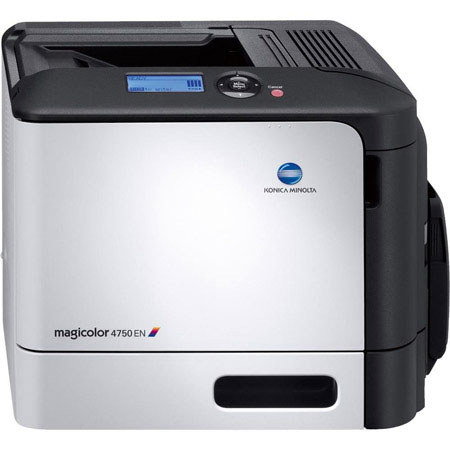
Konica Minolta Magicolor 4750EN Color Laser Printer, 120000 Pages, 4800 Effect x 600 dpi, 31 ppm

SKU: KCMC4750EN1

This item is no longer available.

Overview
Compare
Protection
Q&A

Questions & Answers

Shopper : does this printer work well with Mac OS 10?LEROY W : Yes, it works perfectly. ANTHONY G : I'm a Windows user so I don't know how it works with a Mac. I've had no problems with Windows.
Shopper : Will this work with Windows 7 and 8? Thanks.ROSHANAK G : it should be transparent.MICHAEL A : Yes... Windows 7 drivers can be downloaded from the Konica website... Windows 8 uses the same driver as Windows 7..... I have the printer operating on both platforms.DANIEL D : Works fine on Windows 7 32 & 64 Bit. We have no windows 8 machines yet.ANDREW R : The manufacturer indicates that this printer is compatible with the following operating systems: Windows 7 (x32, x64), Windows Vista (x32, x64), Windows Server 2003 (x32, x64), Windows XP (x32, x64), Windows 2000 (x32, x64), Mac OS X (10.2.8+, 10.3.9+, 10.4, 10.5, 10.6), SuSE Linux Enterprise Desktop10, Red Hat Enterprise Linux 5 Desktop
Shopper : THE 512 MB UPGRADE ON THE RAM - WHAT ARE THE SPECS ON THE RAM CHIP??JIM H : The chip Must be a DIMM (dual in-line memory module) there is only 1 slot for additional memory besides the 256MB the printer comes with (256MB+512MB=768MB) The printer is very fast with the 256MB it comes with, I have not upgraded the memory yet on my printer and am Very pleased with the 256MB preformance!! The owners Manual states the upgrade may only be needed for VERY complex graphics or Double Sided printing. The upgrade is an easy to do yourself, if following the printers Owners Manual!!ANDREW R : Unfortunately, the only specs available from the manufacturer come from the user guide: "There is 256 MB of onboard memory and one available memory expansion slot. The memory can be expanded to a maximum of 768 MB (256 MB + 512 MB)."

Reviews about this item

Review Summary

2012-11-09T19:00:00

Rated 1 out of 5

But the company and future support...

Company drops support after only a couple of years. So if you upgrade operating systems, your sunk.

seadoon1

2012-11-08T19:00:00

Rated 5 out of 5

Upgrading the 256MB Memory to 768MB

I was sent an email from Adorama, that a customer inquired asking about the memory upgrade that can be done on this printer!! 1st the printer works very Fast with the Memory it comes with (256MB) which I use. You can add more Memory up to 768MB (256MB+512MB=768MB)total. there is 1 additional slot for up to 512MB more Memory, it Must be a DIMM (Dual Inline Memory Module) which is a compact surface board with surface mount memory chips . You may need more Memory (DIMM) only for very complex graphics or duplex (double sided printing) Easy memory addition you can do with the printers included owners Manual!!

JIM H.

2012-01-23T19:00:00

Rated 4 out of 5

"A Great Printer with A Great Name"

I use the printer for everyday printing and it does a pretty nice job for photos as well!!! Excellent laser printer and a great price too!! This is my 2nd Magic Color, Had a 2430DL before and this is better, very pleased!!

JIM H.

2011-11-13T19:00:00

Rated 5 out of 5

outstanding printer

It's everything you want in a printer: it's quiet, fast, cheaper-than-inkjet, and the print quality is superb.

mattsoca

2011-10-04T21:00:00

Rated 4 out of 5

Solid color printer

Was looking for a color laser printer for a few months. Most printers in the sub $300.00 are slow. When I mean slow, I mean painfully slow. 12 ppm color, 5 ppm color. I could fall asleep waiting for a 20 page document. The so I saw this Magicolor 4750en on ad for a special price. 31ppm color. Why not. This is a solid printer. Its should be priced alot higher. So pleased with my purchase.

JONESN
About Konica 4750EN

FEATURED REVIEWS

Upgrading the 256MB Memory to 768MB

By JIM H.

I was sent an email from Adorama, that a customer inquired asking about the memory upgrade that can be done on this printer!! 1st the printer works very Fast with the Memory it comes with (256MB) which I use. You can add more Memory up to 768MB (256MB+512MB=768MB)total. there is 1 additional slot for up to 512MB more Memory, it Must be a DIMM (Dual Inline Memory Module) which is a compact surface board with surface mount memory chips . You may need more Memory (DIMM) only for very complex gra...

View full Review

outstanding printer

By mattsoca

It's everything you want in a printer: it's quiet, fast, cheaper-than-inkjet, and the print quality is superb.

User comfort is one of the highlights of the Konica Minolta Magicolor 4750EN Color Laser Printer. With its large backlit display and self-explanatory buttons, they are easy to read and operate. The Emperon Print System offers an 800 MHz processor and 256 MB RAM ensure absolute top performance.

The Konica Minolta Magicolor 4750EN Color Laser Printer features a standard paper feeder and up to 31 ppm black/color, which gives you the benefit of highly versatile media handling capabilities. The use of Simitri HD toner on the magicolor 4750EN promises a consistently brilliant print quality.

What's in the box:

  • Konica Minolta Magicolor 4750EN Color Laser Printer
  • Starter Toner Cartridges (Black/Cyan/Magenta/Yellow)
  • Imaging Unit (Black/Cyan/Magenta/Yellow)
  • Waste Toner Box
  • Konica Minolta Warranty
