Yes, the SD3500v Docking Station supports dual HD video output, allowing you to add two external monitors to enhance your workspace and productivity.
The docking station's two USB 3.0 ports support super-speed data transfer of up to 5 Gbps.
Extend Mode allows you to share your entire desktop across multiple screens, ideal for working with and viewing multiple applications simultaneously. Clone Mode allows you to replicate the same content on your second display as you do on your master display.
Yes, the SD3500v Docking Station comes with free Kensington DockWorks Software to ensure the best connection, performance, and security from your docking station.
Yes, two fast and powerful USB 3.0 ports are positioned on the front of the dock for easy access when you need to charge a phone or tablet, or transfer data from another device.
Review Summary
2022-07-12T20:00:00
The docking station is very easy to use and set up. Very small and functional. This replaced my PC and is much more versatile.
Practical B.

2022-06-01T20:00:00
I just love my docking station. I have had it for about a month and it perfectly suited to my needs of switching from one laptop to another.
rbrewer

2022-04-07T08:55:29
This gadget did the trick! Needed to connect two monitors to my laptop with only one port. This dual docking station was the key. It has its own power, which I guess is key when connecting monitors (not all USB ports deliver enough power to connect a monitor). Has tons of extra slots as I add more peripherals but currently it has both monitors, a wifi extender, my mouse/keyboard dongle and a speaker attached. Still two slots in front to spare, and two more in the back!
Miriam K.
2021-10-17T20:00:00
Pros: Slim profile, verticality takes up less desk space, solid performance typically Cons: Just give me 2 HDMI ports or 2 Display Ports, I don't want an adapter for my 2nd HDMI port; has a tendency to flicker when I first plug in each day, but goes away within 5 minutes
StarLazar4u2

2020-05-05T20:00:00
I have had it for several weeks. It was easy to set up and is working well.
PatriciaGT

2020-04-23T20:00:00
I am thrilled with this product. I previously purchased a different unit (from someone other than HP), and I determined it didn't work with my second monitor. The Kensington USB 3.0 Docking Station was installed within minutes, and it works great with all of my devices. I especially like having additional USB ports.
gnjordan

2020-02-10T19:00:00
We purchased this to make it easier to plug in our laptop to the screen, printer, etc. Had to load the driver, but once that was done, everything worked just fine.
speters999

2020-01-11T19:00:00
Asked HP if they had a dual pc docking station. They sent a dual monitor single pc dock. There are much cheaper docks that do what the Kensington does.
Pent R.

2019-02-28T19:00:00
Had to contact Kensington to get my docking station to work correctly. Also found out the price was less on their site versus on the HP site. Disappointing but in retrospect, understandable.
satisfied u.

2019-02-09T19:00:00
The HP team helped me determine what docking station was the best, and this one is perfect! Easily hooked up my laptop, extra monitor, wireless keyboard and mouse, and printer. So simple to hook up and use. Much appreciated!!
lbeaup

2019-01-14T19:00:00
I bought this a couple months ago and I'm glad I did. It saved me a lot of money going this route and has made my day to day life easier when I'm doing my spreadsheets.
Titans61

2018-06-08T20:00:00
This docking station really helped simplify my desk by having all cables connected to one device
aderene

2018-02-20T19:00:00
I spent a lot of time with HP chat (very helpful) to ensure I could find a dock that would work with my laptop, supported 2 extra monitors and had plenty of usb ports. It arrived the next day (!) and took me about 10 minutes to setup and swap out my old dock for this one. Worked perfectly straight out of the box and I have a beautiful laptop + 2 monitor setup now that supports my multiple audio and video devices as well.
Lita

2017-06-16T20:00:00
Must have - I have my external hard drive, thumb drive, plug in for wireless mouse and keyboard, hub and USB cord for camera uploading attached
ArtG

Accidents happen where life happens. Protect your favorite Adorama products and purchase a protection plan to stay covered from accidental damage, mechanical or electrical failure, and more.
If we can’t fix it, we’ll replace it at no additional cost.
Protect your product from drops, spills, and more.
Enjoy your gear without fear. We have you covered!
When regular use of your product over time results in mechanical or electrical failure.
We will never charge you a deductible after the purchase of a plan.
Our claims process is simple & easy and our customer service team is happy to help.
Adorama Protect powered by Extend is available for purchase to customers in the United States. Not available for purchase Internationally or in U.S. Territories.
Browse our FAQ
USB 3.0 (DisplayLink)
2
HDMI, VGA, DVI-I
2K
macOS, Windows
6
No
The Task Master
Yes
USB 3.0 Laptops, Ultrabooks & Windows Tablets and Monitors that support up to 2K
Windows 7 or above, macOS 10.14 or above
4x USB 2.0 Ports (back) up to 480Mbps
2x USB 3.0 Ports (front) supporting 5V/0.9A (does not support fast-charging)
1x 3.5mm Microphone port (front), 1 x 3.5mm Headphone port (front)
Supports up to 480Mbps on USB 2.0, and up to 5Gbps on USB 3.0
1000, 100, 10
Single Monitor: 1920 x 1200 @ 60Hz and Dual Monitors: 2048 x 1152 @ 60Hz
DisplayLink driver installation required
Kensington Security Slot
1x HDMI v1.2, 1x DVI-I (DVI-to-VGA and DVI-to-HDMI supported with included adapters)
No
085896339724
Exactly what I was looking for!
By Lita
I spent a lot of time with HP chat (very helpful) to ensure I could find a dock that would work with my laptop, supported 2 extra monitors and had plenty of usb ports. It arrived the next day (!) and took me about 10 minutes to setup and swap out my old dock for this one. Worked perfectly straight out of the box and I have a beautiful laptop + 2 monitor setup now that supports my multiple audio and video devices as well.
Very Functional Docking Station
By Practical B.
The docking station is very easy to use and set up. Very small and functional. This replaced my PC and is much more versatile.
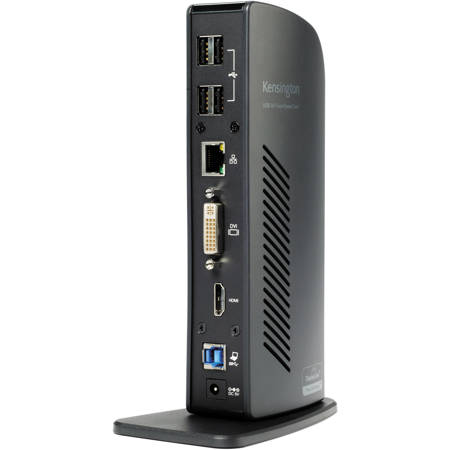
It's no secret that ultra-thin laptops and 2-in-1 convertibles like the Microsoft Surface Pro are the epitome of mobile productivity and sleek design. However, their slim profiles often mean a compromise on connectivity ports, leaving you in a constant cycle of plugging and unplugging peripherals. Enter the SD3500v USB 3.0 Universal Docking Station, a solution designed to transform a single USB port into a versatile hub of six, providing seamless access to all your essential peripherals, including your keyboard, mouse, printer, and external hard drive.
With the SD3500v Docking Station, you're not just expanding your connectivity; you're also enhancing your visual workspace. Thanks to its dual HD video output, you can add two external monitors to supercharge your productivity. The docking station's two USB 3.0 ports support super-speed data transfer of up to 5 Gbps, ensuring your data moves as fast as you do.
The SD3500v Docking Station is equipped with 1 DVI Out and 1 HDMI Out, allowing you to expand your workspace by adding additional monitors. Whether you're connecting a DVI monitor to the DVI port or using the included DVI>VGA adapter to connect a VGA monitor, you're covered. If you have an HDMI monitor, you can connect directly into the HDMI out port. You can even connect a second HDMI monitor to the DVI port using the included DVI>HDMI adapter, running both the DVI and HDMI ports simultaneously.
The SD3500v Docking Station also offers Extend Mode, a feature that allows you to share your entire desktop across multiple screens. This is ideal for enhancing productivity by working with and viewing multiple applications simultaneously. Alternatively, Clone Mode allows you to replicate the same content on your second display as you do on your master display.
Convenience is at the forefront of the SD3500v Docking Station's design. Two fast and powerful USB 3.0 ports are positioned on the front of the dock for easy access when you need to charge a phone or tablet, or transfer data from another device. Headphone and microphone input ports are also within easy reach when needed. Additionally, four USB 2.0 ports are strategically located on the back of the docking station, keeping your printer, keyboard, and mice cables or wireless dongles hidden from view.
The SD3500v Docking Station comes with intuitive display settings software. This user-friendly management console sits on your applications bar, allowing you to easily switch between display modes, change the master monitor, or adjust alignment and position of your screens. For businesses, our corporate install support provides for mass installation via the Microsoft server.
For those who need even more screen real estate, the SD3500v Docking Station supports the addition of more monitors using a multi-display adapter, available separately. These connect into one of the six USB ports and can be used with DVI or VGA monitors. To ensure the best connection, performance, and security from your Kensington dock, free Kensington DockWorks Software is included.






