While a mouse is a useful navigational tool for word processing programs or for surfing the web, it’s woefully inadequate for fine-motor tasks. Tablets and electronic notepads are much better suited for detail-oriented work like photo editing, graphic design, and digital painting.
Maximize your productivity and improve your dexterity with a drawing tablet or electronic notepad.
Drawing tablets and electronic notepads connect to your desktop or laptop computer via a USB cord or Bluetooth connection. Most models come with an integrated stylus so you can draw, write, and fine-tune creative work with ease.
Screened Tablets
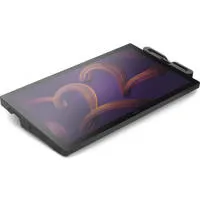
When shopping for a drawing tablet, your first decision is whether or not you need a screen. Some tablets feature a large display so you can draw or edit directly on your image or document. Tablets with displays are easier to use for many applications because they provide an experience similar to drawing directly on paper or canvas. You can see where your pen tip is and what effect it has on your work.
Screenless Tablets
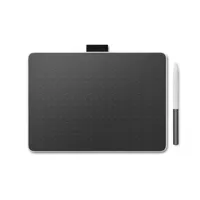
Some creatives prefer screenless tablets because they’re much less expensive and more durable. You can also use them with professional-quality, color-calibrated, large-screen monitors, so you’re not limited by your tablet’s screen size.
Notepad Sizes
Electronic notepads come in many sizes from compact 7- and 10-inch models, to larger 24- to 27-inch models. Large drawing tablets with screens often feature 4K resolution so you can work on photographs, digital drawings, and 3D design work in extreme detail.
Must-Have Features for Tablets and Electronic Notepads
Drawing tablets are meant to simplify your digital tasks, so it’s always a good idea to select a model with plenty of bells and whistles that can streamline your workflow.
Programmable buttons and hotkeys quickly bring up common menus or settings that you regularly use. Stylus buttons are helpful for toggling between different tools in programs like Photoshop or for increasing and decreasing your paintbrush size.
Some models can switch between pen and fingertip control for even more customization.
The Best Electronic Notepads and Drawing Tablets
Professional workflows require professional tools so you can set yourself up for frustration-free success. Electronic notepads and drawing tablets by top brands like Wacom offer cutting-edge technology for better performance. With benefits like palm rejection, programmable gestures, and periodic firmware upgrades, you can feel confident that your drawing tablet will always improve your workflow by providing accuracy and reliability.