Orders placed during Passover Holiday (Wed 4/1 after 4PM ET – Thurs 4/9) will ship Fri 4/10. View our holiday shipping schedule.

Overview
Compare
Specs
Protection
Q&A

Questions & Answers

FAQ

What is the purpose of the pivot function on the ThinkCentre Tiny-In-One 22 Gen 4 monitor?

The pivot function allows the monitor to rotate vertically, offering more flexibility in terms of display orientation and placement options. This feature is particularly useful for tasks that benefit from a portrait view, such as reading documents or coding.

What does the Eye Comfort Certification on the ThinkCentre Tiny-In-One 22 Gen 4 monitor mean?

The Eye Comfort Certification indicates that the monitor has been tested and certified to reduce eye strain and fatigue during prolonged use. This makes it an ideal choice for users who spend extended periods working on their computers.

How does the Tiny 1L PC integration work with the ThinkCentre Tiny-In-One 22 Gen 4 monitor?

The monitor is specifically designed to house a Tiny 1L PC. You simply insert the Tiny PC into the designated slot at the back of the monitor and connect the power cord. This integration results in a cleaner, more organized workspace with fewer cables.

What is the ThinkShutter feature on the ThinkCentre Tiny-In-One 22 Gen 4 monitor?

The ThinkShutter is a physical camera cover that provides privacy and security when the webcam is not in use. It's a simple yet effective way to prevent unwanted access to your webcam.

What makes the ThinkCentre Tiny-In-One 22 Gen 4 monitor a good choice for professional use?

The monitor offers a range of features that cater to professional needs. These include Full HD resolution for clear visuals, built-in speakers for audio, an ergonomic design for comfortable use, and a webcam with dual microphones for video conferencing. Additionally, its compatibility with Tiny PCs makes it a versatile and future-proof choice.

Reviews about this item

Review Summary

2024-05-13T20:00:00

Rated 4 out of 5

Amazing design!

Great Montitor! Touchscreen, webcam, speakers, all by plugging in one USB 3 cord, power, and video cable or just drop in you tiny computer and don't worry about plugging anything in. It's an AIO that you easily customize. Great design! The only reason four stars instead of five is because I loved this product so much I bout a TIO24Gen 5 touch. Didn't think it possible, but it blows this one out of the water with design. I have them both hooked up to my tiny desktop. It's slide right in back of the 24" and the 22" just plugs right in. Touch works on both. breeze to setup.

Craw77

2024-05-08T20:00:00

Rated 1 out of 5

Recurring issues

Multiple issues with this monitor. 1. Speaker can sometime sound like it's blown. 2.There are times when monitor does not wake up with the M70q. 3. Monitor would just go into sleep while your actively using the computer. Eg. While your typing a document.

SpeakurMind

2023-11-20T19:00:00

Rated 5 out of 5

Buy THIS Touch Screen You'll Love It

Love the Touch Screen! Works great! Clear picture.

TJOK

2023-11-18T19:00:00

Rated 1 out of 5

Misplaced Items with NO ETA!!

I wouldn't know what it's like because I haven't even received my power cord yet so I can't even try and it. Terrible customer service that hasn't let me know of anything going on.

Colin N.

2023-11-16T19:00:00

Rated 1 out of 5

Would not reccommend.

Original ThinkCentre TIO22Gen4 I ordered and received didn't work, so I was sent a replacement, but the replacement also doesn't work. I think maybe there is something wrong with the disk/driver? I'm not sure, but it doesn't work and I'm wary of . Hoping to hear about my return request soon.

Kayla M.

2023-07-31T20:00:00

Rated 3 out of 5

Setup failure

No instruction on how to connect to a Lenovo laptop. Called support who told me to call Think center support. It was easier to Google the instructions. No cords for connecting to a laptop or desk top. Had to purchase a separate Active adaptor to connect it.

Noo N.

2023-07-04T20:00:00

Rated 5 out of 5

IT Project Manager

This screen meet all our reqirements. Working very well.

Pavel P.

2023-06-19T20:00:00

Rated 1 out of 5

Purchased monitor NOT working

This monitor appears great on pictures but it does not been function as stated. It comes with a CD to install the driver and that IS REALLY SURPRISING AS MOST LAPTOP (including Lenovo) laptops no longer come with CD drives. How then do they expect users to install the driver using a CD? I mean this is 2023 and you are expecting one to install drivers from a CD? Seriously? I had been pushed around by the support team for over a month now. Several calls to Lenovo does not help as the support team kept transferring me from one representative to the other (up to 4 reps per call) with no solution. Might eventually have to return it since it is not working and there is no help from Lenovo. Very disappointment that Lenovo would roll out such a product and mislead buyers and waste people's time trying to purchase a product that is not 'plug and play' as displayed!

LovJ

2023-04-24T20:00:00

Rated 5 out of 5

Great Monitor

This monitor has a great resolution and saves space by having the mini desktop attach to the back. Less cables is a huge plus.

Evolve

2023-03-16T20:00:00

Rated 5 out of 5

workin project busines

exclent item, price and screen quality, good resolution

exclent i.

2022-12-05T19:00:00

Rated 5 out of 5

Great product

Great product. Fast shipping. Highly recommended. Will buy again.

Timmy21

2022-12-05T19:00:00

Rated 5 out of 5

Great product

Great product. Fast shipping. Highly recommended. Will buy again.

Lenovo P.

2022-09-16T20:00:00

Rated 5 out of 5

The great American novel machine

More than a monitor, it's a cleverly thought out device that hosts a tiny PC, and is being used by my wife to write a novel. It's ergonomic design has made it indespendible, and a joy to use.

Meederr

2022-09-01T20:00:00

Rated 5 out of 5

Efficient equipment

Compact, easy to put together, easy to start using.

Dyson S.

2022-05-16T20:00:00

Rated 1 out of 5

Customer service is non -existent

Don't bother -had problems getting this set up and customer "service" refused to help, so I returned ot

Do b.

2022-04-18T20:00:00

Rated 2 out of 5

Touch does not work with all computers

Touchscreen does not work with our Tiny M73 units. Had to return.

Trance H.

2021-07-25T20:00:00

Rated 5 out of 5

Unexpectedly good product.

Skeptical at first about the TIO concept. After assembling the products, it is well made, sturdy and will suite our needs perfectly.

BobM1

2021-07-20T20:00:00

Rated 4 out of 5

Good sized monitor

Although the 21.5" is a nice unit and display is very sharp it is disappointing not being able to purchase the 23 Inch model.

DonN2

2021-07-19T20:00:00

Rated 5 out of 5

Pretty perfect little monitor

Screen clarity is top notch and the stand is nice and heavy, so this isn't going anywhere! The integration with the tiny desktops is inspired.

Daniel B.

2021-07-05T20:00:00

Rated 1 out of 5

Faulty Touch Screen

Touchscreen does not work. Our client was very upset and we had to purchase another touchscreen at a much higher price!

TTEC C.

2021-06-08T20:00:00

Rated 1 out of 5

I bought this monitor, and when I try to connect from my Lenovo T470S laptop using HDMI to Display Port cable it is not connected. Moreover, I have tried with all cables with other connectors but still not work out. So I unsatisfied with this purchase. So looking forward to refund/replacement or new product in place of this. Due to this, my work has been impacted. Product Name: ThinkCentre TIO22Gen4 21.5-inch WLED FHD

Chandra P.

2021-05-24T20:00:00

Rated 5 out of 5

New design

Sleek, clean cut, great quality and new design. Love this product!

Piero

2021-05-21T20:00:00

Rated 5 out of 5

Amazing!

This is a fantastic monitor. Colors are very sharp, there is no glare from the screen, and it looks amazing. I only but Lenovo products, as they are superior quality and well worth the price.

Stephen T.

2021-05-16T20:00:00

Rated 3 out of 5

The deisgn of the monitor should have been Better.

By better -- i mean it is 2021 and the structure of the monitor should have been smaller and more compact. The size of the screen is fine, but the monitor is too big for a compact desk. the depth of the back of the monitor to the front of the screen is 7 inches. That depth leaves all this EXCESS space behind the monitor. This monitor takes up 1/3 of my desk and is 12 inches from my eyes! Not what I expected and too close for comfort and health of my eyes.

senate

2021-05-10T20:00:00

Rated 5 out of 5

A must have

Just what I was looking for. Great desktop space saver and works like a charm with the M93p

Frank581000

2021-05-10T20:00:00

Rated 5 out of 5

Awesome Monitor

This is a great looking monitor it keeps the computer hidden well and the desk looking clean. The resolution is brilliant and detailed.

Blue I.

Select a plan in the Add Protection section above and purchase with this product by clicking “Add to Cart”.

image-protection

TRUSTED PROTECTION PLANS, EXCEPTIONAL SERVICE.

Invest In Your Gear and Peace Of Mind!

Accidents happen where life happens. Protect your favorite Adorama products and purchase a protection plan to stay covered from accidental damage, mechanical or electrical failure, and more.

Repair or Replacement

Repair or Replacement

If we can’t fix it, we’ll replace it at no additional cost.

Accidental Damage

Accidental Damage

Protect your product from drops, spills, and more.

Peace of Mind

Peace of Mind

Enjoy your gear without fear. We have you covered!

Malfunction Protection

Malfunction Protection

When regular use of your product over time results in mechanical or electrical failure.

Zero Deductible

Zero Deductible

We will never charge you a deductible after the purchase of a plan.

Customer-Focused Support

Customer-Focused Support

Our claims process is simple & easy and our customer service team is happy to help.

Adorama Protect powered by Extend is available for purchase to customers in the United States. Not available for purchase Internationally or in U.S. Territories.

Lenovo ThinkCentre TIO 22 Gen 4 Specifications

Performance

Performance

Jump to...
  • Display Size

    21.5" (54.61cm)

  • View Area

    18.74 x 10.54" (476.1 x 267.8mm)

  • Panel

    In-Plane Switching

  • Backlight

    WLED

  • Aspect Ratio

    16:9

  • Resolution

    1920 x 1080

  • Pixel Pitch

    0.24795 x 0.24795mm

  • Dot / Pixel Per Inch

    102.4 dpi

  • View Angle (H / V)

    178 Degree / 178 Degree

  • Response Time

    4 ms (Extreme mode) / 6 ms (Typical mode) / 14 ms (Off mode)

  • Color Support

    16.7 Million

  • Refresh Rate

    60Hz

  • Brightness

    250 nits

  • Contrast Ratio

    1000:1

  • Color Gamut

    72%

  • Anti-glare

    Yes

  • Curvature

    None

  • Camera

    HD 720p camera with Think Shutter

  • Microphone

    Dual Microphone

  • Speakers

    2W x 2, Stereo speakers

  • Power Consumption (Typical / Maximum)

    14W / 25W

  • Power Adapter

    90W 88%

  • Touchscreen

    None

  • Smart System

    None

  • Stand

    Tilt, Swivel, Pivot, Height Adjust Stand

  • Side Bezel Width

    2mm

  • Mounting

    Supports VESA mount 100mm

  • ThinkCentre M Series Support

    Tiny Support

Connectivity

Jump to...
  • USB Port

    USB 3.1 Gen 1 Type-A (only available when a Tiny is installed or a PC is connected)

  • Video Connector

    1x DP 1.2

  • Network Connectivity

    None

Certifications

Jump to...
  • Environmental Certification

    ENERGY STAR Certified, TCO 8.0, TCO Edge 2.0, EPEAT Silver, RoHS

  • Ergonomic Certification

    TUV Rheinland Low Blue Light, TUV Rheinland Flicker Free, TUV Rheinland Eye Comfort

  • Sync Technology

    None

Software

Jump to...
  • Operating System

    Support Windows 7, Windows 10

Physical

Jump to...
  • Color

    Black

  • Dimensions (H x W x D)

    With Stand: 19.25 x 8.68 x 22.37" (489 x 220.4 x 568.2mm)

  • Weight

    Including Stand: 4.51 lbs (6.58kg)

  • UPC Code

    194632565904

About Lenovo ThinkCentre TIO 22 Gen 4

FEATURED REVIEWS

Buy THIS Touch Screen You'll Love It

By TJOK

Love the Touch Screen! Works great! Clear picture.

IT Project Manager

By Pavel P.

This screen meet all our reqirements. Working very well.

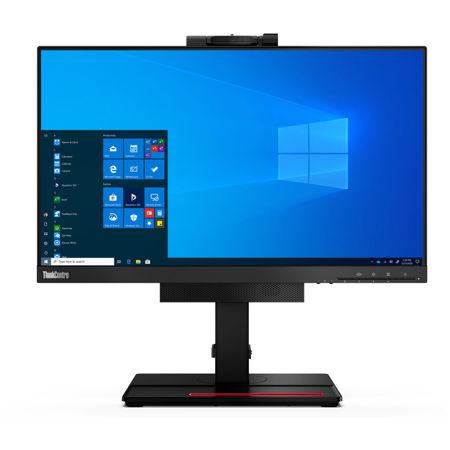
Lenovo created the first monitor in the industry specifically designed to stow a Tiny 1L PC. This groundbreaking Tiny-in-One solution gave businesses an innovative alternative to other desktop and all-in-one devices that offered maximum upgrade and maintenance efficiency while also solving cable management and work space issues. With the introduction of the fourth generation of TIO, includes 21.5-inch, we offer all those benefits plus many new features that greatly enhance the user experience.

Paired with the enterprise-level power and performance of Tiny desktop, the TIO Gen 4 delivers a superior computing experience that now includes extended lift height, and webcam with integrated mic and speakers. The addition of ThinkShutter enhances the ThinkShield security solutions built into the Tiny inside.

Purposeful design
The TIO Gen 4 offers an enhanced computing experience through improved thermal design. We redesigned the back thermal cover to achieve better heat dissipation when paired with Tiny desktops, which allows users to achieve optimal performance and productivity.

Relentless innovation
We are inspired by our customers and what they want from our devices. It shows in the fact that we pioneered the industry in TIO devices. This innovative combination allows businesses to upgrade monitors and PCs separately to save budget and offers users an even more clutter-free, space-saving design

Trusted quality
The TIO Gen 4 is designed for performance and durability in any environment. These monitors endure extreme tests to ensure they can withstand vibration, drops, electrostatic discharge, heat, humidity, and more.

Efficient Upgrades
The TIO Gen 4 is perfect for large enterprises, government organizations, health care systems, and educational institutions who require powerful desktop performance coupled with upgrade efficiency. Because TIO allows you to purchase PCs and monitors separately, you can refresh either at a time that's best for your budget. The TIO Gen 4 comes in screen size, including 21.5 inches, that work with the latest generation of Tiny PCs as well as any Tiny going back to the second generation. Installation is easy. Just lift the back cover, insert the Tiny, and plug in the power cord. Upgrades are just as fast.

Space Savings
With an 18% smaller footprint than the previous generation, the TIO Gen 4 takes up even less desk space. As always, TIO Gen 4 offers much better cable management than the combination of a tower or small form factor PC plus monitor(s). When bundled with a Tiny, the TIO Gen 4 only uses one power cord total, while larger PCs with monitors can require two or more power cords. Additionally, the TIO Gen 4 can be used as a second, space saving display.

Enhanced User Experience
The TIO Gen 4 is designed with people in mind. The new stand features height adjustment up to 150 mm, which offers better ergonomics for taller users whether seated or standing. Eye Comfort Certification assures users of less eye strain and fatigue. And because our phones are always within reach, the TIO Gen 4 features a new cell phone holder integrated into the base.

Better Communications
In today's world of virtual meetings, the TIO 22 Gen 4 is your best asset with HD 720p webcam and dual mics. The webcam on all TIO Gen 4 sizes rotates for the best view of the user. And of course, security is top of mind, especially when communications are involved. The TIO Gen 4 also features a ThinkShutter camera cover to provide better privacy and security when the webcam is not in use.

Lenovo ThinkCentre TIO 22 Gen 4 Features

  • Modular AIO by TIO+TINY
  • 21.5" FHD / In-Plane Switching technology / 3-side borderless panel
  • VOIP support
  • HD 720p camera with Think Shutter
  • The TIO Gen 4 offers an enhanced computing experience through improved thermal design
  • 250 nits Maximum Brightness
  • 1000:1 Contrast Ratio and 60Hz Refresh Rate
  • 178 Degree / 178 Degree Viewing Angle

Product Documents

User Manual

Key Features

  • Modular AIO by TIO+TINY
  • 21.5" FHD / In-Plane Switching technology / 3-side borderless panel
  • VOIP support
  • HD 720p camera with Think Shutter
  • The TIO Gen 4 offers an enhanced computing experience through improved thermal design
  • 250 nits Maximum Brightness

What's in the box:

  • Lenovo ThinkCentre Tiny-In-One 22 Gen 4 21.5" 16:9 Full HD IPS WLED LCD Monitor (Black)
  • Stand and Base
  • Power Cable
  • 90W Power Adapter
  • User Manual
  • Lenovo 3 Year Limited Warranty